
Domain Name Generator & WHOIS Lookup
Type a keyword to get domain name ideas and see which ones are available right now. Look up any registered domain to see its registrar, age and expiry date.
- Live registry checkRDAP and DNS
- WHOIS lookupregistrar, age, expiry
- 100% freeno sign-up
%22%2F%3E%3Cg%3E%3Ccircle%20cx%3D%22110%22%20cy%3D%22170%22%20r%3D%2280%22%20fill%3D%22url(%23t2a12C)%22%2F%3E%3Ccircle%20cx%3D%22110%22%20cy%3D%22170%22%20r%3D%2280%22%20fill%3D%22none%22%20stroke%3D%22%23FFB08F%22%20stroke-width%3D%223%22%20opacity%3D%22.7%22%2F%3E%0A%3Cellipse%20cx%3D%22110%22%20cy%3D%22170%22%20rx%3D%2236%22%20ry%3D%2280%22%20fill%3D%22none%22%20stroke%3D%22%237A1E2E%22%20stroke-width%3D%225%22%20opacity%3D%22.55%22%2F%3E%0A%3Cpath%20d%3D%22M30%20170h160M40%20130h139M40%20210h139M110%2090v160%22%20stroke%3D%22%237A1E2E%22%20stroke-width%3D%225%22%20opacity%3D%22.55%22%20fill%3D%22none%22%2F%3E%0A%3Cpath%20d%3D%22M62%20110a80%2080%200%200%201%2072-16%22%20stroke%3D%22%23FFD9C8%22%20stroke-width%3D%226%22%20stroke-linecap%3D%22round%22%20fill%3D%22none%22%20opacity%3D%22.8%22%2F%3E%3C%2Fg%3E%3Cg%3E%3Crect%20x%3D%22120%22%20y%3D%2252%22%20width%3D%22264%22%20height%3D%2266%22%20rx%3D%2222%22%20fill%3D%22%232A0A16%22%20opacity%3D%22.35%22%20transform%3D%22translate(5%2C7)%22%2F%3E%3Crect%20x%3D%22120%22%20y%3D%2252%22%20width%3D%22264%22%20height%3D%2266%22%20rx%3D%2222%22%20fill%3D%22url(%23t2a12W)%22%2F%3E%3Ctext%20x%3D%22146%22%20y%3D%2295%22%20font-family%3D%22Poppins%2CArial%2Csans-serif%22%20font-size%3D%2226%22%20font-weight%3D%22800%22%20fill%3D%22%233A0F1F%22%3Eyourname%3C%2Ftext%3E%3Crect%20x%3D%22316%22%20y%3D%2260%22%20width%3D%2260%22%20height%3D%2250%22%20rx%3D%2216%22%20fill%3D%22url(%23t2a12C)%22%2F%3E%3Ccircle%20cx%3D%22342%22%20cy%3D%2282%22%20r%3D%2211%22%20fill%3D%22none%22%20stroke%3D%22%23fff%22%20stroke-width%3D%225%22%2F%3E%3Cpath%20d%3D%22M350%2090l10%2010%22%20stroke%3D%22%23fff%22%20stroke-width%3D%225%22%20stroke-linecap%3D%22round%22%2F%3E%3C%2Fg%3E%3Cg%3E%3Crect%20x%3D%22214%22%20y%3D%22156%22%20width%3D%22104%22%20height%3D%2254%22%20rx%3D%2216%22%20fill%3D%22%232A0A16%22%20opacity%3D%22.35%22%2F%3E%3Crect%20x%3D%22210%22%20y%3D%22150%22%20width%3D%22104%22%20height%3D%2254%22%20rx%3D%2216%22%20fill%3D%22url(%23t2a12W)%22%2F%3E%3Ctext%20x%3D%22262.0%22%20y%3D%22186%22%20text-anchor%3D%22middle%22%20font-family%3D%22Poppins%2CArial%2Csans-serif%22%20font-size%3D%2226%22%20font-weight%3D%22800%22%20fill%3D%22%233A0F1F%22%3E.com%3C%2Ftext%3E%3C%2Fg%3E%3Cg%3E%3Crect%20x%3D%22240%22%20y%3D%22224%22%20width%3D%2290%22%20height%3D%2250%22%20rx%3D%2216%22%20fill%3D%22%232A0A16%22%20opacity%3D%22.35%22%2F%3E%3Crect%20x%3D%22236%22%20y%3D%22218%22%20width%3D%2290%22%20height%3D%2250%22%20rx%3D%2216%22%20fill%3D%22%233A0F1F%22%2F%3E%3Ctext%20x%3D%22281.0%22%20y%3D%22251%22%20text-anchor%3D%22middle%22%20font-family%3D%22Poppins%2CArial%2Csans-serif%22%20font-size%3D%2224%22%20font-weight%3D%22800%22%20fill%3D%22%23FFFFFF%22%3E.ai%3C%2Ftext%3E%3C%2Fg%3E%3Cpath%20d%3D%22M350%20170l7%2016%2016%207-16%207-7%2016-7-16-16-7%2016-7z%22%20fill%3D%22url(%23t2a12D)%22%2F%3E%3Cpath%20d%3D%22M60%2060l5%2012%2012%205-12%205-5%2012-5-12-12-5%2012-5z%22%20fill%3D%22%23FF8A5B%22%2F%3E%3C%2Fsvg%3E)
Your name in popular extensions
Name ideas
“Available” means the official registry has no record of the domain. “Likely available” means it has no DNS record but its registry has no public lookup service to confirm. Premium or reserved names can still show as available — the registrar confirms the final price at checkout.
How the check works. Your browser asks the official registry for each extension through RDAP, the service that replaced WHOIS, and double-checks DNS through Cloudflare’s public resolver. Results are live, not from a stored list. Your searches are not saved by Etemora.
Before you buy: the first-year price is often a discount. Check the renewal price with our domain renewal cost calculator.
How it works
Find a domain name in three quick steps.
- Type a keyword or name
Add one or two words that describe your idea.
- See ideas and availability
Each idea is checked live with registry (RDAP) and DNS lookups.
- Look up any domain
Use the WHOIS lookup to see registrar, age and expiry.
How to use this domain name generator
Type one or two words that describe your business, blog or project — for example “coffee shop”, “fitness” or a brand name you already like. Press Find domains. The tool first checks your exact name across twelve popular extensions such as .com, .net, .org, .io, .ai and .in. Below that it suggests name ideas built from your keywords with common prefixes and suffixes, and checks each one in the extension you pick from the menu.
When a name shows Available, use the Namecheap, Porkbun or Cloudflare button to open that registrar’s search with the name already filled in. When it shows Taken, press WHOIS & expiry to see who it is registered with and when it expires.
How to choose a good domain name
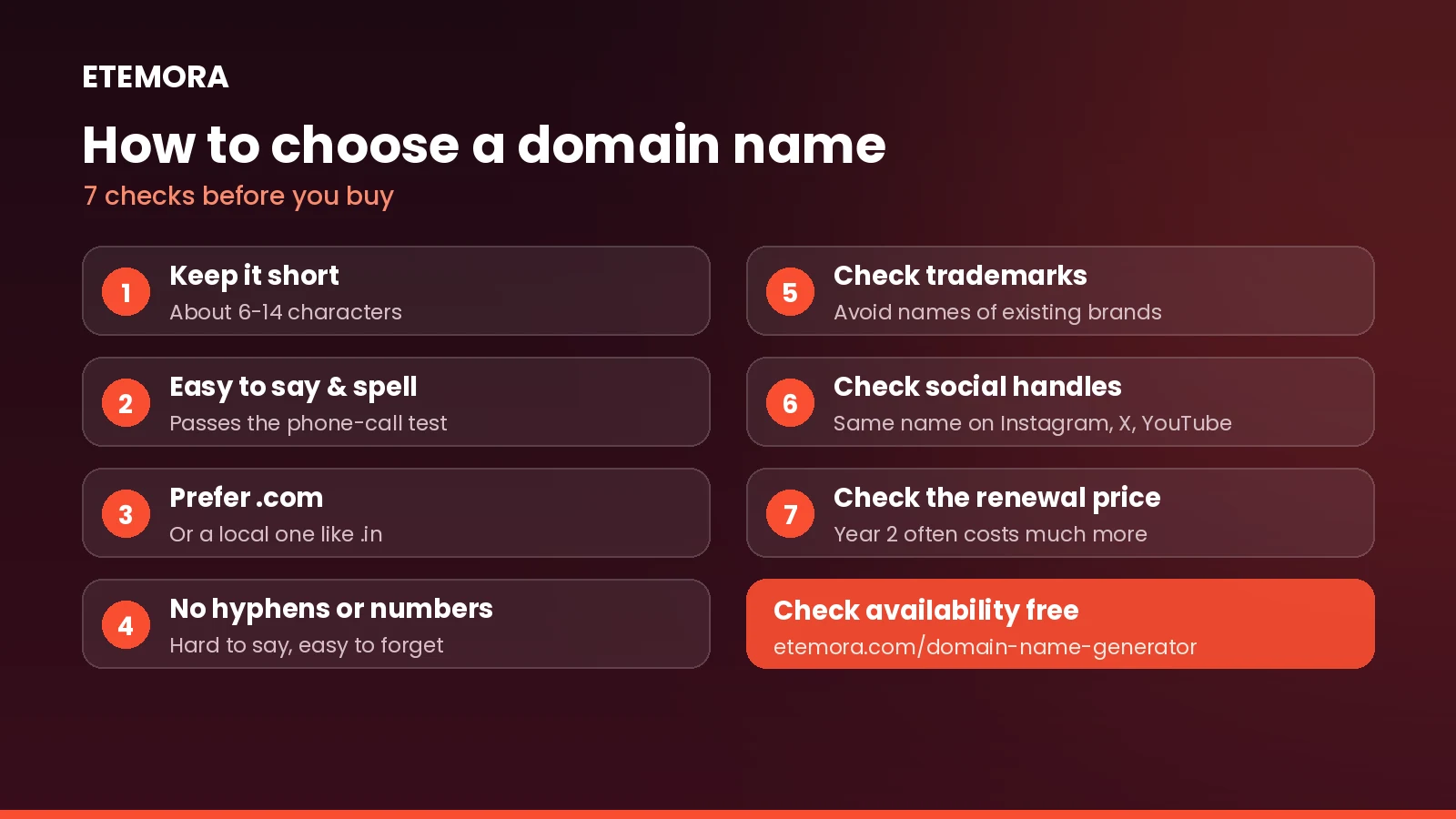
- Keep it short. Fewer characters are easier to remember, type and fit on a logo. Aim for roughly 6 to 14 characters.
- Make it easy to say and spell. If you have to spell it out on a phone call, people will get it wrong. Avoid odd spellings and double letters across words.
- Prefer .com when you can. It is still the extension most people type by default. If you serve one country, a local extension such as .in or .co.uk can work well too.
- Avoid hyphens and numbers. They are hard to say aloud and easy to forget.
- Check trademarks. A name that copies an existing brand can be taken from you later. Search your country’s trademark database before you buy.
- Check social handles. Matching names on Instagram, X or YouTube make your brand easier to find.
- Look at the renewal price, not just the first year. Many registrars discount year one and charge much more after. See why domain renewal prices go up.
What “available” really means
A domain is available when no one holds it at the registry that runs its extension — Verisign for .com and .net, Public Interest Registry for .org, and so on. This tool asks those registries directly, so a result of “Available” means the registry had no record at the moment you checked. A few things can still change at checkout: someone may register it minutes later, the registry may list it as a premium name with a higher price, or it may be reserved and not for sale. A small number of extensions, such as .io and .co, don’t offer a public lookup service, so for those the tool uses DNS and labels free-looking names “Likely available”.
What a WHOIS lookup shows
A WHOIS lookup tells you a domain’s registrar, the date it was first registered, when it was last updated, when it expires, its status codes and its nameservers. Since 28 January 2025, ICANN no longer requires registries and registrars of generic extensions such as .com to run the old WHOIS service — the Registration Data Access Protocol (RDAP) is now the official source. That is what this tool reads.
You usually won’t see the owner’s name, email or address. Since data-protection rules such as the GDPR took effect in 2018, most registries and registrars redact personal details. If you need to reach an owner, most registrars offer an anonymised contact form on their own WHOIS page.
What to do if the domain you want is taken
- Try a different extension — the exact-name check above shows them all at once.
- Add a short word such as get, try, hq or app, or use one of the generated ideas.
- Check the expiry date. If a domain is about to expire and has no active website, it may come back on the market. Some registrars offer backorders for this.
- Make an offer carefully. Use an escrow service for any purchase from a private owner, and never pay a stranger directly.
Next steps after you find a name
Compare where to buy it with our best domain registrars guide or the side-by-side domain registrar comparison tool. Follow the steps in how to buy a domain name, and lock your account down using our list of the most secure domain registrars. Need a website on it? Our best web hosting guide and hosting renewal cost calculator help you pick a plan that stays affordable.
Domain name generator: frequently asked questions
Is this domain name generator free?
Yes. There is no sign-up and no limit on searches. The tool only checks availability; you buy the domain from any registrar you choose.
How accurate is the availability check?
For most extensions it asks the official registry in real time, so it reflects the registry’s records at that moment. Premium and reserved names, and names registered seconds after your check, are the exceptions. The registrar’s checkout is always the final word.
Do you save or sell the names I search?
No. The checks run from your browser straight to the registries and to Cloudflare’s public DNS resolver. Etemora doesn’t store your searches. Registry and resolver requests are handled under those services’ own policies.
Why can’t I see who owns a domain?
Most registries and registrars hide personal details for privacy. The lookup shows the registrar, dates, status and nameservers, which is usually enough to judge whether a domain is in active use.
What is the difference between WHOIS and RDAP?
Both show domain registration data. RDAP is the newer standard: it returns structured data over HTTPS and supports privacy controls. ICANN made it the official source for generic extensions in January 2025.
Which extension should I choose?
Choose .com if it is available and fits your name. Use a country extension like .in for a local business, .org for non-profits, and newer extensions like .ai, .io or .app only if they suit your brand and you are happy with their renewal prices.
Sources: ICANN: Launching RDAP; Sunsetting WHOIS, IANA RDAP bootstrap registry, RFC 9083 (RDAP responses), Cloudflare DNS over HTTPS.
Other free tools
Guides related to this tool
 Web HostingBest Domain Registrars in 2026: 10 Options Compared
 Web HostingHow to Buy a Domain Name in 2026: 8 Simple Steps
 Web HostingHostinger vs WordPress.com: 2026 Honest Comparison