
Hostinger vs WordPress.com: 2026 Honest Comparison
 By M. Zaid
- Updated September 30, 2026
- 16 min read
Hostinger vs WordPress.com is a comparison between two different ways of running a WordPress website. Hostinger gives you a hosting account where WordPress is installed and managed alongside hosting-level tools, while WordPress.com sells WordPress as an all-inclusive managed platform, with hosting, updates, security and caching handled as part of the service.
That difference matters more than the headline monthly price. This guide compares current US pricing (including renewals), WordPress control, plugins, backups, staging, published performance data, security, support and room to grow — and explains which setup suits beginners, bloggers, business owners and developers.
Quick answer: Hostinger is the more flexible choice if you want self-hosted WordPress with SSH, Git, staging and up to 3 sites on its entry plan. WordPress.com is built to remove server work, and since April 2026 every paid plan can install plugins. Hostinger Premium is listed at $2.99/month on a 48-month term (renews at $10.99/month), while WordPress.com Personal is $4/month billed yearly and auto-renews at $5/month (US prices, September 2026).
Want the lowest long-term starting price?
Check Hostinger WordPress Pricing →Hostinger vs WordPress.com at a Glance
| Platform | Best for | Starting price | Renewal price | Key strength | Main drawback |
|---|---|---|---|---|---|
| Hostinger (Premium) | Site owners who want WordPress control | $2.99/mo on 48 months | $10.99/mo | Hosting-level tools, 3 sites | Headline price needs a 4-year term |
| WordPress.com (Personal) | People who want managed WordPress | $4/mo billed yearly | $5/mo billed yearly | Managed infrastructure, small renewal jump | Developer tools start at Business |
| WordPress.com Free | Hobby sites and trying WordPress.com | $0 | $0 | No-cost start | WordPress.com address and ads shown to visitors |
Prices are US list prices before tax, read from the official Hostinger and WordPress.com pricing pages in September 2026. Promotions change often, so treat the checkout page as the final source.
Hostinger vs WordPress.com Pricing
Pricing is the biggest practical difference in the Hostinger vs WordPress.com decision, but comparing only the advertised monthly number is misleading because the two companies bill in very different ways.
Hostinger pricing
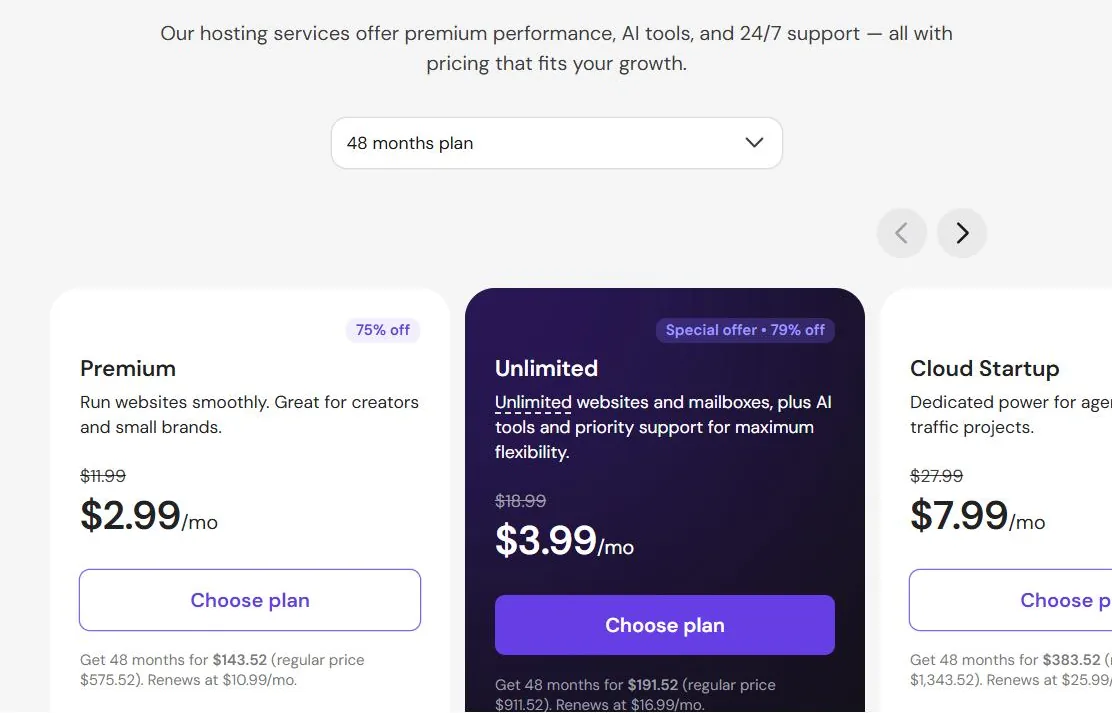
Hostinger currently advertises its Premium WordPress plan at $2.99/month when you pay for 48 months up front. The total charged today is $143.52, and the listed renewal price is $10.99/month. Premium includes 3 websites, 20 GB SSD storage, a free domain for one year, free weekly backups, CDN, AI tools and priority 24/7 support. The Unlimited plan is $3.99/month on 48 months and renews at $16.99/month, with unlimited websites, 50 GB NVMe storage and daily backups.
WordPress.com pricing
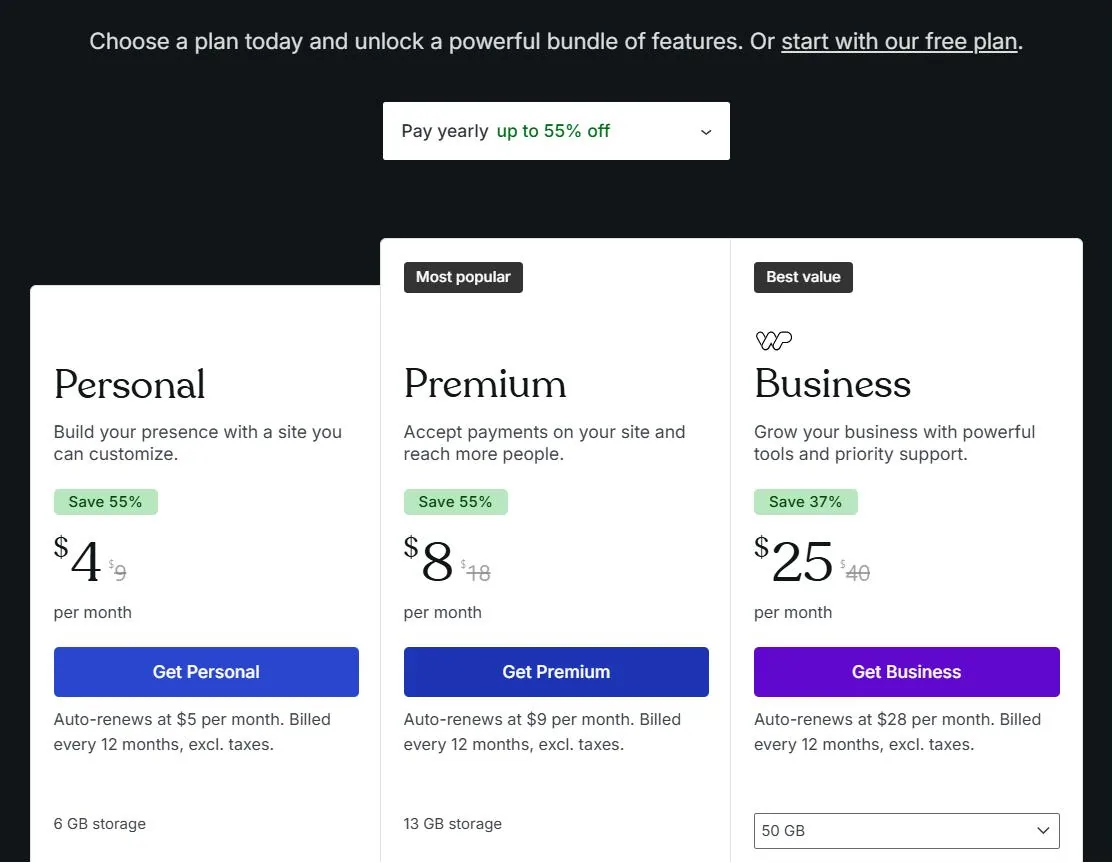
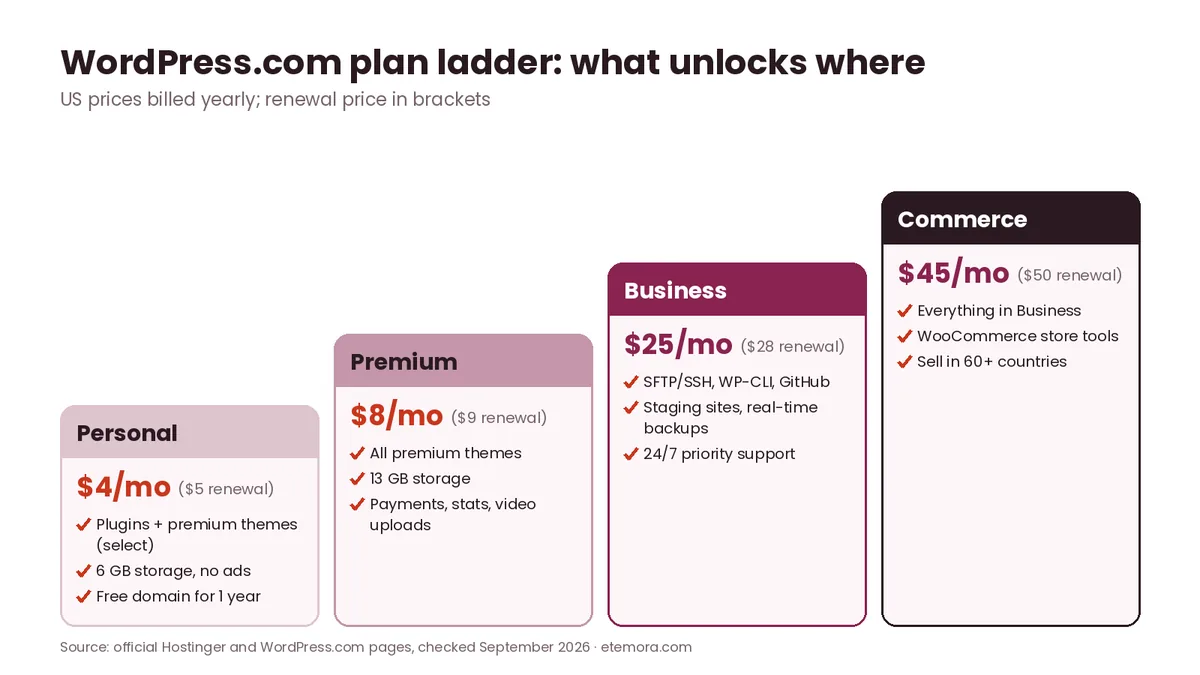
WordPress.com uses shorter billing periods. Its Personal plan is $4/month billed yearly ($48 for the first year) and the pricing page states it auto-renews at $5 per month, billed every 12 months. Premium is $8/month (renews at $9), Business is $25/month (renews at $28) and Commerce is $45/month (renews at $50), all billed yearly. Paying monthly costs more: Personal is $9 month to month. Two-year and three-year terms lower the Personal rate to about $3.25 and $2.75 a month.
| Pricing factor | Hostinger Premium | WordPress.com Personal |
|---|---|---|
| Advertised starting price | $2.99/mo (48 months) | $4/mo (billed yearly) |
| Paid today | $143.52 for 48 months | $48 for 12 months |
| Renewal | $10.99/mo | $5/mo billed yearly ($60/year) |
| Websites | 3 | 1 per plan |
| Storage | 20 GB SSD | 6 GB |
| Free domain | 1 year | 1 year on yearly and multi-year plans |
| Refund window | 30-day money-back guarantee | 14 days (yearly and multi-year plans), 7 days (monthly) |
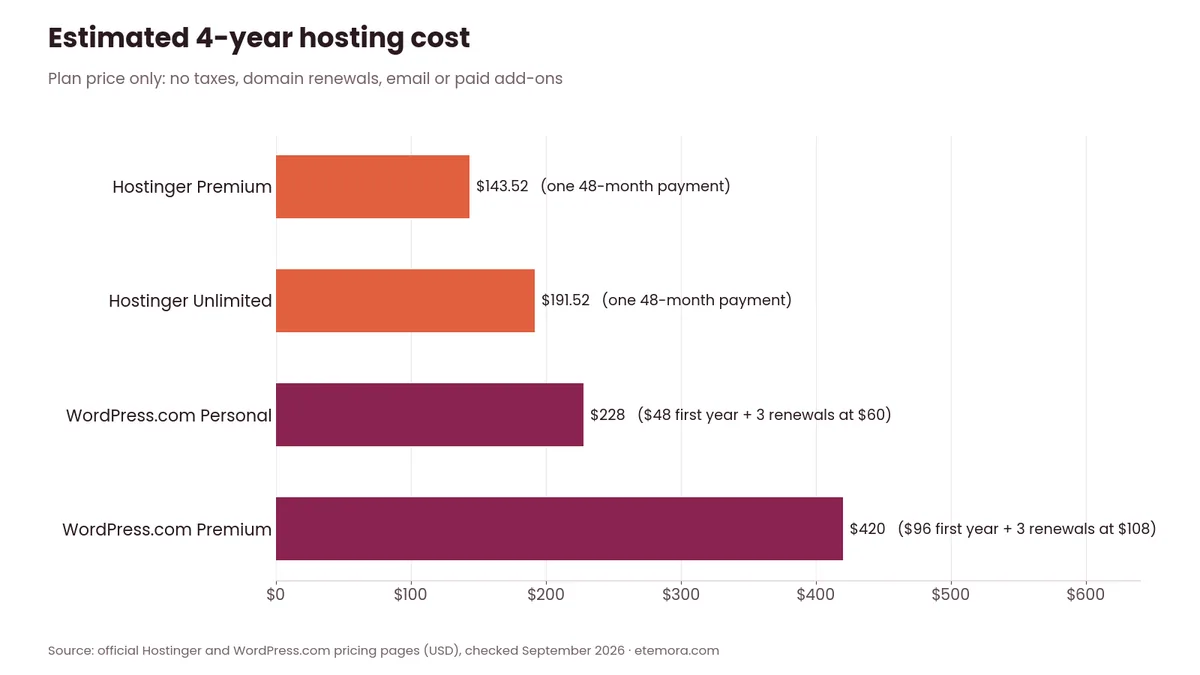
The two offers are not directly equivalent. Hostinger’s price is tied to a four-year purchase and then jumps by more than 3.5×, while WordPress.com’s price is based on a one-year purchase and rises by only $1 a month at renewal.
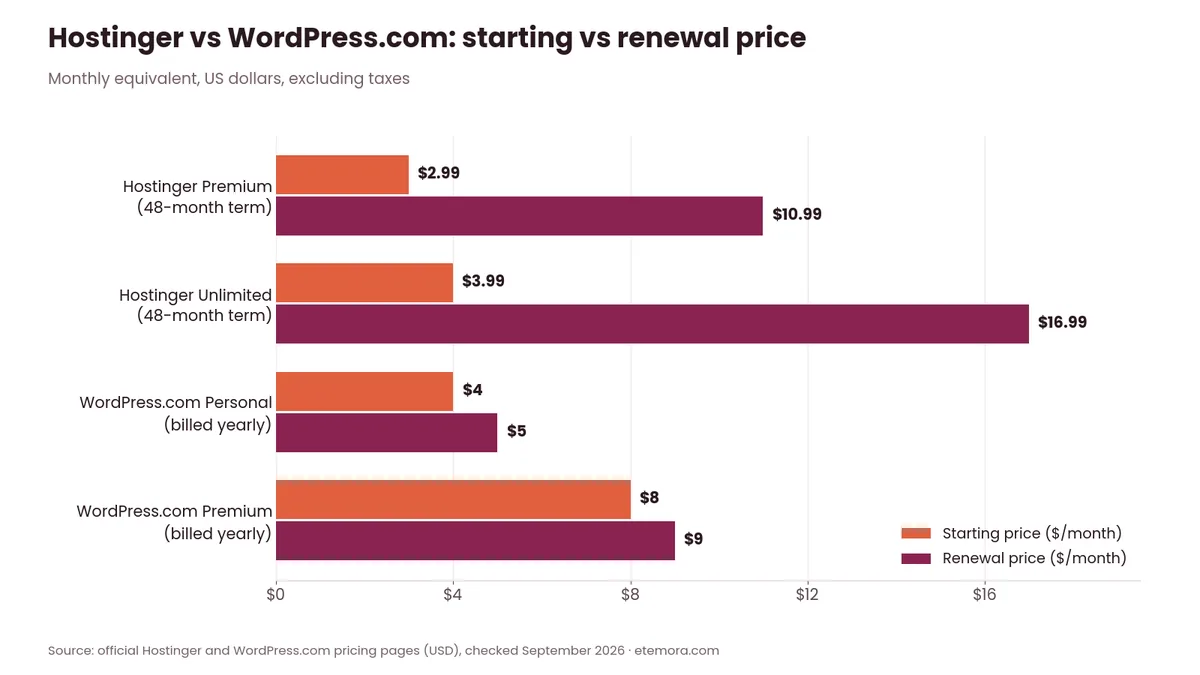
Over a full four years the picture is closer than the headline numbers suggest. Hostinger Premium costs $143.52 in one payment, while WordPress.com Personal adds up to about $228 ($48 in year one plus three renewals at $60). After year four, however, Hostinger Premium renews at roughly $132 a year, compared with $60 a year for WordPress.com Personal.
Hostinger vs WordPress.com Features
The feature gap starts with the hosting model. Hostinger gives you a hosting account on which WordPress runs; WordPress.com gives you WordPress with the hosting hidden behind its own dashboard.
Hostinger’s WordPress plans include automatic updates, backups, a one-click staging tool, CDN, AI tools (an AI website builder, troubleshooter and optimizer) and what it calls a complete developer toolkit: WP-CLI, SSH access, Git integration and PHP version control. Free, unlimited website migrations are also advertised.
WordPress.com describes every plan as all-inclusive managed hosting. Its hosting page lists malware scanning, DDoS protection, automatic updates, a global CDN across 28+ data centers and a 99.99% uptime claim. Business and Commerce add SFTP/SSH, WP-CLI, Git commands, GitHub deployments, staging sites and real-time backups.
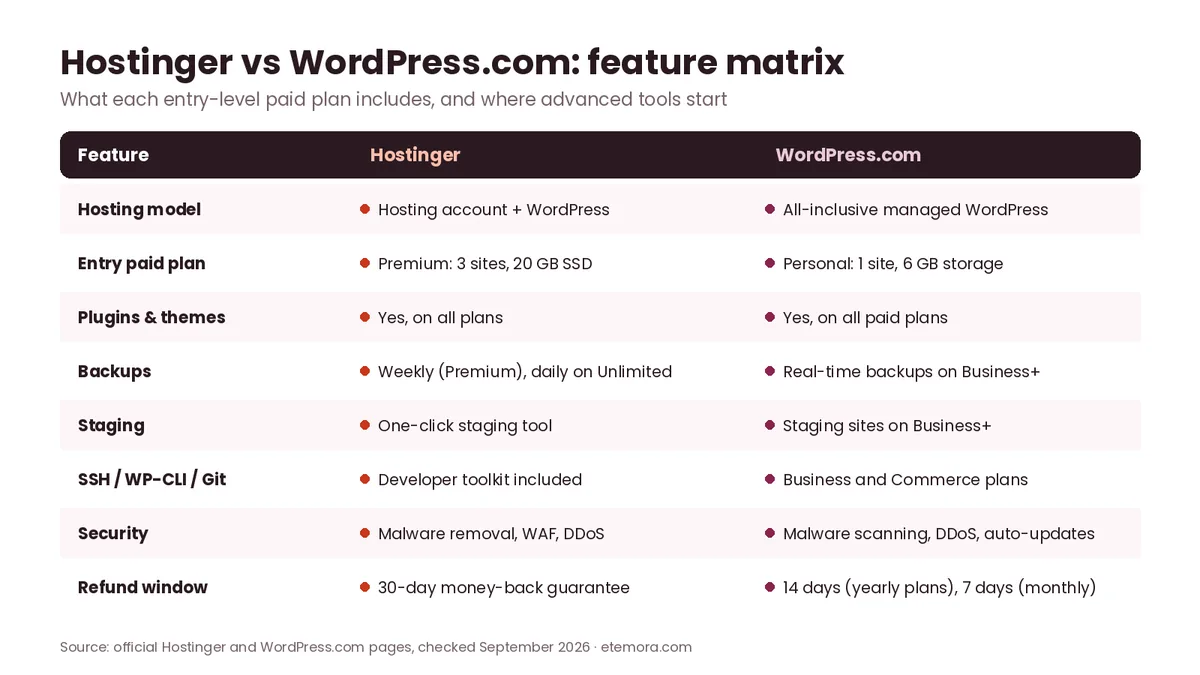
A major 2026 change: plugin installation is now available on every paid WordPress.com plan, including Personal and Premium. WordPress.com’s April 2026 announcement says paid users can access 50,000+ plugins from the WordPress Plugin Directory, and its pricing page now mentions over 60,000 plugins in the WordPress.com marketplace. Older comparisons that say WordPress.com needs Business for plugins are out of date.
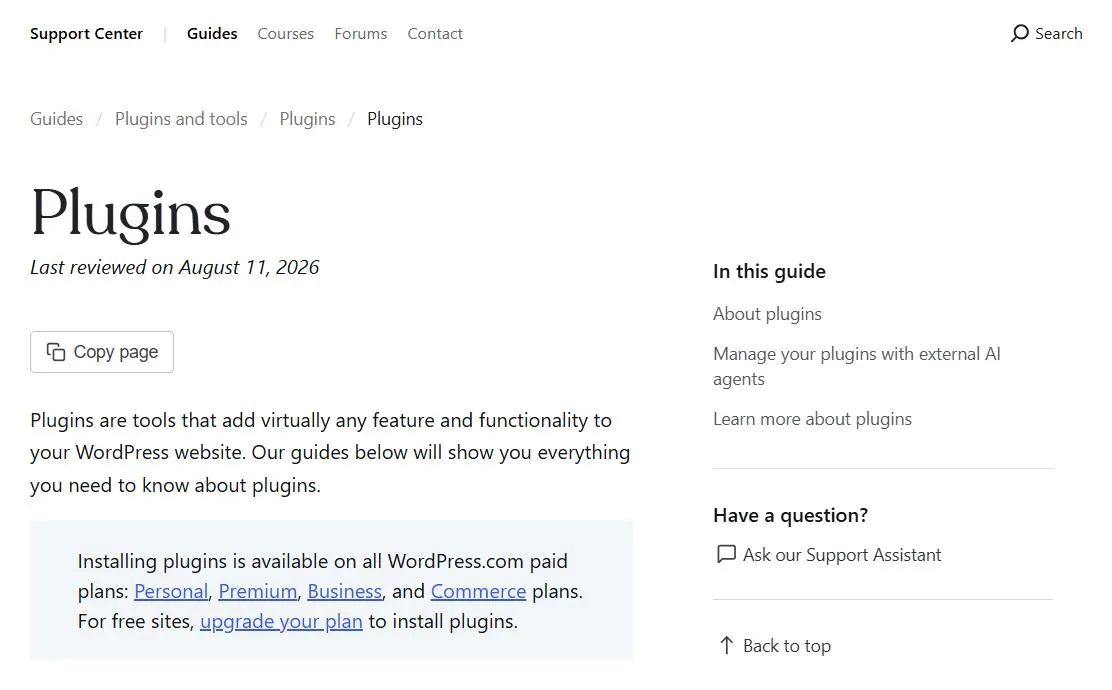
| Feature | Hostinger | WordPress.com |
|---|---|---|
| WordPress hosting | Yes | Yes (all plans, including free) |
| Automatic WordPress updates | Yes | Yes |
| Plugins | Yes | All paid plans |
| Premium themes | Any theme you upload | Select premium themes on Personal; all on Premium and above |
| CDN | Included | Included (global CDN) |
| Backups | Weekly on Premium; daily on Unlimited | Real-time backups on Business and Commerce |
| Staging | One-click staging tool | Business and Commerce |
| SSH / WP-CLI / Git | Included in the WordPress developer toolkit | Business and Commerce |
| AI website tools | AI builder, troubleshooter, optimizer | Guided AI website builder (usage limits apply) |
| Hosting-level control | Higher | More managed |
Prefer WordPress without managing a server?
Check WordPress.com Plans →Ease of Use
On ease of use, Hostinger vs WordPress.com is closer than it looks: both platforms let beginners launch a WordPress site, but they remove different kinds of complexity.
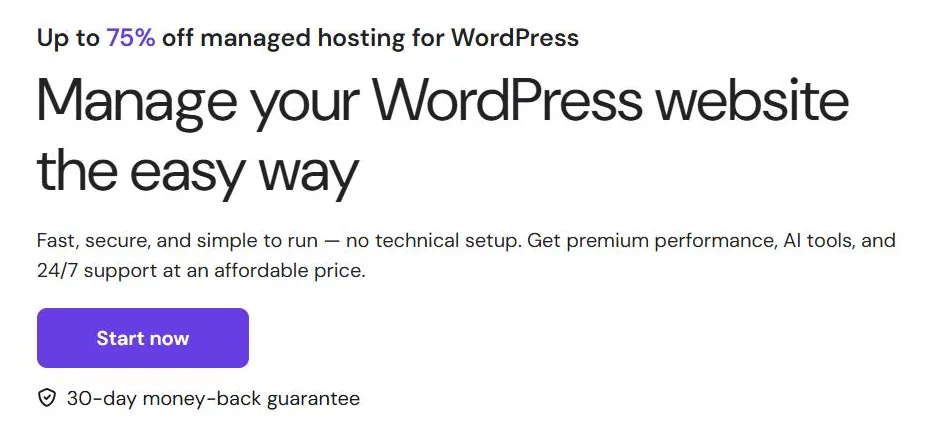
Hostinger combines its hosting dashboard (hPanel) with WordPress management. Its WordPress hosting page promises “no technical setup” and adds an AI agent that can set up services, connect domains, configure DNS and fix common issues through chat.
WordPress.com goes further. Its support documentation explains that managed hosting means WordPress.com takes care of backups, security, caching and other technical tasks that you would normally handle yourself with another host. You buy a plan, build your site and never see a server panel.
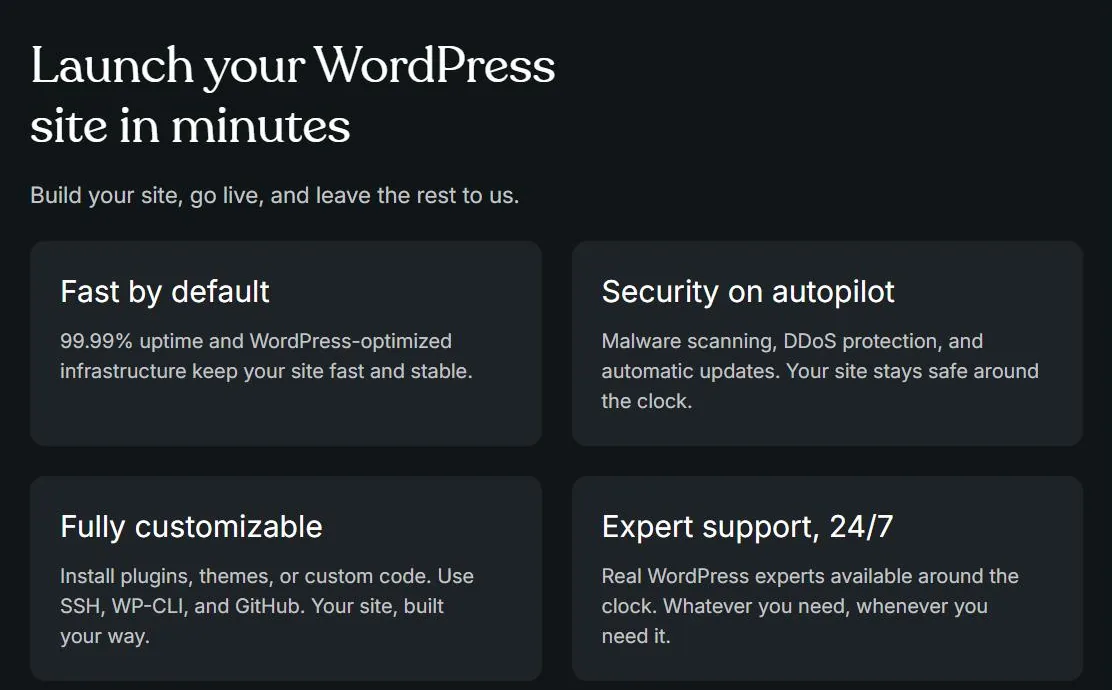
Hostinger is still beginner-friendly, but it exposes more settings and hosting choices. Those choices become useful as a website becomes more technically demanding.
Hostinger vs WordPress.com Performance
Etemora did not run performance tests for this comparison. Independent published tests give useful context, but each reflects the publisher’s own test site, plan and measurement period.
WordPress.com: WPBeginner’s 2026 WordPress.com review (July 2026 speed test) reported a 417 ms Largest Contentful Paint and an 866 ms full page load on its test site, plus a 273 ms average global response time. These are WPBeginner’s results, not Etemora measurements.
Hostinger: TechRadar’s 2026 Hostinger review reported 99.96% uptime over 10 weeks of monitoring, a 382 ms average response time and an 878 ms page load measured from 16 locations. Its test site ran on Hostinger’s most basic shared hosting plan, not on the WordPress Premium plan compared here.
Because the plans, test sites and methods differ, these numbers should not be read as a head-to-head benchmark. Both providers use caching and a CDN; your theme, plugins, images and traffic will usually matter more than the logo on the invoice.
Security
Security is another area where the Hostinger vs WordPress.com hosting model matters.
Hostinger lists automatic malware removal, an advanced web application firewall (WAF), DDoS mitigation and fully managed security on its WordPress hosting page, alongside automatic WordPress updates, free SSL and automatic backups. The staging tool lets you test changes before they go live.
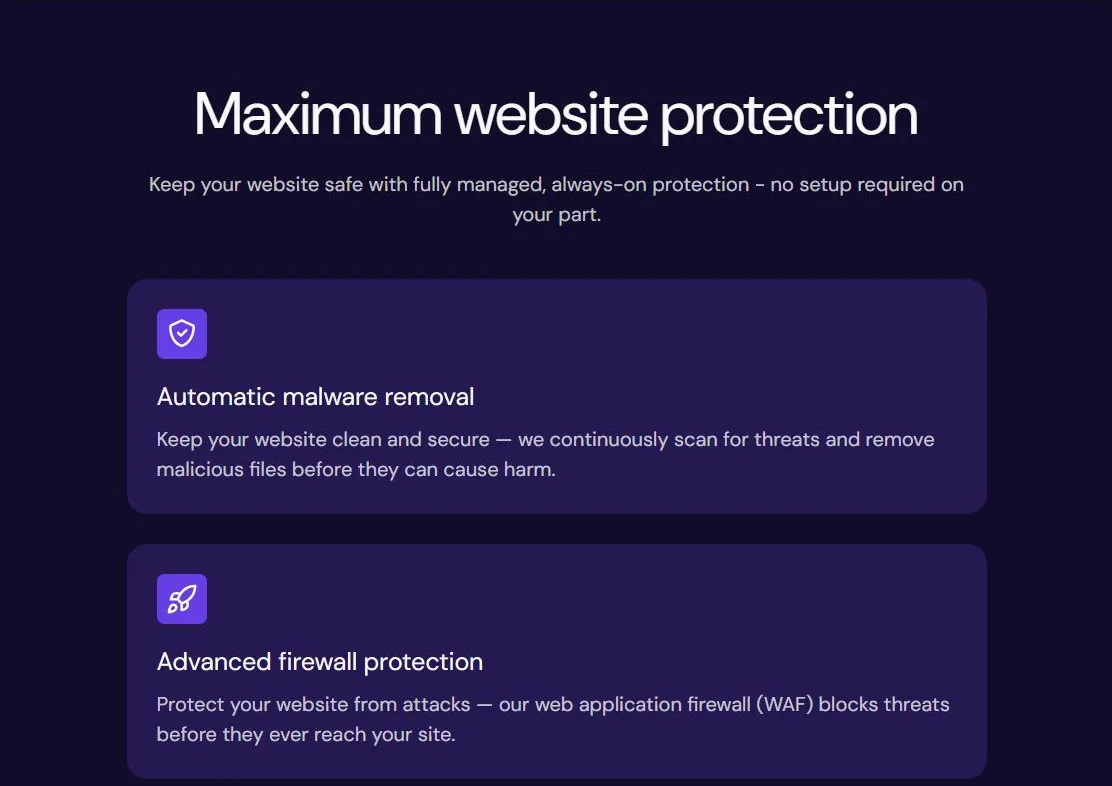
WordPress.com advertises “security on autopilot”: malware scanning, DDoS protection and automatic updates, with SSL included. Because WordPress.com controls more of the stack, there is less for you to configure — and less you can change.
Platform security never replaces good habits. Strong passwords, two-factor authentication, trusted plugins and regular updates still matter on either host.
Support
Support in Hostinger vs WordPress.com depends mostly on the plan you pick. Hostinger advertises priority 24/7 expert support on its current WordPress plans, plus an AI agent that can hand you over to a human when needed. Its knowledge base covers WordPress setup, backups, staging and migrations.
WordPress.com support comes from its Happiness team and depends on the plan: Personal and Premium include free expert support, while Business and Commerce add free 24/7 priority expert support. Free-plan users get community forum help.
WordPress Control and Customization
Control is where the Hostinger vs WordPress.com difference is biggest.
With Hostinger you run the open-source WordPress software on your own hosting account. You can use any theme or plugin, edit files, switch PHP versions and work with SSH, WP-CLI and Git, within the limits of your plan.
WordPress.com now allows plugins, custom CSS, global styles and font uploads on every paid plan, so the old argument that Personal cannot be customized no longer applies.
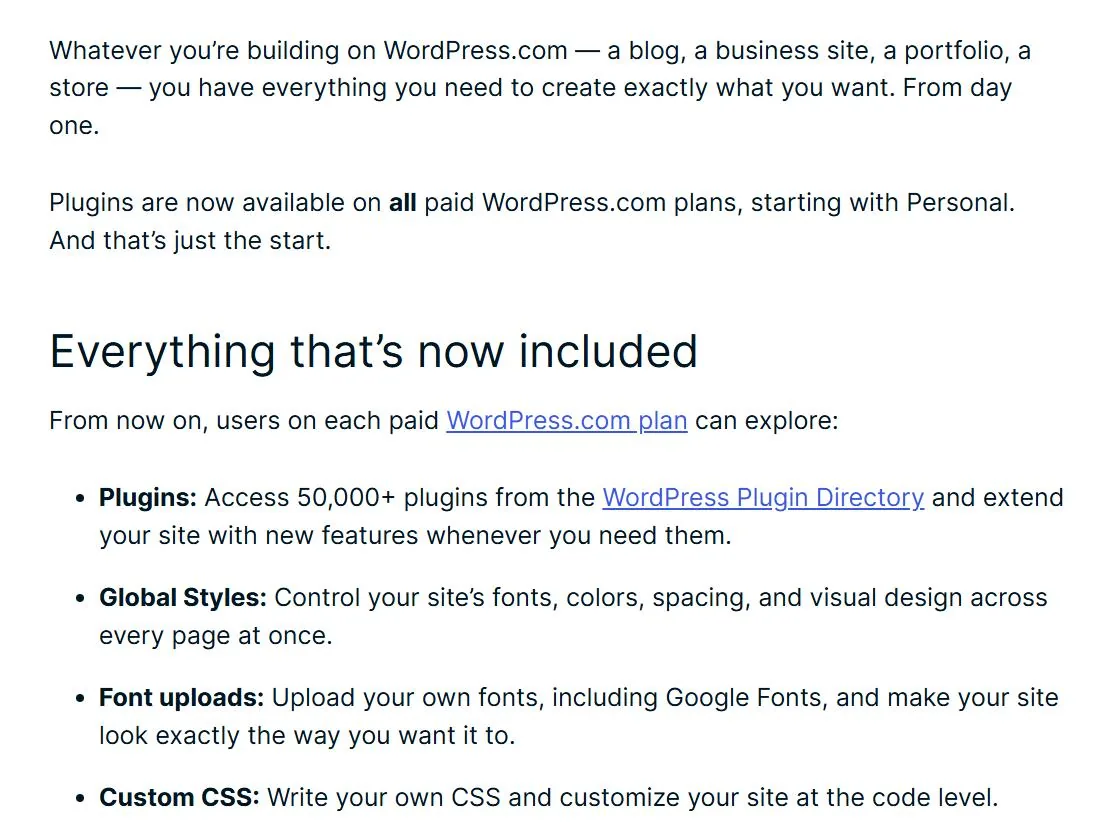
It remains a managed platform, though. Developer features such as SFTP/SSH, WP-CLI, GitHub deployments, database management and staging sites start at the Business plan.
For developers who want server-level control or an environment that behaves like traditional self-hosted WordPress, Hostinger is the more direct model. For people who want WordPress features without managing infrastructure, WordPress.com is more contained.
Hosting for Blogs and Content Websites
Both platforms can host blogs and content-focused websites well.
WordPress.com includes unlimited pages, posts, users and visitors on its plans, along with built-in newsletters, RSS and subscriber tools. That makes it a natural home for writers who mainly want to publish.
Hostinger Premium supports up to three websites with 20 GB of storage, which suits people running a main blog plus a couple of side projects. You also control caching, SEO plugins and page builders directly.
Ecommerce
For online stores, Hostinger vs WordPress.com comes down to who manages WooCommerce. Both can run a store, but the route differs. Hostinger lists ecommerce as available on its WordPress plans, so you can install WooCommerce and manage it yourself, and its AI agent can help manage WooCommerce products on supported plans.
WordPress.com Premium adds PayPal and Stripe payment buttons, while its Commerce plan is built for stores, with WooCommerce tools and selling in 60+ countries. You get a managed store, but at a higher price ($45/month billed yearly).
Hostinger vs WordPress.com: Who Should Choose Which
The Hostinger vs WordPress.com decision gets much easier once you match the platform to the site you are building.
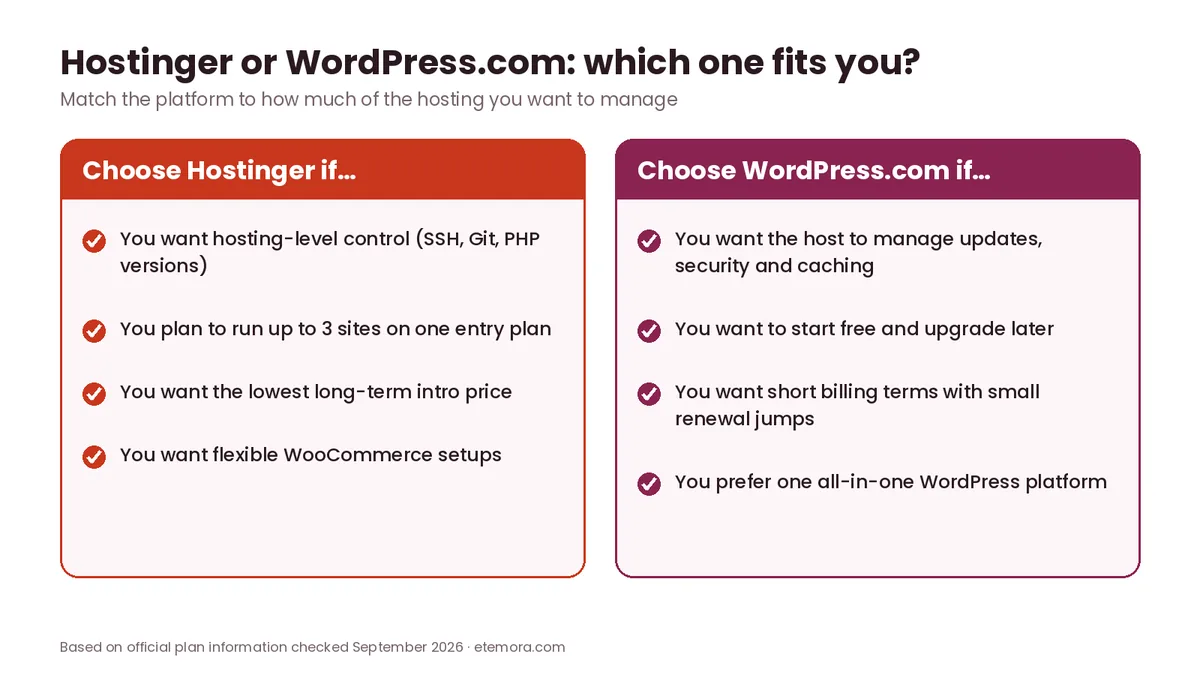
Choose Hostinger if
- You want self-hosted WordPress with hosting-level control.
- You expect to use many plugins, themes or custom code.
- You want staging, SSH, WP-CLI and Git on an entry plan.
- You want to host up to 3 websites on one plan.
- You want the lowest long-term introductory price in this comparison.
Choose WordPress.com if
- You want fully managed WordPress with no separate hosting account.
- You want to start free and upgrade later.
- You prefer yearly billing with a small renewal jump.
- You want plugins on a low-cost plan without moving to Business.
- You like the WordPress.com ecosystem, newsletters and Reader.
Consider something else if you need unusual server configurations, agency workflows or dedicated resources beyond both platforms’ standard plans. For a broader shortlist, see our guide to the best web hosting services, or compare a pure managed host in Hostinger vs WP Engine.
Leaning towards more control and 3 sites?
View Hostinger Plans →Hostinger vs WordPress.com for Beginners
Beginners often assume the easiest platform is simply the one with the cheapest introductory price. That is not always true.
Hostinger’s setup is beginner-friendly because it installs WordPress, SSL, backups and caching for you, and its AI tools help with building and troubleshooting. WordPress.com is more contained: you choose a plan, build inside the WordPress.com dashboard and let the provider manage everything underneath.
The trade-off is control. A beginner who later wants advanced configuration may appreciate Hostinger’s flexibility, while someone who never wants to think about hosting may prefer WordPress.com. If the difference between a host and a platform is still unclear, start with what web hosting is and how it works, and see how website builders differ again.
How to Choose Between Hostinger and WordPress.com
Use these six checks to settle Hostinger vs WordPress.com for your own site.
1. Decide whether you want managed or self-hosted WordPress
This is the most important question. Hostinger gives you hosting for the WordPress software; WordPress.com gives you WordPress as a managed service.
2. Compare the full billing term
Don’t compare Hostinger’s $2.99 headline with WordPress.com’s $4 without checking what is charged today: $143.52 for four years versus $48 for one year.
3. Check the renewal price
Promotional rates are temporary. Hostinger Premium renews at $10.99/month; WordPress.com Personal auto-renews at $5/month billed yearly. If you want to model longer periods, our domain renewal cost calculator helps with the separate domain bill.
4. Check your plugin and developer needs
Every paid WordPress.com plan now supports plugins, which removes a big historical difference. If you need SSH, Git or staging on a budget, Hostinger still includes them where WordPress.com asks for Business.
5. Think about maintenance and growth
A small blog needs very little infrastructure. A growing store, agency or developer project may need staging, SSH, multiple sites and more resources. Compare the specific plan, not just the company name.
6. Look beyond the first year
Add renewal pricing, domain renewals, email, premium plugins and themes to your estimate. For another hosting head-to-head built the same way, read Hostinger vs Bluehost.
How We Compared
This is a research-based comparison; we did not run hands-on tests. We reviewed the official Hostinger and WordPress.com pricing pages (US dollars), plan feature pages, support documentation and refund terms in September 2026, along with named independent performance results from WPBeginner and TechRadar, which are attributed to those publishers rather than presented as our own. Read more about how we review products.
Final Verdict: Hostinger vs WordPress.com
Hostinger vs WordPress.com is ultimately a choice between hosting control and a managed WordPress environment.
- Best for self-hosted WordPress control: Hostinger
- Best for beginners who want managed infrastructure: WordPress.com
- Best for developer workflows on a budget: Hostinger
- Best for simple managed blogging: WordPress.com
- Best for flexible WooCommerce setups: Hostinger
On price, Hostinger Premium is cheaper over the first four years ($143.52 vs about $228 for WordPress.com Personal), but it renews at $10.99/month while WordPress.com Personal renews at $5/month billed yearly. The biggest reason to choose Hostinger is control; the biggest reason to choose WordPress.com is managed simplicity.
Hostinger vs WordPress.com FAQs
Is Hostinger better than WordPress.com?
Hostinger offers more hosting-level control, while WordPress.com provides a more managed WordPress environment. Hostinger suits people who want flexibility with plugins, themes and developer tools; WordPress.com suits people who want the infrastructure managed for them.
Is WordPress.com cheaper than Hostinger?
Not over the first four years on the entry plans. Hostinger Premium costs $143.52 for 48 months, while WordPress.com Personal costs about $228 over four years ($48 plus three renewals at $60). After that, WordPress.com Personal ($60/year) renews for less than Hostinger Premium ($10.99/month). Prices are US list prices checked in September 2026.
Can I install plugins on WordPress.com?
Yes. Plugin installation is available on every paid WordPress.com plan, including Personal and Premium. Free sites need to upgrade first.
Is Hostinger good for WordPress?
Hostinger’s WordPress plans include automatic updates, backups, CDN, a staging tool, AI tools and a developer toolkit with WP-CLI, SSH, Git and PHP version control, which makes it suitable for beginners and for users who want more control.
Is WordPress.com good for beginners?
Yes. WordPress.com includes hosting, automatic updates and security without a separate hosting account, and its free plan lets you start at no cost, although free sites use a WordPress.com address and show ads.
Can I move a WordPress.com site to Hostinger?
Yes, WordPress sites can be moved between hosts, although the process depends on your site. Hostinger advertises free, unlimited website migrations, and WordPress.com offers export and import tools. Take a full backup before you start.
Does Hostinger use WordPress.com?
No. They are separate services. Hostinger provides web hosting on which you install WordPress, while WordPress.com runs its own hosted WordPress platform.
Does WordPress.com include web hosting?
Yes. Every WordPress.com plan, including the free plan, includes hosting, so you don’t need to buy hosting separately.
Which is better for developers?
Hostinger generally gives more direct control at a lower price, with SSH, WP-CLI, Git and PHP version control on its WordPress plans. WordPress.com offers SFTP/SSH, WP-CLI and GitHub deployments on its Business and Commerce plans.
Sources
Related articles you may like
 Web HostingHow to Buy a Domain Name in 2026: 8 Simple Steps
 Web HostingLargest Domain Registrars in 2026 (Ranked by .com Domains)
 SecurityMost Secure Domain Registrars in 2026: 2FA, Locks and Privacy Compared
 Web HostingHow to Transfer a Domain to Another Registrar (Step by Step)
 Web HostingWhy Domain Renewal Prices Go Up (and 7 Ways to Pay Less)
 Web HostingHostinger vs Bluehost: Full Comparison in 2026