Free Tools
Small, focused tools that answer one question each — what something actually costs over time, and how two products really differ once you line up the facts. Free, no sign-up, nothing to install.
- 24 free toolsin 9 groups
- 100% freeno sign-up
- UpdatedSeptember 2026
%22%2F%3E%3Cg%3E%3Crect%20x%3D%2261%22%20y%3D%2257%22%20width%3D%22112%22%20height%3D%22112%22%20rx%3D%2222%22%20fill%3D%22%232A0A16%22%20opacity%3D%22.35%22%2F%3E%3Crect%20x%3D%2256%22%20y%3D%2250%22%20width%3D%22112%22%20height%3D%22112%22%20rx%3D%2222%22%20fill%3D%22url(%23t2a13W)%22%2F%3E%3Crect%20x%3D%2272%22%20y%3D%2272%22%20width%3D%2256%22%20height%3D%2216%22%20rx%3D%225%22%20fill%3D%22%23FF8A5B%22%2F%3E%3Crect%20x%3D%2272%22%20y%3D%2296%22%20width%3D%2214%22%20height%3D%2212%22%20rx%3D%223%22%20fill%3D%22%23E3CFD6%22%2F%3E%3Crect%20x%3D%2292%22%20y%3D%2296%22%20width%3D%2214%22%20height%3D%2212%22%20rx%3D%223%22%20fill%3D%22%23E3CFD6%22%2F%3E%3Crect%20x%3D%22112%22%20y%3D%2296%22%20width%3D%2214%22%20height%3D%2212%22%20rx%3D%223%22%20fill%3D%22%23E3CFD6%22%2F%3E%3Crect%20x%3D%2272%22%20y%3D%22114%22%20width%3D%2214%22%20height%3D%2212%22%20rx%3D%223%22%20fill%3D%22%23E3CFD6%22%2F%3E%3Crect%20x%3D%2292%22%20y%3D%22114%22%20width%3D%2214%22%20height%3D%2212%22%20rx%3D%223%22%20fill%3D%22%23E3CFD6%22%2F%3E%3Crect%20x%3D%22112%22%20y%3D%22114%22%20width%3D%2214%22%20height%3D%2212%22%20rx%3D%223%22%20fill%3D%22%23E3CFD6%22%2F%3E%3Crect%20x%3D%2272%22%20y%3D%22132%22%20width%3D%2214%22%20height%3D%2212%22%20rx%3D%223%22%20fill%3D%22%23E3CFD6%22%2F%3E%3Crect%20x%3D%2292%22%20y%3D%22132%22%20width%3D%2214%22%20height%3D%2212%22%20rx%3D%223%22%20fill%3D%22%23E3CFD6%22%2F%3E%3Crect%20x%3D%22112%22%20y%3D%22132%22%20width%3D%2214%22%20height%3D%2212%22%20rx%3D%223%22%20fill%3D%22%23E8452C%22%2F%3E%3C%2Fg%3E%3Cg%3E%3Crect%20x%3D%22201%22%20y%3D%2247%22%20width%3D%22112%22%20height%3D%22112%22%20rx%3D%2222%22%20fill%3D%22%232A0A16%22%20opacity%3D%22.35%22%2F%3E%3Crect%20x%3D%22196%22%20y%3D%2240%22%20width%3D%22112%22%20height%3D%22112%22%20rx%3D%2222%22%20fill%3D%22url(%23t2a13W)%22%2F%3E%3Crect%20x%3D%22212%22%20y%3D%2260%22%20width%3D%2211%22%20height%3D%2211%22%20rx%3D%222%22%20fill%3D%22%232A0A16%22%2F%3E%3Crect%20x%3D%22238%22%20y%3D%2260%22%20width%3D%2211%22%20height%3D%2211%22%20rx%3D%222%22%20fill%3D%22%232A0A16%22%2F%3E%3Crect%20x%3D%22264%22%20y%3D%2260%22%20width%3D%2211%22%20height%3D%2211%22%20rx%3D%222%22%20fill%3D%22%232A0A16%22%2F%3E%3Crect%20x%3D%22277%22%20y%3D%2260%22%20width%3D%2211%22%20height%3D%2211%22%20rx%3D%222%22%20fill%3D%22%232A0A16%22%2F%3E%3Crect%20x%3D%22212%22%20y%3D%2273%22%20width%3D%2211%22%20height%3D%2211%22%20rx%3D%222%22%20fill%3D%22%232A0A16%22%2F%3E%3Crect%20x%3D%22225%22%20y%3D%2273%22%20width%3D%2211%22%20height%3D%2211%22%20rx%3D%222%22%20fill%3D%22%232A0A16%22%2F%3E%3Crect%20x%3D%22251%22%20y%3D%2273%22%20width%3D%2211%22%20height%3D%2211%22%20rx%3D%222%22%20fill%3D%22%232A0A16%22%2F%3E%3Crect%20x%3D%22277%22%20y%3D%2273%22%20width%3D%2211%22%20height%3D%2211%22%20rx%3D%222%22%20fill%3D%22%232A0A16%22%2F%3E%3Crect%20x%3D%22225%22%20y%3D%2286%22%20width%3D%2211%22%20height%3D%2211%22%20rx%3D%222%22%20fill%3D%22%232A0A16%22%2F%3E%3Crect%20x%3D%22238%22%20y%3D%2286%22%20width%3D%2211%22%20height%3D%2211%22%20rx%3D%222%22%20fill%3D%22%232A0A16%22%2F%3E%3Crect%20x%3D%22264%22%20y%3D%2286%22%20width%3D%2211%22%20height%3D%2211%22%20rx%3D%222%22%20fill%3D%22%232A0A16%22%2F%3E%3Crect%20x%3D%22212%22%20y%3D%2299%22%20width%3D%2211%22%20height%3D%2211%22%20rx%3D%222%22%20fill%3D%22%232A0A16%22%2F%3E%3Crect%20x%3D%22238%22%20y%3D%2299%22%20width%3D%2211%22%20height%3D%2211%22%20rx%3D%222%22%20fill%3D%22%232A0A16%22%2F%3E%3Crect%20x%3D%22251%22%20y%3D%2299%22%20width%3D%2211%22%20height%3D%2211%22%20rx%3D%222%22%20fill%3D%22%232A0A16%22%2F%3E%3Crect%20x%3D%22277%22%20y%3D%2299%22%20width%3D%2211%22%20height%3D%2211%22%20rx%3D%222%22%20fill%3D%22%232A0A16%22%2F%3E%3Crect%20x%3D%22225%22%20y%3D%22112%22%20width%3D%2211%22%20height%3D%2211%22%20rx%3D%222%22%20fill%3D%22%232A0A16%22%2F%3E%3Crect%20x%3D%22251%22%20y%3D%22112%22%20width%3D%2211%22%20height%3D%2211%22%20rx%3D%222%22%20fill%3D%22%232A0A16%22%2F%3E%3Crect%20x%3D%22264%22%20y%3D%22112%22%20width%3D%2211%22%20height%3D%2211%22%20rx%3D%222%22%20fill%3D%22%232A0A16%22%2F%3E%3Crect%20x%3D%22212%22%20y%3D%22125%22%20width%3D%2211%22%20height%3D%2211%22%20rx%3D%222%22%20fill%3D%22%232A0A16%22%2F%3E%3Crect%20x%3D%22238%22%20y%3D%22125%22%20width%3D%2211%22%20height%3D%2211%22%20rx%3D%222%22%20fill%3D%22%232A0A16%22%2F%3E%3Crect%20x%3D%22264%22%20y%3D%22125%22%20width%3D%2211%22%20height%3D%2211%22%20rx%3D%222%22%20fill%3D%22%232A0A16%22%2F%3E%3Crect%20x%3D%22277%22%20y%3D%22125%22%20width%3D%2211%22%20height%3D%2211%22%20rx%3D%222%22%20fill%3D%22%232A0A16%22%2F%3E%3C%2Fg%3E%3Cg%3E%3Crect%20x%3D%2271%22%20y%3D%22173%22%20width%3D%22112%22%20height%3D%22112%22%20rx%3D%2222%22%20fill%3D%22%232A0A16%22%20opacity%3D%22.35%22%2F%3E%3Crect%20x%3D%2266%22%20y%3D%22166%22%20width%3D%22112%22%20height%3D%22112%22%20rx%3D%2222%22%20fill%3D%22url(%23t2a13A)%22%2F%3E%3Cpath%20d%3D%22M100%20196v-12a22%2022%200%200%201%2044%200v12%22%20fill%3D%22none%22%20stroke%3D%22%23FFB08F%22%20stroke-width%3D%228%22%2F%3E%3Crect%20x%3D%2290%22%20y%3D%22194%22%20width%3D%2264%22%20height%3D%2248%22%20rx%3D%2210%22%20fill%3D%22url(%23t2a13C)%22%2F%3E%3Ccircle%20cx%3D%22122%22%20cy%3D%22214%22%20r%3D%226%22%20fill%3D%22%237A1E2E%22%2F%3E%3C%2Fg%3E%3Cg%3E%3Crect%20x%3D%22211%22%20y%3D%22165%22%20width%3D%22112%22%20height%3D%22112%22%20rx%3D%2222%22%20fill%3D%22%232A0A16%22%20opacity%3D%22.35%22%2F%3E%3Crect%20x%3D%22206%22%20y%3D%22158%22%20width%3D%22112%22%20height%3D%22112%22%20rx%3D%2222%22%20fill%3D%22url(%23t2a13A)%22%2F%3E%3Cpath%20d%3D%22M226%20176h40l16%2016v50h-56z%22%20fill%3D%22%23fff%22%2F%3E%3Crect%20x%3D%22234%22%20y%3D%22200%22%20width%3D%2236%22%20height%3D%226%22%20rx%3D%223%22%20fill%3D%22%23E3CFD6%22%2F%3E%3Crect%20x%3D%22234%22%20y%3D%22212%22%20width%3D%2230%22%20height%3D%226%22%20rx%3D%223%22%20fill%3D%22%23E3CFD6%22%2F%3E%3Crect%20x%3D%22234%22%20y%3D%22226%22%20width%3D%2240%22%20height%3D%2210%22%20rx%3D%224%22%20fill%3D%22%23E8452C%22%2F%3E%3C%2Fg%3E%3Cpath%20d%3D%22M340%2060l7%2016%2016%207-16%207-7%2016-7-16-16-7%2016-7z%22%20fill%3D%22url(%23t2a13D)%22%2F%3E%3Cpath%20d%3D%22M34%20150l5%2012%2012%205-12%205-5%2012-5-12-12-5%2012-5z%22%20fill%3D%22%23FF8A5B%22%2F%3E%3C%2Fsvg%3E)
Web hosting
1 toolSee what a hosting plan really costs once the intro price ends, before you commit to years of renewals.
Names & Domains
4 toolsFind a name for your business, then work out what the domain really costs and where to buy it.
Business Name Generator
Name ideas from your keywords in five styles, with a shortlist and a live .com check.
Open tool →Domain Name Generator
Get domain name ideas, check availability live in 12+ extensions, and look up any domain’s registrar and expiry date.
Open tool →Domain Renewal Cost Calculator
Set how long you will actually keep a domain and see what each registrar really costs — renewals included.
Open tool →Compare Domain Registrars
Put any two or three registrars side by side — price, what comes free, and whether you keep control of your own DNS.
Open tool →Privacy & Security
2 toolsCompare privacy products on facts you can check, not marketing claims.
Writing & SEO
3 toolsMeasure a piece of writing and preview its Google snippet before you submit, send or publish it.
Free Word Counter & Text Analyzer
Count words, characters, sentences, paragraphs and reading time as you type — your text stays in your browser.
Open tool →AI Writing Pattern Checker
Paste your text to spot phrases and habits that sound AI-generated, with tips to make it sound like you. No fake AI score.
Open tool →SERP Snippet Preview
See how your title and meta description may look in Google and check their length in pixels.
Open tool →Sharing
1 toolTurn a link, a network or a contact card into something people can scan.
Images
3 toolsShrink photos, change their format or remove the background, without losing the detail that matters.
Free Image Compressor
Compress JPG, PNG and WebP images right in your browser — batch processing, quality presets and instant size savings, nothing ever uploaded.
Open tool →Background Remover
Remove the background from any photo with AI that runs in your browser. Transparent PNG, no upload, no watermark.
Open tool →Free WebP to JPG & PNG Converter
Convert WebP to JPG or PNG, or JPG and PNG to WebP, in batches with a ZIP download. Nothing is uploaded.
Open tool →Documents
6 toolsCreate invoices, shrink, combine and convert PDFs, or turn a fixed PDF back into something you can edit.
Free PDF Tools
Compress, merge and split PDFs, or convert PDF to JPG/PNG and images to PDF. Runs in your browser, no upload.
Open tool →Free Invoice Generator
Make a PDF invoice with your logo, items, discount and GST, VAT or sales tax. No sign-up, no upload.
Open tool →Free PDF to Word Converter
Convert a PDF into an editable Word file — text, headings, lists and tables, converted in your browser and never uploaded.
Open tool →Free PDF to CSV Converter
Turn a question paper into a CSV with your own columns — questions, options, answers and diagrams, read in your browser and never uploaded.
Open tool →Free KDP Book Resizer
Resize a book interior PDF to common KDP trim sizes, then run a print preflight check — all in your browser, never uploaded.
Open tool →Free KDP Cover Size Calculator
Work out your full-wrap paperback cover size and spine width, then download a free cover template — all in your browser.
Open tool →Freelancing & money
2 toolsWork out what to charge for your time, compare a salary with an hourly figure, or add sales tax to a price.
Everyday calculators
2 toolsQuick answers for everyday dates and numbers, worked out in your browser.
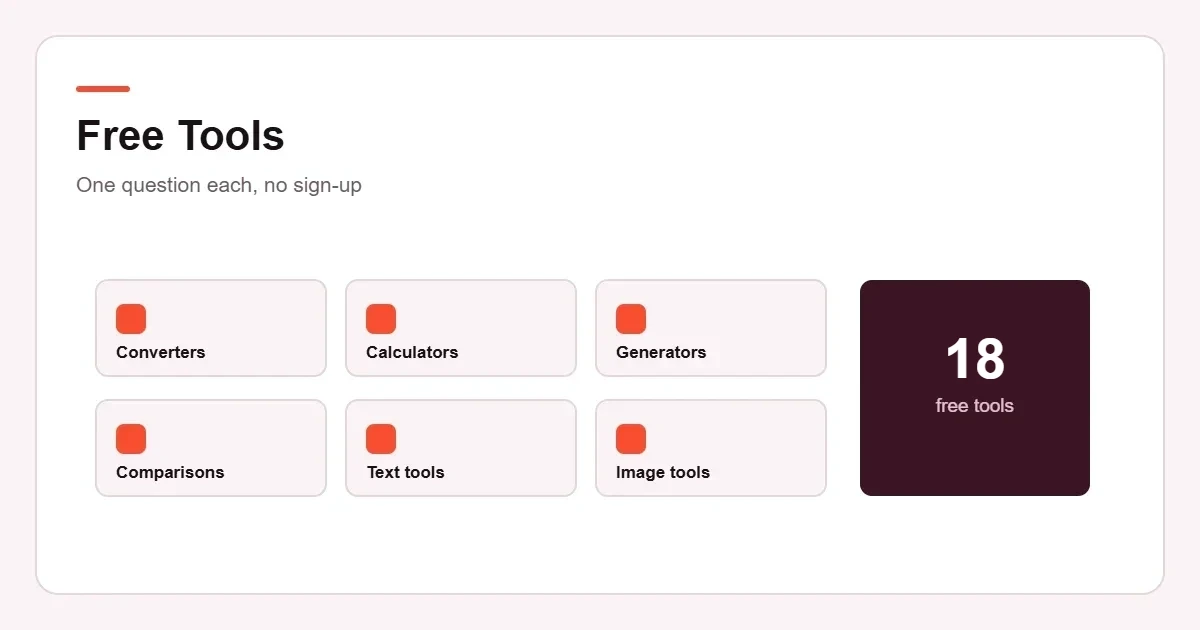
What these free tools are for
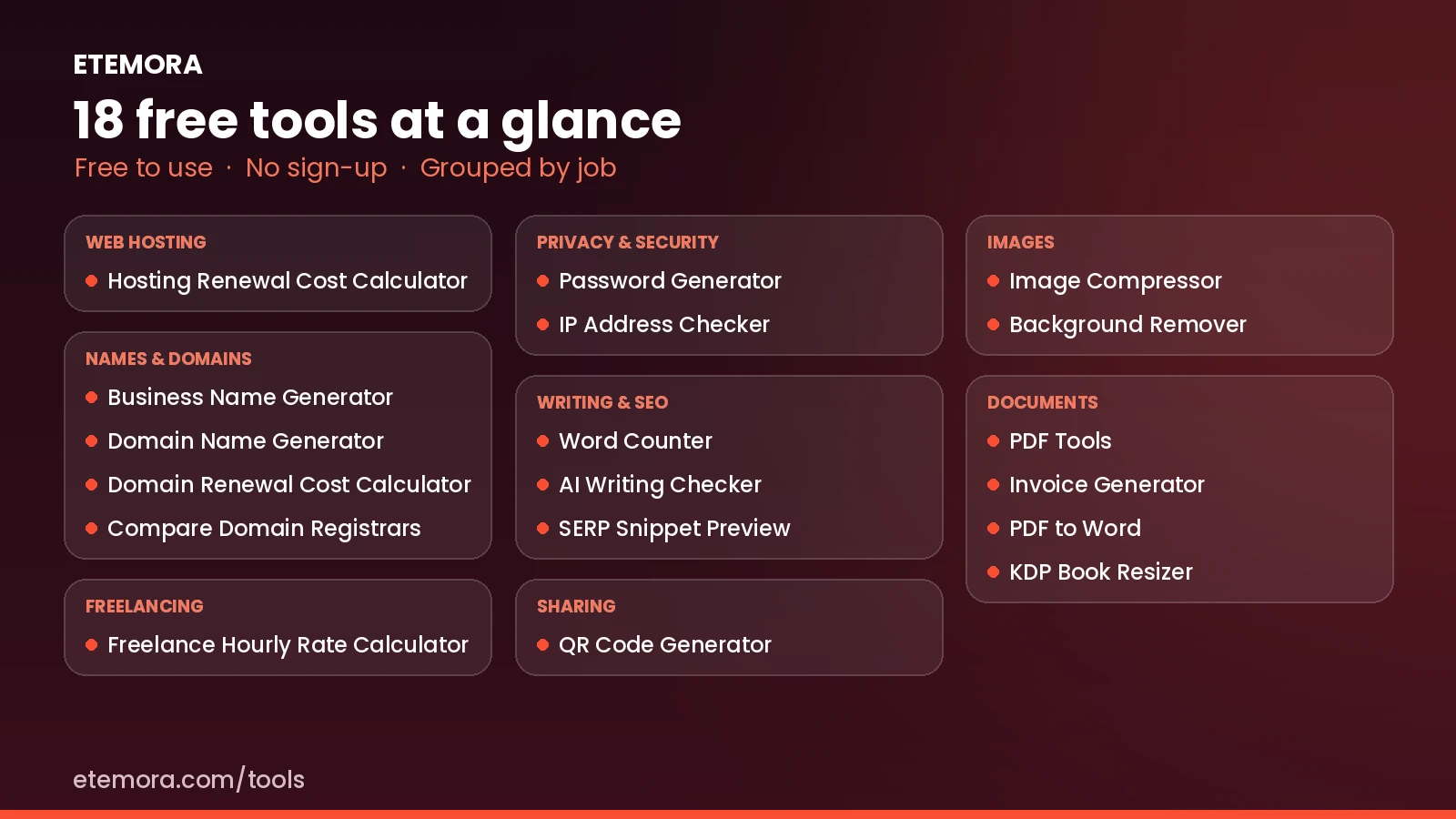
Every one of the free tools on this page started as something we needed while writing an article. They stayed small on purpose: each one answers a single question and then gets out of the way. There is no account to create, no trial that runs out, and no upsell at the end of the result.
The domain tools get used the most. The renewal calculator works out what a name actually costs over five or ten years rather than in the first twelve months, and the registrar comparison lines up the rows that usually differ — renewal price, transfer terms, WHOIS privacy. If you are buying your first domain, ICANN’s summary of registrants’ benefits and responsibilities is worth ten minutes before you do.
The newer tools fill the gaps around those jobs. The domain name generator suggests names and checks availability live, the hosting renewal cost calculator does for hosting what the renewal calculator does for domains, the password generator and IP address checker answer everyday security questions, the AI writing checker flags stock phrases in a draft, and the background remover cuts out a photo without uploading it.
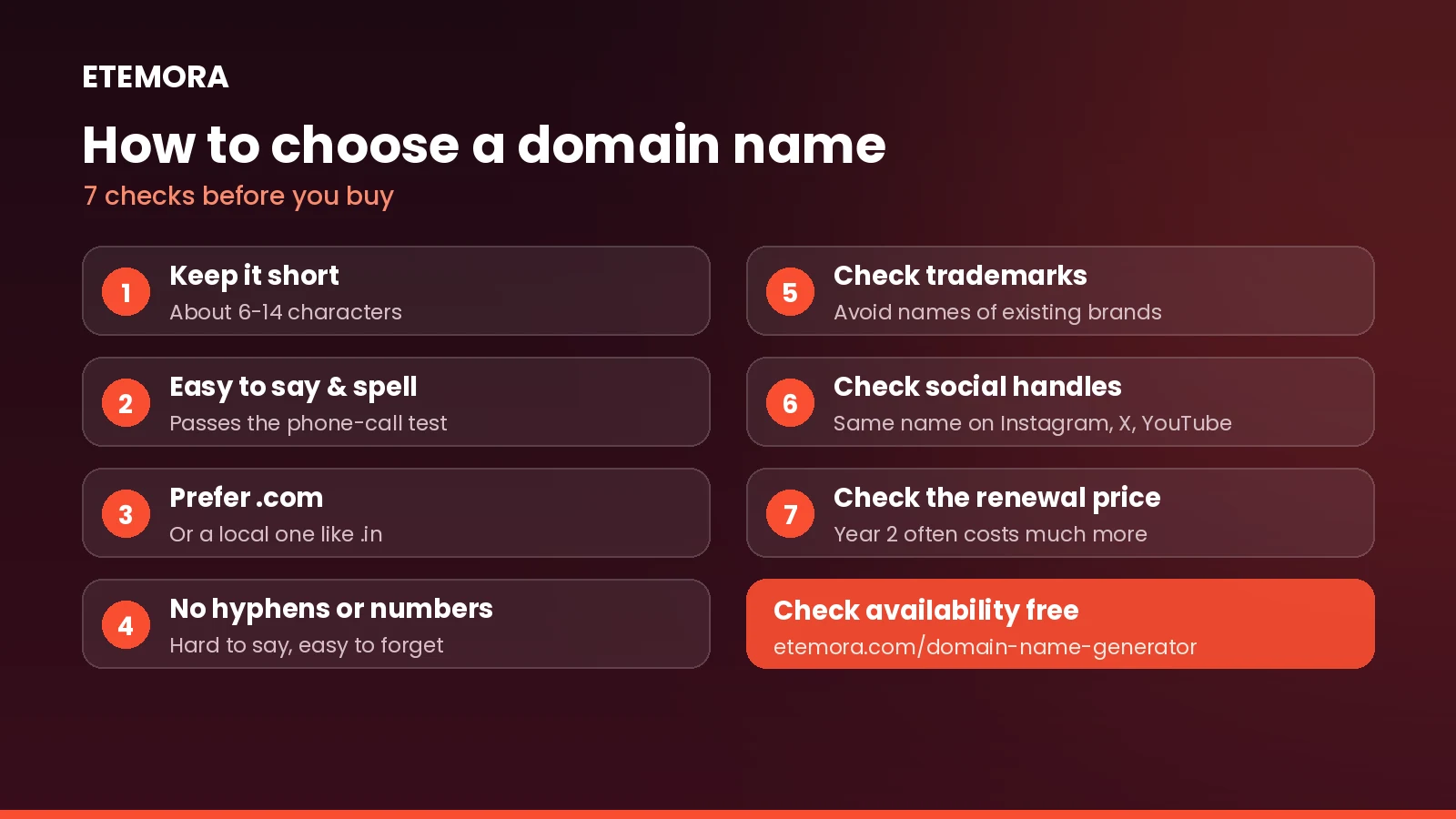
The writing, image and document tools cover jobs that normally send people hunting for a paid app: counting words and reading time, shrinking an image before it goes on a page, turning a PDF back into an editable document, and resizing a book interior to a KDP trim size.
What these free tools will not do
None of these free tools replaces the professional software in its category, and none of them pretends to. The comparison tools show only figures a provider has published; they cannot verify a claim about speed, uptime or logging. The document tools handle common, well-formed files well and can struggle with awkward ones — a PDF made from scans, for example, has no text layer to pull out in the first place.
Where the result matters — a print file going to a printer, or a price you are about to commit to for five years — treat the output of any of these free tools as a first pass and check it against the source. Each of the free tools has its own page, and each page spells out what it checks and what it leaves alone.
Free tools: frequently asked questions
Are these free tools really free?
Yes. There is no account to create and no trial that runs out. If a tool has a limit, such as a maximum file size, its page says so.
Do the tools upload my files or text?
Several of them, including the password generator, the AI writing checker and the background remover, run entirely in your browser, so what you type or add stays on your device. Each tool page explains what it sends and what it does not.
How up to date are the prices in the calculators?
Prices are taken from each provider’s public pricing page and checked by hand, and each calculator shows when its figures were last checked. Prices can change at any time, so confirm on the provider’s site before you buy.
Which tool should I start with if I am building a website?
Start with the domain name generator to find a name, check its long-term cost with the domain renewal cost calculator, then compare hosting plans with the hosting renewal cost calculator. The image compressor helps once your pages are live.
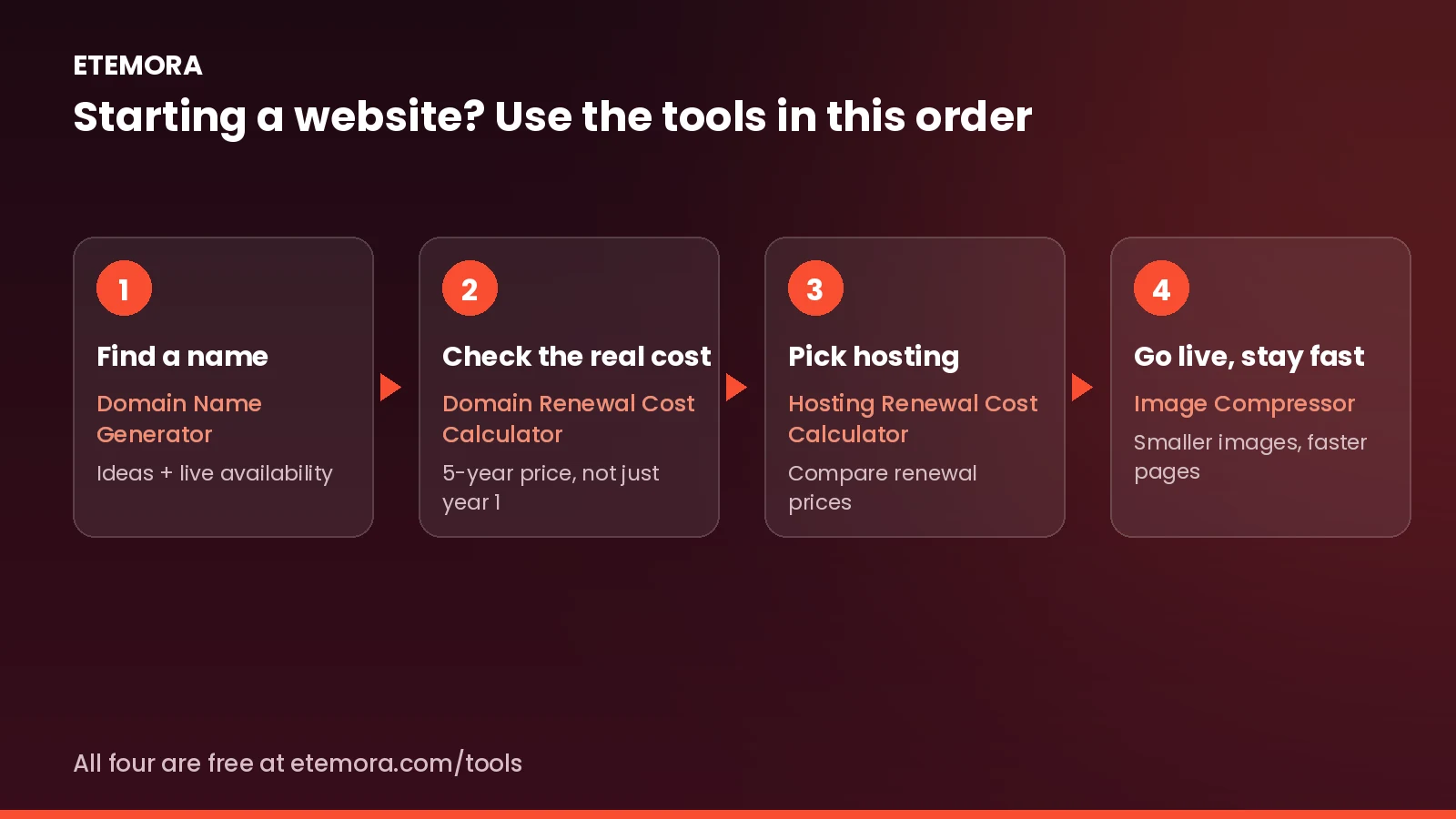
Can I suggest a new free tool?
Yes. Tell us what you need on the contact page. Most of these tools started as a question that came up while writing our guides.
How these tools get their numbers. Every price, limit and feature in these tools is read off the provider’s own public pricing or documentation pages and re-checked by hand before it goes in. Where we could not confirm something, the cell is left blank rather than guessed.
Prices change without notice, so treat a figure here as correct on the date shown on each tool and confirm on the provider’s site before you buy.