
Password Generator & Strength Checker
Create a strong, random password in one click, or check how strong a password is. Everything runs in your browser — nothing is sent or saved.
- Nothing sent or savedruns in your browser
- Crypto-secure randomWeb Crypto API
- 100% freeno sign-up
%22%2F%3E%3Cpath%20d%3D%22M150%20118v-30a50%2050%200%200%201%20100%200v30%22%20fill%3D%22none%22%20stroke%3D%22url(%23t2a9A)%22%20stroke-width%3D%2222%22%2F%3E%3Cpath%20d%3D%22M150%20118v-30a50%2050%200%200%201%20100%200v30%22%20fill%3D%22none%22%20stroke%3D%22%23FFB08F%22%20stroke-width%3D%224%22%20opacity%3D%22.5%22%2F%3E%0A%3Crect%20x%3D%22116%22%20y%3D%22112%22%20width%3D%22168%22%20height%3D%22130%22%20rx%3D%2224%22%20fill%3D%22url(%23t2a9C)%22%2F%3E%3Crect%20x%3D%22116%22%20y%3D%22112%22%20width%3D%22168%22%20height%3D%22130%22%20rx%3D%2224%22%20fill%3D%22none%22%20stroke%3D%22%23FFB08F%22%20stroke-width%3D%223%22%20opacity%3D%22.6%22%2F%3E%3Ccircle%20cx%3D%22200%22%20cy%3D%22164%22%20r%3D%2216%22%20fill%3D%22%237A1E2E%22%2F%3E%3Crect%20x%3D%22193%22%20y%3D%22172%22%20width%3D%2214%22%20height%3D%2236%22%20rx%3D%227%22%20fill%3D%22%237A1E2E%22%2F%3E%0A%3Cg%3E%3Crect%20x%3D%2240%22%20y%3D%22250%22%20width%3D%22320%22%20height%3D%2248%22%20rx%3D%2216%22%20fill%3D%22url(%23t2a9W)%22%2F%3E%3Ctext%20x%3D%22200%22%20y%3D%22283%22%20text-anchor%3D%22middle%22%20font-family%3D%22Poppins%2CArial%2Csans-serif%22%20font-size%3D%2226%22%20font-weight%3D%22800%22%20letter-spacing%3D%223%22%20fill%3D%22%233A0F1F%22%3Ek7%23Qm2!vRx9%40%3C%2Ftext%3E%3C%2Fg%3E%3C%2Fsvg%3E)
Passwords are made with your browser’s built-in cryptographic random number generator. At least one character from each type you tick is always included.
Check a password’s strength
Private by design. The generator and the checker run entirely on this page. What you type or generate is not sent to Etemora or anyone else, and it is not stored. You can even disconnect from the internet after the page loads and both tools keep working.
The strength result is an estimate. It assumes an attacker who can make 10 billion guesses a second against a stolen password database, and it penalises common passwords, keyboard patterns, sequences and repeats. Real-world risk also depends on how a website stores your password and whether you reuse it.
How it works
Get a strong password in three quick steps.
- Set length and types
Pick the length and which characters to include.
- Copy your password
Press Copy, or New for another random one.
- Check any password
Paste a password to see an estimate of its strength.
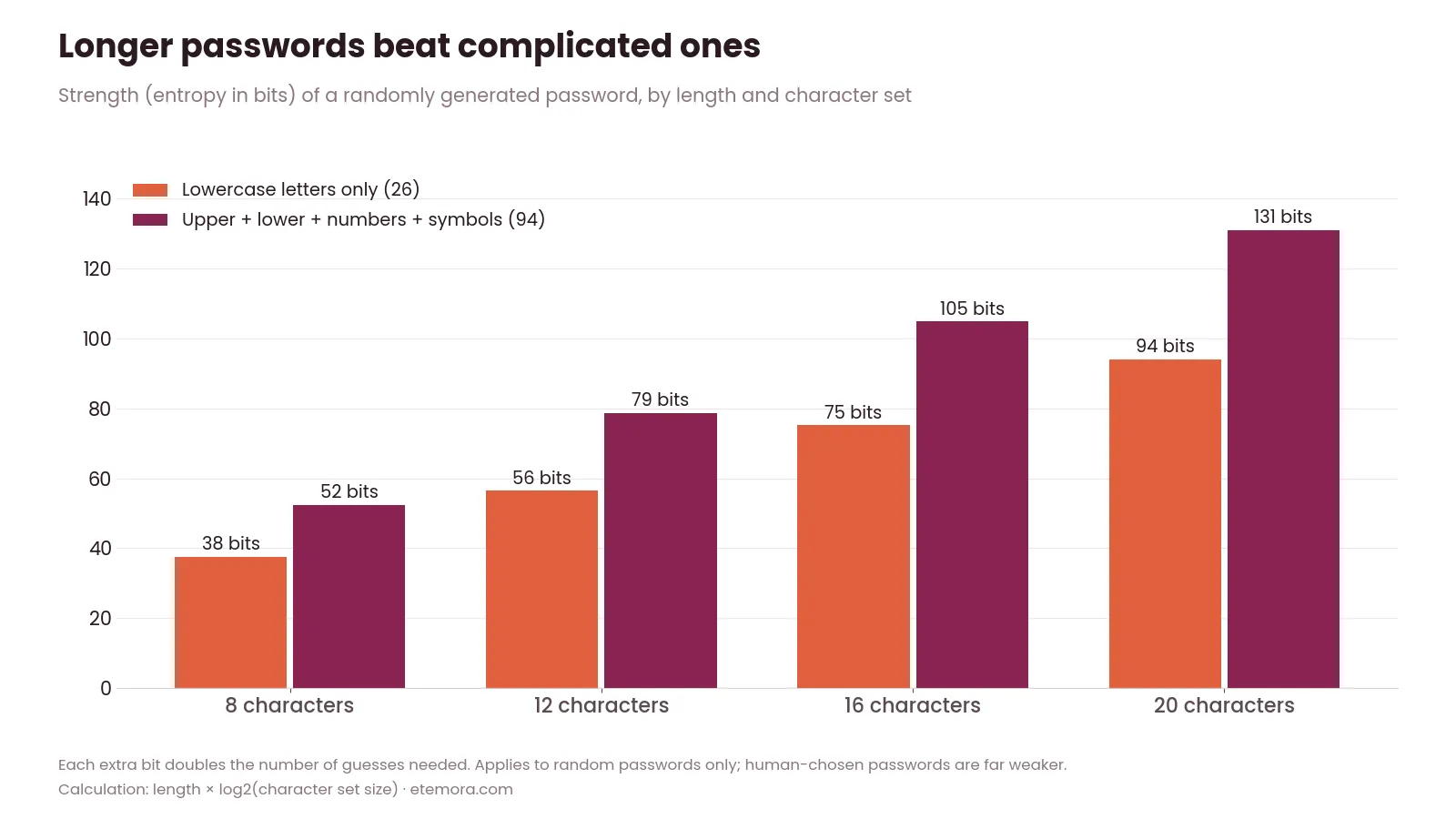
What makes a password strong
Three things matter more than anything else: length, randomness and uniqueness. The U.S. Cybersecurity and Infrastructure Security Agency (CISA) recommends passwords of at least 16 characters, made of random characters, and different for every account. NIST’s Digital Identity Guidelines also favour longer passwords over forced complexity rules and advise checking new passwords against lists of known-compromised ones.
Length beats cleverness. Swapping letters for symbols (“P@ssw0rd”) barely helps, because attackers’ tools try those substitutions first. A long, truly random password, like the ones this password generator creates, has no pattern to exploit.
How to use the password generator
A new password appears as soon as the page loads. Move the slider to set the length — 16 characters is a good default, and longer is better where a site allows it. Untick any character types a website does not accept, or tick “No look-alike characters” if you will ever need to read the password aloud or type it by hand. Press Copy, paste it into the sign-up form, and save it in your password manager straight away.
How the strength checker works
Type or paste a password into the checker to see how it would hold up. It works out how many possible combinations the password could come from, based on its length and the kinds of characters it uses, then lowers the score for weaknesses attackers exploit: very common passwords, keyboard runs like “qwerty”, sequences like “1234” or “abcd”, repeated characters, years, and common words. The time shown is a rough estimate of how long a fast offline attack would take to guess it.
Use it to test the idea of a password, not to type in the real password to your bank. If you are unsure whether a password has ever leaked, the safest move is to replace it with a new random one.
Where to keep your passwords
Nobody can remember a different 16-character random password for every account — and you shouldn’t try. A password manager stores them in an encrypted vault, fills them in for you and can generate new ones. Our best password managers comparison looks at price, security features and ease of use. For your most important accounts, also turn on two-factor authentication, so a stolen password alone is not enough to get in.
Is it safe to use an online password generator?
It depends on how the generator works. This one creates passwords with the Web Crypto API built into your browser, on your own device, and never sends them over the network. Avoid generators that email you a password, need you to sign up, or show the same password to everyone who visits.
Sources: CISA – Use strong passwords, NIST SP 800-63B, Digital Identity Guidelines.
Password generator: frequently asked questions
How long should a password be?
At least 16 characters for a random password, following CISA’s guidance, and longer where the website allows it. Every extra character multiplies the number of guesses an attacker needs, so length is the easiest way to make a password stronger.
Are passwords made by this generator stored anywhere?
No. Passwords are created in your browser using its built-in cryptographic random number generator. They are not sent to Etemora, not logged and not saved. Once you close or refresh the page, the password is gone unless you have copied it.
Should I use symbols in my password?
Yes, if the website accepts them, because they add more possible combinations. But length matters more: a long random password without symbols is stronger than a short one with them. Untick symbols only when a site rejects them.
Is it safe to type my real password into a strength checker?
This checker runs only on your device and sends nothing, but the safest habit is not to type important passwords into any website other than the one they belong to. Test a similar example instead, or simply replace a doubtful password with a new random one.
How often should I change my passwords?
Current NIST guidance does not recommend changing passwords on a fixed schedule. Change a password when there is a reason to — a data breach, suspicious activity, or if you reused it elsewhere — and make sure every account has its own unique password.
Keeping many accounts safe? See our best password managers guide, and check what your connection reveals with our IP address checker.
Other free tools
Guides related to this tool
 SecurityBest Password Managers in 2026: 10 Options Compared
 SecurityBest Antivirus Software in 2026: 10 Antivirus Programs Compared
 SecurityMost Secure Domain Registrars in 2026: 2FA, Locks and Privacy Compared