
Free Background Remover
Remove the background from a photo in seconds and download a transparent PNG. The AI runs in your browser, so your images are never uploaded.
- Image never uploadedruns in your browser
- HD and Quick modespick speed or detail
- PNG downloadtransparent or colour
- 100% freeno sign-up
%22%2F%3E%3Crect%20x%3D%2286%22%20y%3D%2256%22%20width%3D%22232%22%20height%3D%22208%22%20rx%3D%2224%22%20fill%3D%22%232A0A16%22%20opacity%3D%22.35%22%20transform%3D%22translate(6%2C8)%22%2F%3E%3Crect%20x%3D%2280%22%20y%3D%2250%22%20width%3D%22232%22%20height%3D%22208%22%20rx%3D%2224%22%20fill%3D%22url(%23t2a11W)%22%2F%3E%0A%3CclipPath%20id%3D%22t2a11K%22%3E%3Crect%20x%3D%2296%22%20y%3D%2266%22%20width%3D%22200%22%20height%3D%22176%22%20rx%3D%2214%22%2F%3E%3C%2FclipPath%3E%3Cg%20clip-path%3D%22url(%23t2a11K)%22%3E%3Crect%20x%3D%2296%22%20y%3D%2266%22%20width%3D%22100%22%20height%3D%22176%22%20fill%3D%22url(%23t2a11A)%22%2F%3E%3Crect%20x%3D%22196%22%20y%3D%2266%22%20width%3D%2216%22%20height%3D%2216%22%20fill%3D%22%23FFFFFF%22%2F%3E%3Crect%20x%3D%22212%22%20y%3D%2266%22%20width%3D%2216%22%20height%3D%2216%22%20fill%3D%22%23F3E6EA%22%2F%3E%3Crect%20x%3D%22228%22%20y%3D%2266%22%20width%3D%2216%22%20height%3D%2216%22%20fill%3D%22%23FFFFFF%22%2F%3E%3Crect%20x%3D%22244%22%20y%3D%2266%22%20width%3D%2216%22%20height%3D%2216%22%20fill%3D%22%23F3E6EA%22%2F%3E%3Crect%20x%3D%22260%22%20y%3D%2266%22%20width%3D%2216%22%20height%3D%2216%22%20fill%3D%22%23FFFFFF%22%2F%3E%3Crect%20x%3D%22276%22%20y%3D%2266%22%20width%3D%2216%22%20height%3D%2216%22%20fill%3D%22%23F3E6EA%22%2F%3E%3Crect%20x%3D%22196%22%20y%3D%2282%22%20width%3D%2216%22%20height%3D%2216%22%20fill%3D%22%23F3E6EA%22%2F%3E%3Crect%20x%3D%22212%22%20y%3D%2282%22%20width%3D%2216%22%20height%3D%2216%22%20fill%3D%22%23FFFFFF%22%2F%3E%3Crect%20x%3D%22228%22%20y%3D%2282%22%20width%3D%2216%22%20height%3D%2216%22%20fill%3D%22%23F3E6EA%22%2F%3E%3Crect%20x%3D%22244%22%20y%3D%2282%22%20width%3D%2216%22%20height%3D%2216%22%20fill%3D%22%23FFFFFF%22%2F%3E%3Crect%20x%3D%22260%22%20y%3D%2282%22%20width%3D%2216%22%20height%3D%2216%22%20fill%3D%22%23F3E6EA%22%2F%3E%3Crect%20x%3D%22276%22%20y%3D%2282%22%20width%3D%2216%22%20height%3D%2216%22%20fill%3D%22%23FFFFFF%22%2F%3E%3Crect%20x%3D%22196%22%20y%3D%2298%22%20width%3D%2216%22%20height%3D%2216%22%20fill%3D%22%23FFFFFF%22%2F%3E%3Crect%20x%3D%22212%22%20y%3D%2298%22%20width%3D%2216%22%20height%3D%2216%22%20fill%3D%22%23F3E6EA%22%2F%3E%3Crect%20x%3D%22228%22%20y%3D%2298%22%20width%3D%2216%22%20height%3D%2216%22%20fill%3D%22%23FFFFFF%22%2F%3E%3Crect%20x%3D%22244%22%20y%3D%2298%22%20width%3D%2216%22%20height%3D%2216%22%20fill%3D%22%23F3E6EA%22%2F%3E%3Crect%20x%3D%22260%22%20y%3D%2298%22%20width%3D%2216%22%20height%3D%2216%22%20fill%3D%22%23FFFFFF%22%2F%3E%3Crect%20x%3D%22276%22%20y%3D%2298%22%20width%3D%2216%22%20height%3D%2216%22%20fill%3D%22%23F3E6EA%22%2F%3E%3Crect%20x%3D%22196%22%20y%3D%22114%22%20width%3D%2216%22%20height%3D%2216%22%20fill%3D%22%23F3E6EA%22%2F%3E%3Crect%20x%3D%22212%22%20y%3D%22114%22%20width%3D%2216%22%20height%3D%2216%22%20fill%3D%22%23FFFFFF%22%2F%3E%3Crect%20x%3D%22228%22%20y%3D%22114%22%20width%3D%2216%22%20height%3D%2216%22%20fill%3D%22%23F3E6EA%22%2F%3E%3Crect%20x%3D%22244%22%20y%3D%22114%22%20width%3D%2216%22%20height%3D%2216%22%20fill%3D%22%23FFFFFF%22%2F%3E%3Crect%20x%3D%22260%22%20y%3D%22114%22%20width%3D%2216%22%20height%3D%2216%22%20fill%3D%22%23F3E6EA%22%2F%3E%3Crect%20x%3D%22276%22%20y%3D%22114%22%20width%3D%2216%22%20height%3D%2216%22%20fill%3D%22%23FFFFFF%22%2F%3E%3Crect%20x%3D%22196%22%20y%3D%22130%22%20width%3D%2216%22%20height%3D%2216%22%20fill%3D%22%23FFFFFF%22%2F%3E%3Crect%20x%3D%22212%22%20y%3D%22130%22%20width%3D%2216%22%20height%3D%2216%22%20fill%3D%22%23F3E6EA%22%2F%3E%3Crect%20x%3D%22228%22%20y%3D%22130%22%20width%3D%2216%22%20height%3D%2216%22%20fill%3D%22%23FFFFFF%22%2F%3E%3Crect%20x%3D%22244%22%20y%3D%22130%22%20width%3D%2216%22%20height%3D%2216%22%20fill%3D%22%23F3E6EA%22%2F%3E%3Crect%20x%3D%22260%22%20y%3D%22130%22%20width%3D%2216%22%20height%3D%2216%22%20fill%3D%22%23FFFFFF%22%2F%3E%3Crect%20x%3D%22276%22%20y%3D%22130%22%20width%3D%2216%22%20height%3D%2216%22%20fill%3D%22%23F3E6EA%22%2F%3E%3Crect%20x%3D%22196%22%20y%3D%22146%22%20width%3D%2216%22%20height%3D%2216%22%20fill%3D%22%23F3E6EA%22%2F%3E%3Crect%20x%3D%22212%22%20y%3D%22146%22%20width%3D%2216%22%20height%3D%2216%22%20fill%3D%22%23FFFFFF%22%2F%3E%3Crect%20x%3D%22228%22%20y%3D%22146%22%20width%3D%2216%22%20height%3D%2216%22%20fill%3D%22%23F3E6EA%22%2F%3E%3Crect%20x%3D%22244%22%20y%3D%22146%22%20width%3D%2216%22%20height%3D%2216%22%20fill%3D%22%23FFFFFF%22%2F%3E%3Crect%20x%3D%22260%22%20y%3D%22146%22%20width%3D%2216%22%20height%3D%2216%22%20fill%3D%22%23F3E6EA%22%2F%3E%3Crect%20x%3D%22276%22%20y%3D%22146%22%20width%3D%2216%22%20height%3D%2216%22%20fill%3D%22%23FFFFFF%22%2F%3E%3Crect%20x%3D%22196%22%20y%3D%22162%22%20width%3D%2216%22%20height%3D%2216%22%20fill%3D%22%23FFFFFF%22%2F%3E%3Crect%20x%3D%22212%22%20y%3D%22162%22%20width%3D%2216%22%20height%3D%2216%22%20fill%3D%22%23F3E6EA%22%2F%3E%3Crect%20x%3D%22228%22%20y%3D%22162%22%20width%3D%2216%22%20height%3D%2216%22%20fill%3D%22%23FFFFFF%22%2F%3E%3Crect%20x%3D%22244%22%20y%3D%22162%22%20width%3D%2216%22%20height%3D%2216%22%20fill%3D%22%23F3E6EA%22%2F%3E%3Crect%20x%3D%22260%22%20y%3D%22162%22%20width%3D%2216%22%20height%3D%2216%22%20fill%3D%22%23FFFFFF%22%2F%3E%3Crect%20x%3D%22276%22%20y%3D%22162%22%20width%3D%2216%22%20height%3D%2216%22%20fill%3D%22%23F3E6EA%22%2F%3E%3Crect%20x%3D%22196%22%20y%3D%22178%22%20width%3D%2216%22%20height%3D%2216%22%20fill%3D%22%23F3E6EA%22%2F%3E%3Crect%20x%3D%22212%22%20y%3D%22178%22%20width%3D%2216%22%20height%3D%2216%22%20fill%3D%22%23FFFFFF%22%2F%3E%3Crect%20x%3D%22228%22%20y%3D%22178%22%20width%3D%2216%22%20height%3D%2216%22%20fill%3D%22%23F3E6EA%22%2F%3E%3Crect%20x%3D%22244%22%20y%3D%22178%22%20width%3D%2216%22%20height%3D%2216%22%20fill%3D%22%23FFFFFF%22%2F%3E%3Crect%20x%3D%22260%22%20y%3D%22178%22%20width%3D%2216%22%20height%3D%2216%22%20fill%3D%22%23F3E6EA%22%2F%3E%3Crect%20x%3D%22276%22%20y%3D%22178%22%20width%3D%2216%22%20height%3D%2216%22%20fill%3D%22%23FFFFFF%22%2F%3E%3Crect%20x%3D%22196%22%20y%3D%22194%22%20width%3D%2216%22%20height%3D%2216%22%20fill%3D%22%23FFFFFF%22%2F%3E%3Crect%20x%3D%22212%22%20y%3D%22194%22%20width%3D%2216%22%20height%3D%2216%22%20fill%3D%22%23F3E6EA%22%2F%3E%3Crect%20x%3D%22228%22%20y%3D%22194%22%20width%3D%2216%22%20height%3D%2216%22%20fill%3D%22%23FFFFFF%22%2F%3E%3Crect%20x%3D%22244%22%20y%3D%22194%22%20width%3D%2216%22%20height%3D%2216%22%20fill%3D%22%23F3E6EA%22%2F%3E%3Crect%20x%3D%22260%22%20y%3D%22194%22%20width%3D%2216%22%20height%3D%2216%22%20fill%3D%22%23FFFFFF%22%2F%3E%3Crect%20x%3D%22276%22%20y%3D%22194%22%20width%3D%2216%22%20height%3D%2216%22%20fill%3D%22%23F3E6EA%22%2F%3E%3Crect%20x%3D%22196%22%20y%3D%22210%22%20width%3D%2216%22%20height%3D%2216%22%20fill%3D%22%23F3E6EA%22%2F%3E%3Crect%20x%3D%22212%22%20y%3D%22210%22%20width%3D%2216%22%20height%3D%2216%22%20fill%3D%22%23FFFFFF%22%2F%3E%3Crect%20x%3D%22228%22%20y%3D%22210%22%20width%3D%2216%22%20height%3D%2216%22%20fill%3D%22%23F3E6EA%22%2F%3E%3Crect%20x%3D%22244%22%20y%3D%22210%22%20width%3D%2216%22%20height%3D%2216%22%20fill%3D%22%23FFFFFF%22%2F%3E%3Crect%20x%3D%22260%22%20y%3D%22210%22%20width%3D%2216%22%20height%3D%2216%22%20fill%3D%22%23F3E6EA%22%2F%3E%3Crect%20x%3D%22276%22%20y%3D%22210%22%20width%3D%2216%22%20height%3D%2216%22%20fill%3D%22%23FFFFFF%22%2F%3E%3Crect%20x%3D%22196%22%20y%3D%22226%22%20width%3D%2216%22%20height%3D%2216%22%20fill%3D%22%23FFFFFF%22%2F%3E%3Crect%20x%3D%22212%22%20y%3D%22226%22%20width%3D%2216%22%20height%3D%2216%22%20fill%3D%22%23F3E6EA%22%2F%3E%3Crect%20x%3D%22228%22%20y%3D%22226%22%20width%3D%2216%22%20height%3D%2216%22%20fill%3D%22%23FFFFFF%22%2F%3E%3Crect%20x%3D%22244%22%20y%3D%22226%22%20width%3D%2216%22%20height%3D%2216%22%20fill%3D%22%23F3E6EA%22%2F%3E%3Crect%20x%3D%22260%22%20y%3D%22226%22%20width%3D%2216%22%20height%3D%2216%22%20fill%3D%22%23FFFFFF%22%2F%3E%3Crect%20x%3D%22276%22%20y%3D%22226%22%20width%3D%2216%22%20height%3D%2216%22%20fill%3D%22%23F3E6EA%22%2F%3E%3C%2Fg%3E%0A%3Cg%3E%3Ccircle%20cx%3D%22196%22%20cy%3D%22136%22%20r%3D%2234%22%20fill%3D%22url(%23t2a11C)%22%2F%3E%3Cpath%20d%3D%22M136%20242c6-46%2032-70%2060-70s54%2024%2060%2070z%22%20fill%3D%22url(%23t2a11C)%22%2F%3E%3C%2Fg%3E%0A%3Cpath%20d%3D%22M196%2060v196%22%20stroke%3D%22%23fff%22%20stroke-width%3D%224%22%20stroke-dasharray%3D%228%206%22%2F%3E%0A%3Cg%20transform%3D%22rotate(-35%20330%20210)%22%3E%3Crect%20x%3D%22318%22%20y%3D%22150%22%20width%3D%2222%22%20height%3D%22130%22%20rx%3D%2210%22%20fill%3D%22url(%23t2a11B)%22%2F%3E%3Crect%20x%3D%22318%22%20y%3D%22150%22%20width%3D%2222%22%20height%3D%2230%22%20rx%3D%228%22%20fill%3D%22url(%23t2a11D)%22%2F%3E%3C%2Fg%3E%0A%3Cpath%20d%3D%22M300%20110l7%2016%2016%207-16%207-7%2016-7-16-16-7%2016-7z%22%20fill%3D%22url(%23t2a11D)%22%2F%3E%3Cpath%20d%3D%22M352%20150l4%2010%2010%204-10%204-4%2010-4-10-10-4%2010-4z%22%20fill%3D%22%23FF8A5B%22%2F%3E%3C%2Fsvg%3E)
Tip: a clear subject with good contrast against the background gives the cleanest edges. Very fine hair, glass and smoke are the hardest parts for any background remover.
Your photos stay on your device. The image is processed by an AI model running inside your browser. It is not uploaded to Etemora or anyone else. The only download is the AI model itself, fetched once from Hugging Face and then cached by your browser.
Works best on: a recent desktop browser (Chrome or Edge use your graphics card for speed). On older phones the HD mode can be slow or run out of memory — switch to the fast portrait mode if that happens.
Need a smaller file for your website? Run the result through our free image compressor.
How it works
Remove a background in three quick steps.
- Add a photo
Drop, paste or choose an image. It stays on your device.
- Pick HD or Quick
HD gives cleaner edges; Quick is faster, best for portraits.
- Choose a background and download
Keep it transparent or pick a colour, then save the PNG.
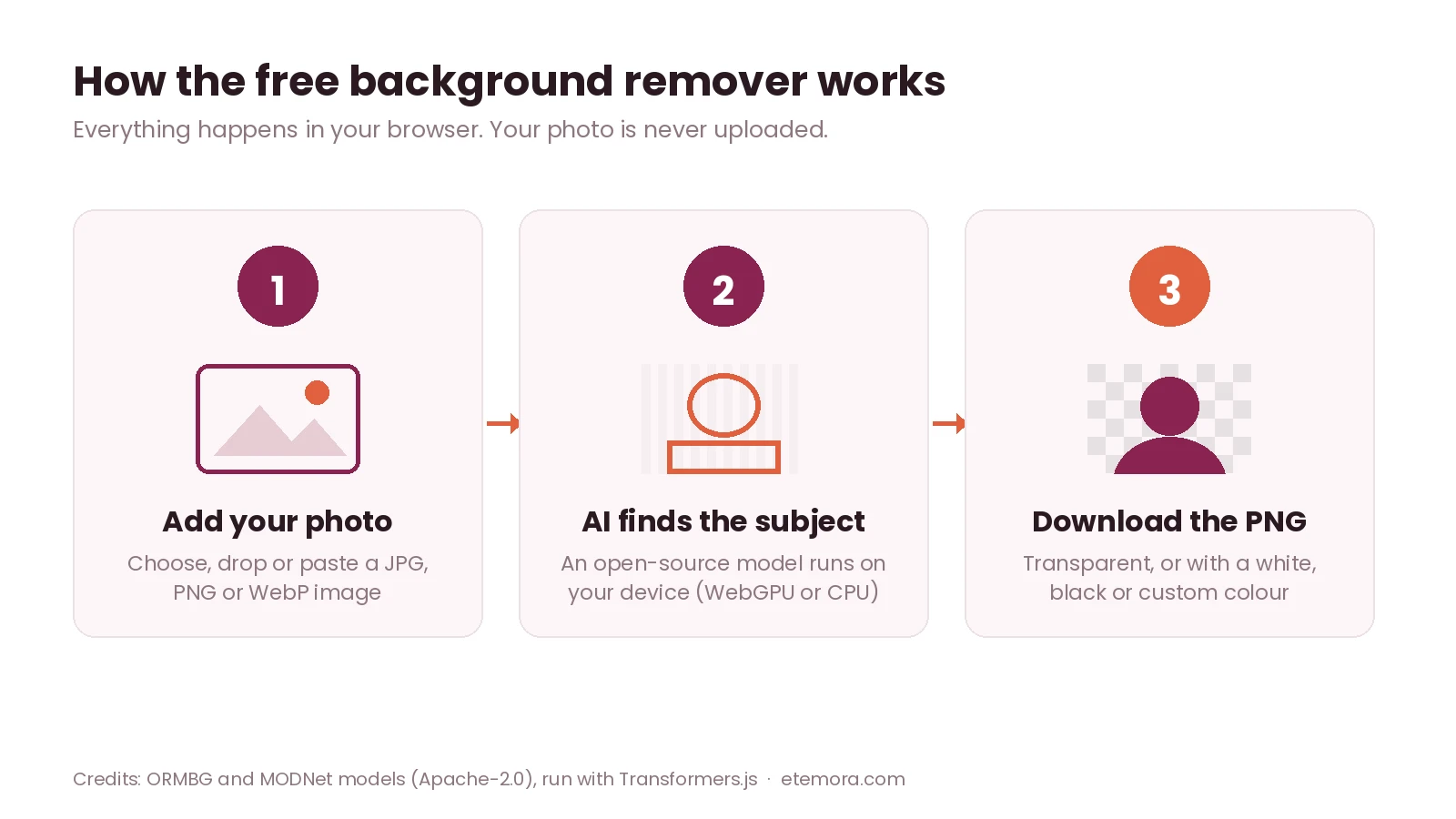
How to remove a background from an image
Choose a photo, drop it onto the box or paste it from your clipboard. Pick Any object (HD) for products, pets, cars or logos, or People & portraits for selfies and headshots. The background remover finds the main subject, cuts it out and shows the result on a checkerboard, which means that area is transparent.
Keep it transparent and press Download PNG, or pick a white, black or custom background colour first — handy for product listings, profile pictures and ID-style photos. There is no watermark and no limit on how many images you process.
Which mode should you use?
Any object (HD) uses a general-purpose segmentation model, so it handles almost any subject: a shoe on a table, a laptop, a dog on grass, a person in a busy street. It gives cleaner edges but needs a bigger one-time download. People & portraits uses a smaller model trained specifically on human portraits. It is much quicker, especially on phones, but it is not designed for objects.
Tips for a clean cut-out
Use a photo where the subject is in focus and stands out from the background by colour or brightness. Crop out anything you don’t need before you start. Large images take longer; around 1,500–2,500 pixels on the long side is plenty for most uses. If an edge looks rough, try the other mode — the two models make different trade-offs.
How this background remover works
When you press start, your browser downloads an open-source AI model and runs it locally using WebGPU (your graphics card) or, if that isn’t available, WebAssembly on your processor. The model predicts which pixels belong to the subject, and those predictions become the transparency mask for your PNG. Because nothing is sent to a server, it keeps working for any image, costs nothing to run and doesn’t need an account.
Credits: ORMBG (Apache-2.0) for HD mode, MODNet (Apache-2.0) for portrait mode, run with Transformers.js (Apache-2.0).
Background remover: frequently asked questions
Is this background remover really free?
Yes. There is no sign-up, no watermark and no limit on the number of images. Because the AI runs on your own device instead of a paid server, there is nothing to charge for.
Are my images uploaded anywhere?
No. Your photo is processed inside your browser and never leaves your device. The only thing downloaded is the AI model itself, the first time you use each mode, and your browser keeps it for next time.
Why is the first image slow?
The first time you use a mode, your browser has to download the AI model — about 45 to 90 MB for HD mode and 7 to 13 MB for portrait mode — and prepare it. After that it is cached, so later images are processed in a few seconds.
What file do I get?
A PNG file. With the transparent option, the removed background is fully transparent, ready to place on any design. If you choose a colour, the PNG has that solid background instead.
Can I use the result commercially?
The tool adds no watermark and claims no rights over your images, so the result is as free to use as the original photo was. Make sure you own the photo or have permission to use it, especially for products, logos and pictures of other people.
Making product or social images? See our best AI image generators guide, or shrink the file size with the free image compressor.
Other free tools
Guides related to this tool
 Tech & SoftwareBest AI Image Generators in 2026
 SEO & MarketingBest Marketing Tools in 2026: 10 Tools Compared
 AI ToolsChatGPT vs Claude: 2026 Honest AI Comparison