
Free Invoice Generator
Create a professional PDF invoice in minutes — add your logo, items, discount and GST, VAT or sales tax. Everything runs in your browser, so your data is never uploaded.
- Data never uploadedmade in your browser
- GST, VAT & sales tax14 currencies, CGST + SGST
- 100% freeno sign-up, no watermark

Summary
The invoice is created inside your browser. Nothing you type is sent to our server. Your details are saved only in this browser so you can come back to them; use “Clear all” to remove them.
How it works
A professional invoice in three quick steps.
- Fill in the details
Your business, your client and the invoice number and dates.
- Add items and tax
Quantities, rates, discount and GST, VAT or sales tax.
- Download the PDF
Send it to your client by email or print it.
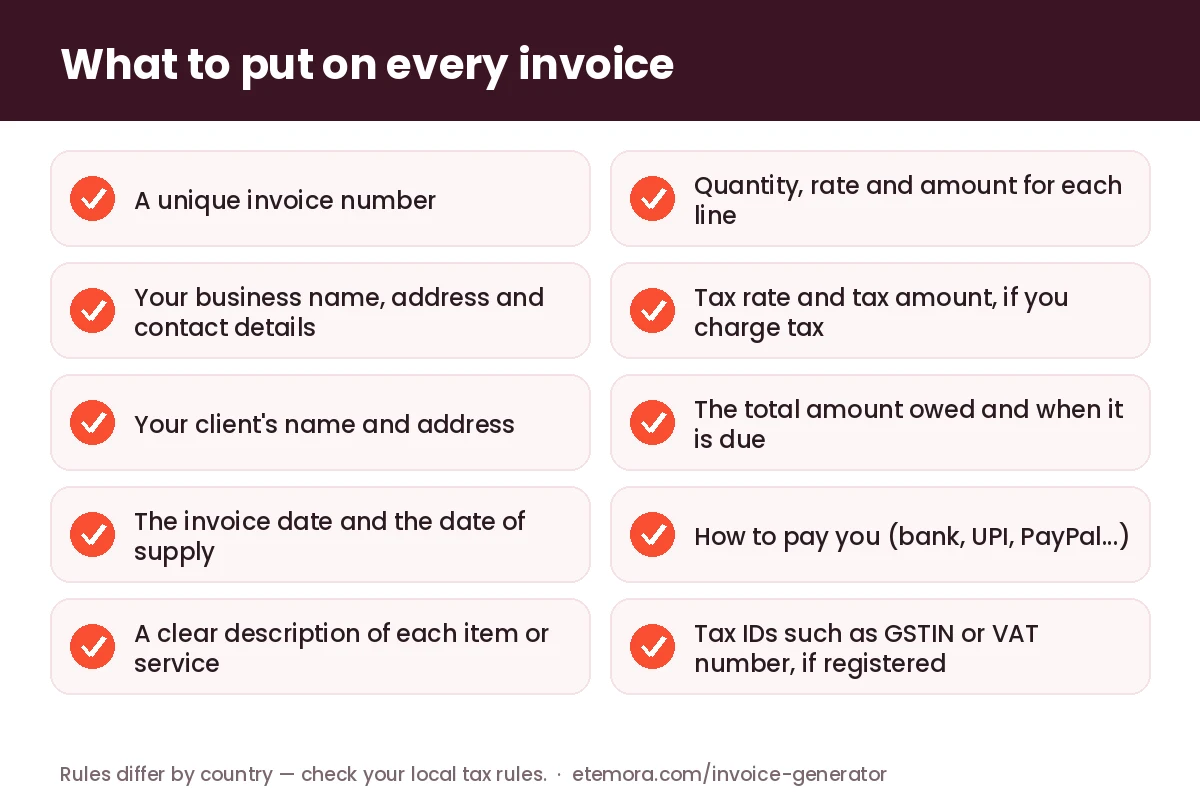
How to make an invoice with this free invoice generator
Start with your details: business or personal name, address, email and phone. You can add a logo (PNG, JPG or WebP), and a tax ID with its own label — for example GSTIN in India or VAT No. in the UK and EU. Then add who you are billing, the invoice number, the invoice date and the due date.
Under Items, add one line for each product or piece of work, with a quantity and a rate. The amount, subtotal, discount, tax, shipping and total update as you type. If the client has already paid part of the invoice, enter it under Amount already paid and the PDF will show the balance due. Press Download PDF invoice and the file is created on your device in a second or two.
Your business details are remembered in this browser, so next time you only change the client and the items. New invoice keeps your details and moves the number on by one, for example from INV-0007 to INV-0008.
What should an invoice include?
The UK government’s guidance on invoices lists the basics: a unique identification number, your name, address and contact details, the customer’s name and address, a clear description of what you are charging for, the supply date, the invoice date, the amounts charged, VAT if it applies, and the total owed. Those fields are useful almost anywhere, and every one of them has a place in this tool.
Many countries add their own rules on top. Use the notes and terms box for anything extra your country asks for, and when in doubt, check with your tax office or an accountant — this page is a practical guide, not tax advice.
GST invoices in India: what to add
For registered businesses in India, Rule 46 of the CGST Rules sets out what a tax invoice must contain. It includes the supplier’s name, address and GSTIN, a consecutive invoice serial number of no more than sixteen characters, the date, the recipient’s details (and GSTIN if registered), the HSN code, a description, quantity, taxable value, the tax rate and amount, and the place of supply.
- GSTIN: set the tax ID label to “GSTIN” for you and for your client.
- Invoice number: the field is limited to 16 characters, matching the rule. Keep your numbers consecutive.
- CGST + SGST: for a sale within your state, enter the total GST rate (for example 18) and tick Show tax as two equal halves — the invoice then shows CGST 9% and SGST 9%. For an inter-state sale, leave it unticked and name the tax “IGST”.
- HSN or SAC code and place of supply: add the code to each item’s description and the place of supply in the notes.
The PDF shows the rupee as “Rs.”, because the standard PDF font used here does not include the ₹ sign. Amounts use Indian grouping, such as 1,06,274.50.
Invoicing tips for freelancers
Agree the rate and payment date before you start, then send the invoice as soon as the work is delivered. Describe the work in plain words (“Logo design, 3 concepts, 2 revision rounds”) rather than just “Design”, so there is nothing to query. Put clear payment details — bank account, UPI ID or PayPal address — in the terms box, and a due date such as 14 days.
New to client work? Our guide on how to start freelancing covers finding your first clients, and Upwork vs Fiverr explains how those platforms handle payment and fees — useful if you also invoice clients directly. For more ways to earn, see how to make money online.
Is it safe? How this invoice generator works
Everything happens inside your browser. The PDF is built with the open-source pdf-lib library (MIT licence), which the page loads from the public cdnjs network when you first download. The names, amounts and client details you type are not sent to our server. To save you retyping, the form is stored in your browser’s local storage on this device only — press Clear all on a shared computer.
A few honest limits: the PDF font covers English and other Latin-alphabet languages, so characters such as Hindi or Arabic letters are replaced with “?” (the tool warns you when this happens); there is one tax rate per invoice rather than per line; and the tool does not create e-invoices with an IRN or QR code for India’s e-invoicing system. Need to merge the invoice with receipts, or shrink it before emailing? Use our free PDF tools.
Invoice generator: frequently asked questions
Is this invoice generator really free?
Yes. There is no sign-up, no watermark and no limit on the number of invoices. The PDF is made by your own browser, so there is nothing to charge for.
Is my invoice data stored anywhere?
Only in your own browser, so the form is filled in next time you visit. Nothing is sent to our server. Press “Clear all” to delete it from this browser.
Can I add GST, VAT or sales tax?
Yes. Give the tax a name, such as GST, VAT or Sales tax, and enter the rate. For Indian intra-state sales you can split GST into equal CGST and SGST lines.
Can I add my logo?
Yes. Upload a PNG, JPG or WebP logo and it appears at the top left of the invoice. A wide logo with a transparent background looks best.
Which currencies are supported?
US dollar, euro, pound, Indian rupee, Australian, Canadian and Singapore dollars, UAE dirham, Pakistani rupee, Bangladeshi taka, Nigerian naira, South African rand, Philippine peso and Japanese yen, each with its usual number format.
Is an invoice made here legally valid?
An invoice is valid when it contains the details your country requires, not because of the software used to make it. Fill in every field that applies to you, and check local rules with your tax office or accountant if you are unsure.
More free tools: see all Etemora tools.
Other free tools
Guides related to this tool
 FreelancingHow to Start Freelancing: 7 Proven Steps in 2026
 FreelancingUpwork vs Fiverr: Which Platform Is Right for Freelancers?
 FreelancingHow to Make Money Online in 2026: 15 Legit Ways & Platforms