
How to Buy a Domain Name in 2026: 8 Simple Steps
 By M. Zaid
- Updated September 30, 2026
- 10 min read
Quick answer: To buy a domain name, pick a short, easy-to-spell name, choose an extension such as .com, check it’s available at a domain registrar, compare the renewal price (not just the first-year price), pay for one or more years, and confirm the verification email your registrar sends. Registration usually takes a few minutes. A standard .com costs roughly $11 to $20 a year at registrars with flat pricing, based on prices we checked in September 2026.
Buying a domain is usually the first real step in starting a website, a business email or an online brand. It only takes a few minutes, but a few small decisions at checkout can cost you money every year for as long as you own the name.
This guide shows how to buy a domain name in eight simple steps, what it really costs, where to buy it, and the mistakes beginners most often make.
How to Buy a Domain Name in 8 Steps
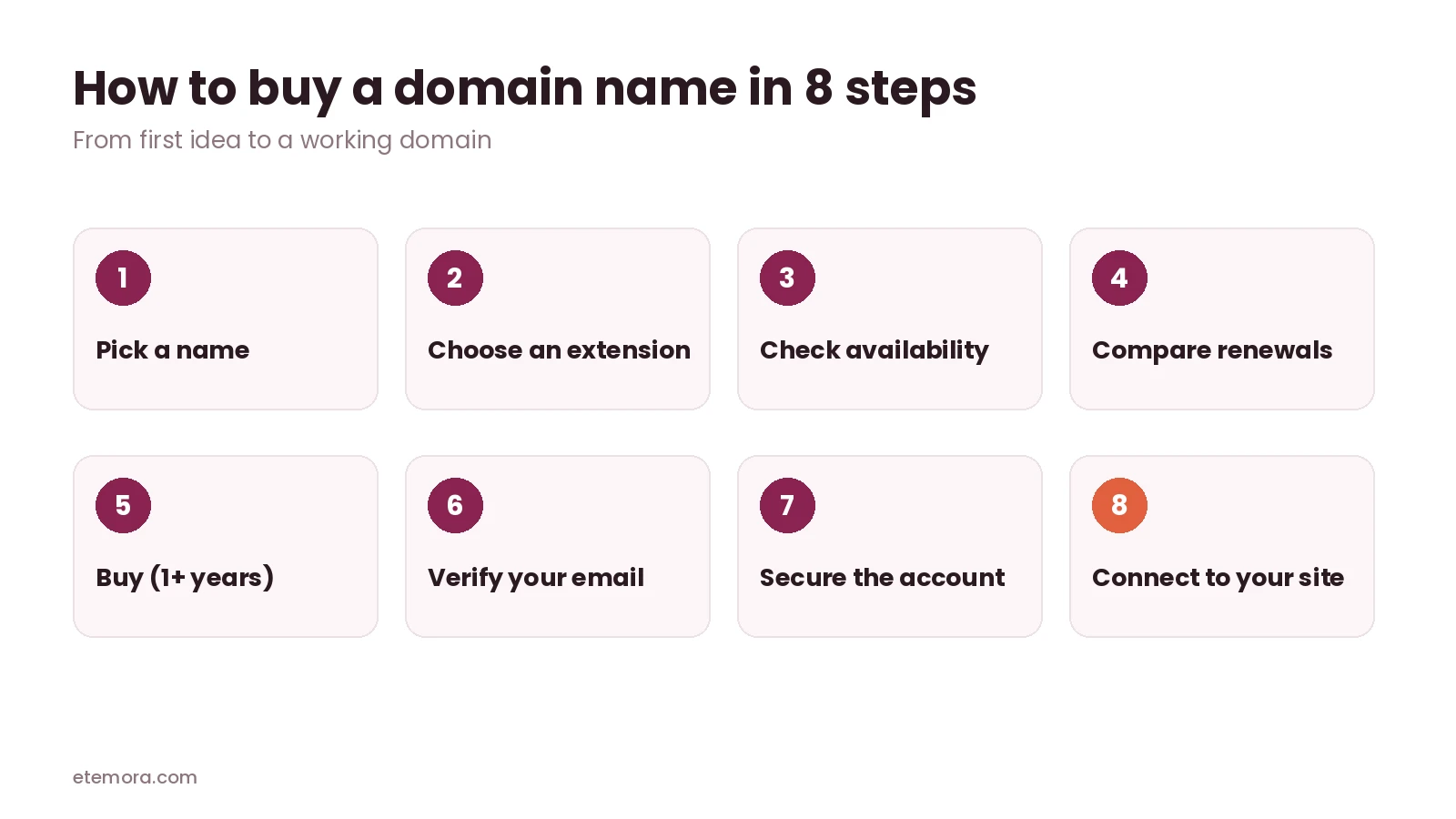
Step 1: Pick a name
Good domain names are short, easy to say out loud and easy to spell. Avoid hyphens and numbers where you can, since people often mistype them. Say the name to a friend and ask them to type it: if they get it wrong, keep looking.
Before you commit, check that the name doesn’t clash with an existing brand. In the US, you can use the free USPTO trademark search; other countries have their own trademark databases.
A few more tips before you buy a domain name:
- Keep it under about 15 characters if you can. Short names are easier to remember and fit better on business cards and social profiles.
- Make it brandable. A unique name is easier to trademark and stand out with than a generic phrase full of keywords.
- Check social handles. If the same name is free on the social platforms you plan to use, your brand will be more consistent.
- Think long term. A name tied to one product or city can feel limiting if your business grows.
Step 2: Choose an extension
The extension is the part after the dot. .com is still the most recognized choice. .net and .org are good alternatives, and country codes like .in or .uk suit local businesses. Extensions like .io or .co look modern but often cost much more to renew.
Step 3: Check availability
Search the name on any registrar’s website. If it’s taken, the registrar will suggest alternatives. If a name is listed as “premium”, it usually costs much more than a normal registration and may renew at a premium price too. To check a name across many extensions at once, try our free domain name generator, which also suggests alternatives if your first choice is taken. Still deciding what to call your business? The free business name generator suggests names and checks whether the .com is free.
Step 4: Compare renewal prices
This is the step most people skip. Many registrars advertise a low first-year price and charge much more from year two. When you buy a domain name, look for the renewal price on the registrar’s pricing page and compare that. Our guide on why domain renewal prices go up explains the difference.
Step 5: Buy the domain for one or more years
Add the domain to your cart and choose the registration length. Most registrars let you register a domain for one to ten years. Skip add-ons you don’t need, and check that WHOIS privacy is included for free.
Step 6: Verify your email address
After you buy a domain name, the registrar will usually email you to confirm your contact details. Don’t ignore it. Under ICANN rules, registrars must act if you don’t respond to contact verification for more than 15 days, which can mean your domain is suspended.
Step 7: Secure your account
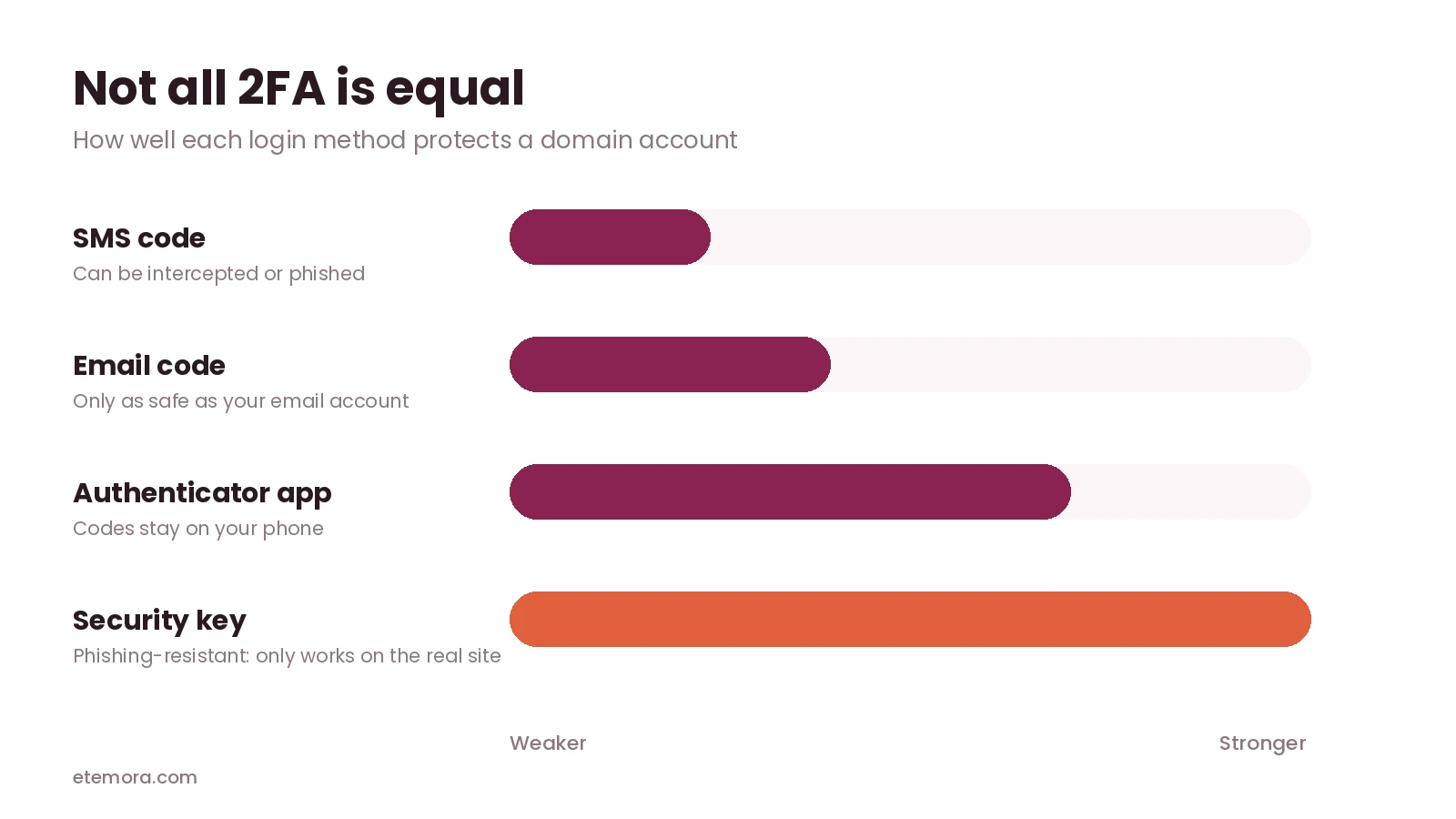
Turn on two-factor authentication, keep the transfer lock on, and turn on auto-renew. Our guide to the most secure domain registrars explains which settings matter most.
Step 8: Connect the domain to your website or email
Point the domain to your website by changing its nameservers or DNS records to the values your web host or website builder gives you. The same applies to business email. Changes often work within minutes to a few hours, though nameserver changes can occasionally take up to 48 hours.
How Much Does It Cost to Buy a Domain Name?
For a standard .com, expect to pay roughly $11 to $20 a year at registrars with the same first-year and renewal price. Some registrars charge less in the first year and more afterwards. Here are .com prices from our best domain registrars comparison, read from each registrar’s pricing page in September 2026:
| Registrar | First year | Renewal |
|---|---|---|
| Cloudflare | At cost | At cost |
| Dynadot | $10.88 | $10.88 |
| Porkbun | $11.08 | $11.08 |
| Namecheap | $11.28 | $18.48 |
| Hover | $18.99 | $18.99 |
| Squarespace | $20.00 | $20.00 |
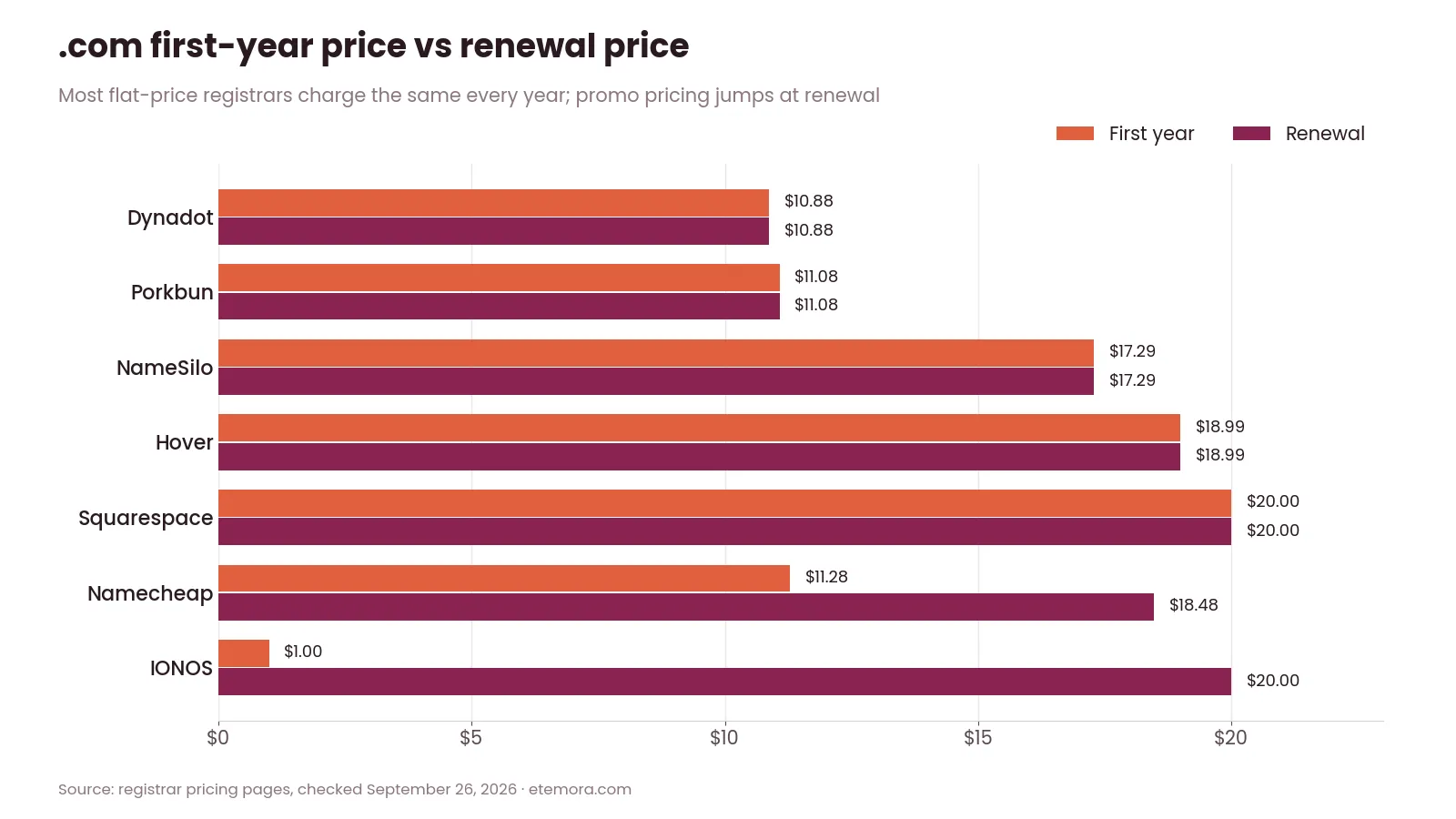
Keep in mind that the .com wholesale price rises on November 1, 2026, so most registrars will raise their .com prices slightly after that date. Our domain renewal cost calculator shows what a domain costs over 5 or 10 years.
Some web hosts include a free domain for the first year with a hosting plan. That can be good value, but check the domain’s renewal price from year two, and remember that the domain may be tied to your hosting account.
Where Should You Buy a Domain Name?
You can buy a domain name from a domain registrar, a web host or a website builder. Each option suits a different person:
- A domain registrar such as Porkbun, Cloudflare, Namecheap or Dynadot is best if you want low long-term prices and full control. Our best domain registrars guide compares ten of them.
- A web host is convenient if you’re buying hosting anyway. See our guide to the best web hosting services.
- A website builder like Squarespace or Wix keeps everything in one place, which is simplest for beginners. See the best website builders.
If you want to compare registrars side by side, use our domain registrar comparison tool.
Ready to pick a registrar?
Compare the Best Domain Registrars →Domain Name vs Web Hosting: What’s the Difference?
Beginners often mix these up. When you buy a domain name, you’re buying the address, such as yourbusiness.com. Web hosting is the server space where your website’s files live. You need both for a normal website, but they don’t have to come from the same company.
- Domain name: your address on the internet, renewed every year at a registrar.
- Web hosting: where the website is stored and served from. Our guide on what web hosting is explains it in more detail.
- Website builder: an all-in-one service that includes hosting and a design tool, and often lets you connect or buy a domain inside it.
Keeping your domain at a separate registrar from your host makes it easier to switch hosts later, since you only change DNS settings instead of moving the domain.
What If You Need a Domain Today?
Registering a domain is usually instant: once payment goes through, the domain is yours within minutes. If speed matters, choose a registrar with a simple checkout and no forced upsells, and set up your DNS straight away. The part that can take longer is DNS, since changes can take a few hours, and occasionally up to 48 hours, to spread across the internet.
Common Mistakes When You Buy a Domain Name
- Choosing on first-year price alone. The renewal price is what you’ll pay every year after that.
- Paying for WHOIS privacy. Most major registrars now include it for free.
- Buying add-ons you don’t need. Email, SSL or “protection” bundles often renew automatically.
- Using an email address you might lose. Use an address you’ll keep for years, since renewal notices and verification emails go there.
- Letting it expire. Turn on auto-renew and keep your payment card up to date.
- Ignoring trademarks. A name that copies a known brand can lead to disputes.
Frequently Asked Questions
How do I buy a domain name?
Search for the name at a domain registrar, check the renewal price, add it to your cart, choose the number of years, pay, and confirm the verification email. It usually takes a few minutes.
How much does it cost to buy a domain name?
A standard .com costs roughly $11 to $20 a year at registrars with flat pricing, based on September 2026 prices. Other extensions can cost more or less.
Can I buy a domain name forever?
No. Domains are registered for a set period, usually one to ten years at a time, and must be renewed to keep them.
Where is the best place to buy a domain name?
For low long-term prices, a dedicated registrar such as Porkbun, Cloudflare or Dynadot. For convenience, your web host or website builder.
Do I need hosting to buy a domain name?
No. You can buy a domain on its own and connect it to hosting, a website builder or email later.
Can I buy a domain someone else owns?
Sometimes. If it’s listed for sale, you can buy it from the owner or through a marketplace, often for much more than a normal registration.
How long does it take to buy a domain name?
Registration is usually instant. Connecting the domain to a website can take a few hours, and occasionally up to 48 hours, while DNS changes spread.
Can I move my domain later?
Yes. After the first 60 days, you can usually transfer it to another registrar. Our guide on how to transfer a domain explains how.
The Bottom Line
To buy a domain name, pick a short name, choose .com if it’s available, compare renewal prices, pay for as many years as you’re comfortable with, confirm the verification email and secure your account.
Start by comparing options in our best domain registrars guide.
How we put this together: this guide is research-based. Prices come from our September 2026 registrar comparison, read from each registrar’s official pricing page, and the verification rule comes from ICANN’s published guidance. Prices and rules change, so check the registrar’s checkout page before you buy.
Disclosure: Some links on this page may be affiliate links. If you purchase through an eligible link, Etemora may earn a commission at no additional cost to you. Our editorial recommendations are not determined solely by commission. Learn more →
Related articles you may like
 Web HostingHostinger vs WordPress.com: 2026 Honest Comparison
 Web HostingLargest Domain Registrars in 2026 (Ranked by .com Domains)
 SecurityMost Secure Domain Registrars in 2026: 2FA, Locks and Privacy Compared
 Web HostingHow to Transfer a Domain to Another Registrar (Step by Step)
 Web HostingWhy Domain Renewal Prices Go Up (and 7 Ways to Pay Less)
 Web HostingHostinger vs Bluehost: Full Comparison in 2026