
What Is a Website Builder and How Does It Work?
 By M. Zaid
- Updated September 30, 2026
- 17 min read
- How Does a Website Builder Work?
- Website Builder vs Website Coding
- What Can You Build With a Website Builder?
- Drag-and-Drop and Template-Based Builders
- What Is an AI Website Builder?
- Website Builder vs Web Hosting
- Website Builder vs WordPress
- What Features Should a Website Builder Have?
- How Much Does a Website Builder Cost?
- Are Website Builders Good for SEO?
- What Is an Ecommerce Website Builder?
- How to Choose a Website Builder
- Are Website Builders Worth It?
- FAQs
Quick answer: What is a website builder? A website builder is a software platform that lets you create and publish a website using templates, visual editing tools, or AI, instead of manually coding it. Many website builders also include hosting, SSL, and basic SEO tools as part of the same subscription.
What is a website builder, exactly? A website builder is a software platform that lets you create and publish a website without having to build every part of the site manually with code. Instead of writing HTML, CSS, JavaScript, and server configuration yourself, a website builder gives you a visual interface and pre-built tools for creating pages.
Depending on the platform, you might be able to choose a template, drag and drop sections, add text and images, create forms, add a blog, sell products, connect a domain, configure SEO settings, or use AI to generate pages and content — then publish the website. Some website builders also provide hosting, security, domains, and backups as part of the same subscription, which is why they’ve become one of the easiest ways for beginners, freelancers, and small businesses to get online.
But there’s an important distinction: a website builder is the tool you use to create the website. Hosting is the infrastructure that delivers it to visitors. Some platforms provide both; others only provide the builder and require separate hosting. Understanding that difference makes choosing the right platform much easier.
How Does a Website Builder Work?
At the simplest level, a website builder converts the things you create in its interface into the files, database records, and configuration required to display a website.
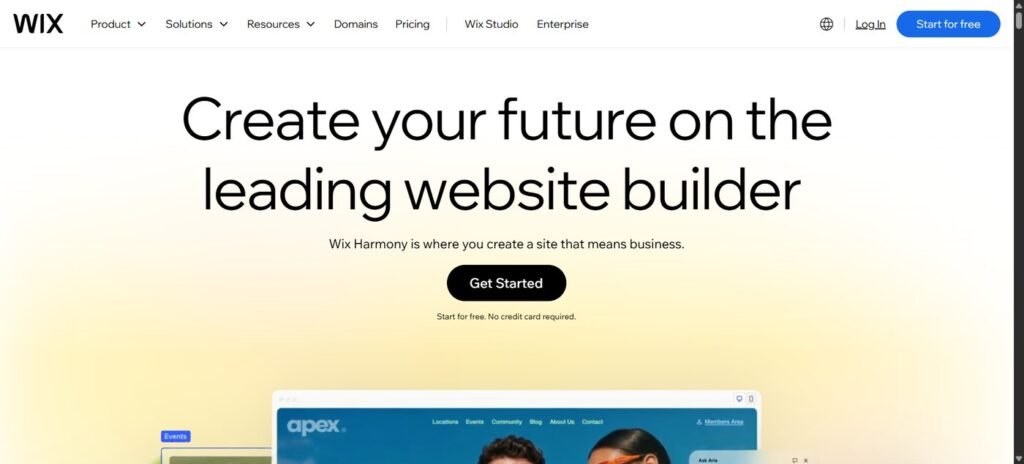
The basic process usually looks like this: you edit the website → the builder stores your content/design → the platform generates the website → hosting serves the website → a visitor opens your domain. This is why website builders can dramatically reduce the technical barrier to creating a website — you don’t necessarily have to write the HTML and CSS yourself, since the builder translates your selections into the underlying website structure.
Say you’re building a website for a small business. You start with a template, then change the logo, colors, fonts, images, text, and navigation, and add pages like Home, About, Services, and Contact. The builder stores those changes, and when someone visits your website, the platform’s hosting infrastructure delivers the necessary resources to their browser. The visitor doesn’t need to know which builder you used — they simply see the finished website.
Website Builder vs Website Coding
Before website builders became mainstream, creating a website often required understanding HTML, CSS, JavaScript, FTP, web servers, databases, DNS, hosting, and security. You can still build websites this way, and developers do it every day — but most small businesses don’t need to build every component from scratch.
A website builder provides a layer of abstraction. Instead of writing CSS to give a button rounded corners, you might simply select Border radius → Rounded. That’s the core value of a website builder: it trades some technical control for speed and simplicity.
Curious what a website builder is doing for you behind the scenes? MDN’s beginner guide How the web works explains servers, browsers and files in plain English.
What Can You Build With a Website Builder?
Modern website builders can create much more than simple five-page websites. Depending on the platform, you can build:
- Business websites — for consultants, agencies, local businesses, restaurants, contractors, and freelancers.
- Portfolios — for photographers, designers, artists, developers, and architects.
- Blogs — for writers, publishers, review websites, and personal blogs.
- Ecommerce stores — for physical products, digital products, subscriptions, and memberships.
- Landing pages — for marketing campaigns, product launches, and lead generation.
- Booking websites — for salons, restaurants, consultants, coaches, and service businesses.
The right platform depends heavily on what you’re trying to build.
Drag-and-Drop and Template-Based Builders
A drag-and-drop website builder lets you visually place components — a heading, image, text block, button, or form — onto a page and change their properties without writing code. This is particularly useful for beginners, though “drag and drop” doesn’t necessarily mean unlimited freedom: some platforms provide a structured editor where elements snap into predefined layouts, while others allow much more free-form positioning.
Most website builders also offer templates — pre-designed website structures you customize with your own content. Choosing a “Restaurant” template, for example, might give you a Home page, Menu, About, Reservations, and Contact page already laid out, which you then replace with your own text and images. Templates can dramatically reduce the work required to create a website, but if thousands of businesses use the same template without meaningful customization, their websites can start looking remarkably similar. A template should be treated as a starting point, not the finished website.
What Is an AI Website Builder?
An AI website builder uses artificial intelligence to automate parts of website creation. Instead of starting with a blank editor, you might type a prompt like “Create a website for a local photography studio specializing in wedding photography,” and the AI may generate the website structure, pages, headlines, images, sections, colors, calls to action, and initial copy. Some platforms can generate an entire website from a short description, which makes AI website builders particularly attractive to beginners.
But there’s an important limitation: AI can generate the first version quickly — it doesn’t guarantee that the first version is good. You still need to check facts, business information, images, contact details, pricing, SEO, mobile layout, calls to action, accessibility, and legal pages before publishing.
Want to compare current AI website builders?
Compare the Best Website Builders in 2026 →The difference between an AI builder and a traditional one is mainly how much of the initial creation is automated. A traditional builder follows template → edit → customize → publish, while an AI builder follows describe your website → AI generates a draft → edit → customize → publish. AI can save time, especially when you don’t know where to start, but a good workflow still has you verify and rewrite what the AI generates rather than simply accepting it.
Website Builder vs Web Hosting
This is probably the most important distinction for beginners. A website builder helps you create and manage the website. Web hosting provides the server infrastructure where the website actually runs. Think of building a house: the website builder is the tools used to design and build the house, while hosting is the property and infrastructure where it exists.
Some companies combine both — platforms such as Wix and Squarespace bundle hosting into the website-builder subscription. Other setups separate them, such as choosing a hosting provider separately and installing WordPress on it. If you haven’t read it yet, Etemora’s guide to what web hosting is and how it works explains servers, DNS, domains, and how a website actually gets delivered to visitors.
A website builder is also not the same thing as your domain name — your domain (e.g. etemora.com) is your web address, the website builder is the tool used to create the website behind that address, and hosting is the infrastructure. Some providers sell all three together, but that doesn’t mean they’re technically the same thing. If you’re choosing a domain separately, Etemora’s current comparison of the best domain registrars focuses heavily on renewal pricing, since the cheapest first-year domain isn’t necessarily the cheapest domain to keep long term.
Website Builder vs WordPress
This is one of the biggest decisions you’ll face, and it depends on which WordPress you’re talking about. WordPress.com is a hosted platform that provides infrastructure and WordPress functionality as a service. Self-hosted WordPress uses the WordPress software on hosting that you choose, which gives you considerably more control over hosting, plugins, themes, performance, security, and custom code — but also more responsibility.
A hosted website builder generally says: “We’ll handle the technical infrastructure. You build the website.” Self-hosted WordPress says: “Here’s the software. You control the environment.” Neither approach is automatically better — the question is how much control and technical responsibility you actually want.
A website builder can be a strong fit if you’re a beginner, need a site quickly, don’t want to manage servers or maintain WordPress, need a simple business website, want hosting included, or prefer visual editing. WordPress can make more sense if you plan to publish a lot of content, need extensive plugins, want deeper customization and control over hosting, need complex workflows, or have someone who can manage the technical side — particularly relevant for content-heavy websites publishing hundreds or thousands of articles.
What Features Should a Website Builder Have?
Before choosing a platform, look at the actual features you’ll use:
- Visual editor — can you easily edit pages?
- Templates — are there suitable designs for your industry?
- Mobile editing — can you control how the site appears on phones?
- Custom domain — can you connect your own domain?
- Hosting and SSL — is hosting included, and does the platform provide HTTPS?
- SEO controls — can you edit titles, meta descriptions, URLs, canonicals, sitemap, and robots settings?
- Blogging — can you create and organize articles properly?
- Ecommerce — if you’re selling products, does it handle payments, inventory, shipping, taxes, and orders?
- Analytics — can you connect tools such as Google Analytics and Search Console?
- Forms and integrations — can visitors contact you, and can the platform connect to your other software?
- Export/migration — can you move your website elsewhere later? This last point is often ignored, and it shouldn’t be.
Imagine spending three years building a business website with hundreds of articles, products, and customers, then deciding to leave the platform — can you easily take everything with you? Different builders provide very different levels of portability, so before committing, ask: “What happens if I want to leave?” That’s especially important for businesses planning to grow.
Also check that the builder produces accessible pages — the W3C’s introduction to web accessibility is a quick way to learn what that means.
How Much Does a Website Builder Cost?
There is no single price. You may encounter free plans ($0), entry-level plans (roughly $5–$15/month), business plans (roughly $15–$40/month), ecommerce plans (often $20–$300+/month depending on platform and scale), and custom enterprise pricing. But the subscription is only part of the cost — you may also pay for a domain, business email, premium apps, ecommerce transaction fees, payment processing, premium templates, additional storage, and marketing or booking tools.
| Plan Type | Typical Monthly Cost |
|---|---|
| Free | $0 (with branding/feature limits) |
| Entry-level | ~$5–$15 |
| Business | ~$15–$40 |
| Ecommerce | ~$20–$300+ |
| Enterprise | Custom pricing |
Suppose a platform advertises $10/month. That sounds cheap, but once you add a domain, business email, a premium app, and payment processing fees, your website often isn’t really costing $10/month anymore. Always compare the total cost, not just the introductory subscription price.
Free website builders can be useful for learning, testing an idea, or hobby projects, but free plans often come with a platform-branded domain, advertising, limited storage, and restricted customization. For a serious business, a custom domain is usually worth the relatively small additional cost.
Are Website Builders Good for SEO?
Yes, they can be — but choosing a website builder doesn’t automatically make a website rank. A website can have technically perfect SEO settings and still fail if the content doesn’t satisfy search intent, targets the wrong keywords, or lacks internal linking and authority. Conversely, websites built on many different platforms can rank very well.
At minimum, look for a platform that lets you control custom page titles, meta descriptions, clean URLs, heading structure (H1/H2/H3), image alt text, canonical URLs, an XML sitemap, robots controls, mobile responsiveness, and redirects. The platform itself doesn’t prevent a website from ranking — the bigger question is whether it gives you enough control over content, technical SEO, site structure, and internal linking, and whether you actually use those capabilities well.
Whichever builder you choose, Google’s own SEO Starter Guide explains the basics every website should get right, from page titles to crawlable links.
What Is an Ecommerce Website Builder?
An ecommerce website builder is designed specifically to help businesses sell products online. It needs more than a page, an image, and a button — a real store needs a product catalog, inventory, payments, shipping, taxes, discounts, customer accounts, orders, returns, analytics, and marketing, which is why a platform like Shopify is fundamentally different from a basic business website builder built around pages rather than products.
Building an online store?
Compare the Best Website Builders →How to Choose a Website Builder
Here’s a practical process for choosing between platforms:
- Decide what you’re building — a business website, blog, portfolio, store, or landing page.
- Decide how much control you need — simple, or highly customizable?
- Decide who will manage it — you, an employee, a freelancer, or a developer?
- Calculate the real cost — subscription, domain, email, apps, plugins, and transaction fees.
- Check migration — ask what happens if you leave the platform later.
- Check SEO and mobile editing — make sure you can control the basics, since most visitors will be on mobile.
- Check ecommerce needs — don’t use a basic builder for a store simply because the editor is easy.
- Try the free plan or trial before committing, and compare platforms side by side.
There isn’t one universal answer — a beginner business website, a design-focused portfolio, an online store, and a content-heavy blog can all call for a different type of platform. For an easy all-purpose website, look at Wix, Hostinger, or GoDaddy; for design control, Squarespace or Framer; for an online store, Shopify; for a content-heavy publication, WordPress; for professional visual control, Webflow; and for AI-assisted WordPress builds, 10Web.
Ready to compare the actual platforms?
See Etemora’s 10 Website Builders Compared →| Need | Builder Type to Consider |
|---|---|
| Beginner business website | Wix / Hostinger / GoDaddy |
| Design-focused site | Squarespace / Framer |
| Ecommerce | Shopify |
| Publishing / blog | WordPress |
| Professional design control | Webflow |
| WordPress visual design | Elementor |
| AI-built WordPress | 10Web |
| Low startup budget | Hostinger |
Are Website Builders Worth It?
For many people, yes. The biggest advantage isn’t simply that they’re easy — it’s that they reduce the amount of technical infrastructure you have to manage yourself, such as hosting, themes, plugins, security, updates, backups, and DNS. The trade-off is control and portability, since you’re relying more heavily on the platform.
So the real question isn’t “are website builders worth it?” — it’s “is the convenience worth the platform dependency for my website?” For a small business, the answer is often yes. For a developer building a highly customized application, probably not.
Advantages typically include being easy to use, faster setup, hosting and security handled for you, professional templates, and built-in tools like forms and analytics. Disadvantages can include platform dependency, less technical control, difficult migration, costs that increase with add-ons, and customization limits that vary by plan.
The biggest hidden cost isn’t always the subscription — it’s migration. If you’ve spent years building hundreds of pages, blog posts, product listings, and SEO rankings, moving everything to a new platform later can be expensive. That’s why scalability and portability should be considered before you choose, not after.
Final Thoughts: What Is a Website Builder?
A website builder is a platform that simplifies website creation by providing visual editing tools, templates, content-management features, and increasingly, AI-assisted creation. Instead of manually building every part of a website, you can choose a template, customize it, add content, connect a domain, and publish — and many modern builders also bundle hosting, SSL, templates, SEO tools, analytics, ecommerce, and AI into the same subscription.
The trade-off is that convenience often comes with less control and greater dependence on the platform. Before choosing one, ask what you’re building, how much control you need, who will manage it, how much it will really cost, whether you can move later, and whether it provides the SEO and ecommerce features you need. Once you answer those questions, choosing a website builder becomes much easier.
Ready to compare the actual platforms?
Compare the Best Website Builders in 2026 →Frequently Asked Questions
What is a website builder in simple words?
A website builder is a tool that lets you create a website using visual editors, templates, and pre-built components instead of manually coding the entire site.
How does a website builder work?
You create and customize pages inside the builder. The platform stores your content and generates the website that its hosting infrastructure delivers to visitors.
Do website builders include hosting?
Many do. Wix, Squarespace, Shopify, Hostinger Website Builder, Webflow, Framer, and GoDaddy bundle hosting into their platforms. Other setups, such as self-hosted WordPress, require separate hosting.
Do I need coding knowledge to use a website builder?
No. Most website builders are designed so beginners can create websites without writing code.
What is an AI website builder?
An AI website builder uses artificial intelligence to generate parts or all of a website from a description, after which you can edit and customize the result.
Is WordPress a website builder?
WordPress is primarily a content-management system, but it can be used with visual website builders such as Elementor. WordPress.com also provides a hosted website-building experience.
Is a website builder the same as web hosting?
No. A website builder helps create the site, while hosting provides the infrastructure that delivers it to visitors. Some companies bundle both.
Which website builder is best for ecommerce?
Shopify is specifically designed around ecommerce, including products, inventory, payments, shipping, and orders.
Can I move my website to another platform later?
Sometimes. The difficulty depends on the platform and the type of content you’re moving — simple text and images are generally easier to move than ecommerce data, memberships, and platform-specific functionality.
How much does a website builder cost?
It can range from free to hundreds of dollars per month depending on the platform, plan, ecommerce requirements, and business features. Always compare the total cost rather than the introductory price alone.
Disclosure: Some links on this page may be affiliate links. If you purchase through an eligible link, Etemora may earn a commission at no additional cost to you. Our editorial recommendations are not determined solely by commission. Learn more →
Related articles you may like
 Web HostingHostinger vs WordPress.com: 2026 Honest Comparison
 Tech & SoftwareNamecheap vs GoDaddy: 2026 Honest Domain Comparison
 Web HostingHow to Buy a Domain Name in 2026: 8 Simple Steps
 Web HostingLargest Domain Registrars in 2026 (Ranked by .com Domains)
 SecurityMost Secure Domain Registrars in 2026: 2FA, Locks and Privacy Compared
 Web HostingHow to Transfer a Domain to Another Registrar (Step by Step)