
Best AI Tools for Work in 2026:
10 Options Compared
 By M. Zaid
- Updated October 20, 2026
- 28 min read
Some links on this page are affiliate links. If you buy through them, Etemora may earn a commission at no extra cost to you. Read our affiliate disclosure
AI has moved well beyond simple chatbots. The tools on this list can draft and edit documents, summarise meetings, research topics with sources attached, analyse spreadsheets, build presentations, design marketing assets, automate repetitive workflows and search across everything your team has already written.
Which makes the hard part something else entirely. Finding an AI tool is trivial. Working out which one deserves a place in your actual workflow — and which subscription you will still be using in three months — is the real question.
Some assistants are general-purpose and handle writing, research, coding and analysis from one box. Others live inside software you already pay for, which often matters more than raw capability. And a few are built for one job — automation, design, project management, editing — and do it better than any generalist.
For this comparison we looked at 10 major AI tools across work capabilities, writing quality, research, file analysis, integrations, collaboration, automation, ease of use, pricing and overall value.
Editor’s note
This is a research-based comparison. Etemora has not run controlled workplace benchmarks against every tool on this list. We evaluate publicly documented capabilities, current pricing, integrations and provider documentation, alongside reputable independent sources where relevant. AI features, usage limits, underlying models and prices change unusually often — all figures below were checked in September 2026, and you should confirm the current plan details before subscribing.
- All 10 AI Tools at a Glance
- 1. ChatGPT — Best Overall
- 2. Claude — Best for Writing and Knowledge Work
- 3. Gemini — Best for Google Workspace
- 4. Microsoft Copilot — Best for Microsoft 365
- 5. Perplexity — Best for Research
- 6. Notion AI — Best for Workspace Productivity
- 7. Canva AI — Best for Design and Marketing
- 8. Grammarly — Best for Writing and Communication
- 9. ClickUp Brain — Best for Project Management
- 10. Zapier — Best for Automation
- Full Comparison Table
- What AI Tools Actually Do for Work
- Which AI Tool Is Best for Your Job
- Do You Need More Than One?
- Are Free AI Tools Good Enough?
- What AI Work Tools Cost
- Is AI Safe to Use for Work?
- Will AI Replace Employees?
- How to Choose the Right One
- Our Verdict
- FAQs
- How We Compared
Quick picks
- Best overall: ChatGPT
- Best for writing: Claude
- Best for Google Workspace: Gemini
- Best for Microsoft 365: Microsoft Copilot
- Best for research: Perplexity
- Best workspace AI: Notion AI
- Best for design: Canva AI
- Best for everyday editing: Grammarly
- Best for projects: ClickUp Brain
- Best for automation: Zapier
The 10 Best AI Tools for Work at a Glance
| AI tool | Best for | Free option | Standout feature |
|---|---|---|---|
| ChatGPT | Best overall | Yes | One assistant for almost every task |
| Claude | Writing and knowledge work | Yes | Projects that keep context across sessions |
| Gemini | Google Workspace users | Yes | Works inside Gmail, Docs and Drive |
| Microsoft Copilot | Microsoft 365 users | Yes | AI inside Word, Excel and Outlook |
| Perplexity | Research | Yes | Web answers with sources attached |
| Notion AI | Workspace productivity | Limited | AI inside your docs and databases |
| Canva AI | Design and marketing | Yes | Idea to editable design in minutes |
| Grammarly | Writing and communication | Yes | Editing everywhere you already type |
| ClickUp Brain | Project management | Trial | AI that can read your actual projects |
| Zapier | Automation | Yes | Connects AI to the rest of your stack |
1. ChatGPT — Best AI Tool for Work Overall
Best for: professionals who want one AI tool that handles many different kinds of work.
ChatGPT is our best overall pick for 2026 because of range. It covers an unusually wide set of professional tasks from a single interface: drafting and rewriting documents, brainstorming, analysing files, summarising, researching, working with spreadsheets, generating and reading images, writing and debugging code, planning projects, building presentations and setting up reusable custom workflows.
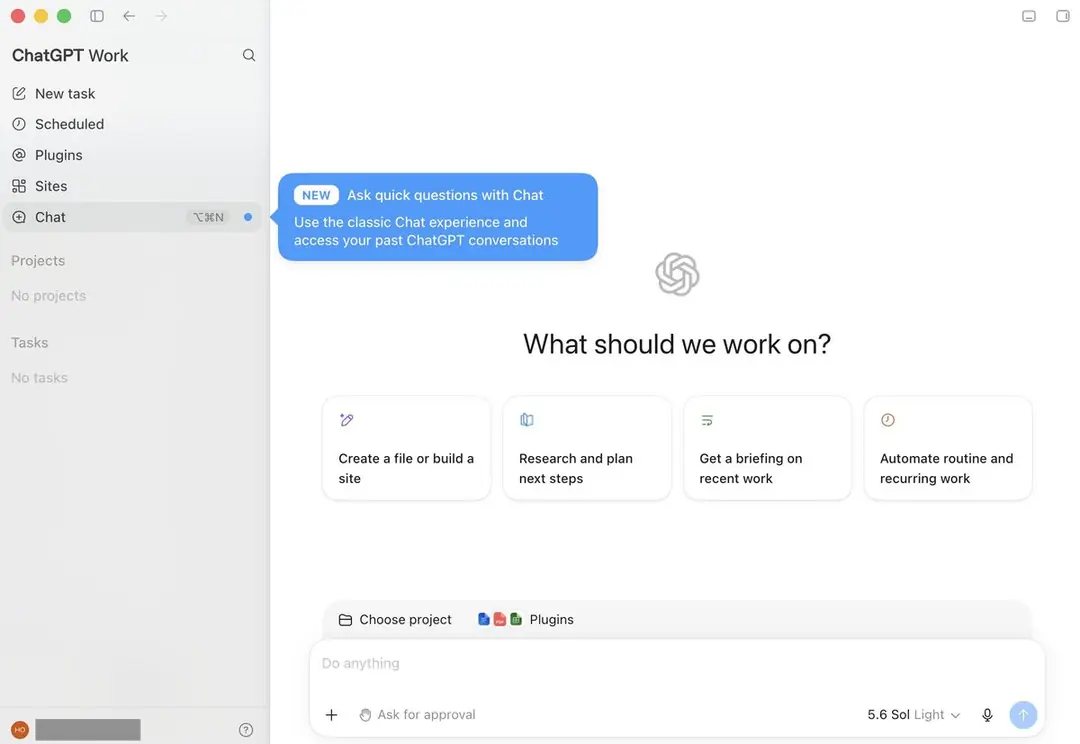
| Free plan | Yes, with lower usage limits and reduced model access |
| Paid from | $20/month (ChatGPT Plus) |
| Business | From $20 per standard seat/month, billed annually |
| Connectors | Google Workspace, Slack, GitHub, Microsoft 365 and more |
| Best feature | Breadth — writing, analysis, code and images in one place |
Pros
- The most versatile tool on this list by a clear margin
- Strong writing and brainstorming
- File and spreadsheet analysis
- Research and image generation included
- Useful coding assistance
- Custom projects and reusable workflows
- Business plan does not train on your data by default
- Capable free tier
Cons
- Usage limits vary by plan and change without much notice
- Model availability shifts frequently
- Can still state incorrect things confidently
- Business teams need to read the data policy carefully
2. Claude — Best for Writing and Knowledge Work
Best for: writers, researchers, analysts and anyone working with large amounts of reference material.
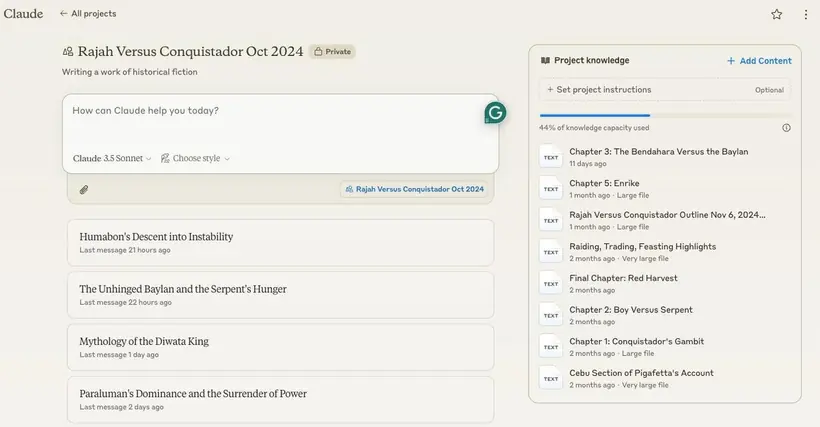
Claude is ChatGPT’s strongest competitor and the better choice for a specific kind of work: long documents, careful editing, and projects that run for weeks rather than minutes. Anthropic positions Claude Pro around everyday productivity, with Projects, research, Google Workspace connections, extended thinking and access to additional Claude models.
| Free plan | Yes, with usage limits |
| Paid from | $20/month (Claude Pro), or $17/month billed annually |
| Projects | Persistent context and uploaded reference files |
| Integrations | Google Workspace connections on paid plans |
| Best feature | Long-form reasoning that holds together across a whole document |
Pros
- Excellent long-form writing and editing
- Handles large documents without losing the thread
- Projects keep context between sessions
- Research and summarisation
- Strong coding assistance
- Google Workspace connections
Cons
- Usage limits depend on your plan
- Less focused on image and visual creation
- Some advanced features are subscription-only
- Output still needs a human review pass
3. Gemini — Best for Google Workspace Users
Best for: people whose working day already lives inside Google’s apps.
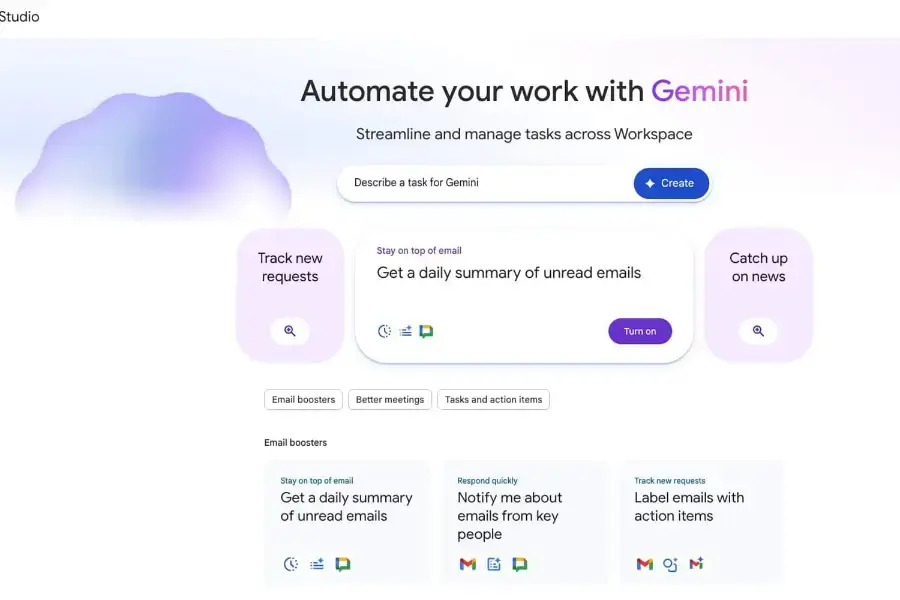
Gemini becomes compelling for a reason that has little to do with which chatbot writes the best paragraph. Depending on your plan, Google’s AI can work alongside Gmail, Docs, Sheets, Drive, Meet and Search — and that integration usually saves more time than a marginally better standalone answer.
| Free plan | Yes |
| Paid tiers | Google AI Pro and higher tiers bundle AI with other Google services |
| Availability | More than 150 countries |
| Works with | Gmail, Docs, Sheets, Drive, Meet and Search |
| Best feature | AI where your email and documents already are |
Pros
- Deep integration across Google Workspace
- Genuinely useful inside Gmail and Docs
- Strong multimodal capabilities
- Search grounding for current information
- Free tier available in most regions
Cons
- Value depends almost entirely on how much Google software you use
- Features and plan names differ by region
- Capabilities change frequently
- Best features sit behind paid tiers
4. Microsoft Copilot — Best for Microsoft 365 Users
Best for: businesses and professionals already standardised on Microsoft 365.
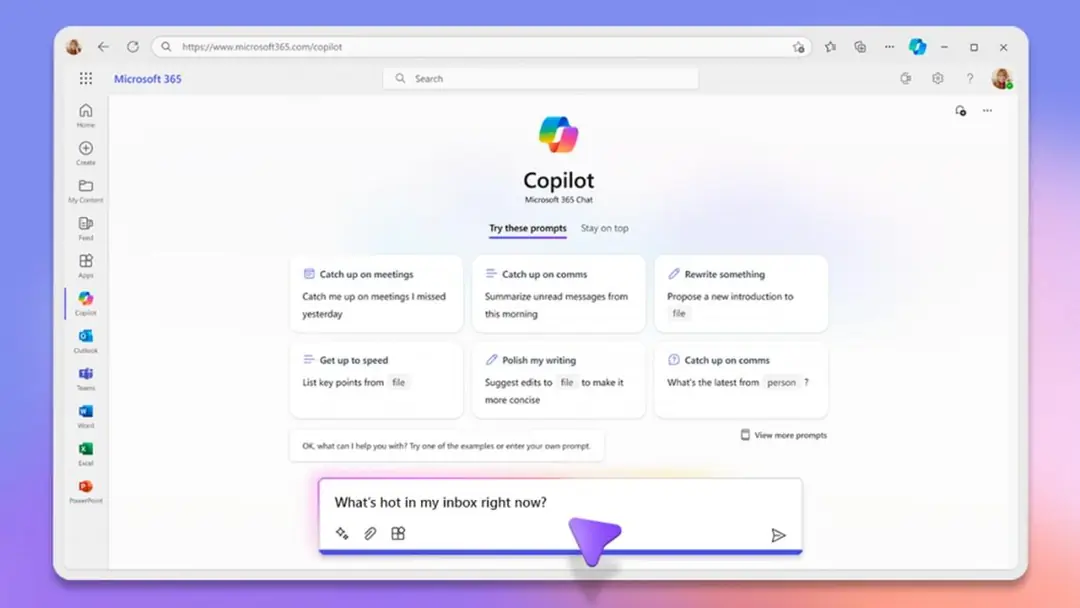
Copilot’s advantage is the same as Gemini’s, pointed at a different ecosystem: the AI sits inside the applications instead of beside them. Rather than copying a table out of Excel and into a chatbot, you ask for what you need where the file already is — in Word, Excel, PowerPoint, Outlook and Teams.
| Free plan | Yes, with limited capabilities |
| Business pricing | Microsoft lists ₹1,495.73/user/month billed yearly on its India site — a promotional rate, reduced from ₹1,745 |
| Personal | Microsoft 365 Personal includes Copilot in Word, Excel, PowerPoint and Outlook, plus 1 TB of OneDrive |
| Works inside | Word, Excel, PowerPoint, Outlook and Teams |
| Best feature | Enterprise security and admin controls around the AI |
Pros
- Works inside Word, Excel, PowerPoint and Outlook
- Teams integration for meetings and chat
- Strong enterprise security and data-protection controls
- Familiar admin tooling for IT teams
- No context-switching for everyday office work
Cons
- Only worth it if you already run on Microsoft 365
- Pricing structure is genuinely confusing
- Some features require qualifying Microsoft 365 plans
- Advanced business tiers get expensive quickly
5. Perplexity — Best AI Tool for Research
Best for: research, fact-finding and tracking down sources.
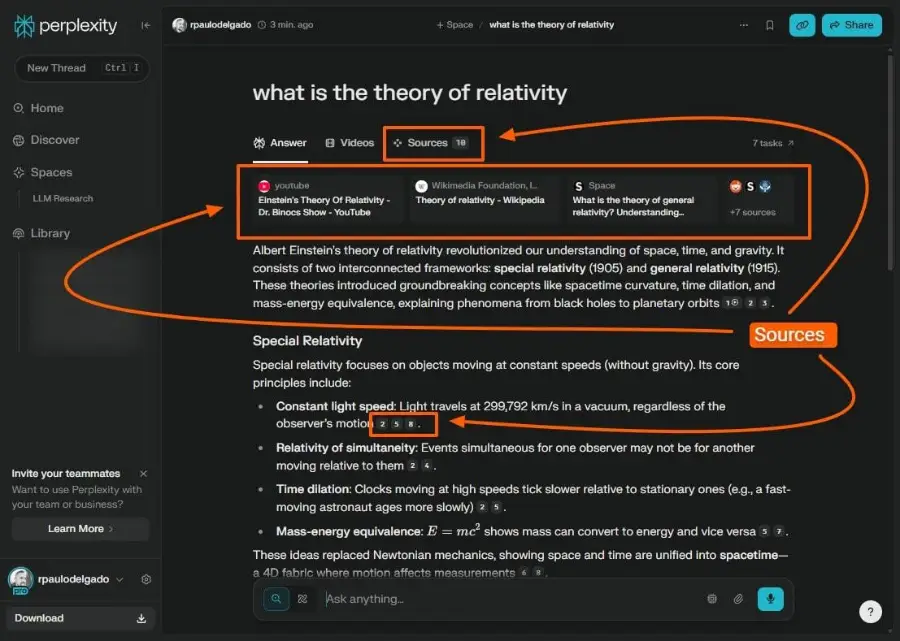
Perplexity approaches AI from a different angle to everything else here. Its core experience is searching the web, synthesising what it finds and showing the sources alongside the answer — which makes it the natural choice for market research, competitor work, product comparisons and anything where the citation matters as much as the summary.
| Free plan | Yes, with limited advanced searches |
| Paid from | $20/month (Perplexity Pro) |
| Pro adds | Higher usage, advanced models, deeper research, file uploads |
| Sources | Citations shown with every answer |
| Best feature | Research workflow with the receipts attached |
Pros
- Purpose-built for research rather than adapted to it
- Citations included by default
- Genuinely web-first, so current information is its strength
- Multiple underlying models
- File analysis and deep research modes
Cons
- You still have to open the cited sources — a citation is not a guarantee
- Not the best tool for long creative writing
- Premium research usage can run out
- Results vary with how the web indexes a topic
6. Notion AI — Best for AI-Powered Workspace Productivity
Best for: teams that already run documents, projects and knowledge inside Notion.
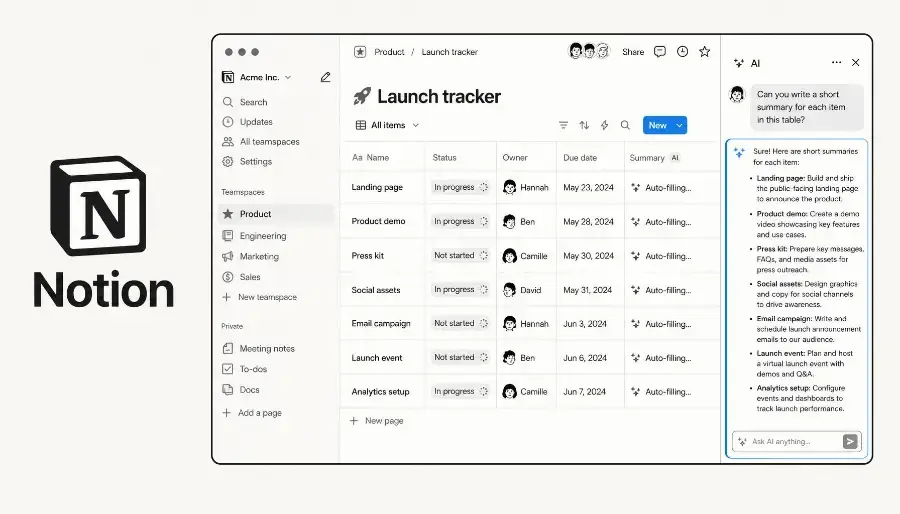
Notion AI has an advantage standalone chatbots structurally cannot match: the assistant lives where your information already is. Documents, databases, tasks, wikis, meeting notes and team knowledge sit in one place, so “summarise what we decided about pricing” is a question about your own workspace rather than a prompt you have to paste context into.
| Free plan | Limited trial AI usage on lower plans |
| Paid from | $20 per member/month (Business plan) |
| Business includes | Notion Agent, AI Meeting Notes and Enterprise Search |
| Works across | Docs, databases, tasks, wikis and meeting notes |
| Best feature | AI that can actually read your team’s existing knowledge |
Pros
- AI inside the workspace, not beside it
- Excellent documentation and wiki structure
- Databases and project organisation
- AI meeting notes
- Enterprise Search across connected knowledge
- Good collaboration
Cons
- Only worth it if Notion is already your workspace
- AI features vary by plan
- More complicated to set up than a chatbot
- Not designed as a general-purpose assistant
7. Canva AI — Best for Design and Marketing
Best for: marketers, content creators and anyone who needs visual output without a designer.
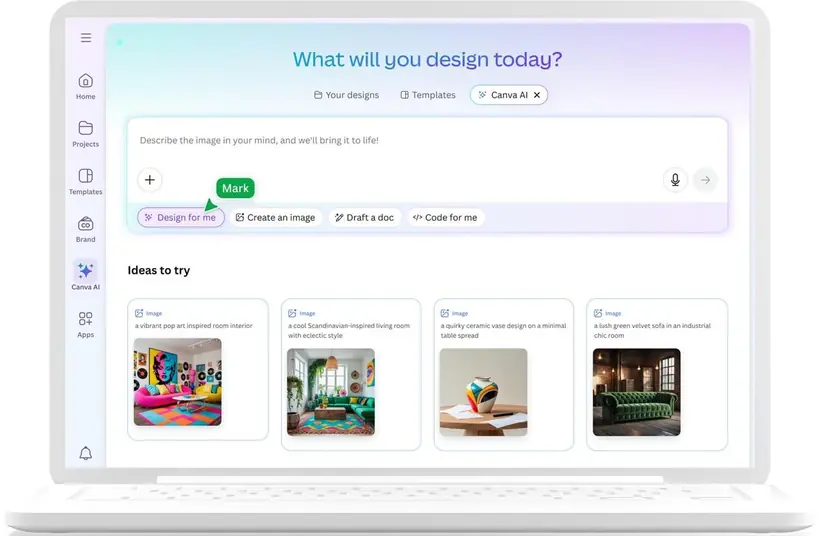
Canva is no longer just drag-and-drop design. Its AI features cover presentations, social graphics, marketing assets, images, copy, video, brand assets, layouts and automatic resizing — which for most small teams removes the slowest step between an idea and something publishable.
| Free plan | Yes, including some AI usage |
| Paid from | $144/year for one person (Canva Pro, US pricing) |
| Pro adds | Much higher AI usage, premium content and Brand Kits |
| Output | Presentations, social posts, images, video and print |
| Best feature | Idea to editable, on-brand design in minutes |
Pros
- Fastest route from idea to finished visual
- Genuinely easy for non-designers
- AI image and writing tools built in
- Presentations and social formats
- Brand Kits keep output consistent
- Huge template library
Cons
- Advanced AI usage is capped
- Many premium assets need Pro
- Not a replacement for a general assistant
- AI-generated layouts still need a human edit
8. Grammarly — Best AI Tool for Writing and Communication
Best for: emails, documents and everyday professional communication.
Grammarly has grown from a grammar checker into a broader writing assistant, and its real advantage is location: it works inside the applications where you already type. Grammar, clarity, tone, rewriting, sentence-level improvement and plagiarism detection on supported plans — applied in your inbox rather than in a separate tab.
Want to compare more AI writing tools beyond Grammarly? See our full breakdown in Best AI Writing Tools in 2026: 10 Tools Compared.
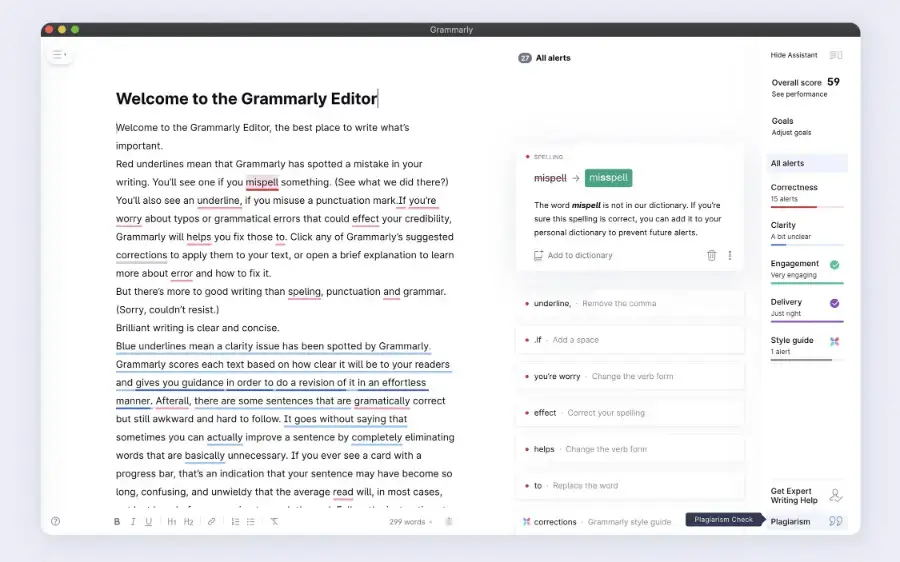
| Free plan | Yes — writing assistance plus 100 AI prompts per month |
| Paid from | $12/month averaged across annual billing (monthly is higher) |
| Pro adds | Full-sentence rewrites, tone adjustment, personalised suggestions |
| Also includes | Plagiarism and AI-text detection, up to 2,000 AI prompts/month |
| Best feature | Editing that follows you across apps and browsers |
Pros
- Works across email, docs and browsers
- Tone adjustment is genuinely useful for client work
- Fast rewrites without leaving the page
- Desktop and browser support
- Usable free plan
Cons
- Not a general-purpose assistant
- Best features need Pro
- Suggestions still need judgement — it flattens voice if you accept everything
- Weaker than dedicated tools for research
9. ClickUp Brain — Best for AI Project Management
Best for: teams managing projects, tasks and delivery.
ClickUp combines project management with AI rather than bolting a chatbot onto the side. Brain can summarise tasks, draft project updates, search across the workspace, create and prioritise tasks, and run AI agents against your actual project data — which is a different proposition to asking a general assistant to guess.
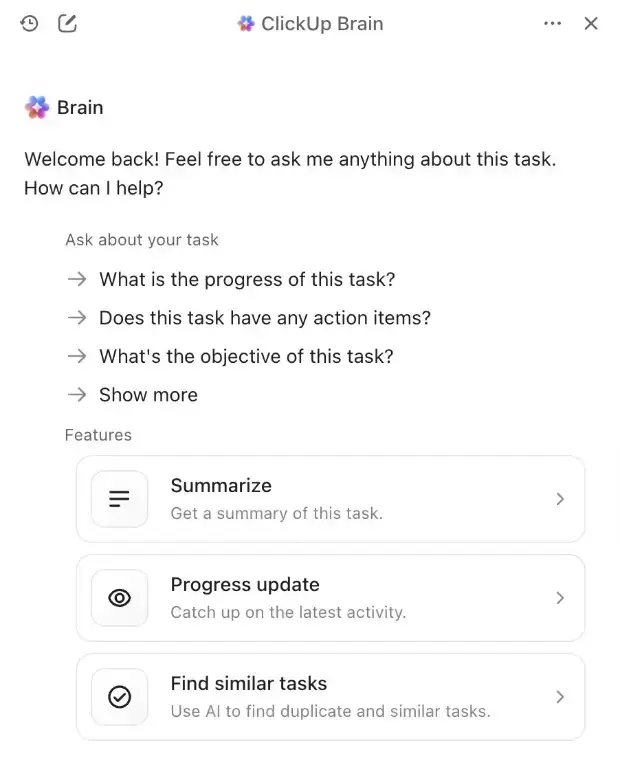
| Free plan | Trial access |
| Paid from | $9 per user/month (Brain AI add-on) |
| Includes | Unlimited Brain Assistant, 1,500 AI Super Credits |
| Models | Chat with Claude, ChatGPT and Gemini models |
| Everything AI | $28 per user/month for the expanded tier |
Pros
- AI that can read your real projects and tasks
- Task summaries and automatic project updates
- Search across the whole workspace
- Multiple underlying AI models
- AI agents and automation
Cons
- ClickUp itself can feel overwhelming
- Only worth it if ClickUp is your workspace
- Credit system takes tracking
- Overkill for personal task lists
10. Zapier — Best AI Tool for Automation
Best for: automating the repetitive work that sits between your apps.
Zapier is the odd one out here, and deliberately so. It is not primarily a chatbot — it is an automation platform that lets your apps and your AI tools work together without you being in the room. That is a different kind of value: instead of opening an assistant when you remember to, the work happens on its own.
A realistic workflow looks like this:
New website form submission → AI analyses the lead → record added to your CRM → personalised reply drafted → sales team notified in Slack.
Or, for a publisher:
New article published → social draft created → article summarised → row added to a content tracking database.
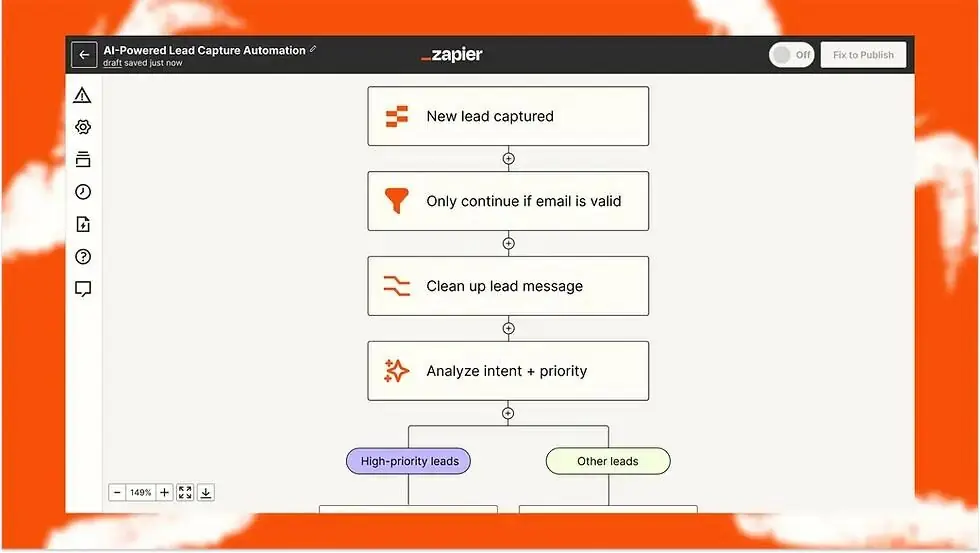
| Free plan | Yes — 100 tasks per month |
| Paid from | $19.99/month (Professional, billed annually) |
| Team | From $69/month |
| Also includes | Tables, Forms, webhooks and AI agents |
| AI steps | AI by Zapier uses model tiers with different task multipliers |
Pros
- Enormous integration ecosystem
- AI steps inside multi-step workflows
- Webhooks, Tables and Forms included
- AI agents for more complex logic
- Genuinely removes recurring manual work
Cons
- Costs climb as task volume grows
- Automations take real setup time
- Task-based pricing needs monitoring
- Overkill for one or two simple workflows
Best AI Tools for Work Compared
| Tool | Best for | Free | Paid from* | Main strength |
|---|---|---|---|---|
| ChatGPT | Overall | Yes | $20/mo | General-purpose work |
| Claude | Writing and knowledge | Yes | $20/mo | Long-form work |
| Gemini | Google users | Yes | Varies by region | Google ecosystem |
| Microsoft Copilot | Microsoft users | Yes | Varies by region | Office integration |
| Perplexity | Research | Yes | $20/mo | Search with citations |
| Notion AI | Workspace | Limited | $20/user/mo | Knowledge management |
| Canva AI | Design | Yes | $144/year | Visual content |
| Grammarly | Writing | Yes | $12/mo annual avg. | Editing everywhere |
| ClickUp Brain | Projects | Trial | $9/user/mo | Project workflows |
| Zapier | Automation | Yes | $19.99/mo annual | App automation |
*Prices are current examples captured in September 2026 and vary by region, billing cycle, plan and promotional offer.
What AI Tools Actually Do for Work
The most common mistake is treating AI as a faster search engine. That undersells it in some places and oversells it in others. Here is where these tools genuinely change a working day.
Writing
Emails, proposals, reports, blog posts, meeting summaries, presentations, product descriptions, social posts and internal documentation. ChatGPT and Claude work best as general drafting partners; Grammarly is better at polishing writing you have already done, inside the app you did it in.
Research
Finding sources, comparing competitors, sizing a market, summarising current information, spotting trends and building research briefs. One rule matters more than the rest: never assume an AI-generated citation is correct. Open the underlying source whenever the answer will actually be used for something.
Meetings
Transcription, discussion summaries, decisions captured, action items extracted and follow-up notes written. Notion and Microsoft both build meeting AI into their ecosystems; dedicated meeting tools go deeper if that is the main problem you are solving.
Data analysis
Spreadsheets, CSVs, sales reports, survey results, financial data, marketing metrics and dashboards. Instead of scrolling thousands of rows you can ask “which products generated the highest revenue last quarter?” or “find the biggest month-over-month decline.” The AI is good at surfacing the pattern; the number itself should still be checked against the source data before anyone acts on it.
Presentations
“Create a 10-slide presentation explaining our Q3 marketing results” is now a reasonable starting instruction. ChatGPT, Canva and Copilot can all generate structure, content and visuals. What none of them can decide is whether the deck tells the right story — that judgement stays with you.
Automation
This is where AI stops being a tool you open and starts being infrastructure. Instead of remembering to use it, you connect it: Gmail → AI → CRM → Slack → Google Sheets. Zapier is the most practical way to build that for most teams.
Project management
Summarising tasks, flagging overdue work, drafting project updates, creating action items, prioritising and searching internal information. ClickUp Brain is built specifically around this loop.
Design
Describe what you need instead of starting from a blank canvas — “a clean LinkedIn graphic announcing our new product” — and edit what comes back. Canva is the most accessible route for teams without a designer.
Which AI Tool Is Best for Your Job?
| If you are a… | Start with | Add |
|---|---|---|
| Writer or editor | Claude | ChatGPT for research and structure |
| Researcher or analyst | Perplexity | Claude to analyse the documents you find |
| Marketer | ChatGPT | Canva for visuals, Perplexity for research |
| Microsoft 365 business | Microsoft Copilot | ChatGPT or Claude for specialised work |
| Google Workspace user | Gemini | Perplexity for sourced research |
| Project or delivery manager | ClickUp Brain | Zapier for automation |
| Freelancer | ChatGPT | Canva and Grammarly |
| Small business owner | ChatGPT or Claude | Zapier once a process repeats weekly |
Do You Need More Than One AI Tool?
Probably — but not five or ten. The most common and most expensive mistake is subscribing to every major AI tool at once. Add up ChatGPT, Claude, Gemini, Perplexity, Copilot, Notion AI, Canva, Grammarly and Zapier and you are well past a serious monthly software bill for capability you are not using.
Build a small stack instead.
| Setup | Stack |
|---|---|
| Freelancer | ChatGPT for general work, Canva for design, Grammarly for final editing |
| Researcher | Perplexity to find it, Claude to analyse it, ChatGPT to organise the output |
| Microsoft-based business | Copilot for everyday work, ChatGPT or Claude for specialised tasks, Zapier for automation |
| Marketing team | ChatGPT for strategy and copy, Perplexity for research, Canva for visuals, Zapier for automation |
| Project team | ClickUp Brain for projects, ChatGPT or Claude for deeper work, Zapier for automation |
Are Free AI Tools Good Enough?
Sometimes, yes. For casual use, the free versions of ChatGPT, Claude, Gemini and Perplexity are more capable than most people expect. A paid plan becomes worth it when you need higher usage limits, advanced models, better file handling, deeper research tools, larger context, integrations, team features, automation or priority access.
Our recommendation: don’t subscribe to an AI tool because it has a premium plan. Identify the task you want improved first, then pick the tool that solves that specific task. It sounds obvious. Almost nobody does it.
How Much Do AI Work Tools Cost?
AI pricing has become genuinely complicated, because providers increasingly combine a subscription with usage limits, credits and metered features. Two tools at “$20 a month” can differ enormously in what that actually buys.
| Tool | Entry price (September 2026) |
|---|---|
| ChatGPT Plus | $20/month |
| Claude Pro | $20/month, or $17/month billed annually |
| Perplexity Pro | $20/month |
| Notion Business | $20 per member/month |
| Grammarly Pro | $12/month averaged over annual billing |
| ClickUp Brain | $9 per user/month |
| Zapier Professional | From $19.99/month billed annually |
| Canva Pro | $144/year |
| Gemini and Microsoft Copilot | Vary significantly by region and existing plan |
Compare what the subscription includes, not just the monthly figure. An inexpensive AI tool that does not solve your problem is still expensive.
General assistant or specialised tool?
There is a real distinction worth understanding before you buy anything.
General AI assistants — ChatGPT, Claude, Gemini — are designed to handle many different tasks reasonably well. Specialised AI tools — Grammarly for writing, Canva for design, Perplexity for research, ClickUp for projects, Zapier for automation — are usually more useful when the AI needs to operate inside a specific workflow rather than in a chat window beside it.
Is AI Safe to Use for Work?
It can be — but you should understand what information you are handing over. Do not paste sensitive company data into a personal consumer account and assume it is protected.
Before using AI with business data, check the provider’s position on data retention, training policies, workspace controls, access permissions, encryption, compliance requirements and third-party integrations. Business plans typically add administrative and privacy controls that consumer plans do not have: OpenAI states that ChatGPT Business does not train on business data by default and provides workspace controls, and Microsoft offers enterprise security and data-protection capabilities around Copilot.
The practical rule: if you would not email it to an external contractor without a contract, don’t paste it into a consumer AI account either.
Will AI Replace Employees?
The more useful framing is that AI is a productivity multiplier rather than a universal replacement. It is genuinely strong at work that is repetitive, information-heavy, text-based, pattern-based, time-consuming and — crucially — easy to verify.
Humans remain necessary for judgement, accountability, strategy, relationships, leadership, context, ethical decisions and final approval. Which is why the strongest workplace strategy is rarely “replace the worker with AI” and much more often “give the worker better tools.”
How to Choose the Best AI Tool for Work
Before paying for anything, answer these five questions honestly.
1. What task takes too much time? Be specific. Not “I need AI” but “I spend two hours every week summarising client meetings.” That is a solvable problem.
2. Where does the work already happen? Google Workspace points to Gemini. Microsoft 365 points to Copilot. Notion points to Notion AI. ClickUp points to ClickUp Brain. Several unrelated apps point to Zapier. Integration often matters more than raw intelligence.
3. Do you need research or generation? Current information means Perplexity. Writing and reasoning means ChatGPT or Claude. Visual output means Canva. Automation means Zapier.
4. How sensitive is your data? For confidential information, read the provider’s business plans and privacy policies before uploading anything.
5. Will you actually use it every week? This is the one that decides value. A $20 subscription that saves ten hours a month is excellent. A $20 subscription you open twice a month is not.
Our Verdict
ChatGPT is the best overall AI tool for work in 2026. Its advantage is versatility: one subscription covers writing, brainstorming, research, file analysis, coding, data work, image generation and much else. ChatGPT Plus is $20/month, and OpenAI’s business offering adds workspace controls and connectors for organisations.
That does not mean everyone should buy it.
Claude is the better choice if your work revolves around writing, documents, research and long-running projects — Claude Pro is also $20/month. Gemini becomes the obvious answer for Google Workspace users, and Microsoft Copilot for organisations already living in Word, Excel, PowerPoint, Outlook and Teams. Perplexity is our research pick because its whole design is built around web search and citations.
For specialised work, Notion AI, Canva, Grammarly, ClickUp Brain and Zapier will each do more for you than yet another general-purpose chatbot.
The real winner is not the tool with the longest feature list. It is the one that removes the most repetitive work from your actual day.
| Category | Our pick |
|---|---|
| Best AI tool overall | ChatGPT |
| Best for writing | Claude |
| Best for Google Workspace | Gemini |
| Best for Microsoft 365 | Microsoft Copilot |
| Best for research | Perplexity |
| Best AI workspace | Notion AI |
| Best for design | Canva AI |
| Best for editing | Grammarly |
| Best for project management | ClickUp Brain |
| Best for automation | Zapier |
Frequently Asked Questions
What is the best AI tool for work in 2026?
ChatGPT is our overall pick among the best AI tools for work, because it handles writing, research, file analysis, coding, brainstorming and data analysis from one platform. Claude is the stronger choice if most of your work is long-form writing or document analysis.
What is the best AI tool for writing?
Claude is our top choice for long-form writing and knowledge-heavy work. ChatGPT is a strong general-purpose alternative, and Grammarly is better for polishing writing inside the apps you already use.
What is the best AI tool for research?
Perplexity, because it is designed around web search, source citations and research workflows rather than adapted to them. You should still open the cited sources when the answer matters.
Is ChatGPT better than Claude for work?
Neither is universally better. ChatGPT is more broadly useful across different task types; Claude is stronger for writing, documents and long-running knowledge work.
Is Gemini better than ChatGPT?
It depends on your workflow. Gemini is particularly useful if your work already lives inside Google services. ChatGPT is more platform-independent and broader in scope.
Is Microsoft Copilot worth it?
It can be, especially if your organisation already runs on Microsoft 365. Copilot is integrated into Word, Excel, PowerPoint, Outlook and Teams, which removes a lot of copying between apps. Pricing varies significantly by region.
Is Perplexity better than ChatGPT for research?
Perplexity is more convenient when you want web research with citations as the default behaviour. ChatGPT can also research and is broader overall, so many people use both.
What is the best AI tool for small businesses?
For most small businesses, ChatGPT or Claude provides the broadest utility. Add Canva for visual content and Zapier once a manual process repeats every week.
What is the best AI tool for marketing?
A combination usually beats a single tool: ChatGPT for strategy and copy, Perplexity for research, and Canva for visual content.
What is the best AI tool for meetings?
It depends on your existing workspace. Notion, Microsoft 365 and other productivity platforms now include AI meeting features, so integration with what you already use should be the deciding factor.
Can AI tools automate my entire business?
Not reliably. AI can automate many individual processes, but important workflows still need monitoring, permissions, quality control and human oversight.
Are paid AI tools worth it?
They can be. The honest test is comparing the subscription cost against the hours of useful work it actually saves you each month — not against what it could theoretically do.
Can I use AI tools for confidential business information?
Only after reviewing the provider’s privacy, security and business-plan policies. A consumer account does not offer the same controls as a business or enterprise plan.
Do I need multiple AI subscriptions?
Not necessarily. Start with one general-purpose tool and add a specialised service only when it solves a specific recurring problem.
What is the best free AI tool for work?
There is no single winner. ChatGPT, Claude, Gemini and Perplexity all offer free access with different capabilities and limits, so the best free option depends on what you actually do each day.
How We Compared These AI Tools
Etemora uses a research-based evaluation process for this comparison. We considered work-related capabilities, writing quality, research features, file analysis, reasoning, integrations, collaboration, automation, ease of use, free-plan availability, paid pricing, usage limits, workspace features, privacy and business controls, and overall value.
We reviewed official provider documentation and current pricing pages, alongside reputable independent reporting where relevant. AI products change unusually quickly — models, usage limits, features and prices can all change without the product itself being replaced — so we do not treat any single benchmark or feature list as permanent.
And importantly: we do not claim hands-on testing where Etemora has not actually performed it. Where we describe capabilities, those come from provider documentation and public product information, not from controlled benchmarks we ran ourselves. If you are rolling these tools out across a team rather than picking one for yourself, NIST’s AI Risk Management Framework is the standard reference for what to settle before a tool touches company data.
The Simple Answer
| If you want to… | Use |
|---|---|
| Have one AI tool for almost everything | ChatGPT |
| Write and analyse long documents | Claude |
| Work inside Gmail and Google Docs | Gemini |
| Work inside Word, Excel and Teams | Microsoft Copilot |
| Do research every day | Perplexity |
| Manage everything in Notion | Notion AI |
| Create marketing designs | Canva AI |
| Write better emails and documents | Grammarly |
| Manage projects and delivery | ClickUp Brain |
| Automate repetitive work | Zapier |
Still deciding? Pick the one task that annoys you most this week and try the free tier of the tool that targets it. Upgrade only when a limit gets in your way — not because a plan exists.
Browse more AI guides →Working through the rest of your software stack too? Our other comparisons cover the best password managers, the best VPN services, the best cloud storage services and the best website builders.
All prices and features in this comparison were checked in September 2026. AI pricing and usage limits change frequently, and introductory offers usually renew at a higher rate — always confirm the current terms, including renewal price, before subscribing.
Affiliate Disclosure: Some links on this page are affiliate links. If you buy through them, Etemora may earn a commission at no additional cost to you. It never changes which tool we recommend. Learn more →
Related articles you may like
 AI ToolsGemini vs ChatGPT (2026): Which AI Assistant Should You Use?
 AI ToolsPerplexity vs Claude (2026): Which AI Tool Should You Use?
 AI ToolsBest ChatGPT Alternatives in 2026: 6 Free and Paid AI Assistants
 AI ToolsClaude vs Gemini (2026): Which AI Assistant Should You Use?
 AI ToolsPerplexity vs ChatGPT (2026): Which AI Tool Should You Use?
 AI ToolsBest AI Tools for Students: 8 Essential Picks for 2026