
Best AI Tools for Students: 8 Essential Picks for 2026
 By M. Zaid
- Updated October 20, 2026
- 24 min read
The best AI tools for students can help with much more than generating answers. The right tools can explain difficult concepts, turn notes into study materials, help with research, improve writing, create presentations and generate practice questions. The wrong tool, however, can make studying less effective if you simply copy its output instead of learning from it.
Quick answer: The best AI tools for students depend on the task. ChatGPT is the strongest general-purpose starting point, Perplexity is useful for web research and cited answers, Quizlet is built around active study and practice, Gemini fits students already using Google apps, Grammarly helps with writing, and Canva is useful for presentations and visual assignments.
This guide compares eight useful AI tools for students in 2026, focusing on what each tool is actually suited for, its free and paid options, important limitations, and how to use AI without letting it replace your own academic work. Every price and student offer below was checked against the official pages in October 2026.
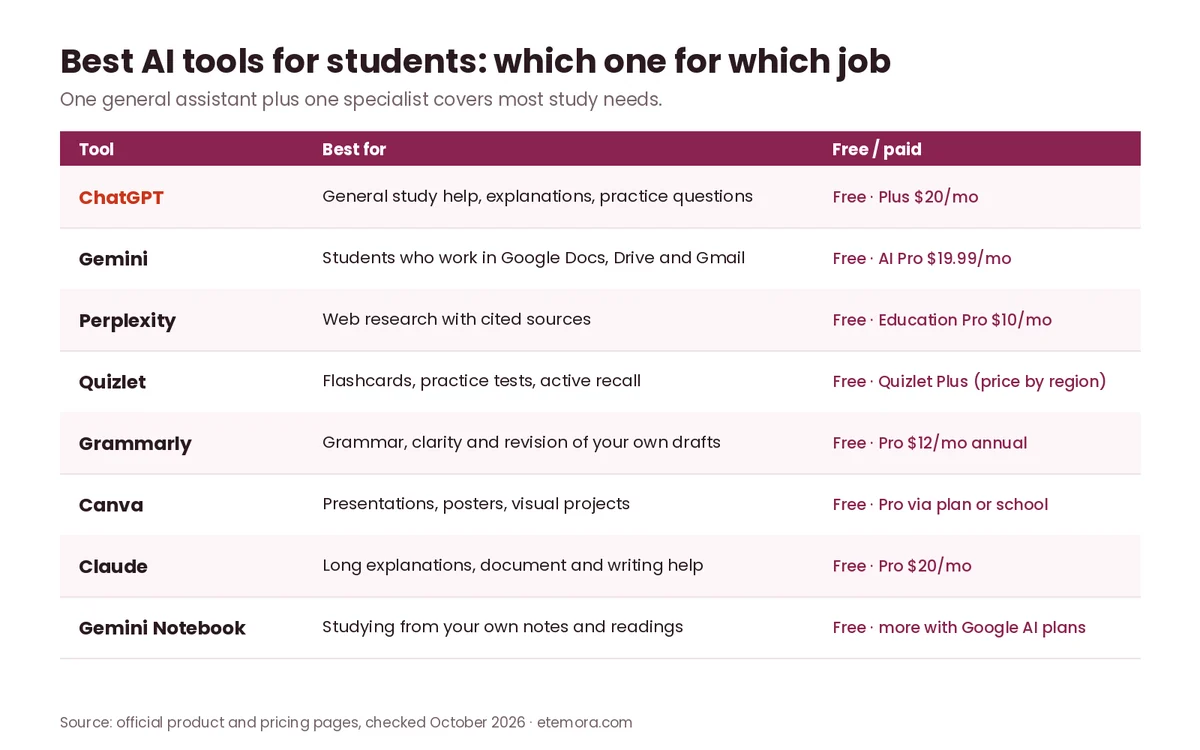
Best AI Tools for Students at a Glance
| Tool | Best For | Free | Paid (Oct 2026) | Key Strength | Main Drawback |
|---|---|---|---|---|---|
| ChatGPT | General study and tutoring | $0 | Plus $20/mo | Broad study, reasoning and file tools | Can produce incorrect information |
| Gemini | Google-based studying | $0 | Google AI Pro $19.99/mo | Google apps, Deep Research, 5 TB storage | Paid plan bundles features you may not need |
| Perplexity | Research and citations | $0 | Education Pro $10/mo | Search-focused answers with sources | Free tier has tight Pro Search limits |
| Quizlet | Flashcards and exam practice | $0 | Quizlet Plus (price varies by region) | AI study guides and practice tests | Advanced tools need a paid plan |
| Grammarly | Writing and revision | $0 | Pro $12/mo billed yearly or $30 monthly | Grammar, rewriting and tone | Not a study or research tool |
| Canva | Presentations and projects | $0 | Pro via paid plan or eligible school | Visual assignments and presentations | Premium features need payment or school access |
| Claude | Long explanations and writing | $0 | Pro $20/mo ($17/mo billed yearly) | Strong writing and document work | Usage limits vary by plan |
| Gemini Notebook | Studying from your own sources | $0 | More with Google AI plans | Answers grounded in your notes | Most useful when sources are organised |
Prices are in US dollars and were checked in October 2026. Free tiers have usage limits, and student offers depend on eligibility, so confirm the current terms before you subscribe.
1. ChatGPT: Best for General Study Help
Best for: students who want one general-purpose AI assistant for explanations, brainstorming, problem solving, writing and document work.
ChatGPT is the most flexible option among the best AI tools for students because students can use it at many different stages of studying rather than for one specific task. You can ask it to explain a difficult concept in simpler language, create practice questions, critique an outline, work through a problem step by step, summarise material you provide, or help organise a study plan.
OpenAI offers a Free plan and ChatGPT Plus at $20 per month, billed monthly; OpenAI says it does not currently offer annual billing for Plus. According to OpenAI’s Plus help article, Plus adds higher model limits, voice conversations, image generation, file uploads and analysis, and Deep Research where available. Usage limits can still apply.
There is also a time-limited student deal. OpenAI’s 2026 Back to School offer gives eligible students four free monthly billing periods of ChatGPT Plus. It is open to current full-time and part-time college and graduate students at eligible US degree-granting institutions, verified through SheerID. The offer must be claimed by October 31, 2026, needs a valid payment method, and renews at $20 per month afterwards unless you cancel.

Useful student applications
- Explaining difficult concepts at different levels
- Creating practice questions
- Brainstorming essay structures
- Working with uploaded documents
- Helping debug code
- Creating study plans
- Reviewing drafts
- Turning notes into questions
The biggest limitation is that a confident answer is not necessarily a correct answer. Students should verify important facts, calculations, quotations, citations and academic claims against course materials or authoritative sources. ChatGPT is also not a substitute for understanding: asking it to solve every assignment without studying the reasoning can leave you with an answer but less knowledge. If you are deciding between the two big general assistants, our ChatGPT vs Claude comparison covers the differences in detail.
Pros and cons
Pros
- Broad range of academic uses
- Free plan available
- File analysis on supported plans
- Useful for interactive explanations
- Student offer for eligible US college students until October 31, 2026
Cons
- AI can make factual errors
- Usage limits can apply
- Some advanced capabilities require a paid plan
- No annual billing for Plus
Skip it if: you only need flashcards or practice tests and would prefer a purpose-built study platform.
Want one AI assistant for most study tasks?
See ChatGPT →2. Gemini: Best for Students Using Google Apps
Best for: students who already organise schoolwork through Google Docs, Gmail, Drive and related Google services.
Gemini is one of the best AI tools for students who already live inside Google’s ecosystem. The Gemini app has a free tier, and Google’s paid AI plans add more access. In the US, Google AI Plus is listed at $4.99 per month and Google AI Pro at $19.99 per month ($199.99 billed yearly). Google AI Pro includes 5 TB of storage, expanded access to Gemini 3.1 Pro and Deep Research, Gemini in Gmail, Docs and Sheets, and expanded access to features and models in Gemini Notebook.

The headline student deal is significant. Google’s Gemini for students page currently offers eligible students Google AI Pro free for one year, including 4x higher usage limits in Gemini and 5 TB of storage. The offer can be redeemed until December 31, 2026, requires a valid payment method, and Google AI Pro then charges $19.99 per month unless you cancel.

The ecosystem connection is the major reason to consider Gemini rather than choosing on chatbot quality alone. A student working on a research project may already have notes in Drive, drafts in Docs and course emails in Gmail. Having AI features connected to that ecosystem reduces the need to move information between separate apps.
Useful student applications
- Research brainstorming
- Document assistance in Docs
- Study questions and quizzes from your own material
- Summarising supplied material
- Writing and editing
- Multi-page research reports with Deep Research
- Organising academic information
Pros and cons
Pros
- Strong Google ecosystem integration
- Free year of Google AI Pro for eligible students
- Gemini Notebook access with higher limits on paid plans
- Google AI Pro includes 5 TB storage
- Free tier available
Cons
- Some features depend on plan and region
- Regular Google AI Pro price is high for occasional users
- Paid plans bundle many features students may not need
- AI-generated information still needs verification
Skip it if: you do not use Google’s ecosystem and only need a straightforward general-purpose AI chatbot.
Already doing your coursework in Google Docs and Drive?
Check the Gemini Student Plan →3. Perplexity: Best for Research and Sources
Best for: students who need to investigate a topic online and want answers accompanied by sources.
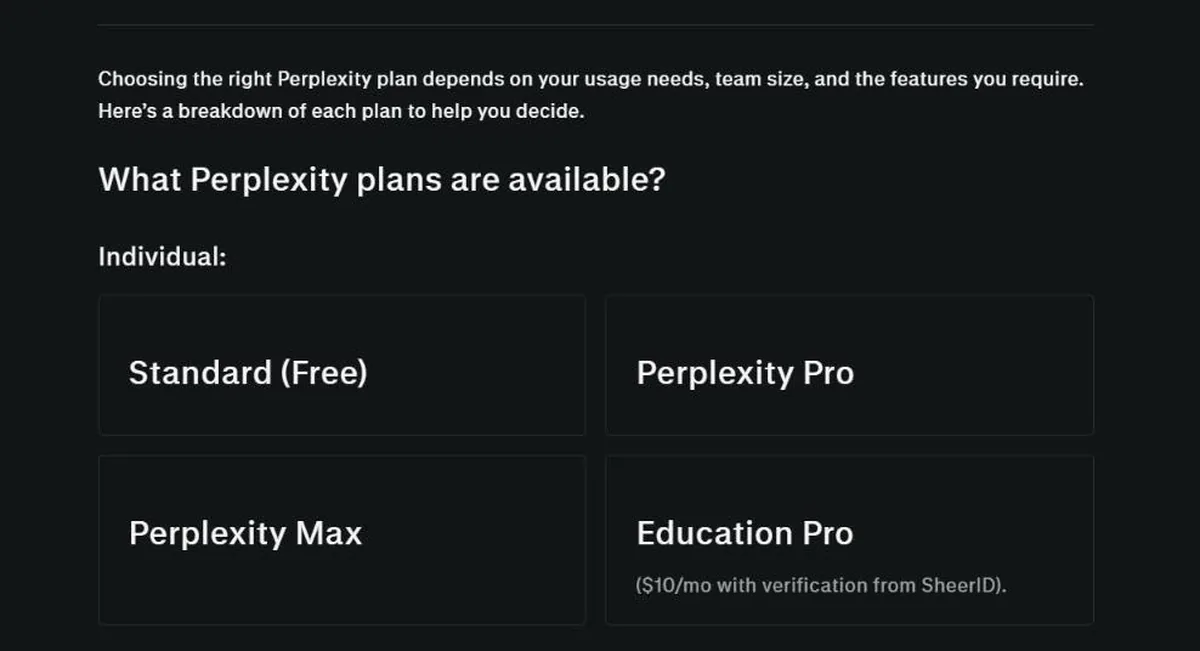
Perplexity earns its place among the best AI tools for students because it is designed around search and research rather than functioning only as a conversational chatbot. According to Perplexity’s plan guide, the free Standard plan gives practically unlimited basic searches, but only 3 Pro Searches per day and 1 Research query per month. Education Pro is available to verified students and educators at $10 per month, with verification handled through SheerID. It includes everything in Pro, plus Learn Mode and education-specific study prompts.
That student price makes Perplexity interesting for research-heavy students who need to investigate current information. Instead of asking a chatbot a broad question, you can use a search-oriented tool to investigate specific claims and follow the cited sources. The important habit is to open those sources: a citation attached to an AI answer does not automatically mean the source supports every sentence around it.
Useful student applications
- Research starting points
- Current-events research
- Finding primary sources
- Comparing information from multiple websites
- Topic exploration
- Creating research questions
- Checking claims
Pros and cons
Pros
- Free Standard plan
- Education Pro at $10/month for verified students
- Search-focused workflow
- Sources are central to the product
Cons
- Free tier allows only 3 Pro Searches per day
- Source quality still needs checking
- Not a flashcard or exam-practice platform
- A cited answer still needs careful verification
Skip it if: your main need is interactive tutoring, flashcards or presentation design rather than online research.
Need sources you can actually follow up?
See Perplexity →4. Quizlet: Best for Flashcards and Exam Practice
Best for: students preparing for exams who benefit from active recall, flashcards and practice tests.
Of the best AI tools for students in this list, Quizlet is the most focused on exam practice. Its AI study tools can turn notes into full-length practice tests with custom question types and time limits, build study guides from uploaded notes, slides or PDFs, summarise long PDFs and lecture slides, and create flashcards from your notes. Quizlet also offers AI homework help and an upgraded Learn mode.
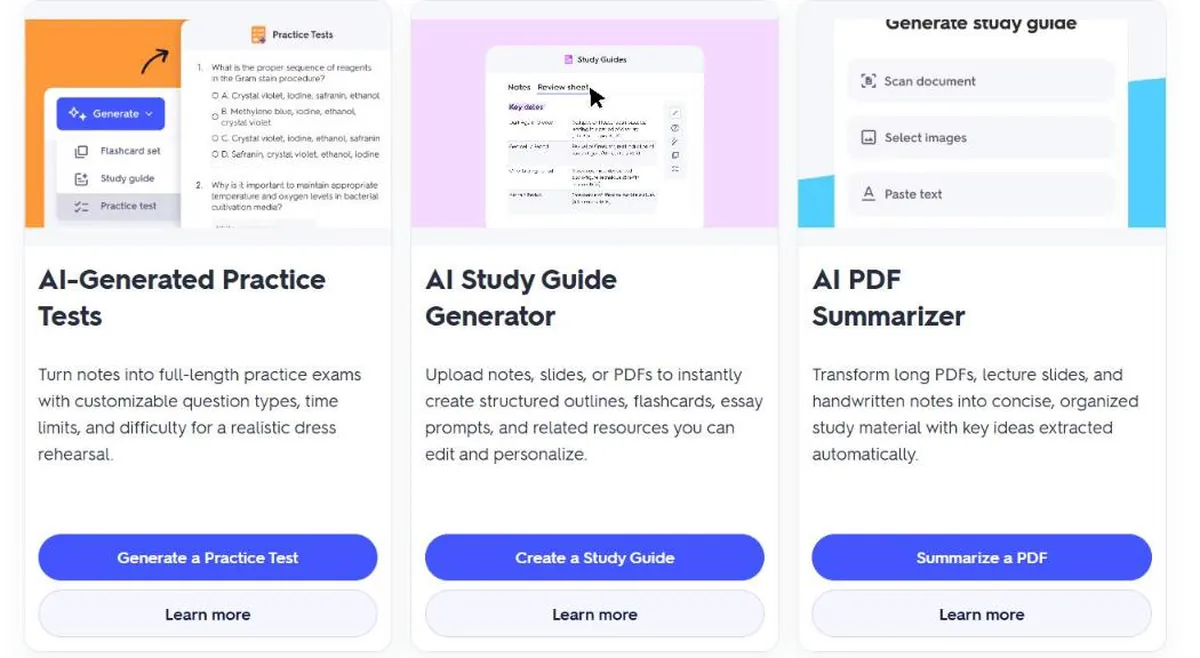
That makes Quizlet useful when the goal is not simply understanding a topic once, but practising it repeatedly. A student preparing for a biology exam could upload class notes, generate questions from the material, then use those questions for active recall.
Quizlet says you can start with some AI features for free, while more advanced capabilities are included with Quizlet Plus subscriptions. It currently sells Quizlet Plus and Quizlet Plus Unlimited, with a 7-day free trial on annual plans; prices are shown in local currency and vary by region, so check the upgrade page before subscribing.
Pros and cons
Pros
- Purpose-built for studying
- AI-generated practice tests
- AI flashcard generation
- Works from notes, slides and PDFs
- Useful for repeated exam practice
Cons
- Advanced AI features need a paid plan
- Generated questions should be checked against course material
- Less useful outside studying
- Not a replacement for a broad AI assistant
Skip it if: you need one AI tool for coding, writing, research, images and general questions rather than dedicated study practice.
Preparing for an exam with flashcards and practice tests?
See Quizlet AI Tools →5. Grammarly: Best for Writing and Editing
Best for: students who already have a draft and want help improving grammar, clarity, tone and wording.
Grammarly is different from ChatGPT and Gemini because its main value is writing assistance rather than academic tutoring, which makes it a specialist among the best AI tools for students. Its Free plan costs $0 and includes spelling and grammar help, tone detection and 100 AI prompts per month. Grammarly Pro costs $12 per member per month billed annually ($144 a year) or $30 per month billed monthly, according to Grammarly Support. Pro adds full-sentence rewrites, tone adjustment, plagiarism and AI-text detection, and 2,000 AI prompts per month. Grammarly is now part of Superhuman.
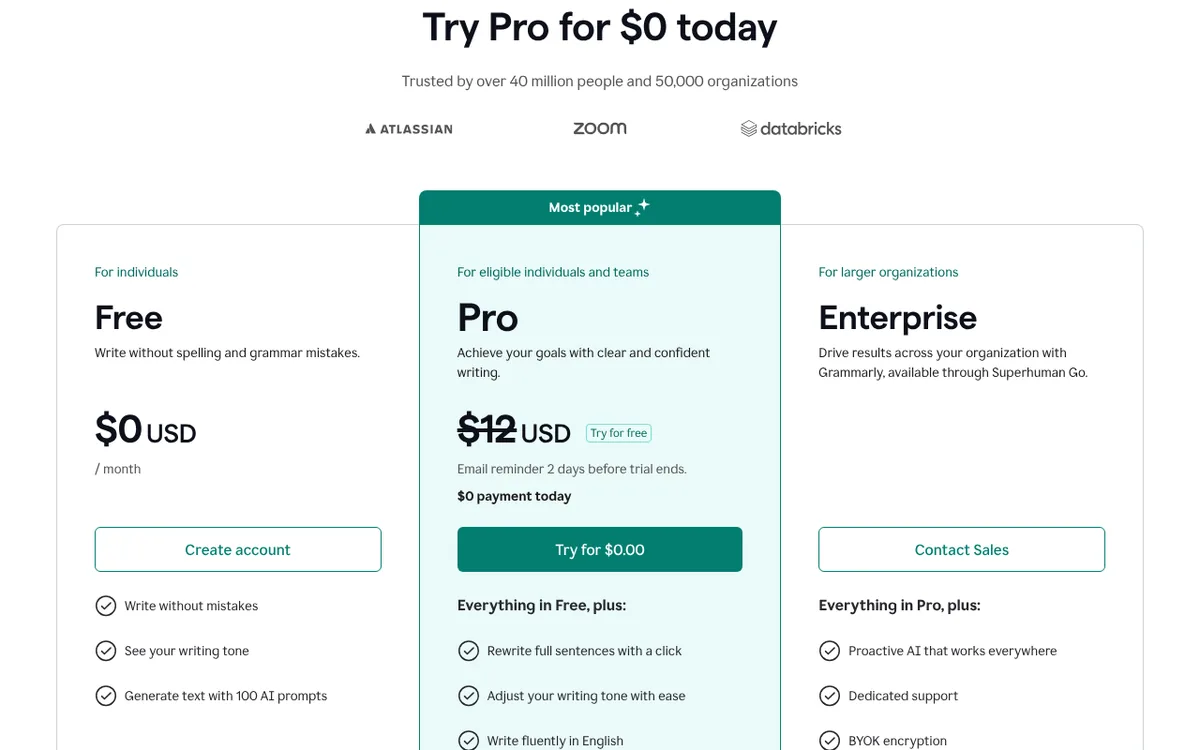
For students, the useful distinction is between editing your own work and asking AI to generate the entire assignment. Using an editing tool to identify unclear writing or grammar problems supports revision, but you should still follow your school’s rules on AI-assisted writing. If writing is your main need, our guide to the best AI writing tools compares more options.
Pros and cons
Pros
- Free plan available
- Strong grammar and revision focus
- Sentence rewriting and tone suggestions
- Works across many writing apps
Cons
- Not a dedicated study platform
- Monthly Pro billing is expensive for basic checks
- AI writing features may break rules on some assignments
- Cannot replace subject knowledge
Skip it if: your main problem is understanding course material rather than improving your writing.
Want cleaner, clearer drafts?
Check Grammarly Plans →6. Canva: Best for Presentations and Visual Projects
Best for: students creating presentations, posters, infographics, videos, resumes and other visual assignments.
Canva is the visual pick among the best AI tools for students: it combines design software with AI-powered features, which makes it useful when an assignment needs to communicate information visually. Its Canva for students page says university and college students can start with Canva Free and may get free Pro and premium features through Canva for Campus if their institution provides it. K-12 (primary and secondary) students can be invited by their teacher or school to Canva Education, which includes free access to Pro and premium features.
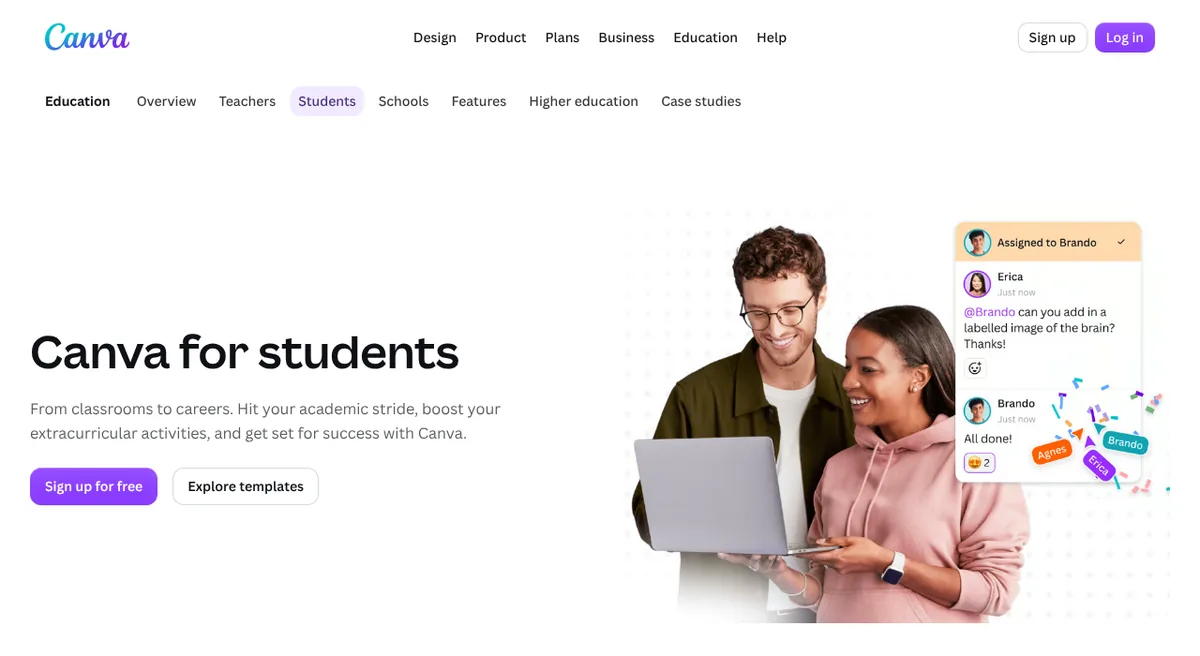
Canva is useful for turning research into a visual presentation, but polished design is not the same as academic quality. For image-heavy projects you can also compare the best AI image generators, and for video assignments the best AI video generators.
Useful student applications
- Class presentations
- Infographics and posters
- Research visuals
- Resume design
- Group projects
- Short educational videos
Pros and cons
Pros
- Free plan available
- Student-focused templates
- Presentation, Docs and Whiteboard tools
- AI-powered design features
- Collaboration features
Cons
- Premium features need payment or school access
- Design tools do not verify academic claims
- Easy to spend too long on appearance
- College access depends on Canva for Campus
Skip it if: your main need is solving equations, researching sources or understanding difficult concepts.
Turning research into slides or a poster?
See Canva for Students →7. Claude: Best for Detailed Explanations and Long Writing
Best for: students who want another general-purpose AI assistant for explanations, brainstorming, document work and writing.
Claude rounds out the general assistants among the best AI tools for students. It can help with academic tasks such as breaking down difficult concepts, reviewing a draft, brainstorming research questions and working with documents. Its Free plan includes chat on web, desktop and mobile, web search, file creation and memory. Claude Pro costs $20 per month billed monthly, or $17 per month with annual billing ($200 billed up front), according to Anthropic’s pricing page.
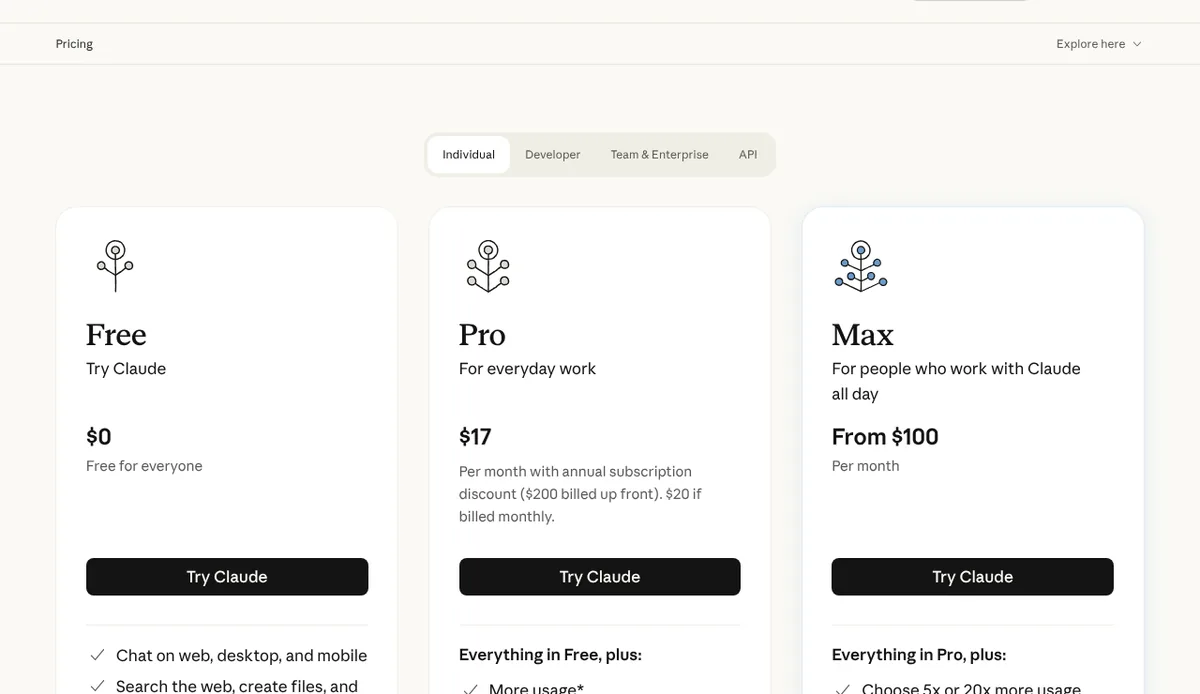
Anthropic has expanded its education work in 2026, but the newest offer is for teachers rather than students: Claude for Teachers, announced in July 2026, gives verified US K-12 educators free access to premium Claude capabilities. Students should not assume there is a universal free student plan for Claude; check the current plans or whether your institution provides access.
Claude is worth considering if you prefer a writing-oriented conversational workflow or want a second AI explanation of difficult material. See our ChatGPT vs Claude guide for a direct comparison.
Pros and cons
Pros
- Strong writing and reasoning use cases
- Useful for document-based work
- Explains concepts conversationally
- Free plan includes web search and file creation
Cons
- No general student discount listed
- Usage limits depend on plan
- It can make factual errors
- A second AI opinion is not authoritative verification
Skip it if: you want a dedicated flashcard, practice-test or visual-design platform.
Want a second AI for long explanations and writing?
See Claude Plans →8. Gemini Notebook: Best for Studying From Your Own Sources
Best for: students who want AI help based primarily on their own notes, documents and other study material.
Gemini Notebook is the most source-focused of the best AI tools for students. It is Google’s notebook-style research tool (the old NotebookLM address now redirects to it). Google describes it as a research and thinking partner whose answers are grounded in the sources you provide. For students, its plans page highlights uploading class materials, turning them into Audio Overviews and generating flashcards before an exam.
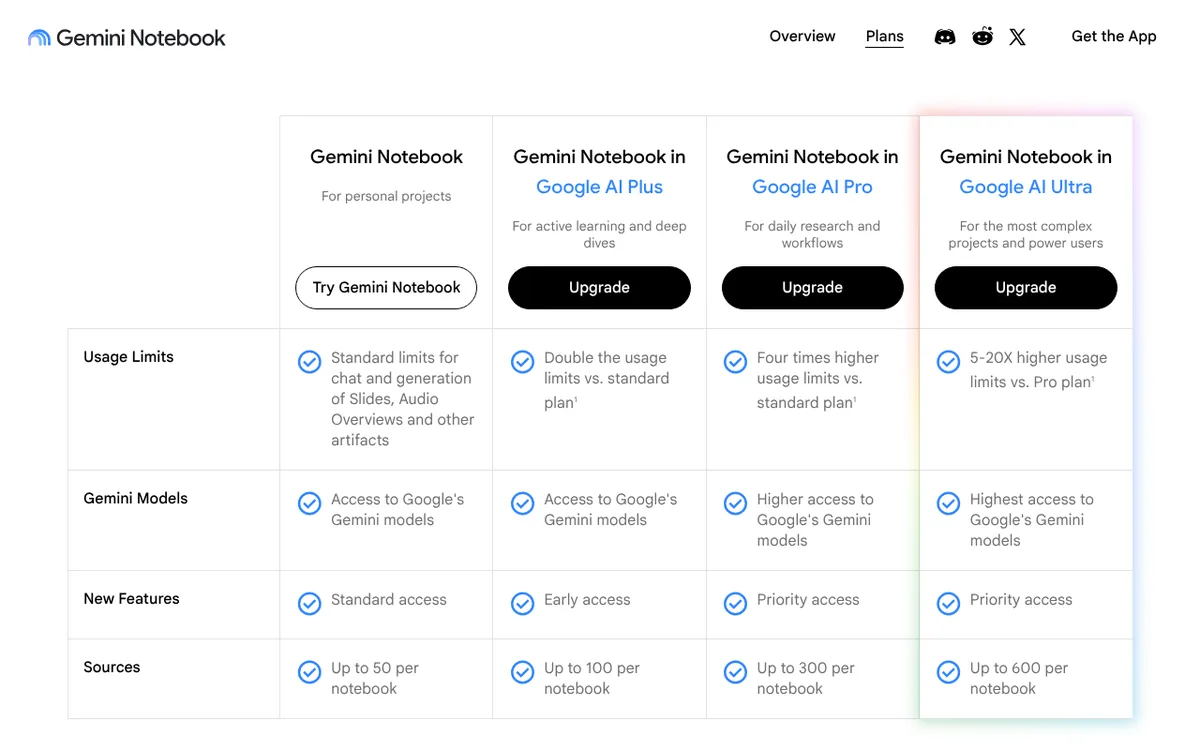
The free version gives standard limits and up to 50 sources per notebook. Google AI Plus doubles the usage limits (100 sources), Google AI Pro offers four times the standard limits (300 sources), and Ultra goes higher still (600 sources). Google notes that Plus, Pro and Ultra are only available in specific regions.
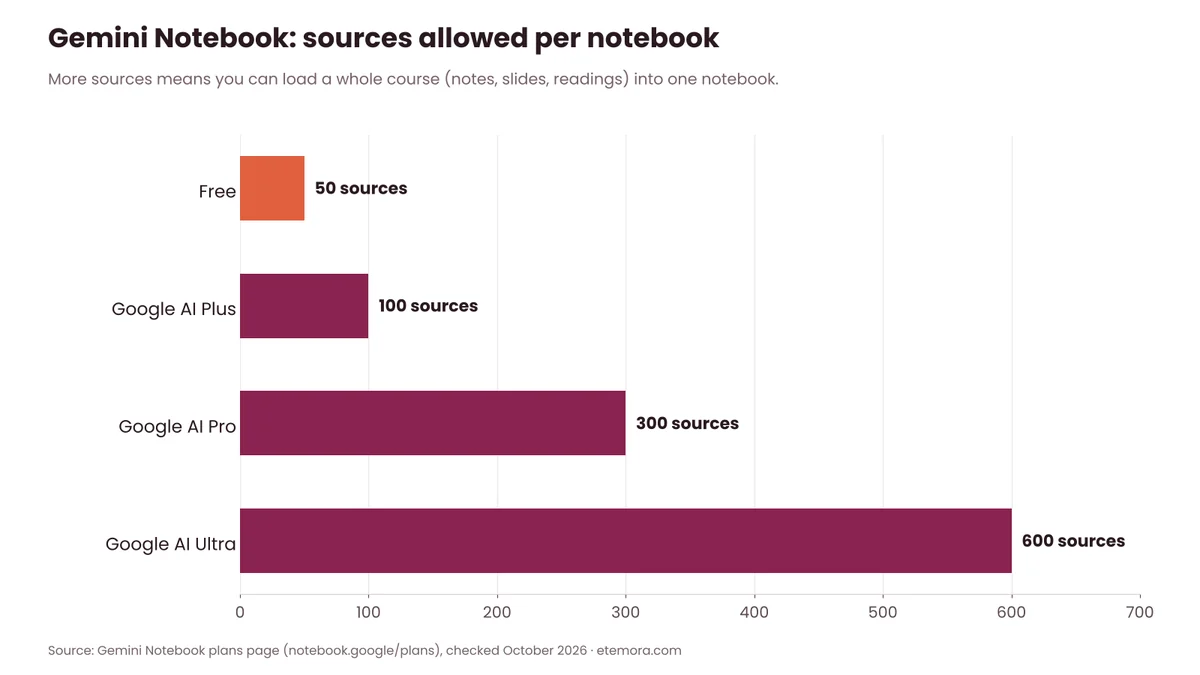
The main advantage of a source-focused notebook is that you begin with material you already have. Instead of asking a general chatbot a broad question and hoping it uses the right context, you can structure your study around your own lecture notes, readings and documents. The original material still needs to be accurate: AI cannot fix a bad source simply because the answer sounds convincing.
Pros and cons
Pros
- Designed around your own study material
- Free version with up to 50 sources per notebook
- Audio Overviews and flashcards
- Connected to Google’s AI plans
Cons
- Most useful when sources are already organised
- Higher limits need a paid Google AI plan
- Features change as Google develops the product
- Should not replace reading the original material
Skip it if: you mostly need open-web research or a general conversational assistant.
Want answers based only on your own notes?
See Gemini Notebook →Which AI Tool Should Students Use for Studying?
You do not need eight subscriptions to use the best AI tools for students. Paying for several AI tools at the same time is unnecessary for most students. A better approach is to choose one general assistant and add a specialist only when you have a recurring need.
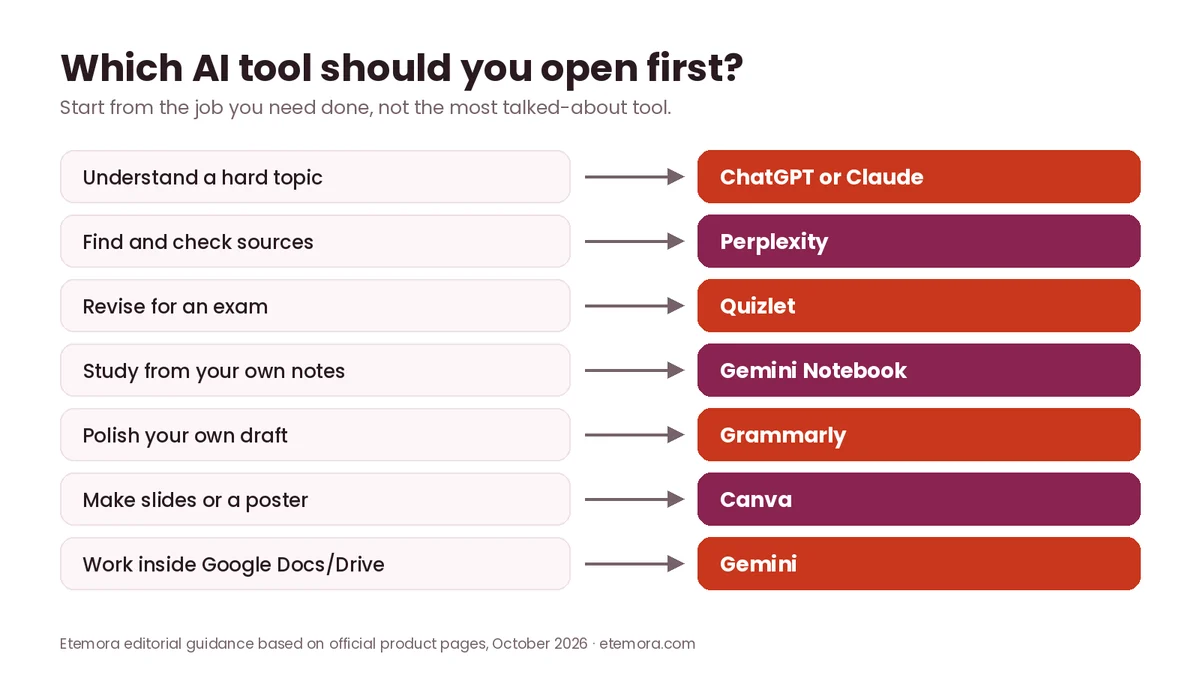
- General study: ChatGPT
- Google ecosystem: Gemini
- Research: Perplexity
- Flashcards and practice tests: Quizlet
- Writing revision: Grammarly
- Presentations: Canva
- Detailed alternative assistant: Claude
- Source-based study: Gemini Notebook
This approach also makes it easier to see which tool is actually helping. For a wider look at general assistants, see our roundup of the best AI chatbots in 2026.
Best AI Tools for Students by Task
Here is how the best AI tools for students map to the most common study tasks.
Best AI tool for homework help
ChatGPT is a strong general-purpose option because you can ask follow-up questions and request explanations instead of only asking for an answer. A better prompt is: “Explain how to solve this problem step by step and stop before the final answer so I can try it.” That turns the AI into a study aid rather than an answer generator.
Best AI tool for research
Perplexity is a natural choice when your task requires finding information online and following sources. Always open the cited material and assess the original source.
Best AI tool for exam preparation
Quizlet is better suited to repeated practice because its AI tools turn notes into flashcards and practice tests. Gemini Notebook is a strong free alternative if you want flashcards built only from your own class materials.
Best AI tool for essays
ChatGPT, Claude and Grammarly can all help, but their roles differ. Use a general AI assistant for brainstorming and structure, and Grammarly for language-level revision. Then make sure the final academic argument and sources are genuinely yours and comply with your institution’s AI policy.
Best AI tool for presentations
Canva is the most obvious choice when the deliverable is visual. It helps students create presentations, documents, videos and other visual projects.
How to Use AI Without Hurting Your Learning
Even with the best AI tools for students, the biggest mistake is treating AI as an answer vending machine. If you ask for a complete solution every time, you may finish assignments faster while learning less. Instead, use AI in ways that make you think. The same habits that help professionals, covered in our guide on how to use AI for work, apply to studying too.
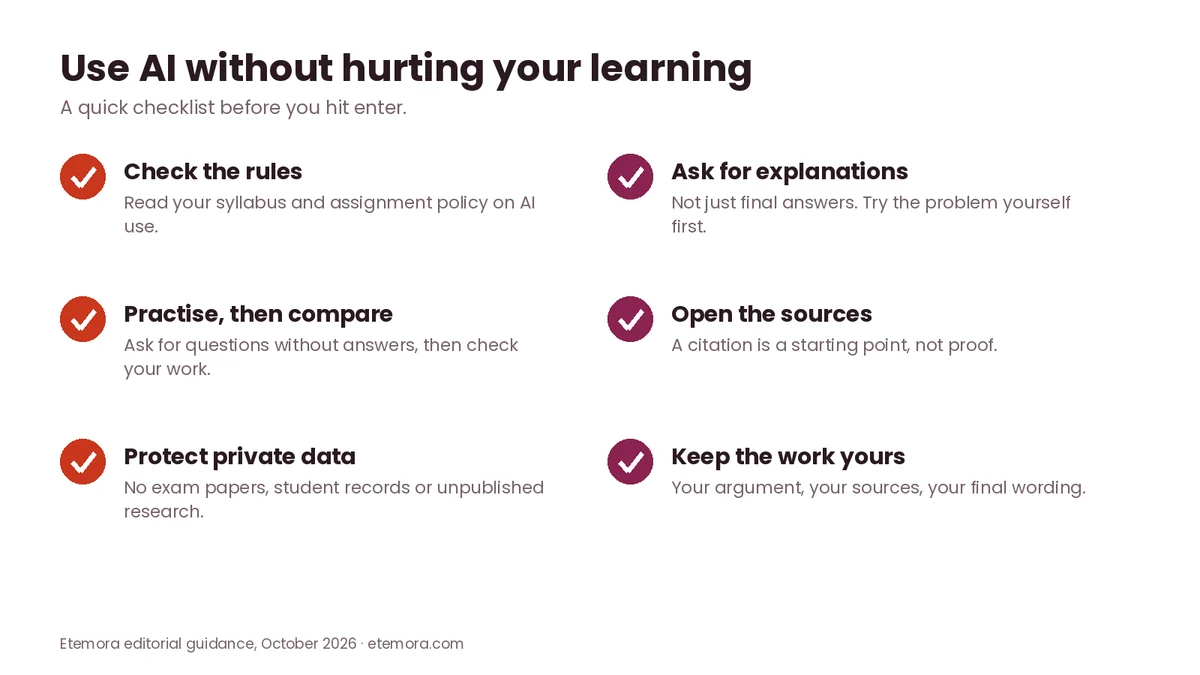
Ask for explanations
Instead of “Give me the answer,” try: “Explain the concept in simple terms, then give me a similar problem to solve.”
Ask for practice questions
After studying a chapter, ask for questions without answers. Attempt them yourself first, then use AI to explain where your reasoning went wrong.
Ask AI to challenge your argument
For essays, give the AI your argument and ask: “What is the strongest counterargument to this position?” This helps you find weaknesses without asking AI to write the paper.
Use your own notes as the starting point
Source-based tools are especially useful when you provide lecture notes, assigned readings or course material. Check that the AI’s summary accurately represents the original material.
Academic Integrity: What Students Need to Know
Even the best AI tools for students can cause problems if you ignore the rules. AI rules differ between schools, universities, instructors and assignments. Some instructors permit brainstorming or editing but prohibit generated text. Others allow AI for specific assignments. Some institutions require you to disclose AI assistance.
Do not assume that because a tool allows a particular action, your instructor permits it. Before using AI for assessed work, check the course syllabus, assignment instructions and institutional policy.
A safe principle is to use AI as a tutor, editor, brainstorming partner or practice generator when those uses are permitted, rather than submitting AI-generated work as your own.
How to Choose the Best AI Tools for Students
1. Start with your actual problem
Do not choose a tool because everyone is talking about it. Ask what you need: understanding, research, writing, flashcards, practice tests, presentations, coding or note organisation. Then choose the tool designed around that job.
2. Check the free tier first
Many of the best AI tools for students do a lot without paying. All eight tools in this list have a $0 starting point. Paid plans become more useful when you repeatedly hit limits or need specific advanced features.

3. Check student pricing
Student offers can be very different from normal consumer pricing. As of October 2026, Perplexity lists Education Pro at $10 per month for verified students, Google offers eligible students a free year of Google AI Pro (redeem by December 31, 2026), and OpenAI’s Back to School offer gives eligible US college and graduate students four free months of ChatGPT Plus (claim by October 31, 2026). Student promotions expire, so check the official offer page before relying on one.

4. Check where your data goes
Before uploading sensitive material, read the provider’s privacy and data-use information. Do not upload confidential student records, private information, unpublished research, examination materials or other restricted documents unless you are permitted to.
5. Check citation quality
For research, a tool that provides sources can be helpful. But citations are starting points for verification, not proof that every AI-generated statement is correct.
6. Consider your school’s rules
Academic-integrity requirements can override the convenience of a tool. A technically available feature is not automatically an acceptable academic use.
7. Do not pay for overlapping tools
If ChatGPT already covers your general study needs, you may not need another paid general chatbot. Use your budget for a specialist only when it solves a recurring problem.
How We Compared
This is a research-based comparison; we did not run hands-on tests. To choose the best AI tools for students, we reviewed official product pages, pricing pages and support documentation from each provider, along with current student and education offers, all checked in October 2026. We compared each tool by its intended student use, free access, paid options, academic workflow and practical limitations. Read more about how we review products.
Final Verdict: Best AI Tools for Students
The best AI tools for students are not necessarily the ones with the most features. The better choice is the one that matches the way you study, and you can build a useful student AI stack without paying for everything.
For most students, the sensible starting point is one general AI assistant plus one specialist tool. Add more only when a real need appears. You can browse more guides in our AI tools section, or compare options for your career in the best AI tools for work.
Ready to start with a general study assistant?
See ChatGPT →Frequently Asked Questions
What is the best AI tool for students in 2026?
ChatGPT is the strongest general-purpose starting point for many students because it supports explanations, brainstorming, practice questions, writing and document work. Students who mainly need research, flashcards, writing revision or presentations may get more value from Perplexity, Quizlet, Grammarly or Canva respectively.
Are AI tools for students free?
Most of the best AI tools for students offer free plans, but free access usually comes with feature or usage limits. ChatGPT, Gemini, Perplexity, Quizlet, Grammarly, Canva, Claude and Gemini Notebook all have free entry options as of October 2026. Paid plans give higher limits or extra features, and student offers have separate eligibility rules.
What is the best AI tool for studying?
It depends on how you study. ChatGPT is useful for explanations and interactive tutoring, Quizlet focuses on flashcards and practice tests, and Gemini Notebook is built around your own study material. A student preparing for an exam may benefit more from Quizlet than from a general chatbot.
Is it okay to use AI for homework?
It depends on your instructor and institution. Some assignments allow AI for brainstorming, tutoring or editing, while others prohibit generated content. Always check the assignment instructions and academic-integrity policy before submitting AI-assisted work.
What is the best AI tool for research papers?
Perplexity is useful for discovering information and sources, while ChatGPT, Gemini or Claude can help brainstorm research questions and organise ideas. None should replace reading the original sources; verify important claims against the actual research, books or journals.
What is the best AI tool for making study notes?
Quizlet and Gemini Notebook are strong options when you want to turn existing notes or documents into study materials. Quizlet creates study guides, flashcards and practice tests from your material, while Gemini Notebook answers questions and builds flashcards grounded in the sources you upload.
Can AI tools replace studying?
No. AI tools can reduce some mechanical work, but they cannot replace the understanding, practice and judgment needed to learn a subject. Ask AI for explanations, examples, questions and feedback, then solve problems and recall information yourself.
Is ChatGPT better than Google Gemini for students?
Neither is automatically better for every student. ChatGPT is a flexible general-purpose assistant, while Gemini is attractive for students who rely on Google’s apps and Gemini Notebook. Compare the specific features and student offers you need rather than choosing on reputation.
Is Perplexity good for college students?
Yes, Perplexity can be useful for college students who research topics online, because its workflow centres on search and sources. Education Pro costs $10 per month for verified students as of October 2026. You should still open and evaluate the cited sources.
Should students pay for AI tools?
Not necessarily. Many students can start with free plans and only pay when they hit a real limitation. Before subscribing, compare student pricing, usage limits and features with your actual workload. One general tool plus one specialist usually makes more sense than several overlapping subscriptions.
Sources
- OpenAI Help Center: What is ChatGPT Plus?
- OpenAI Help Center: ChatGPT Back to School offer for students
- Google: Gemini subscription plans
- Google: Gemini free student plan
- Google: Gemini Notebook plans
- Perplexity Help Center: Which plan is right for you?
- Quizlet: AI study tools
- Grammarly Support: How much does Grammarly Pro cost?
- Grammarly: Plans
- Canva for students
- Anthropic: Claude pricing
- Anthropic: Introducing Claude for Teachers
Related articles you may like
 AI ToolsGemini vs ChatGPT (2026): Which AI Assistant Should You Use?
 AI ToolsPerplexity vs Claude (2026): Which AI Tool Should You Use?
 AI ToolsBest ChatGPT Alternatives in 2026: 6 Free and Paid AI Assistants
 AI ToolsClaude vs Gemini (2026): Which AI Assistant Should You Use?
 AI ToolsPerplexity vs ChatGPT (2026): Which AI Tool Should You Use?
 AI ToolsChatGPT vs Claude: 2026 Honest AI Comparison