
Choose a Domain Name: 10 Proven Tips for 2026
 By M. Zaid
- Updated October 12, 2026
- 21 min read
- 10 Tips to Choose a Domain Name
- 1. Start With the Purpose
- 2. Keep It Short and Memorable
- 3. Make It Brandable
- 4. Don’t Choose Mainly for SEO
- 5. Choose the Right Extension
- 6. Avoid Numbers and Hyphens
- 7. Say It Out Loud
- 8. Research Trademarks
- 9. Check the Domain’s History
- 10. Check Registrar and Renewal Terms
- Decision Checklist
- Domain Name Ideas
- What Makes a Bad Domain Name?
- Keywords in a Domain Name
- Should You Always Choose .com?
- Protect Your Domain
- If Your Domain Is Taken
- Common Mistakes
- Final Verdict
- FAQs
When you choose a domain name, you are picking the name customers will remember, type into a browser, search for and connect with your business for years. A good domain is easy to say, easy to spell, easy to remember and clearly linked to what the website does.
The tricky part is that many obvious names are already registered, while the available alternatives can become long, confusing or hard to brand. This guide explains how to choose a domain name without relying on outdated SEO myths. You will learn how to judge the wording, extension, brand potential, availability, legal risk and long-term cost of a domain before you register it.
Quick answer: To choose a domain name, favour a short, memorable name that is easy to spell and pronounce, fits your business and can grow with it. Check trademarks, availability and renewal terms before you register. Google says keywords in a domain name alone have hardly any ranking effect, and the extension (TLD) does not decide how a site performs in Search, so choose for people and your brand first.
Ready to see which names are still available?
Search Domains at Namecheap →10 Tips to Choose a Domain Name in 2026
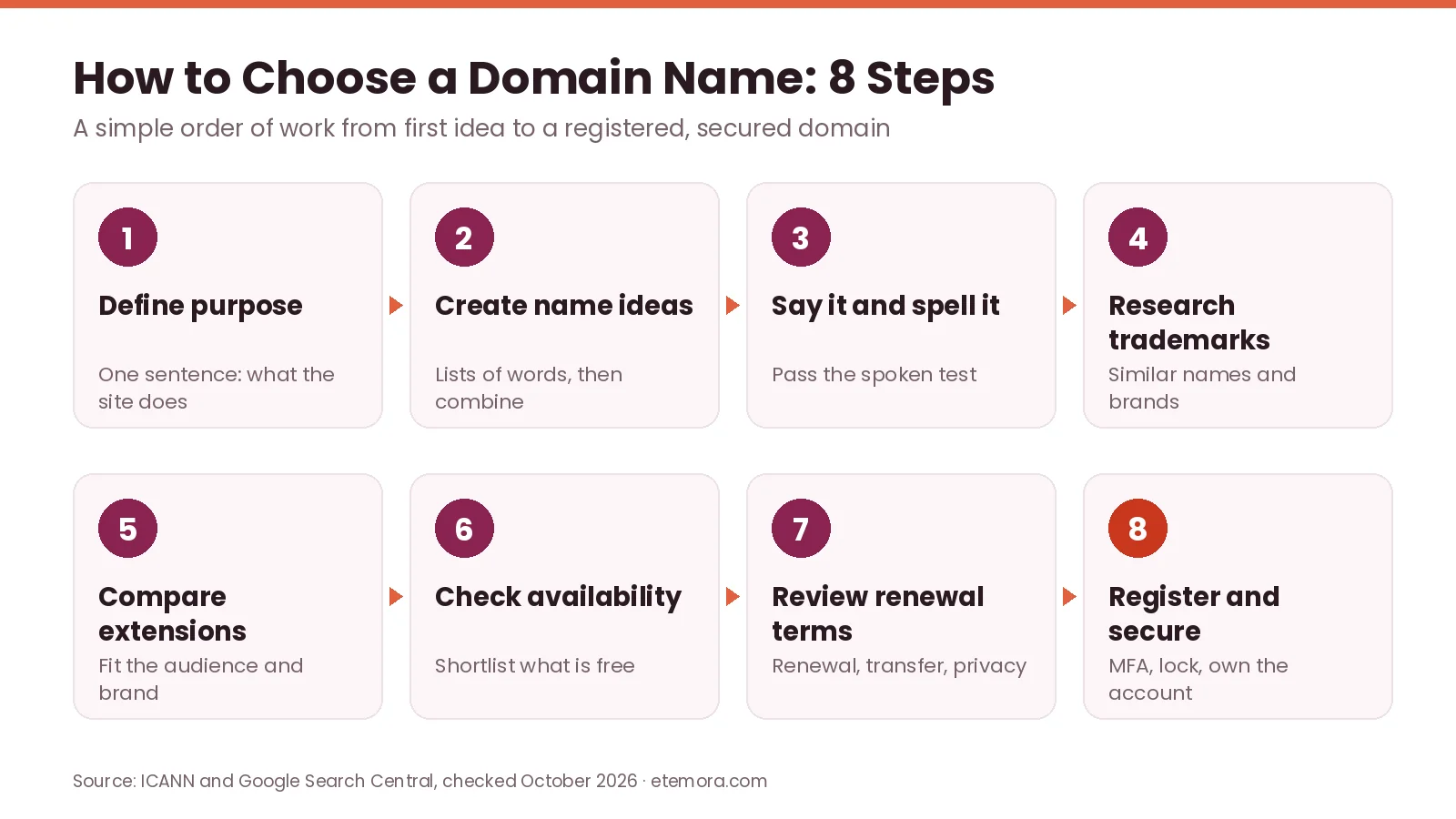
These ten tips show how to choose a domain name step by step. They follow the order most people actually work in: first the purpose and the wording, then the extension and legal checks, and finally the registrar and renewal terms. Use them together. A name that passes one test but fails three others is rarely the right one.
1. Start With the Purpose of Your Website
Before you choose a domain name, define what the website is actually going to do. A personal portfolio can be built around your own name. A local service business may benefit from its business name or location. A software company may need a distinctive brand that does not lock it into one product.
Write down the main purpose in one sentence, for example:
- A freelance designer helping small businesses with branding
- A website selling running equipment
- A local plumbing company serving one city
- A technology publication covering software and online services
- A personal portfolio for a photographer
This simple exercise stops you from picking a name that sounds interesting but does not fit the business. ICANN’s guidance for new registrants also suggests you explore all the options available before choosing your preferred domain name, and take time to understand the registrar and the registration agreement before you buy. If you are new to the buying process itself, our guide on how to buy a domain name walks through each step.

2. Keep the Domain Short and Easy to Remember
When you choose a domain name, shorter is usually easier to communicate, but short does not automatically mean good. A useful domain should pass the spoken test: imagine telling someone the name over the phone. Could they type it correctly without asking you to repeat or spell it?
For example, BrightRoof.com is easier to share than The-Bright-Roof-Company-Online.com. When comparing two available names, ask:
- Can someone spell it after hearing it once?
- Is the pronunciation obvious?
- Does it contain unnecessary words?
- Could someone easily mistype it?
- Does it still look clean written in lowercase?
Do not obsess over making the name extremely short. Chopping words into abbreviations can make a name harder to say and remember. A slightly longer name that is distinctive and easy to understand is often more useful than a short one with no clear meaning.
3. Make It Brandable
A domain name is not just a URL. It often becomes the name people associate with your business. Google’s documentation on choosing a site name for Google Search recommends a unique, concise name that accurately reflects the identity of your site, and says a generic name such as “Best Dentists In Iowa” is unlikely to be selected as a site name unless it is an extremely well-recognized brand.

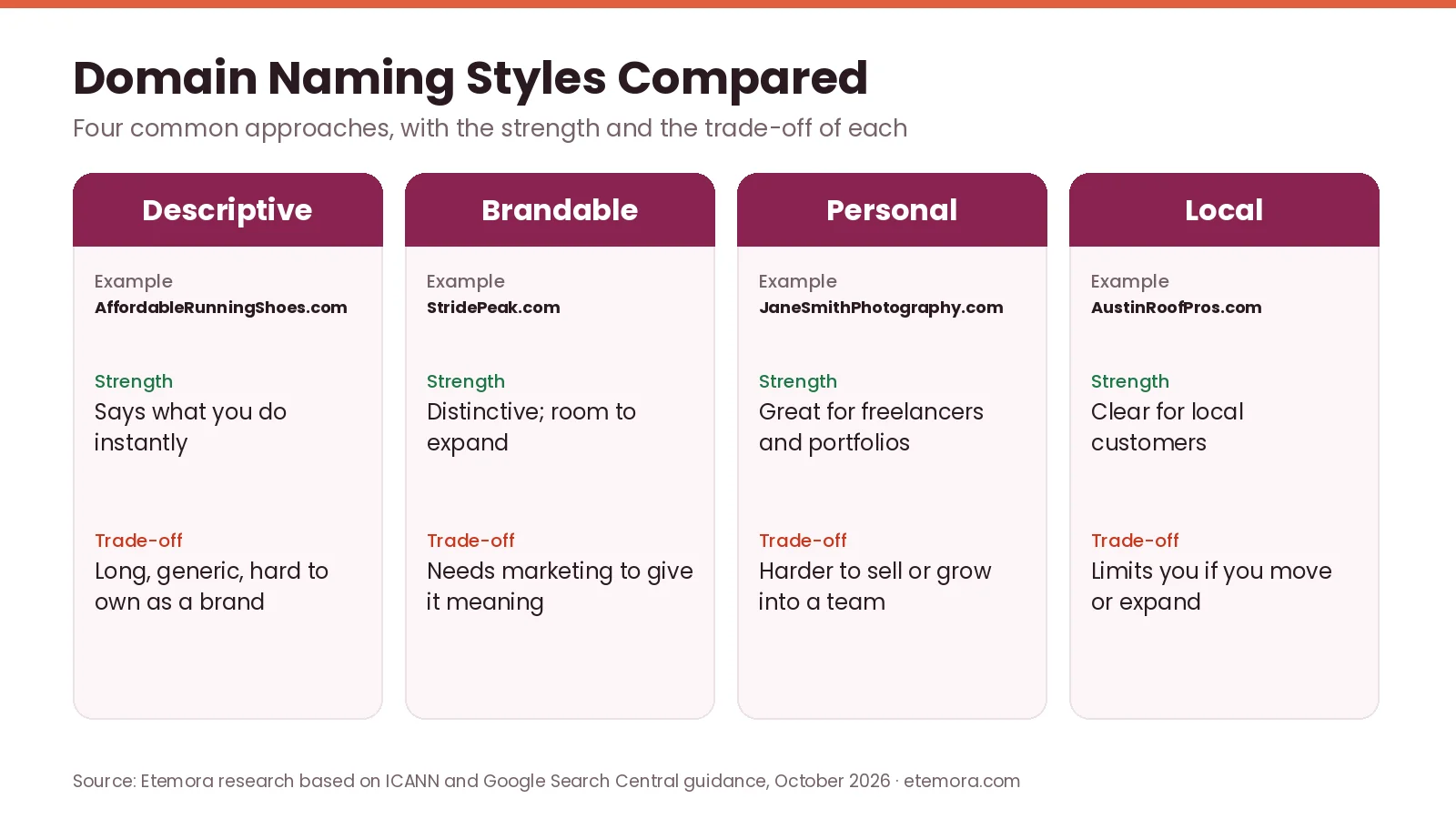
That makes brandability a key factor when you choose a domain name. Compare these approaches:
- Descriptive: AffordableRunningShoes.com
- Brandable: StridePeak.com
- Personal: JaneSmithPhotography.com
- Local: AustinRoofPros.com
There is no universal winner. A descriptive domain tells visitors immediately what a business does. A brandable domain gives a company more room to expand into new products or services. The key question is whether the name can become something people recognize, rather than just a string of keywords.
4. Do Not Choose a Domain Mainly for SEO
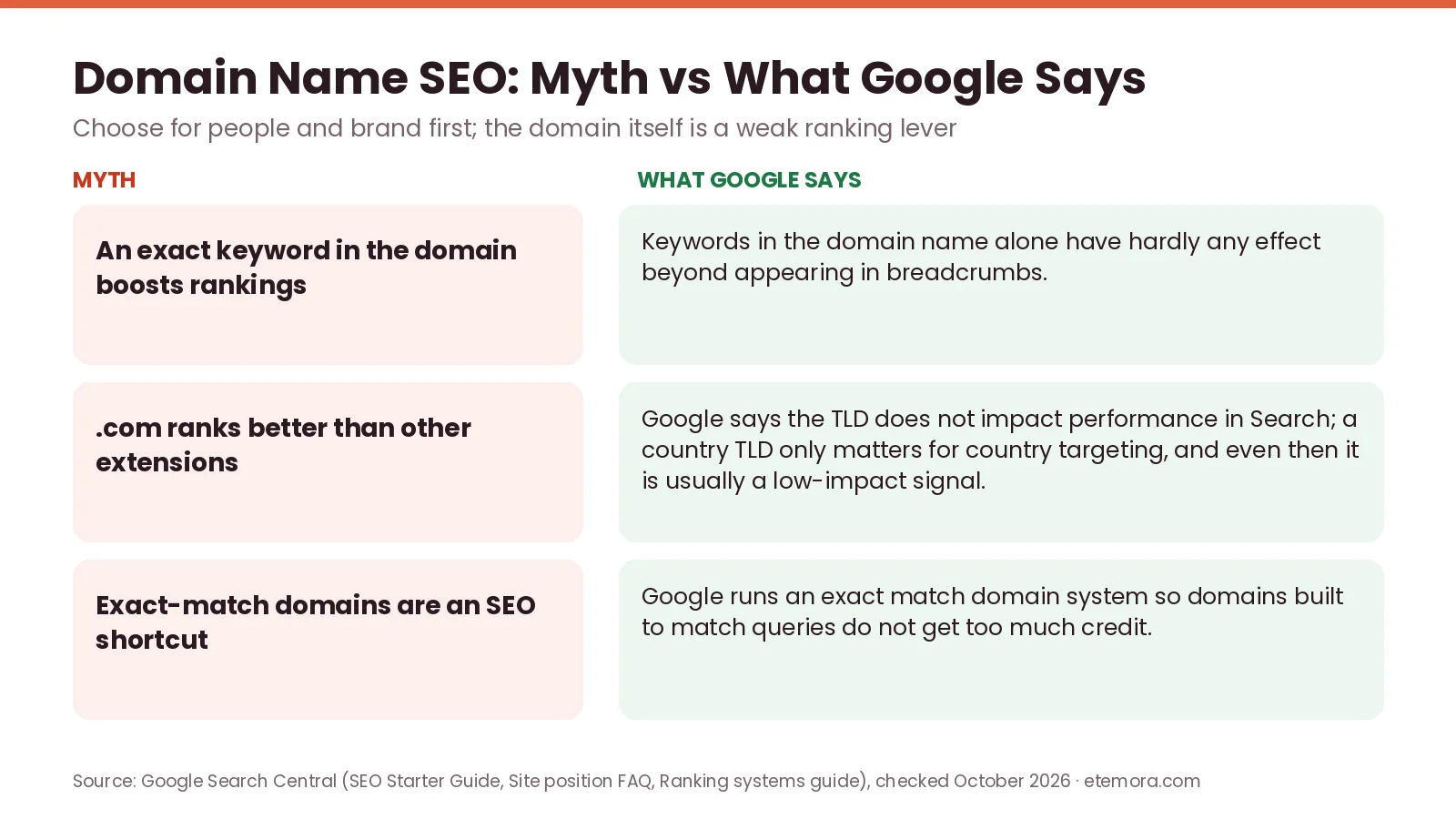
One of the biggest domain myths is that putting an exact keyword in the domain gives a site a major Google ranking advantage. Google’s SEO Starter Guide says that, from a ranking perspective, the keywords in a domain name (or URL path) alone have hardly any effect beyond appearing in breadcrumbs. Its advice is to do what’s best for your business and follow general marketing best practices.

That does not mean keywords are forbidden. A relevant word can make a domain clearer to users. The problem is choosing an awkward name purely because it contains a search phrase. A company selling accounting software, for instance, may find a brand like LedgerFlow.com more flexible than forcing an exact phrase into a long domain.
Think of SEO as one consideration when you choose a domain name, not the whole naming strategy. Rankings come from content, links and site quality, which is where tools from our list of the best SEO tools are far more useful than a keyword-stuffed domain.
5. Choose the Right Domain Extension
The extension is the ending of the domain, such as .com, .org or .net. For a business targeting a broad audience, .com is a straightforward choice when the name you want is available. Other extensions can make sense depending on the organisation, audience, location or brand.
Do not assume one extension ranks higher. Google’s site position FAQ answers “No” to the question of whether a top-level domain affects a site’s performance in Search, and the SEO Starter Guide adds that the TLD only matters if you target users in a specific country, where it is usually a low-impact signal.

When you choose a domain name extension, base it on:
- Your target market
- What your users will expect
- Your brand identity
- Availability
- Renewal price and terms
- Any restrictions attached to the extension
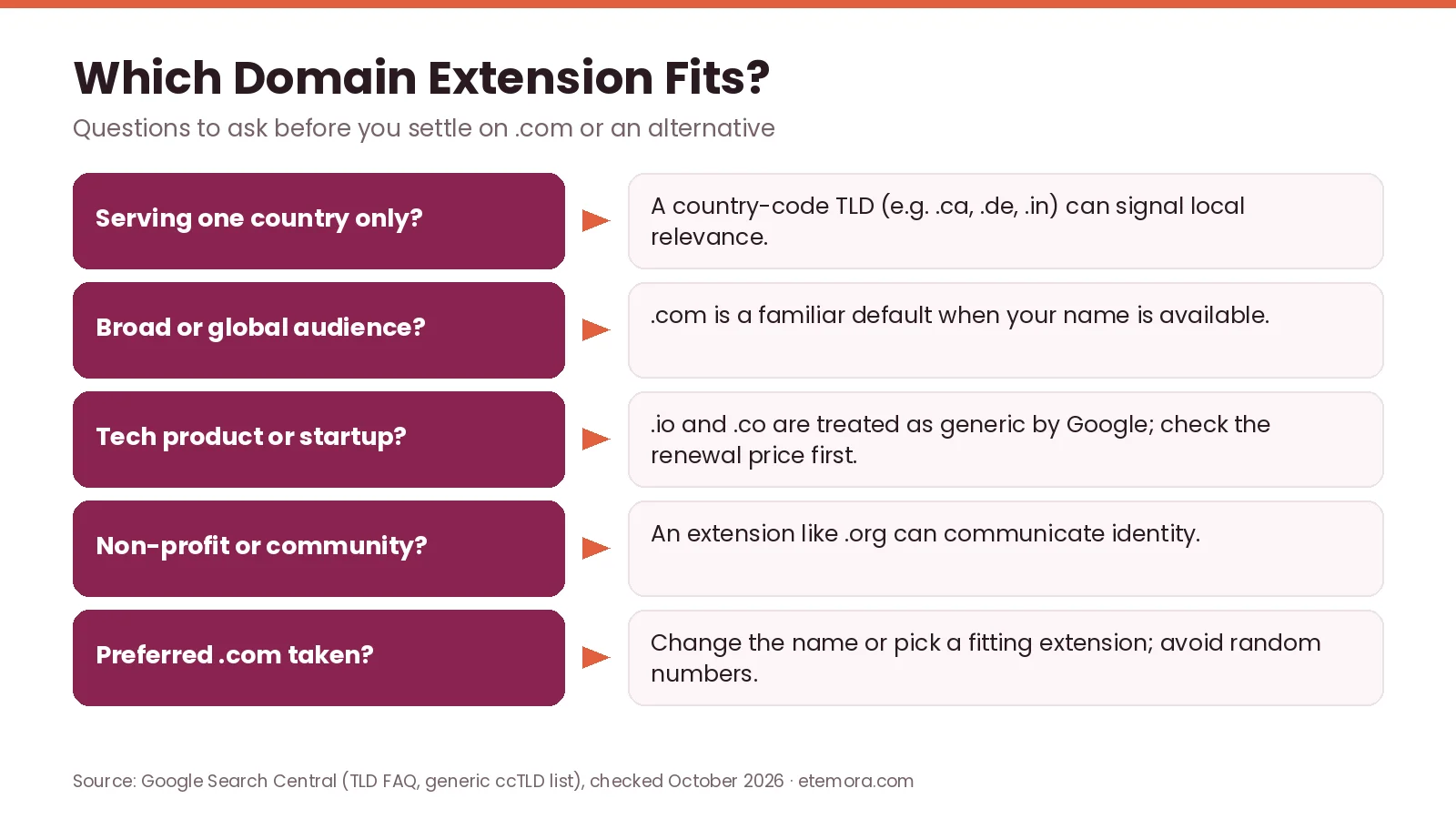
If the .com version is unavailable, do not automatically buy a strange alternative. First decide whether another extension genuinely fits the business. Our .com vs .net vs .io vs .co comparison breaks down the cost and use cases of the four most common choices.
6. Avoid Numbers, Hyphens and Confusing Spellings
Numbers create unnecessary ambiguity. If you tell someone your domain is Bright8.com, will they know whether the number is written as “8” or “eight”? Hyphens cause a similar problem: best-home-services.com is readable, but a listener has to remember where each hyphen goes.
Creative spellings are another trap. Dropping vowels or swapping letters can make a name feel unique on screen, but people who hear it will type the normal spelling and may land on someone else’s website.
This does not mean you can never choose a domain name with a number or hyphen; some established brands use them successfully. The practical rule is simpler: if the characters make the name harder to communicate, consider another option.
7. Check How the Domain Sounds Out Loud
A domain can look excellent on a screen and still be awkward when spoken. Before you finally choose a domain name, say each shortlisted name aloud and listen for:
- Similar-sounding words
- Difficult pronunciation
- Missing spaces between words that create new words
- Unclear spelling
- Accidental double meanings
- Confusing letter combinations
This matters most for businesses whose customers will hear the domain on phone calls, podcasts, videos, events or through word of mouth. A useful test is to tell a friend the domain without showing it and ask them to write down what they heard. If the result is consistently wrong, the name needs another look.
8. Research Trademarks Before Registering
Availability does not mean a name is safe to use, so trademark research belongs in every plan to choose a domain name. A domain can be free to register while a similar name is already tied to another business or trademark. The legal implications depend on the jurisdiction, the goods or services involved and other circumstances.
Research the name before you spend money on branding, packaging, advertising or content. At minimum, search:
- The exact business name
- Similar spellings
- Similar names in your industry
- Existing websites
- Trademark databases such as the USPTO trademark search (United States) and WIPO Global Brand Database
- Social profiles where relevant
Do not assume that adding a word or changing the extension makes a potentially conflicting name safe. If the name is central to a serious business launch, professional legal advice can be worthwhile.
9. Check the Domain’s History
A domain that has been registered before deserves extra research. Search engines, archived pages, business directories and other public sources can sometimes show whether it was used for a legitimate website, parked, redirected or associated with unrelated activity. Buying a previously used domain means you are not necessarily starting with a blank history.
For the current registration record, ICANN’s free Registration Data Lookup tool shows details such as the sponsoring registrar and key registration dates for a domain.

Do not assume an old domain is automatically valuable, and do not assume it is automatically harmful. Investigate before you buy. For a new business, a clean and understandable brand can be more useful than chasing an aged domain simply because it has existed for a long time.
10. Check the Registrar and Renewal Terms
When you choose a domain name, the wording is only half the decision; you also need to decide where to register it. ICANN recommends dealing directly with an ICANN-accredited registrar, researching its customer service and reading the registration agreement, which sets out the fees a registrar may charge and the conditions for switching providers. Our list of the best domain registrars compares the main options side by side.
Pay attention to:
- Registration price
- Renewal price
- Transfer fees
- Privacy options
- DNS management
- Account security
- Support channels
- Expiration policies
- Extra services added during checkout
A low introductory price does not mean the domain will stay cheap. Renewal matters because the domain becomes part of your business infrastructure, and losing it because a payment failed or an expiry date was missed can take down your website and email. Read more about why domain renewal prices go up and how to pay less.
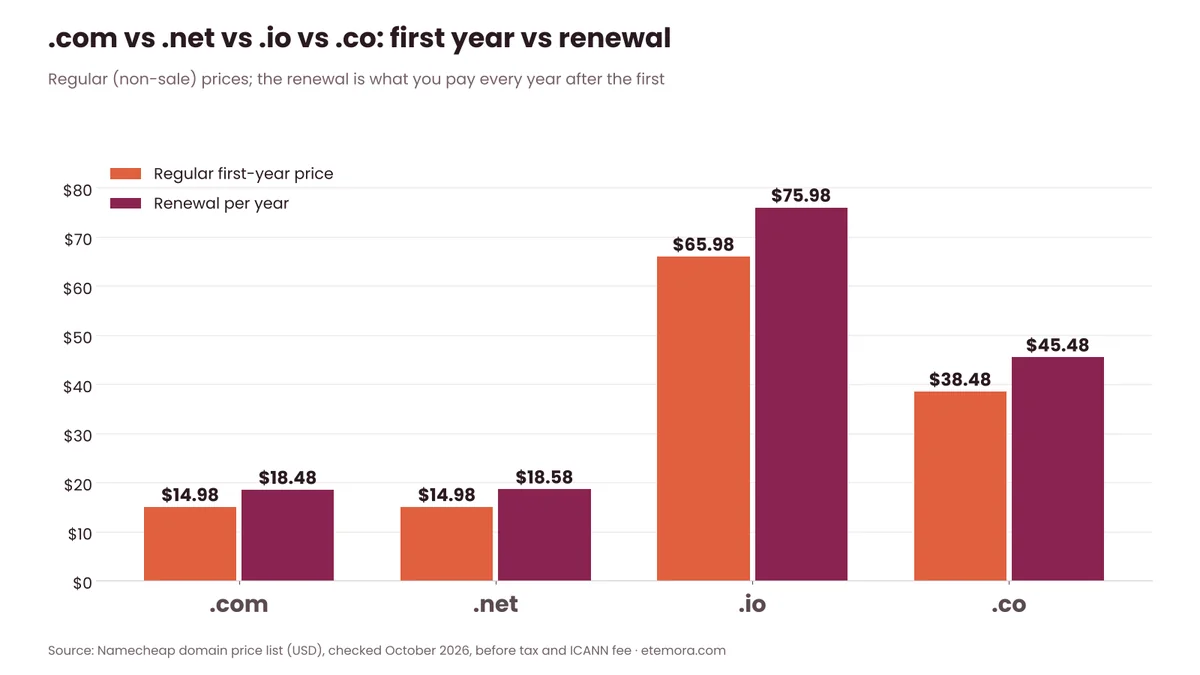
ICANN’s renewal guidance says registrations typically run for one to ten years and that you need to renew before the domain expires or risk losing it. It recommends knowing the renewal fees and terms, tracking the expiry date, keeping contact details current and considering auto-renew.

Want to compare renewal prices before you commit?
Compare Domain Registrars →How to Choose a Domain Name: A Simple Decision Checklist
If you have several available names, score each one against the same criteria instead of choosing the first one you like. This is the quickest way to choose a domain name you will not regret in a year.
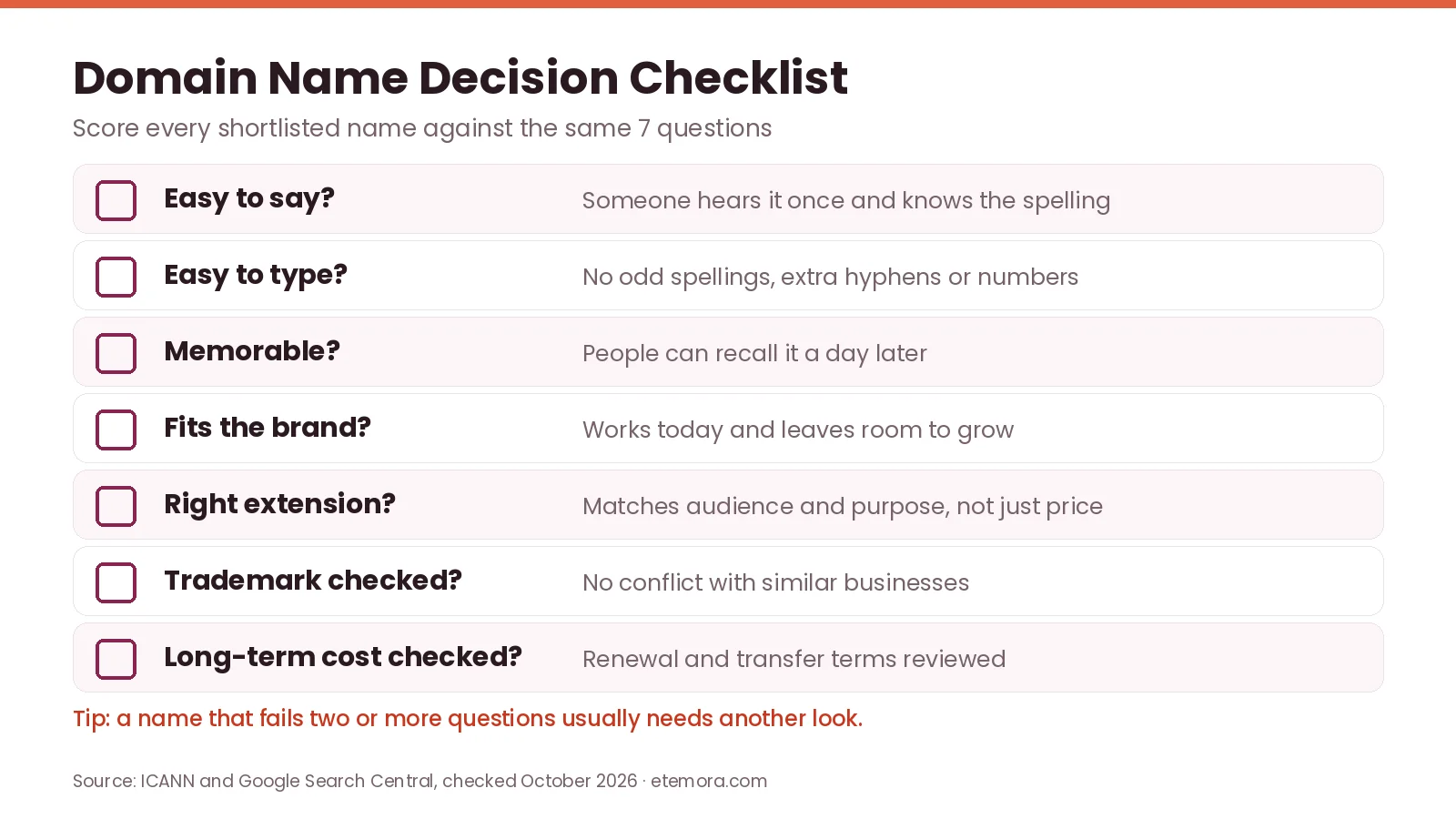
- Is it easy to say? Someone should hear the name once and understand how it is spelled.
- Is it easy to type? Avoid unnecessary punctuation, unusual spellings and confusing character combinations.
- Is it memorable? A customer should have a reasonable chance of remembering it later.
- Does it fit the brand? The name should make sense today without unnecessarily limiting future growth.
- Is the extension appropriate? Choose an extension that fits the audience and purpose, not one that is merely cheap or available.
- Have you checked legal conflicts? Search for similar businesses and trademarks before building the brand around the name.
- Have you checked long-term costs? Look beyond the first-year promotion and review renewal and transfer terms.
To check prices for your shortlist across several registrars at once, use our free domain registrar comparison tool or estimate the multi-year cost with the domain renewal cost calculator.
Domain Name Ideas: A Practical Brainstorming Method
If you need ideas before you choose a domain name, start with words connected to the business rather than typing random names into a domain search. Create four lists:
- What you sell
- Who you serve
- What benefit you provide
- Words associated with your industry
Then combine words from different lists. A business selling project-management software could explore concepts around planning, flow, tasks, teams, projects, boards and progress. You can also try:
- Two-word combinations
- Brand-style invented words
- Personal names
- Geographic names
- Descriptive names
- Metaphors related to the industry
The goal is not to generate hundreds of mediocre domains. Generate a smaller list of names that could genuinely become the brand, then run each one through the checklist above.
What Makes a Bad Domain Name?
Several patterns should make you pause. A domain is worth reconsidering when it is extremely long, hard to pronounce, packed with hyphens, dependent on an unusual spelling or tied too tightly to a product you may stop selling. Another warning sign is a name that sounds too similar to an established company.
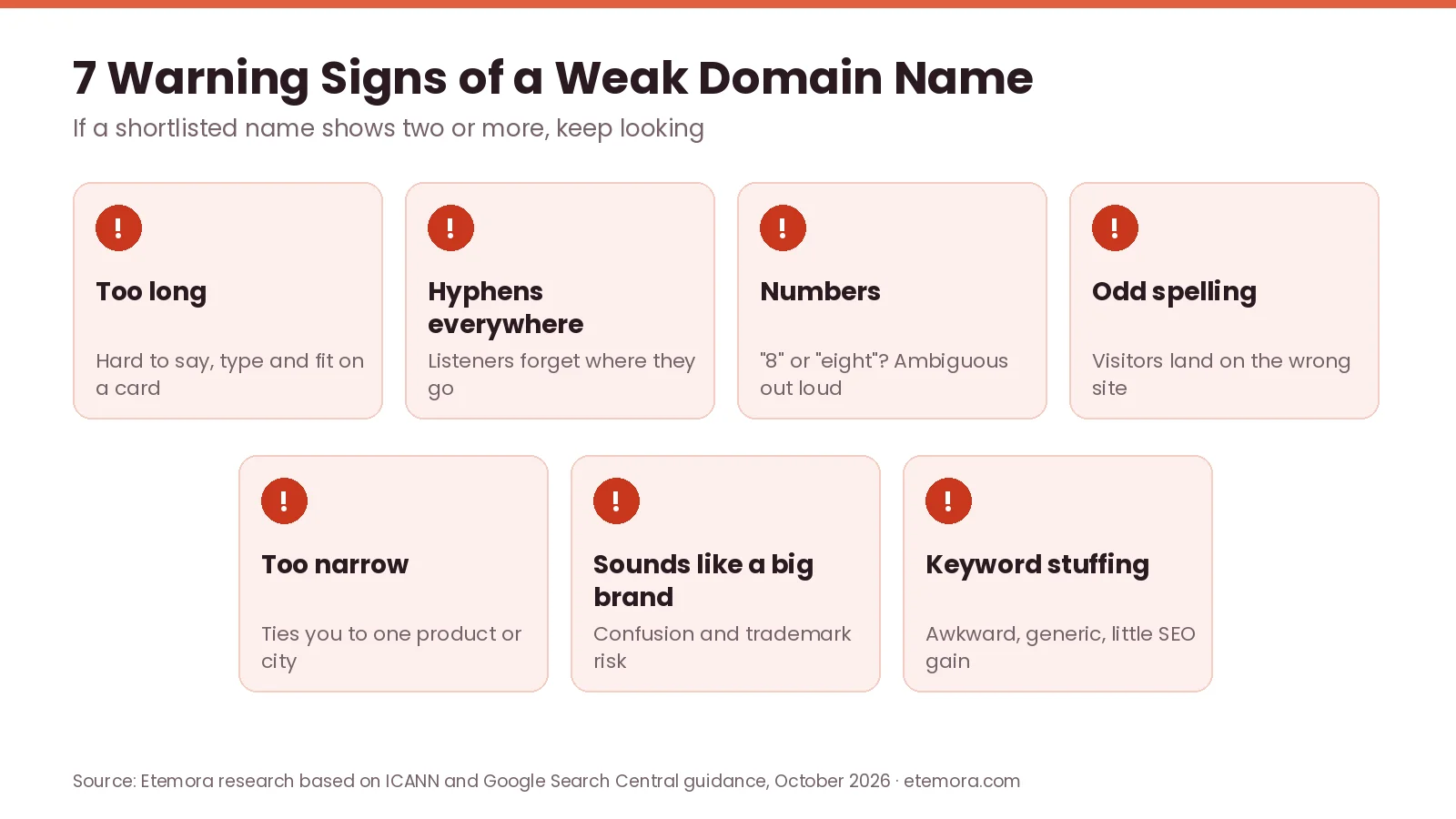
You should also question domains that rely on numbers or abbreviations customers may not understand. The best name is not necessarily the cleverest one. It is the one that communicates clearly and stays useful as the business develops.
Should You Use Keywords in a Domain Name?
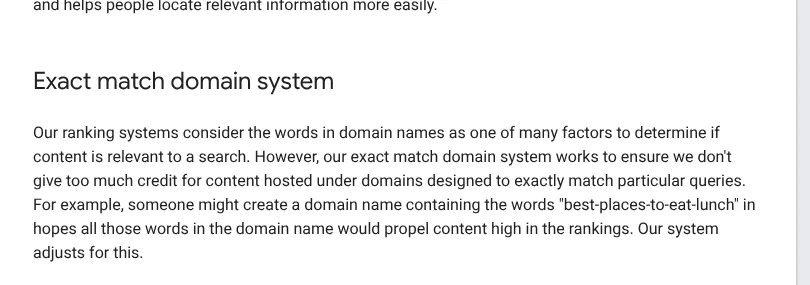
You can use keywords in a domain name, but you do not need them for SEO. Google’s guide to its ranking systems says the words in a domain name are one of many factors used to judge relevance, and that its exact match domain system works to avoid giving too much credit to domains designed to exactly match particular queries.
A keyword can still have branding or communication value. A domain containing a relevant industry term may tell visitors what the company does, even when the keyword provides little direct ranking benefit.
The better question is: “Would this still be a good brand if Google did not exist?” If the answer is yes, you are probably judging the domain for the right reasons.
Should You Always Choose .com?
No, .com is not mandatory. Google says its systems return the best and most relevant results regardless of the top-level domain, so the important question is whether the extension makes sense for your audience and business.
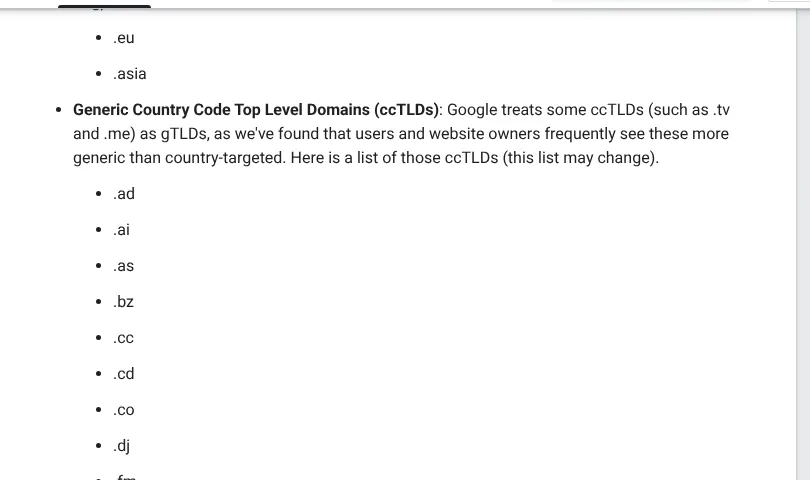
Some country-code extensions are a special case. Google’s guidance on multi-regional sites lists several ccTLDs, including .ai, .co, .io, .me and .tv, that it treats as generic rather than country-targeted, because users and site owners frequently see them that way (Google notes the list may change).
For a global commercial business, .com is a natural preference when it is available. A local business may consider a country-specific extension, while a non-profit may choose an extension that signals its identity. Do not reject a strong brand only because the .com is taken, but do not pick an unfamiliar extension without thinking about how your customers will perceive and remember it.
How to Protect Your Domain After Registration
Once you choose a domain name, protect the account that controls it. ICANN’s domain security advice for registrants recommends keeping your registrant account private, secure and recoverable, enabling multi-factor authentication if your registrar supports it, and asking your registrar to apply a “registrar lock” to help block unauthorised changes, transfers or deletions.


Privacy services also affect what contact information is shown publicly. ICANN explains that privacy and proxy services let customers register a domain without publishing their personal contact details in registration data, and that the two are legally different: with a proxy service, the provider itself is the registered domain name holder.

Finally, make sure you control the registrar account yourself. ICANN advises that if a third party manages your domain, you should ask where it is registered and get the account credentials so you have access when you need it. For registrars with strong security features, see the most secure domain registrars compared.
What to Do If Your Perfect Domain Is Taken
If the perfect name is taken, you can still choose a domain name that works. Do not immediately add random numbers or extra words. Try variations that keep the brand intact:
- Shorten an unnecessary word
- Combine two relevant words
- Use a stronger brand variation
- Consider another suitable extension
- Add a meaningful place name for a local business
- Ask whether an available alternative brand is actually better
You can also check whether the domain is actively used or simply registered. Be careful when buying from an existing owner: premium domains can cost far more than ordinary registrations, and their value depends heavily on the name, market, buyer, seller and transaction terms. If the price is unreasonable, moving to a different brand may be the better business decision.
If you are wondering where most names end up, our ranking of the largest domain registrars shows which companies manage the most .com domains.
Common Domain Name Mistakes
Choosing a name that is too narrow
A business that starts with one product may later add more services. A highly specific domain can become restrictive.
Prioritising keywords over branding
A keyword-heavy domain can be awkward and hard to remember, and Google says domain keywords alone have hardly any ranking effect.
Ignoring renewal costs
The first registration period is only part of the cost of ownership. Check what happens when the promotional period ends.
Skipping trademark research
Domain availability is not the same as legal clearance.
Giving control to someone else
If a developer or agency registers the domain through their own account, make sure you know where it is registered and how ownership and access are handled. ICANN specifically recommends getting access to the registrar account.
Waiting too long
Good names can be registered by someone else at any time. Once a shortlisted name passes your checks, there is little reason to delay registering it.
How We Compared
This guide on how to choose a domain name is based on official ICANN registrant guidance and Google Search Central documentation, checked in October 2026, together with practical branding, usability, security and long-term ownership factors. It is a research-based guide; we did not run hands-on tests. Read more about how we review products and services.
Final Verdict: How to Choose a Domain Name
The simplest way to choose a domain name is to put people before SEO. Look for a name that is easy to say, spell, remember and associate with your business, then check the extension, trademark situation, registration terms and long-term flexibility. Google’s guidance supports this: domain keywords alone have hardly any ranking impact, and the TLD does not decide search performance.
- Best fit for small businesses: a short, brandable name that clearly fits the business
- Best for local businesses: a memorable business name, with a place name when it helps
- Best for freelancers: a personal-name domain or a compact professional brand
- Best for startups: a distinctive brand that can grow beyond the first product
- Best for content websites: a memorable editorial brand, not a keyword-only domain
The strongest domain is not necessarily the shortest, cheapest or most keyword-heavy option. It is the one you can build a recognizable business around without creating spelling, branding, legal or renewal problems.
Found a name that passes every check?
Check Availability at Namecheap →Frequently Asked Questions
How do I choose a good domain name?
To choose a domain name that lasts, pick one that is short enough to remember, easy to spell and pronounce, relevant to your brand and flexible enough to support future growth. Before registering it, check availability, trademarks, the extension, renewal terms and the registrar’s policies.
Does a domain name affect SEO?
A domain name can give context, but its keywords alone have little ranking impact. Google says keywords in a domain name or URL path have hardly any effect beyond appearing in breadcrumbs, so choosing a domain mainly for an exact-match keyword is usually not a strong SEO strategy.
Is .com better for SEO?
No. Google says the top-level domain does not affect a site’s performance in Search, although a country-code domain can be a low-impact signal when you target one country. Brand recognition and user expectations can still make one extension a better fit for a particular business.
Should my domain name include a keyword?
A keyword can help when it makes the domain clearer, but it is not required for SEO. A natural brand name is often better than an awkward exact-match domain, and Google runs an exact match domain system so such domains do not get too much credit.
Should I use numbers or hyphens in my domain?
Usually, avoid them when they make the domain harder to communicate. Numbers are ambiguous when spoken (“8” or “eight”), and hyphens are easy to forget. They are not forbidden, but a clean name is easier to share.
What should I do if my ideal domain is already taken?
Try meaningful variations that keep the brand rather than adding random characters. You can shorten the name, combine words differently, consider another suitable extension or choose a different brand. If someone else owns the domain, investigate its use and the transaction terms before considering a purchase.
Should I check trademarks before buying a domain?
Yes. Check for potentially conflicting trademarks and businesses before building your brand around a domain. A domain being available to register does not by itself mean using the name is legally risk-free. For important business launches, professional legal advice can be appropriate.
How long should a domain name be?
There is no universal ideal length, but shorter names are generally easier to remember and share when they stay clear and distinctive. The practical test is whether people can hear the name, understand its spelling, remember it later and type it without confusion.
Can I change my domain name later?
Yes, a website can move to another domain, but it creates technical, branding and search-management work. If the original domain already has links, traffic, email addresses and brand recognition, changing it can be disruptive, so choosing carefully at the start reduces that risk.
How can I protect my domain name?
Use a secure registrar account, enable multi-factor authentication when available, keep registration details current and watch for registrar messages such as renewal reminders. ICANN also recommends asking your registrar for a registrar lock to help prevent unauthorised changes or transfers.
Sources
- ICANN: Information for Domain Name Registrants
- ICANN: Thinking About Registering a Domain Name? (PDF)
- ICANN: Renewing Your Domain Name
- ICANN: Protecting your domain name account
- ICANN: Privacy and Proxy Service Providers
- ICANN Registration Data Lookup tool
- Google Search Central: SEO Starter Guide
- Google Search Central: Site position in Google Search results FAQ
- Google Search Central: Guide to Google Search ranking systems
- Google Search Central: Provide a site name to Google Search
- Google Search Central: Managing multi-regional and multilingual sites
- USPTO: Trademark search
- WIPO: Global Brand Database
Related articles you may like
 DomainsWhat Is a Domain Name? A Simple Guide for 2026
 DomainsCheapest Domain Registrars: 6 Best Deals in 2026
 Domains.com vs .net vs .io vs .co: Best 2026 Domain Extension Choice
 Domains.com Renewal Prices 2026: What 9 Registrars Charge Above Wholesale
 DomainsNamecheap Review: Honest 2026 Pricing & Features
 DomainsNamecheap vs GoDaddy: 2026 Honest Domain Comparison