
Namecheap Review: Honest 2026 Pricing & Features
 By M. Zaid
- Updated October 4, 2026
- 21 min read
This Namecheap Review answers the question most buyers actually have: is Namecheap a good place to buy a domain or host a website, or do the low introductory prices hide expensive renewals and limitations?
Namecheap is best known as a domain registrar, but it also sells shared hosting, managed WordPress hosting (EasyWP), VPS and dedicated servers, email, SSL certificates, security products and website-building tools. This review covers the parts that matter most to typical website owners: domain pricing, hosting plans, features, security, ease of use, support, renewal costs and alternatives. All prices are in US dollars and were checked against Namecheap’s official pages in October 2026.
Quick answer: Namecheap is a strong option for budget-conscious buyers who want domains, hosting and related services from one account. A .com costs $11.28 for the first year and renews at $18.48/year, domain privacy is free for eligible domains, and Stellar shared hosting starts at $26.88 for the first year on yearly billing. The main caution is renewal pricing: most hosting plans renew at roughly double the promotional first-year price.
Want to see today’s Namecheap prices?
Check Current Namecheap Pricing →Namecheap Review at a Glance
“Namecheap pricing” is not one number. Domain registration, shared hosting and managed WordPress hosting have different billing structures and renewal terms, so this Namecheap Review table separates them.
| Product | Best for | First term (Oct 2026) | Renewal | Key strength | Main drawback |
|---|---|---|---|---|---|
| .com domain | Domain buyers | $11.28/year | $18.48/year | Free privacy on eligible domains | Renewal costs more than year one |
| Stellar | One small website | $26.88 for year one ($2.28/mo) | $55.88/year | 3 websites, cPanel, 30 mailboxes | 20 GB SSD storage |
| Stellar Plus | Several small sites | $34.88 for year one ($2.98/mo) | $85.44/year | Unlimited websites, unmetered SSD | Higher renewal |
| Stellar Business | Business sites | $58.88 for year one ($4.98/mo) | $128.88/year | 50 GB SSD, AutoBackup | Most expensive shared tier |
| EasyWP Starter | One WordPress site | $38.88 for year one ($3.24/mo) | $68.88/year | Managed WordPress features | 10 GB NVMe storage |
| EasyWP Turbo | Growing WordPress sites | $61.88 for year one ($5.16/mo) | $114.88/year | 50 GB NVMe, more CPU and RAM | Renewal nearly doubles |
Prices are Namecheap’s listed US-dollar prices on yearly billing, checked October 2026, before tax and the $0.20 ICANN fee where it applies. Promotions change often, so confirm the price at checkout.
What Is Namecheap?
Namecheap is an ICANN-accredited domain registrar, based in Phoenix, Arizona, that has served customers since 2001. Its current product range includes domain registration and transfers, shared hosting, managed WordPress hosting through EasyWP, VPS hosting, dedicated servers, email, SSL, DNS, security products and website-building tools.
For a first-time website owner, this broad catalog can be convenient. You can register a domain and then decide whether to host it with Namecheap or point it to another provider.
That flexibility matters: buying a domain from Namecheap does not require you to use Namecheap hosting. Many site owners keep the registrar separate from the hosting company, and our guide to the best domain registrars explains why that can make switching hosts easier later.
Namecheap Domain Pricing
Domain pricing is the natural starting point for any Namecheap Review. Registration is where Namecheap is most visible, and its current pricing makes the difference between registration and renewal especially important.
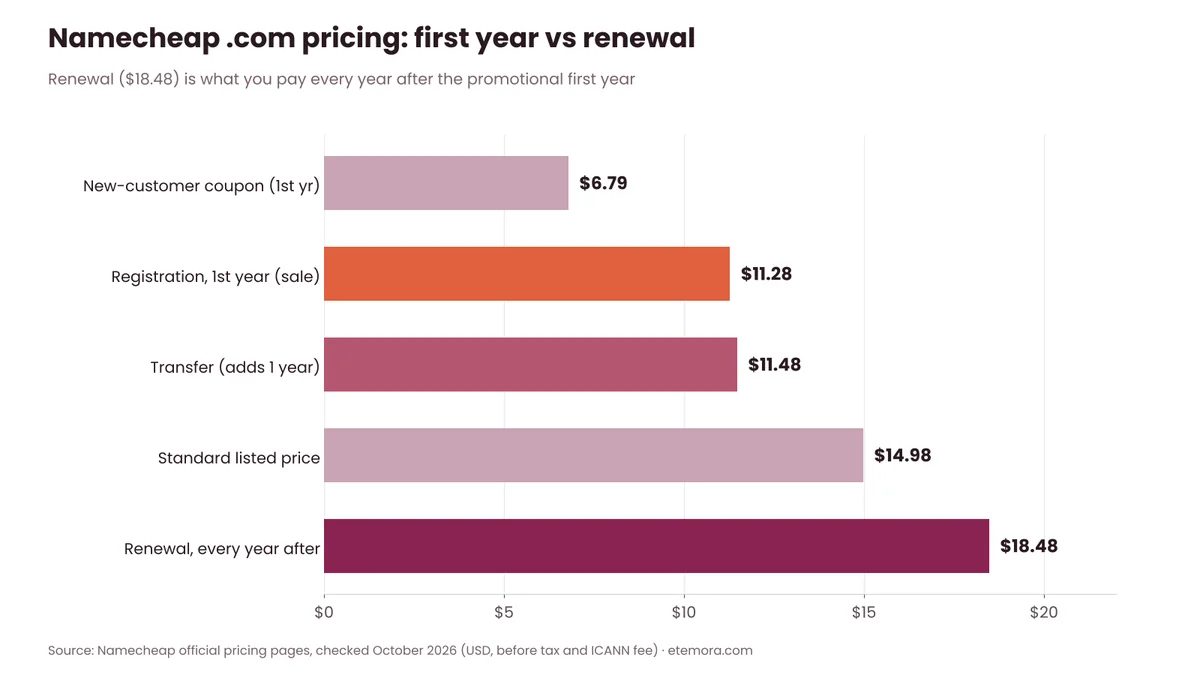
As of October 2026, Namecheap’s domain pricing page lists a .com at $11.28 for the first year (a sale price against the standard $14.98), $18.48 for renewal and $11.48 for a transfer. The same page also advertises a $6.79 .com coupon for new customers only. Namecheap notes that ICANN charges a mandatory $0.20 annual fee for each registration, renewal or transfer of affected domains, which is added at checkout.
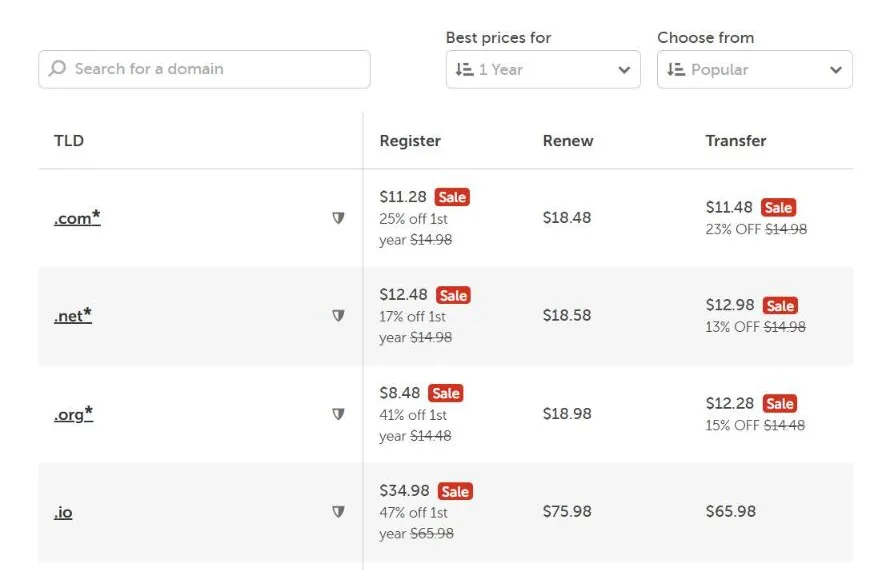
The first-year promotional price should not be treated as the long-term annual cost. If you plan to keep a .com for several years, budget around the renewal rate rather than the promotional registration price.
Namecheap Domain Privacy
One of Namecheap’s most useful domain features is free privacy protection. According to Namecheap’s Domain Privacy page, the service is free for life with every eligible new registration or transfer, and it hides your personal contact details from the public Whois database. The privacy service is provided by Withheld for Privacy.

That removes the need for a separate privacy add-on, but check whether your TLD supports it: because of registry restrictions, privacy is unavailable for a handful of extensions.
Namecheap Domain Transfers
Namecheap also accepts domain transfers. On its domain transfer page, a .com transfer is listed at $11.48 with a renewal price of $18.48 afterwards, and free privacy is included for eligible domains.
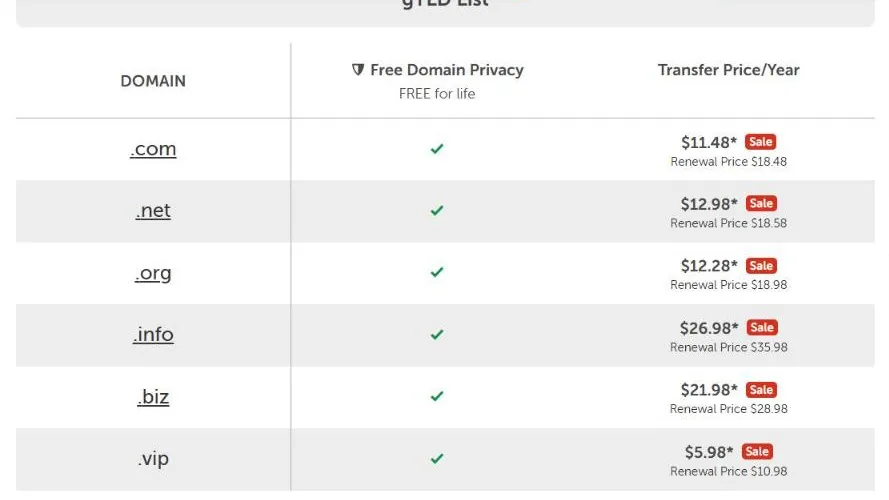
If you already own a domain elsewhere, compare the transfer price and the renewal cost rather than choosing a registrar because of a first-year promotion alone. Our step-by-step guide on how to transfer a domain covers unlocking, authorization codes and timing.
Moving or registering a .com?
See Namecheap Transfer Prices →Namecheap Hosting Pricing
Hosting is the second big part of this Namecheap Review. Namecheap’s lineup includes shared hosting, managed WordPress hosting, VPS and dedicated servers. For most small websites, the shared Stellar plans and EasyWP are the relevant options.
On yearly billing, Namecheap’s shared hosting page lists Stellar at $26.88 for the first year (renews at $55.88/year), Stellar Plus at $34.88 (renews at $85.44/year) and Stellar Business at $58.88 (renews at $128.88/year). Monthly billing costs $5.88, $7.88 and $11.88 per month respectively, while two-year billing lowers the promotional rate to $1.88, $2.28 and $4.48 per month. Namecheap states that the advertised discount applies only to yearly and two-year purchases and not to renewals.
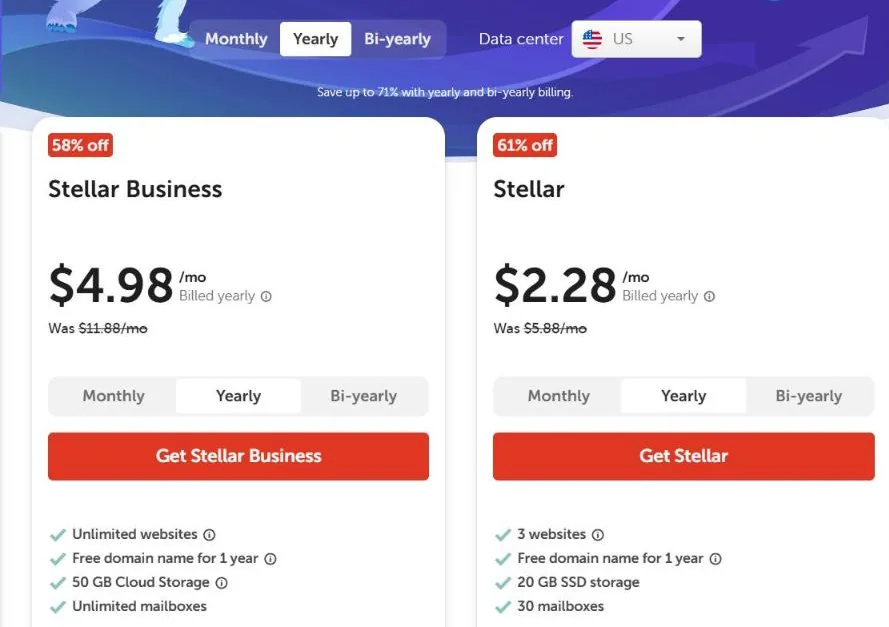
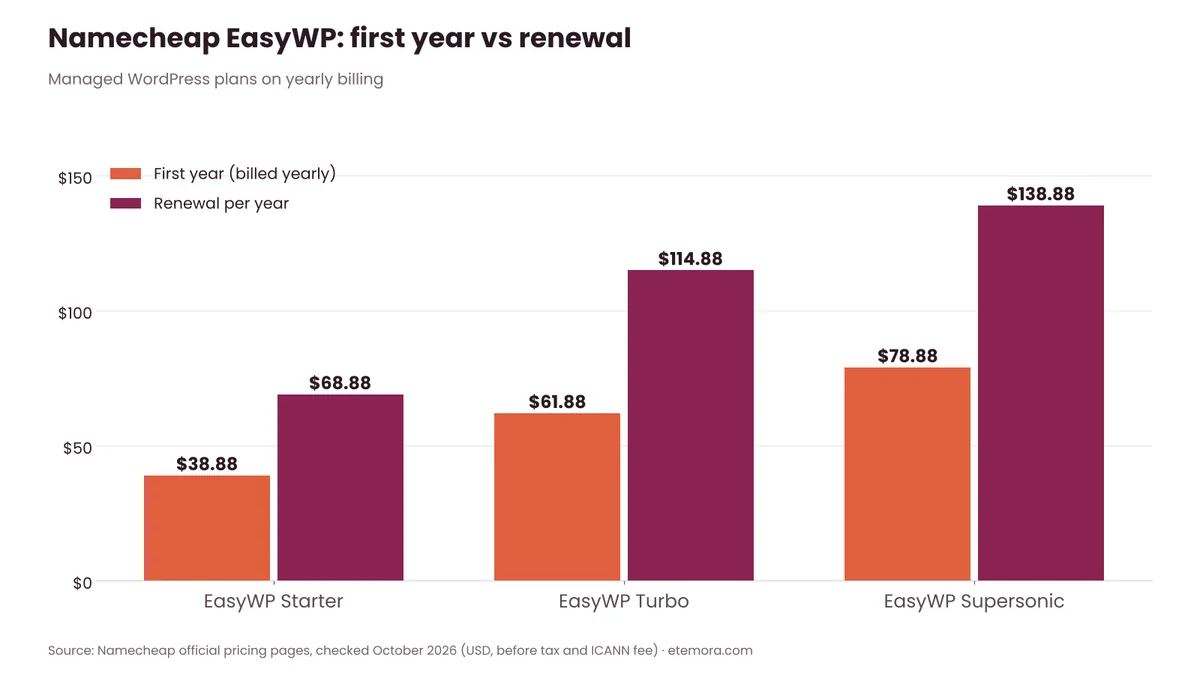
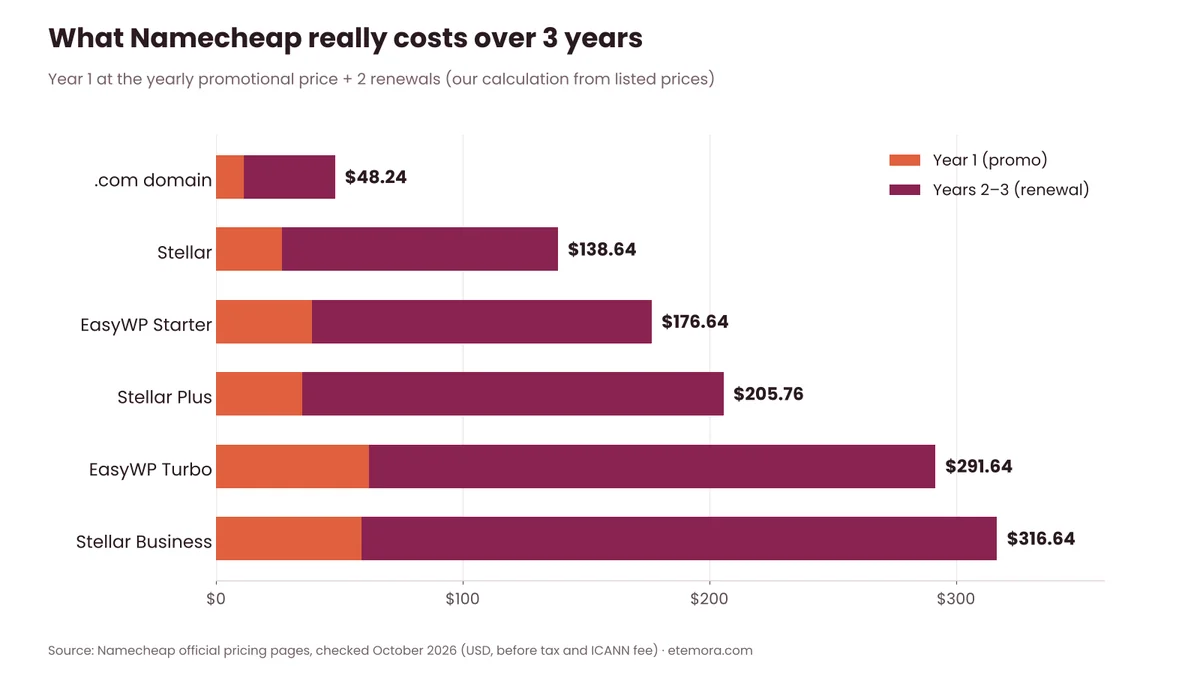
That makes renewal planning particularly important. The chart below shows how much each shared plan renews for compared with its promotional first year.

Stellar
Stellar is the entry plan. It allows up to three websites and includes 20 GB SSD storage, 30 mailboxes, unmetered bandwidth, cPanel, Softaculous and backups twice a week. All shared plans also include Imunify360 security at no extra cost, free automatic SSL installation and free website migration.
Stellar makes sense for a personal website, portfolio, small blog or basic business site where 20 GB of storage is enough. If you need more websites or more storage, the higher plans become relevant.
Stellar Plus
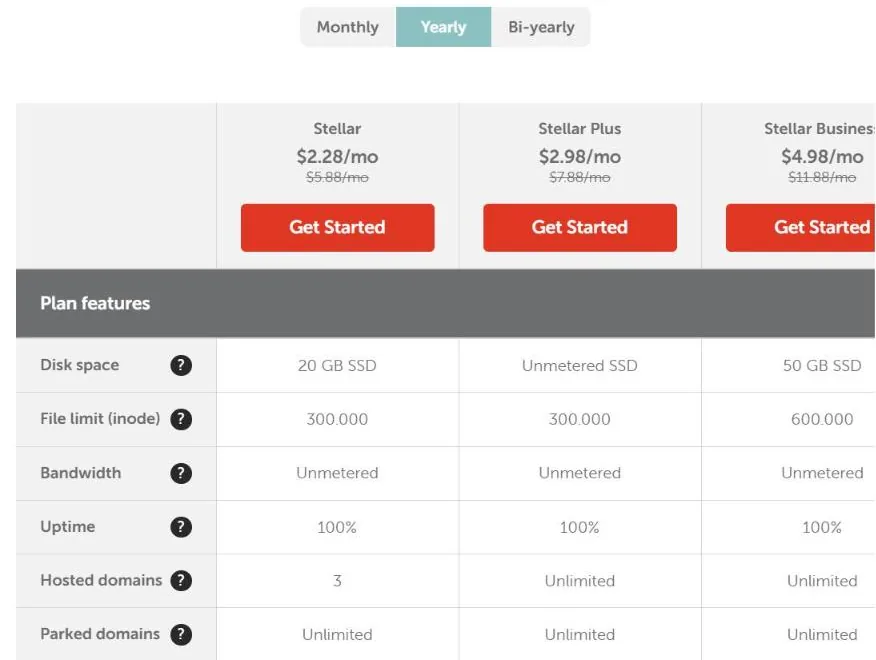
Stellar Plus allows unlimited websites, unlimited mailboxes and unmetered SSD storage, and adds AutoBackup. It renews at $85.44/year as of October 2026.
“Unmetered” should not be read as unlimited storage for any kind of file. Namecheap says the disk space is intended only for your website and must be used in line with its Acceptable Use Policy.
Stellar Business
Stellar Business is the top shared-hosting tier. It includes unlimited websites, unlimited mailboxes, 50 GB SSD storage on Cloud Storage infrastructure, a higher file limit (600,000 inodes versus 300,000 on the other plans) and AutoBackup. It renews at $128.88/year as of October 2026.
Comparing Stellar plans?
View Namecheap Hosting Plans →Namecheap EasyWP Review
EasyWP gets its own section in this Namecheap Review because it works very differently from shared hosting. It is Namecheap’s managed WordPress hosting product. It is separate from traditional shared hosting and runs on Namecheap’s own cloud platform, built specifically for WordPress.
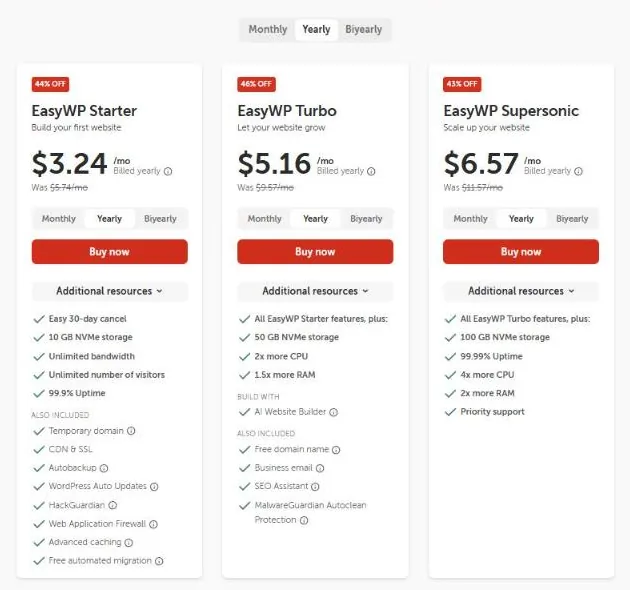
According to Namecheap’s EasyWP pricing page, EasyWP Starter costs $3.24/month billed yearly ($38.88 for the first year) and renews at $68.88/year. It includes 10 GB NVMe storage, unlimited bandwidth, CDN and SSL, Autobackup, WordPress auto updates, HackGuardian, a web application firewall, advanced caching and free automated migration.
EasyWP Turbo costs $5.16/month billed yearly ($61.88 for the first year) and renews at $114.88/year. It raises storage to 50 GB NVMe, with 2x more CPU and 1.5x more RAM than Starter, and adds extras such as a free domain name and business email offer.
EasyWP Supersonic costs $6.57/month billed yearly ($78.88 for the first year) and renews at $138.88/year. It includes 100 GB NVMe storage, 4x more CPU, 2x more RAM, a 99.99% uptime commitment and priority support.
The key difference from shared hosting is management. EasyWP handles WordPress updates, backups, caching and security layers that would otherwise take more manual work. Namecheap also notes that you won’t need a caching plugin, and a few untrusted plugins can’t be activated.
Running WordPress and want less maintenance?
See EasyWP Plans →What Namecheap Really Costs Over Three Years
This may be the most useful table in this Namecheap Review. Because renewals are so much higher than first-year promotions, a three-year view gives a fairer picture. The chart below adds the yearly-billing first-year price to two renewals at the listed renewal rate. It is our own calculation from Namecheap’s published prices, before tax and any ICANN fee.
| Product | Year 1 | Years 2–3 | 3-year total |
|---|---|---|---|
| .com domain | $11.28 | $36.96 | $48.24 |
| Stellar | $26.88 | $111.76 | $138.64 |
| EasyWP Starter | $38.88 | $137.76 | $176.64 |
| Stellar Plus | $34.88 | $170.88 | $205.76 |
| EasyWP Turbo | $61.88 | $229.76 | $291.64 |
| Stellar Business | $58.88 | $257.76 | $316.64 |
You can run your own numbers for other extensions and terms with our domain renewal cost calculator.
Namecheap Features
Namecheap offers considerably more than domain registration. For this Namecheap Review we focused on the features most website owners will actually use.
cPanel and Softaculous
Shared hosting uses cPanel, giving you access to website files, domains, email accounts, DNS settings, statistics and other hosting controls. Softaculous installs WordPress in seconds and offers 100+ other apps with one-click install.
This suits users who want conventional hosting controls rather than a heavily simplified website-builder interface.
Email Hosting
Shared hosting includes domain-based email accounts: 30 mailboxes on Stellar and unlimited mailboxes on Stellar Plus and Stellar Business. Namecheap also lists forwarders, auto-responders, mailing lists and Jellyfish spam protection. That is useful for small businesses that want an address such as contact@yourdomain.com without paying for a separate email service, although heavier email users may still prefer a dedicated business email provider.
Website Builder and AI Tools
All shared hosting plans include Sitejet Website Builder, which can generate a starting site from your business name and industry, plus an “AI for WordPress” tool for creating and editing WordPress sites with prompts.
A builder works well for simple websites, but WordPress remains the more flexible choice if you expect to add advanced plugins, custom functionality or complex content. If you are weighing those options, see our roundup of the best website builders.
Namecheap Security
Security is an area where this Namecheap Review found a solid set of included tools across domains and hosting.
For domains, eligible registrations get free privacy protection, and DNSSEC is available for eligible domains as part of Namecheap’s Basic or Premium DNS. For shared hosting, Imunify360 is included at no extra cost, with malware scanning, intrusion prevention, a machine-learning firewall and KernelCare patching. Namecheap also describes account isolation on its hosting platform, and cPanel supports two-factor authentication.
SSL is worth reading carefully: shared hosting plans include 50 free Standard SSL certificates for one year, installed automatically. EasyWP lists free Let’s Encrypt SSL, currently for Namecheap-registered domains.
Security features are not a guarantee that a site cannot be compromised. You still need strong credentials, updated software, trusted plugins and sensible access controls. For more on choosing a registrar with strong account protection, see our list of the most secure domain registrars.
Namecheap Performance
Etemora did not run performance tests for this Namecheap Review, so this section relies on independent third-party reporting.
In its Namecheap hosting review, TechRadar ran a WordPress core benchmark on Stellar Business and reported an overall server score of 4.7, describing the result as weaker than some competing hosts. Its load test told a different story: at 5, 9 and 15 concurrent users, TechRadar recorded 1,677, 2,903 and 4,917 successful transactions with zero failures, a 100% success rate and a longest transaction of 8.95 seconds.
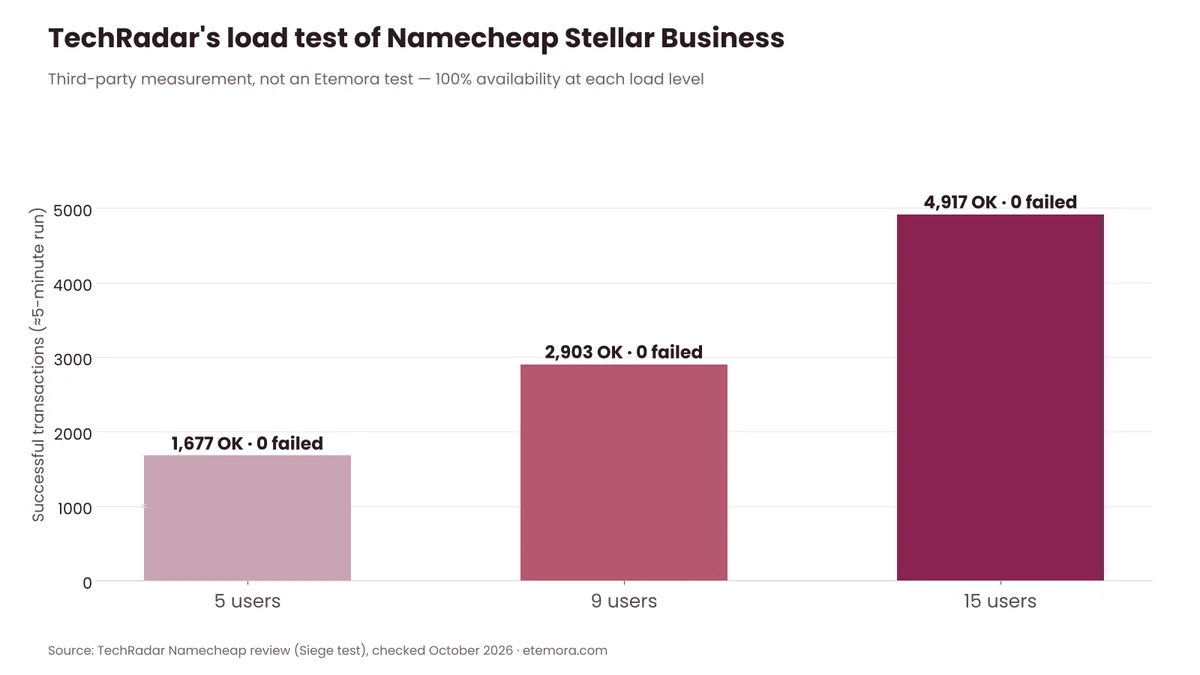
These are TechRadar’s measurements, not Etemora results. The takeaway is that Namecheap’s low prices don’t automatically make it the fastest choice for every WordPress site. For simple websites, the resources may be enough; for demanding applications, busy stores or complex WordPress builds, a more specialized host may make more sense. Our best web hosting services guide compares the alternatives.
Namecheap Ease of Use
Ease of use matters in any Namecheap Review aimed at beginners. Namecheap uses familiar tools such as cPanel and Softaculous rather than forcing you into a fully proprietary hosting workflow.
TechRadar describes the control panel as busy at first, but notes that important hosting settings are organized into dedicated areas and highlights cPanel and Softaculous as useful tools.
For domain management, the Namecheap dashboard brings domains, hosting and related services into one account, which is convenient if you buy several products from the same provider. EasyWP has its own simplified dashboard instead of cPanel.
The trade-off is the size of the catalog. A beginner may see more options, settings and add-ons than they need.
Namecheap Support
Support is often a deciding factor in a Namecheap Review. Namecheap offers 24/7 help through live chat and tickets, plus a large knowledge base, guides, how-to videos and a status page in its Help Center. TechRadar notes that there is no telephone support.

In TechRadar’s review, live chat was always available, with the longest wait to start a conversation around three minutes, and its test ticket received a reply in about 90 minutes. That is an independent publication’s experience, not an Etemora test or a guarantee of future response times.
If you prefer phone support, this is a real limitation. If you are comfortable with chat, tickets and documentation, the available channels are solid.
Want to check support options before buying?
Visit the Namecheap Help Center →Namecheap Pros and Cons
Here is the Namecheap Review summary of where Namecheap stands out and where it falls short, based on its official plan details and the independent evidence above.
Strengths and Weaknesses at a Glance
Pros
- Competitive .com pricing ($11.28 first year)
- Free lifetime privacy for eligible domains
- Large selection of domain extensions
- Shared hosting includes cPanel, Softaculous and Imunify360
- Free website migration
- 24/7 live chat and ticket support
- EasyWP offers affordable managed WordPress hosting
Cons
- Renewals are much higher than introductory rates
- Free shared-hosting SSL covers the first year only
- Entry-level Stellar is limited to 20 GB storage
- Shared hosting isn’t aimed at the most demanding sites
- No telephone support
- The large catalog can make choosing harder
Is Namecheap Good for Domains?
Yes. Namecheap is a reasonable domain registrar for people who value straightforward management and included privacy protection.
Its .com costs $11.28 for the first year and $18.48 to renew as of October 2026, and free privacy for eligible domains avoids a separate subscription. If you are new to the process, our guide on how to buy a domain name walks through each step.
The bigger question is the extension. A cheap .com does not mean every TLD is cheap: on the same price list, .io registers at $34.98 but renews at $75.98. Check the renewal price for your exact TLD before buying. For a head-to-head on .com costs, see our Namecheap vs GoDaddy comparison.
Is Namecheap Good for Hosting?
Namecheap can be a sensible host for smaller websites, especially when low upfront cost and conventional cPanel hosting are priorities.
The main caution is renewal pricing. Stellar, Stellar Plus and Stellar Business renew at $55.88, $85.44 and $128.88 per year respectively as of October 2026.
For WordPress users, EasyWP is a separate option with automatic updates, backups, caching and CDN. It may suit you better than traditional shared hosting if you want Namecheap to handle more of the WordPress maintenance.
Namecheap Refund Policy
Namecheap offers a 30-day money-back guarantee on eligible first-time hosting purchases, but the conditions matter.
Its refund policy says that only first-time Shared Hosting, Stellar, Stellar Plus, Stellar Business, Reseller, VPS and certain other hosting accounts may qualify if cancelled within 30 days of purchase. The shared hosting page adds that the guarantee applies only to customers who start without a 30-day trial, and not to people who opened a second account or re-registered after cancelling.
EasyWP has its own terms: a refund may be issued within 30 days of initial sign-up (excluding free trials) or within 24 hours of a renewal, and refunds don’t cover SSL certificates, domain registration fees or add-ons.
Whatever any Namecheap Review says, read the terms for the specific product rather than assuming every Namecheap service has identical cancellation rules.
Namecheap Review: Hidden Costs to Watch
The biggest cost issue is not the initial price. It is the gap between promotional pricing and renewal pricing.
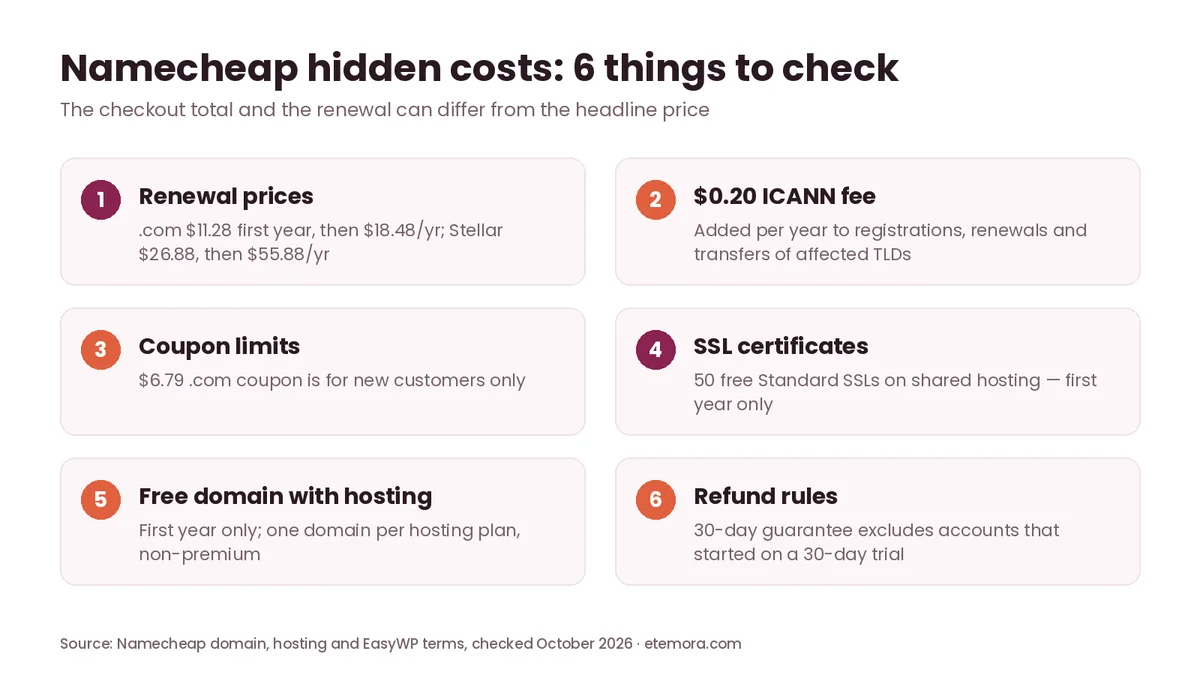
For domains, compare the first-year price with the annual renewal. For hosting, compare the promotional term with the renewal term. Also check whether extras such as premium domains, paid SSL after the first year, email upgrades or other add-ons are part of your plan.
The free domain bundled with shared hosting is free for the first year only, is limited to one non-premium domain per hosting plan, and then renews at the standard rate. The ICANN fee is small, at $0.20 per year for affected domains, but it is added on top of the listed price. Our explainer on domain renewal price increases shows how to keep these costs down.
Namecheap Alternatives
No Namecheap Review is complete without alternatives, because Namecheap is not the only option worth considering.
If your main need is web hosting, compare it with the providers in our best web hosting services guide. If you only need domain registration, our domain registrar comparison gives a broader view of alternatives.
For WordPress specifically, compare EasyWP with other managed WordPress providers on storage, traffic needs, backups, staging, support and renewal pricing rather than promotional rates alone.
The right alternative depends on whether you are buying a domain, hosting one small site, running several websites or operating a more demanding WordPress project.
How to Choose the Right Namecheap Product
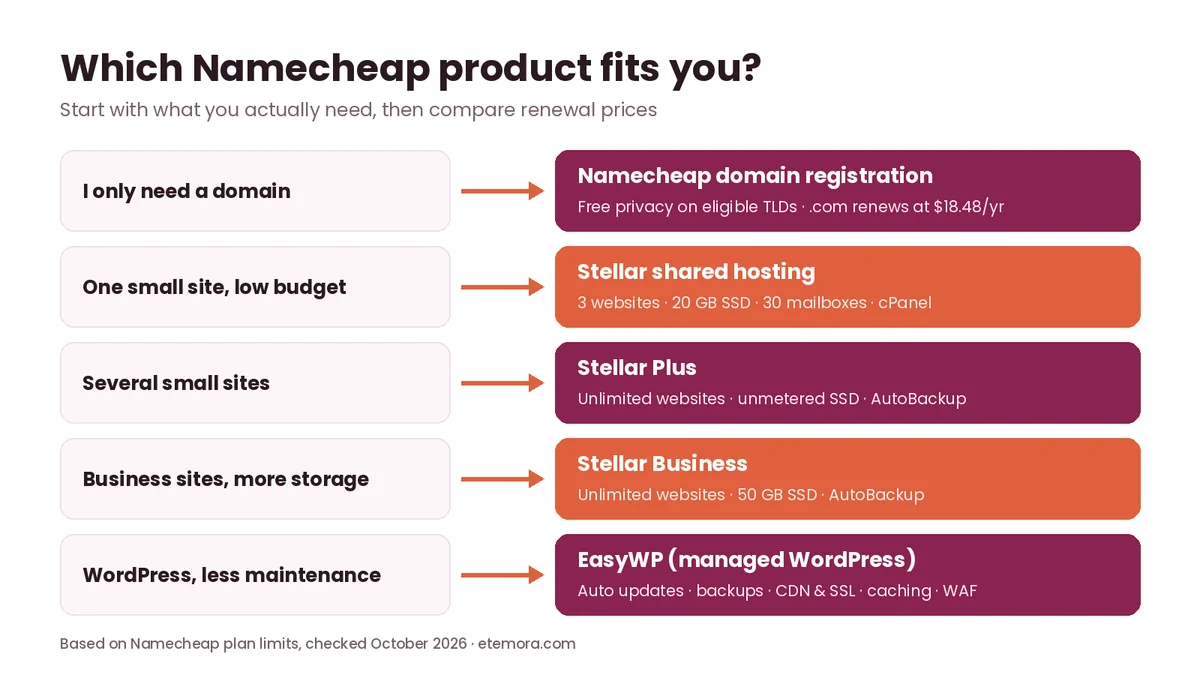
Use this Namecheap Review checklist before you buy.
1. Decide what you actually need
Start with the product rather than the brand. If you only need a domain, compare registrars. If you need hosting, compare hosting plans. If you need managed WordPress, compare EasyWP against other managed WordPress providers.
2. Compare renewal pricing
Don’t decide from the first-year promotional price. Write down the first-term cost and the renewal cost before buying for a realistic view of long-term spending.
3. Check storage and website limits
Stellar allows up to three websites and 20 GB SSD storage, while Stellar Plus and Stellar Business allow unlimited websites. Choose according to your real needs instead of paying for resources you won’t use.
4. Consider your technical skill
cPanel and Softaculous give you plenty of control, but they also expose more settings than a basic website builder. If you want managed WordPress maintenance, EasyWP may be easier to run than conventional shared hosting.
5. Check data center options
Namecheap’s shared hosting page lists US, UK, EU and Singapore data centers, with Cloud Storage included on all Stellar plans in the EU and Singapore and on Stellar Business in the US. Choose the location closest to your main audience where your plan allows it.
6. Check support channels
Namecheap provides 24/7 chat and ticket support but no phone line. If telephone help is essential, compare another provider before committing.
7. Read the product-specific terms
Namecheap’s domain, shared hosting, EasyWP and VPS products have different pricing and refund rules. Don’t assume a guarantee or feature advertised for one product applies to every product in the catalog.
How We Compared
This Namecheap Review is research-based; we did not run hands-on tests. We reviewed Namecheap’s official domain, transfer, privacy, shared hosting, EasyWP and refund pages, including published pricing and plan limits, and used TechRadar’s independent review for its separately reported performance and support observations. Prices were checked in October 2026 in US dollars. See how we review for our wider methodology.
Final Verdict: Namecheap Review
Our Namecheap Review verdict: Namecheap is a solid choice for domain buyers and smaller website owners who value low introductory pricing, free domain privacy and a broad range of online services. Its biggest weakness is not a lack of features but the need to watch renewal pricing and product-specific limits.
- Best for domain buyers: Namecheap domains, especially if you want free privacy on eligible domains and simple management.
- Best for one small budget website: Stellar, when three websites and 20 GB of storage are enough.
- Best for several small websites: Stellar Plus, thanks to unlimited websites and unmetered SSD storage.
- Best for managed WordPress: EasyWP, for automatic updates, backups, caching and CDN.
- Best for advanced server users: Namecheap VPS or dedicated hosting, though unmanaged products need much more technical responsibility.
Ready to compare Namecheap’s current offers?
Check Namecheap Domain Prices → Compare Namecheap Hosting →Frequently Asked Questions
Is Namecheap a good domain registrar?
Yes, especially if you value free privacy on eligible domains and straightforward domain management. Its .com costs $11.28 for the first year and $18.48 to renew as of October 2026, but the best choice can still depend on the extension and its renewal price.
Is Namecheap hosting good?
Namecheap hosting can work well for smaller websites and budget-conscious users. Shared plans include cPanel, email, Softaculous, Imunify360 and free first-year SSL. More demanding sites may need VPS, dedicated or specialized managed WordPress hosting instead.
How much does a .com cost at Namecheap?
A .com costs $11.28 for registration and $18.48 for renewal as of October 2026, and a transfer costs $11.48. New customers can also use a $6.79 coupon for the first year. An ICANN fee of $0.20 may be added at checkout.
Does Namecheap include free domain privacy?
Yes. Namecheap includes free lifetime domain privacy with every eligible new registration or transfer. A handful of extensions are excluded because of registry restrictions.
How much is Namecheap hosting?
On yearly billing, Stellar costs $26.88 for the first year, Stellar Plus $34.88 and Stellar Business $58.88. They renew at $55.88, $85.44 and $128.88 per year respectively (October 2026).
Does Namecheap have a money-back guarantee?
Yes. Eligible first-time shared hosting and certain other hosting purchases can qualify for a 30-day money-back guarantee, but not if the account started on a 30-day trial. EasyWP, renewals and add-ons have their own conditions.
Is Namecheap good for WordPress?
Namecheap offers both shared hosting with one-click WordPress installs and managed WordPress hosting through EasyWP. EasyWP includes automatic WordPress updates, backups, caching, CDN and SSL, which suits users who want less routine maintenance.
Does Namecheap have 24/7 support?
Yes. Namecheap provides 24/7 support through live chat and tickets, plus a large knowledge base. Telephone support is not offered.
Is Namecheap cheaper than other domain registrars?
Namecheap is price-competitive for .com, but there is no single answer for every TLD. Other extensions can have very different registration and renewal prices, so compare the exact extension you need.
What is the bottom line of this Namecheap Review?
Namecheap offers good value for domains and small websites, with free domain privacy and low first-year prices. The key is to budget for renewals, which are roughly double the promotional price on most hosting plans.
Should I buy my domain and hosting from Namecheap?
You can, but you don’t have to. A domain registered at Namecheap can point to hosting from another provider. Buying both together simplifies account management, while separating them makes sense if another host better fits your performance, feature or support needs.
Related articles you may like
 Web HostingHostinger Review 2026: Pricing, Renewals, Plans and Who It Suits
 DomainsWhat Is a Domain Name? A Simple Guide for 2026
 DomainsCheapest Domain Registrars: 6 Best Deals in 2026
 DomainsChoose a Domain Name: 10 Proven Tips for 2026
 Web HostingBest Cheap Web Hosting in 2026: 5 Proven Picks
 Domains.com vs .net vs .io vs .co: Best 2026 Domain Extension Choice