
SERP Snippet Preview
See how your page title and meta description may look in Google on desktop and mobile, and check their length in pixels and characters before you publish.
- Desktop & mobilelive preview
- Pixel-based checksnot just characters
- 100% freeno sign-up

This is an estimate of how Google may show your page. Google can rewrite titles and pick a different snippet from your page text.
Checks
Everything is measured inside your browser. Nothing you type is sent to our server or to Google.
How it works
Check a search snippet in three quick steps.
- Type or paste
Your page title, meta description and URL.
- Preview desktop & mobile
See where Google is likely to cut the text.
- Fix and copy
Follow the checks, then copy the finished tags.
How to use this SERP snippet preview tool
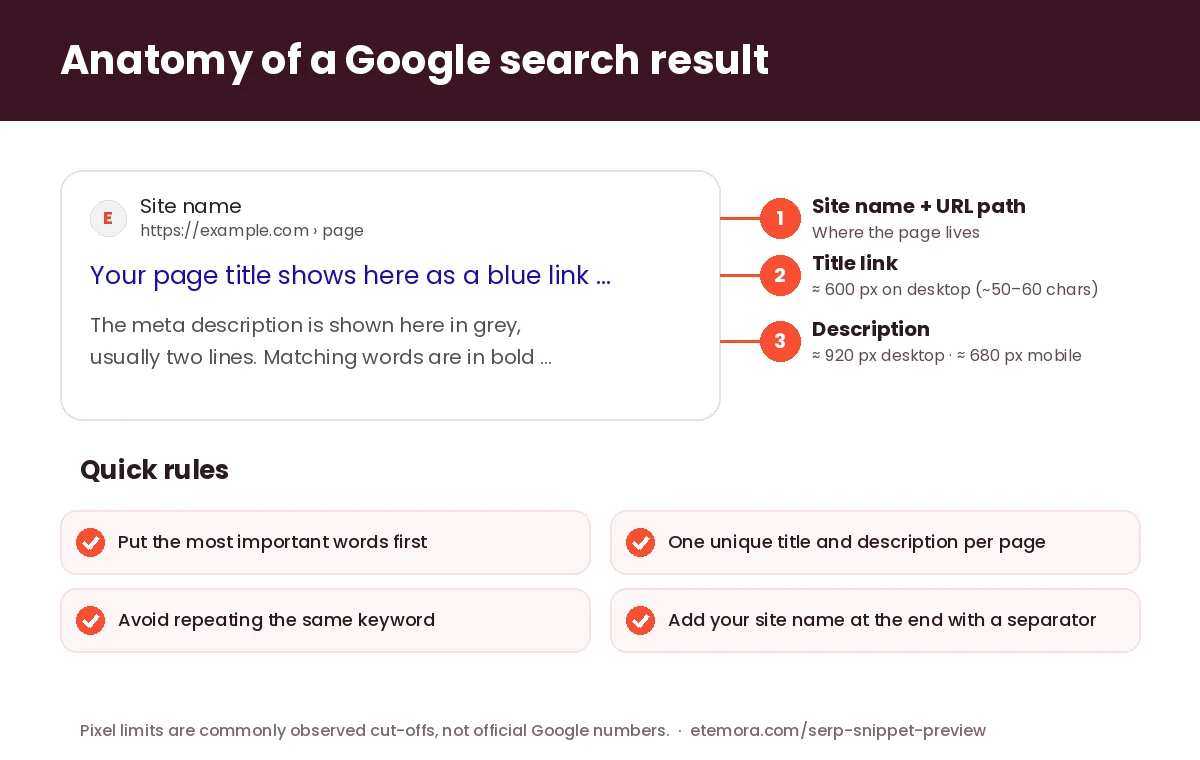
Type or paste your page title, meta description and URL. The preview updates as you type and shows a result the way Google usually lays it out: site name and breadcrumb path, the blue title link, then the grey description. Switch between Desktop and Mobile to see where each version is likely to be cut with “…”.
Add a focus keyword to check that it appears in the title and description. Words that match the keyword are shown in bold, because Google also bolds words that match what someone searched for. When you are happy, press Copy HTML tags to copy a ready-made <title> and <meta name="description">.
How long should a title tag be?
Google does not publish a character limit. Its title link documentation says the title is “truncated in Google Search results as needed, typically to fit the device width”. Because letters have different widths — a “W” is much wider than an “i” — the real limit is the space the text takes up, which is why this tool measures in pixels as well as characters.
On desktop, titles are commonly cut at around 600 pixels, which is roughly 50–60 characters of normal text. That is an observed rule of thumb, not a Google rule, so treat it as a target: put the words that matter most at the start, and keep the end for things that can be cut, such as your site name.
Google’s own advice is to write a descriptive, concise title for every page, avoid repeating the same words (it calls this keyword stuffing and says it can look spammy), and optionally add your site name at the start or end with a separator like “|” or “-”. The checks in this tool follow the same advice.
How long should a meta description be?
According to Google’s snippet documentation, “there’s no limit on how long a meta description can be”, but the snippet is shortened to fit the device. In practice, desktop results usually show about 920 pixels of description (around 150–160 characters) and mobile results less, around 680 pixels. Put the key point in the first sentence so it survives on both.
Google also says snippets are “primarily created from the page content itself” and that it uses your meta description when it describes the page more accurately. So a meta description is a strong suggestion, not a guarantee. Write a unique one for every page, describe what the reader actually gets, and avoid lists of keywords, which Google says are less likely to be shown.
Why Google sometimes changes your title
Google can generate its own title link when it thinks your title tag does not describe the page well — for example when it is empty, very long, stuffed with keywords or the same on many pages. It may use text from your headings, og:title, anchor text of links to the page and other sources instead. The best way to keep your own title is to make it accurate, specific and similar to the page’s main heading.
Setting the title and description in WordPress
Most WordPress sites set these with an SEO plugin. In Rank Math or Yoast, open the page in the editor and use the plugin’s snippet editor to write the SEO title and meta description — you can paste the text you prepared here. If you are choosing an SEO plugin or a keyword research tool, our guide to the best SEO tools in 2026 compares the main options, and best marketing tools covers email and social tools too.
Writing the page itself? The free word counter checks length and reading time, and the AI writing checker points out phrases that sound machine-written.
How this tool measures
The tool measures your text with your browser’s own text engine in Arial at the sizes Google commonly uses in results (20 px titles on desktop, 14 px descriptions). The numbers can differ slightly from what you see on Google, because fonts, screen sizes and Google’s layout change over time. Everything runs on your device; nothing you type is sent anywhere.
SERP snippet preview: frequently asked questions
What is a SERP snippet?
It is how a page appears in search engine results pages (SERPs): the site name and URL, a clickable title and a short description. This tool previews the Google version on desktop and mobile.
What is the ideal title tag length?
Google gives no fixed limit. Titles up to about 600 pixels wide, roughly 50–60 characters, usually show in full on desktop. Put the most important words first in case the end is cut.
What is the ideal meta description length?
There is no official limit, but about 920 pixels (roughly 150–160 characters) usually shows on desktop and around 680 pixels on mobile. Make the first sentence do the most work.
Why does Google show a different description from mine?
Google builds snippets mainly from page content and uses your meta description when it matches the search better. A clear, unique and accurate description gives it the best chance of being used.
Does the meta description affect rankings?
Don’t expect a meta description to lift rankings on its own. Its main job is to help people decide to click, so a clear, specific description can bring more visitors from the same position.
Is this tool free and private?
Yes. There is no sign-up and no limit. The preview and all measurements happen in your browser, and nothing you type is sent to our server or to Google.
More free tools: see all Etemora tools.
Other free tools
Guides related to this tool
 SEO & MarketingBest SEO Tools in 2026: 12 SEO Tools Compared
 SEO & MarketingBest Marketing Tools in 2026: 10 Tools Compared
 AI ToolsChatGPT vs Claude: 2026 Honest AI Comparison