
Upwork vs Fiverr: Which Platform Is Right for Freelancers?
 By M. Zaid
- Updated October 1, 2026
- 15 min read
- The Biggest Difference
- How Upwork Works
- How Fiverr Works
- Fees Compared
- Competition on Each Platform
- Which Is Better for Beginners?
- Best Platform by Service Type
- Best Platform by Profession
- How Clients Buy on Each Platform
- Personal Branding
- Should You Use Both?
- Pricing Strategy and Effective Rate
- How to Get Your First Order or Client
- Long-Term Freelancing Strategy
- Pros and Cons
- Which One Should You Choose?
- FAQs
Quick Answer
- Upwork works on jobs and proposals — you browse client-posted projects and bid using Connects. As of 2026, Upwork charges clients a 5–10% service fee depending on their plan, while freelancers pay a variable 0–15% service fee on each contract, with an optional $19.99/month Freelancer Plus plan.
- Fiverr works on gigs and orders — you list fixed-price packages and clients buy directly, with Fiverr keeping 20% of what you earn.
- Upwork tends to suit ongoing, higher-value, relationship-based work; Fiverr tends to suit clearly-scoped, one-off, productized services.
- Many freelancers eventually use both, plus a personal website, to reduce platform dependency.
Upwork vs Fiverr: The Biggest Difference
Both platforms connect freelancers with clients, but they’re built around opposite workflows. On Upwork, clients post a job, and freelancers actively search for work and submit proposals to be considered — it’s a job marketplace. On Fiverr, freelancers create ready-made service listings called gigs, and clients browse and buy directly — it’s a product marketplace for services.
In the Upwork vs Fiverr debate, this single structural difference explains almost everything else about how the two platforms feel to use: who reaches out first, how pricing works, how competition plays out, and which types of freelancers tend to do best on each one.
| Aspect | Upwork | Fiverr |
|---|---|---|
| Core model | Job postings + proposals | Gigs (packages) + orders |
| Who initiates | Freelancer applies to client’s job | Client orders freelancer’s gig |
| Pricing style | Hourly or fixed-price contracts | Tiered fixed packages (Basic/Standard/Premium) |
| Fee model | Client pays 5–10% service fee (by plan); freelancer pays a 0–15% fee per contract (optional $19.99/month plan) | Freelancer pays 20% flat on every order |
| Getting work | Spend Connects to submit proposals | Optimize gig listing for search and browsing |
| Best suited for | Ongoing projects, higher budgets, long-term clients | Clearly scoped one-off tasks, quick turnarounds |
Neither model is universally “better” — it depends on the type of work you do and how you prefer to find clients. If you’d rather see the wider landscape before committing to either one, Etemora’s comparison of the best freelancing platforms lines up ten marketplaces side by side on fees, niches, and payout speed.
How Upwork Works
Upwork is built around job listings. A client posts a project with a description, budget, and required skills. Freelancers then browse open jobs and submit a proposal explaining why they’re a good fit, along with a quote.
Contracts on Upwork can be hourly (tracked via Upwork’s time-tracking app, billed weekly) or fixed-price (paid in milestones). Clients can also invite freelancers directly to a job without a proposal being submitted, which becomes more common as your profile builds a track record.
What Are Upwork Connects?
Connects are a credit system freelancers use to submit proposals — each job typically costs a handful of Connects to apply to, and freelancers get an allotment of free Connects monthly with the option to buy more. This exists to discourage low-effort mass-applying and to make each proposal a small, deliberate investment. New freelancers often underestimate how much thought a proposal needs, since every Connect spent on a generic pitch is a wasted opportunity to apply somewhere more winnable.
How Fiverr Works
Fiverr flips the direction of the interaction. Instead of applying to jobs, freelancers (“sellers”) create gigs — structured listings describing a specific service, usually with tiered packages, sample images, and starting prices. Clients (“buyers”) search or browse categories and purchase a gig directly, similar to shopping on an ecommerce site.
Because gigs are pre-packaged, buyers know the price and scope upfront, which lowers the friction to purchase — but it also means sellers have to anticipate demand and price their tiers carefully in advance, rather than negotiating case by case.
Upwork vs Fiverr Fees: Full Breakdown
Fees are one of the most-asked-about Upwork vs Fiverr differences. Upwork replaced its old sliding-scale freelancer fee with a variable model: clients pay a service fee based on their plan, and freelancers pay a variable 0–15% service fee on each contract, set when the contract starts. Here’s how it breaks down as of 2026.
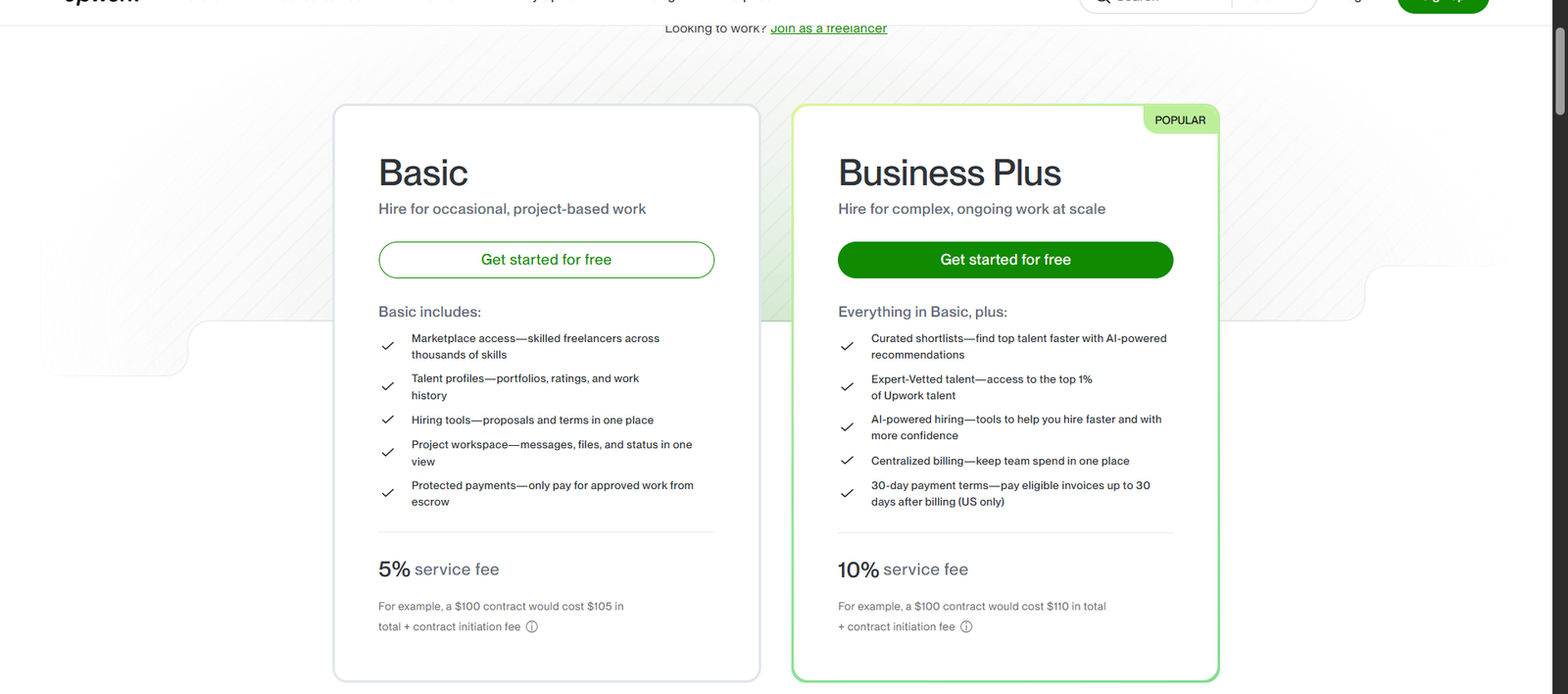
| Basic plan | 5% service fee + contract initiation fee |
| Business Plus plan | 10% service fee + contract initiation fee |
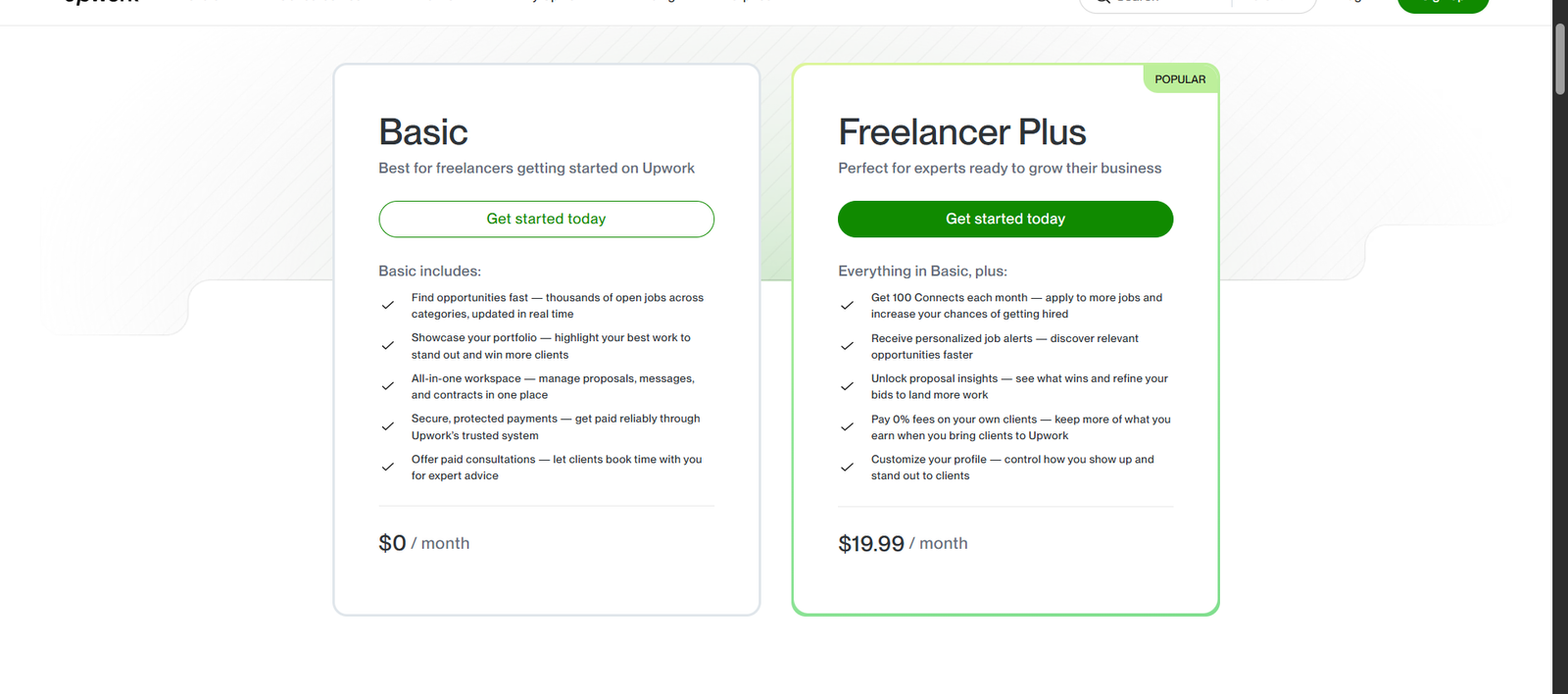
| Basic | $0/month |
| Freelancer Plus | $19.99/month |
| Flat rate on every order | 20% |
Worked example: On a $1,000 Upwork contract, a client on the Basic plan pays a 5% service fee (about $50, plus a small contract initiation fee) on top of the contract — the freelancer then pays Upwork’s variable service fee of 0% to 15% depending on the contract, so they keep between $850 and $1,000. On Fiverr, that same $1,000 order is charged a flat 20% seller fee, leaving the freelancer $800. Upwork’s cut can work out lower, but unlike Fiverr’s flat rate it varies by contract, so check the fee shown before you accept an offer.
Upwork vs Fiverr Competition: Proposals vs Gigs
In Upwork vs Fiverr, competition works differently on each platform because of how work is discovered.
On Upwork, you’re competing directly against every other freelancer who applies to the same job — often dozens of proposals for a single posting, especially in oversaturated categories like generic content writing or data entry. Standing out requires a sharp, specific proposal tailored to that job, not a template.
On Fiverr, you’re competing for search ranking and browse-page visibility. A well-optimized gig with strong reviews can generate orders passively for months without you doing anything beyond delivering good work, but a brand-new gig with no reviews has to fight for visibility against thousands of established sellers in the same category.
Upwork vs Fiverr for Beginners: Which Is Better?
Beginners often find Fiverr slightly easier to start on, because you don’t need to win a bidding war against experienced freelancers for every piece of work — your gig simply exists and can pick up orders from buyers who stumble onto it, even with zero reviews, especially in less crowded subcategories.
Upwork can be harder to break into initially because clients often filter for freelancers with existing reviews and Job Success Score, and a brand-new profile has neither. That said, Upwork’s lower-competition niches (specialized technical skills, for example) can actually be easier to win than broad Fiverr categories like logo design or voiceover work, which are extremely saturated.
What If You Have No Reviews Yet?
On either platform, the first few reviews matter disproportionately. On Fiverr, consider pricing your first few gig orders competitively (not necessarily rock-bottom) to earn initial reviews faster. On Upwork, look for smaller, lower-budget jobs early on specifically to build your Job Success Score and get real client feedback, then raise your rates once you have a track record.
Which Platform Fits Different Service Types
Some services naturally suit one platform’s structure more than the other.
- Logo design: Fits Fiverr well — it’s a well-defined, package-friendly deliverable that buyers are used to shopping for by price tier.
- Website redesign: Often fits Upwork better, since scope tends to vary project to project and benefits from a proposal that addresses the client’s specific site and goals.
- KDP (book) formatting: Works well as a Fiverr gig, since the service is repeatable and easy to tier by page count or complexity.
As an Upwork vs Fiverr rule of thumb: if your service is highly standardized and repeatable, gigs suit it. If it varies significantly by client and needs discovery or scoping conversations first, proposals suit it better.
Upwork vs Fiverr: Best Platform by Profession
| Profession | Better Starting Point |
|---|---|
| Writers | Both — gigs for short-form content, proposals for ongoing content strategy |
| Designers | Fiverr for packaged design work, Upwork for branding projects |
| Developers | Upwork, for scoped and hourly technical contracts |
| SEO professionals | Upwork, since SEO work is usually ongoing and relationship-based |
| Virtual assistants | Upwork, for recurring hourly arrangements |
| AI-related services | Both are viable, and pairing them with the right AI tools can speed up delivery — see Etemora’s best AI tools for work for options freelancers use to work faster |
How Clients Buy: Gigs vs Proposals
| Fiverr (Gigs) | Upwork (Proposals) | |
|---|---|---|
| Discovery | Client searches/browses | Client posts a job |
| Decision basis | Listing, reviews, price tiers | Proposal quality, profile, past work |
| Negotiation | Minimal — buy the package | Common, especially on scope and rate |
| Speed to purchase | Fast, often same day | Slower, involves review and messaging |
Upwork vs Fiverr: Personal Branding
Fiverr gig pages function a bit like a mini storefront — your profile, portfolio images, and gig descriptions all contribute to a consistent seller “brand” that buyers can browse. Upwork profiles are closer to a professional resume, emphasizing verified work history, client feedback, and a Job Success Score rather than a curated storefront feel.
Neither platform lets you fully own your brand, though — your profile and reviews live on their platform, under their rules. Freelancers serious about long-term branding eventually look beyond marketplaces entirely (more on that below).
Should You Use Both Fiverr and Upwork?
Many experienced freelancers skip the Upwork vs Fiverr choice and run profiles on both platforms simultaneously. Fiverr can generate steady, lower-touch orders for standardized services, while Upwork can bring in higher-value, longer-term contracts. Running both also diversifies income against either platform’s algorithm changes, fee adjustments, or account issues.
The main cost of using both is time and attention — maintaining two separate profiles, gig listings, and proposal pipelines takes more ongoing effort than focusing on one.
Repeat Clients: Where the Real Money Is
On both platforms, your best clients are usually the ones who come back. On Upwork, long-running contracts with returning clients also build your reviews and Job Success Score. On Fiverr, repeat buyers often reorder directly from your gig or message you for custom offers, and having a “repeat client” reputation can make new buyers more confident.
Pricing Strategy and Your Effective Hourly Rate
It’s easy to price gigs or proposals based on gut feeling, but what actually matters is your effective hourly rate — what you earn per hour once fees and actual time spent are factored in.
Example: Say you price a Fiverr logo design gig at $150 and it takes you 5 hours to deliver. After Fiverr’s 20% fee, you keep $120, or $24/hour effective. If the same design takes you 3 hours because you’re experienced, your effective rate jumps to $40/hour on the identical listing price. This is why tracking your actual time per deliverable matters more than the sticker price of your gig or quote.
Connects vs Visibility: Where Your Effort Goes
On Upwork, your ongoing “cost” of getting work is Connects spent on proposals — effort goes into writing strong, targeted pitches. On Fiverr, your ongoing cost is largely time invested in optimizing gig titles, tags, and images for search visibility, plus responding quickly to buyer messages, since response rate affects ranking.
How to Get Your First Order or Client
On Fiverr
- Create 2–3 tightly-scoped gigs rather than one vague, broad listing.
- Use clear, well-lit sample images or mockups — buyers decide fast.
- Price your first tier competitively to earn initial reviews.
- Respond to buyer messages quickly; response time affects your gig’s ranking.
On Upwork
- Complete your profile fully, including a clear specialty rather than a generalist pitch.
- Apply to smaller, lower-budget jobs early to build reviews and Job Success Score.
- Write a short, specific proposal referencing the exact job, not a copy-pasted template.
- Follow up professionally if a client goes quiet after an initial exchange.
What to Put on Your Gig or Profile
Lead with outcomes, not just skills — what the client actually gets, not just “I am experienced in X.” Include real samples wherever possible, and be specific about turnaround time and revisions, since ambiguity here is a common source of buyer frustration on both platforms.
Long-Term Freelancing Strategy
Marketplaces like Fiverr and Upwork are excellent for finding clients, but they come with a structural trade-off: you don’t own the relationship, the platform does. Your reviews, ranking, and even your account access all depend on rules you don’t control.
Because of this, many freelancers eventually build a personal website alongside their marketplace profiles — a place to showcase a portfolio, collect leads directly, and reduce dependence on any single platform’s algorithm or fee structure. If you’re considering this step, Etemora’s guide on what a website builder is and how it works is a good starting point, and the comparison of the best website builders can help you pick a platform once you’re ready to build one.
A Note on Taxes
Freelance income from Fiverr or Upwork is generally taxable income in most countries, but exact rules, thresholds, and reporting requirements vary significantly by country (and, in places like India, sometimes by state or income type). This isn’t tax advice — check with your local tax authority or a qualified tax professional for guidance specific to your situation.
Upwork vs Fiverr Pros and Cons
Upwork Pros
- No percentage fee deducted from freelancer earnings
- Better suited to ongoing, higher-value work
- Direct client communication and negotiation
Upwork Cons
- Freelancer Plus subscription ($19.99/month) needed for more Connects and job alerts
- Harder to get initial traction with no reviews
- Requires writing individual proposals
Fiverr Pros
- No cost to list gigs or apply for work
- Passive discovery once a gig ranks well
- Simple, package-based pricing for buyers
Fiverr Cons
- Flat 20% fee regardless of client loyalty
- Extremely saturated in popular categories
- Less room for case-by-case negotiation
Upwork vs Fiverr: Which One Should You Choose?
If your work is standardized, package-friendly, and you’d rather be found than pitch, start with Fiverr. If your work varies by client, commands higher project budgets, and benefits from ongoing relationships, start with Upwork. If you’re unsure, there’s no rule against testing both with a small time investment and seeing which one produces better early results for your specific skill.
| If you are… | Consider |
|---|---|
| New, with a packageable skill | Fiverr |
| Experienced, seeking long-term clients | Upwork |
| Offering highly custom/scoped work | Upwork |
| Offering a repeatable, fixed-scope service | Fiverr |
| Wanting to diversify income sources | Both, alongside a personal site |
Not sure a marketplace is even your best fit?
Compare 10 Freelancing Platforms →Frequently Asked Questions
Is Upwork or Fiverr better for beginners?
Fiverr is often slightly easier to start on since gigs can attract orders without a bidding process, though Upwork’s lower-competition niches can also work well for beginners with specialized skills.
Upwork vs Fiverr: which platform has lower fees?
Upwork now charges clients a 5–10% service fee depending on their plan, and freelancers pay a variable 0–15% service fee per contract, plus an optional $19.99/month Freelancer Plus plan. Fiverr charges sellers a flat 20% on every order regardless of client history.
Can I use Fiverr and Upwork at the same time?
Yes. Many freelancers run profiles on both platforms to diversify their client sources and income streams.
Do I need a portfolio to get started?
A portfolio strongly helps on both platforms. If you’re just starting out, sample or spec work can substitute until you have real client deliverables to show.
Which platform is better for long-term freelancing?
Neither platform alone is ideal for the long term, since both keep you dependent on their rules and fees. Many established freelancers pair marketplace work with a personal website to build a more independent client base over time.
How much can I realistically earn on Fiverr or Upwork?
Earnings vary enormously by skill, niche, and experience level. Tracking your effective hourly rate after fees, rather than just your listed prices, is the most reliable way to judge whether a gig or contract is actually worth your time.
Disclosure: Some links on this page may be affiliate links. If you purchase through an eligible link, Etemora may earn a commission at no additional cost to you. Our editorial recommendations are not determined solely by commission. Learn more →
Related articles you may like
 FreelancingUpwork Fees Explained: Complete 2026 Guide
 FreelancingHow to Start Freelancing: 7 Proven Steps in 2026
 FreelancingBest Remote Job Websites in 2026: 12 Platforms Compared
 FreelancingHow to Make Money Online in 2026: 15 Legit Ways & Platforms
 FreelancingBest Freelancing Platforms in 2026: 10 Websites Compared
 Tech & SoftwareHostinger vs WP Engine 2026: Which WordPress Host Is Better?