
Upwork Fees Explained: Complete 2026 Guide
 By M. Zaid
- Updated October 1, 2026
- 18 min read
- Upwork Fees Explained for Freelancers
- How the Upwork Service Fee Works
- Upwork Connects Cost Explained
- Is Upwork Free for Freelancers?
- Upwork Direct Contract Fees
- Upwork Withdrawal Fees
- How Much Upwork Takes From $1,000
- Upwork Client Fees
- Hourly vs Fixed-Price Projects
- Hidden Costs to Watch
- Calculate Your Rate After Fees
- Choose the Right Upwork Plan
- How to Choose
- Final Verdict
- FAQs
Upwork Fees Explained matters because the platform has more than one cost freelancers and clients can encounter. A freelancer may pay a percentage of earnings, spend Connects to submit proposals, pay for optional Freelancer Plus, and face a withdrawal fee depending on the payout method. Clients can also pay marketplace and contract initiation fees.
This Upwork fees explained guide breaks down the current Upwork fee structure, explains what a freelancer actually keeps from a project, and covers the extra costs that are easy to overlook. All prices and fee figures below were checked against Upwork’s official pricing and help pages in October 2026.
Quick Answer
Upwork fees explained in short: the freelancer service fee currently ranges from 0% to 15% of earnings, depending on the contract. Connects cost $0.15 each, Freelancer Basic is $0/month and Freelancer Plus costs $19.99/month (with 100 Connects a month), as of October 2026. Clients also pay a service fee (5% on the Basic plan, per Upwork’s client pricing page) and, on Basic, a one-time Contract Initiation Fee of $0.99 to $14.99.
Want to see the plans and fees on Upwork’s own page?
Check Current Upwork Pricing →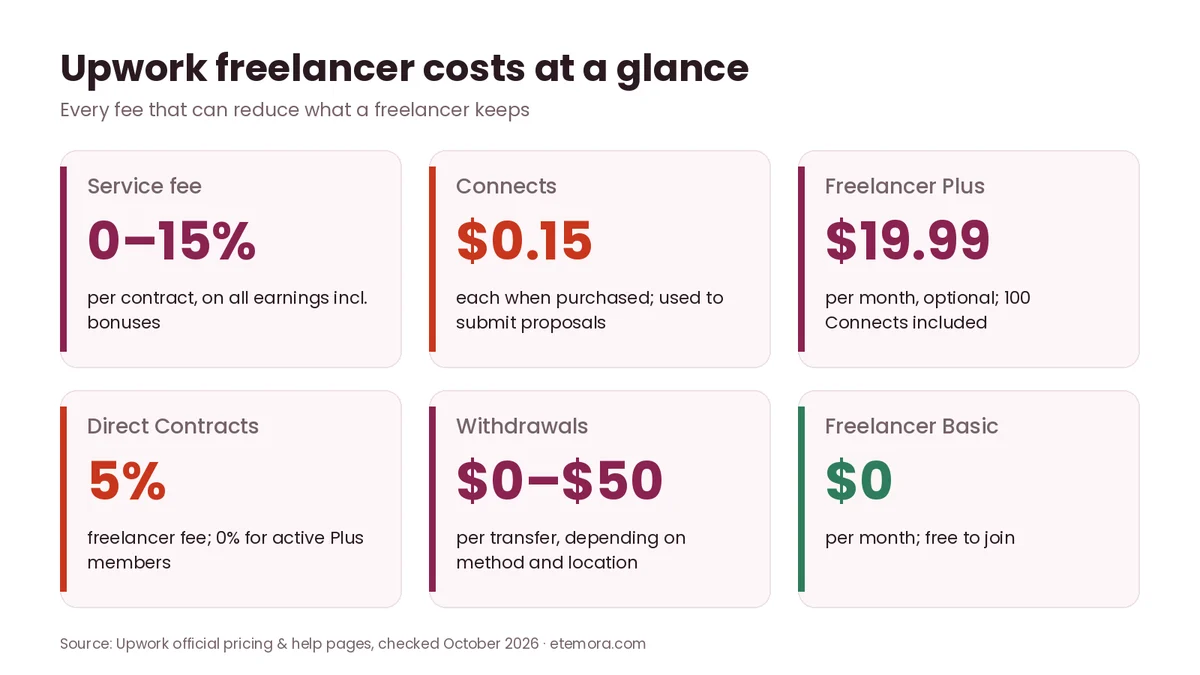
Upwork Fees Explained for Freelancers
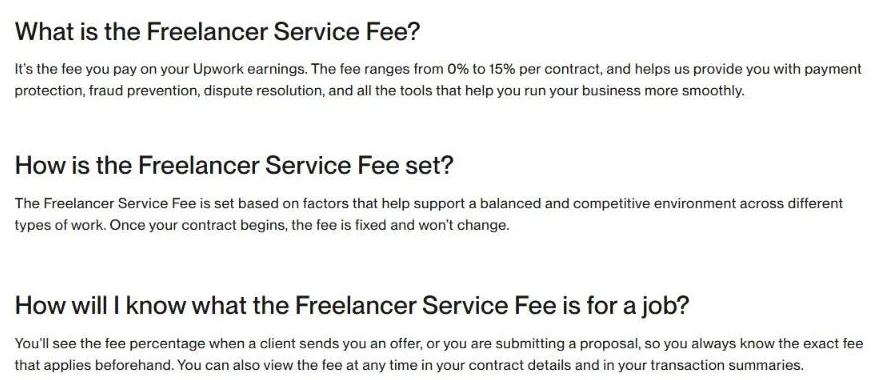
The main Upwork cost for freelancers is the Freelancer Service Fee. Upwork states that freelancers pay a variable fee ranging from 0% to 15% on earnings, including bonuses, according to its freelancer pricing page.
The important point is that there is not one universal percentage that applies to every freelancer and every contract. Upwork says you see the fee percentage when a client sends you an offer or when you submit a proposal, and you can view it at any time in your contract details and transaction summaries. Once a proposal, offer or contract is sent, the fee is locked in for that contract.
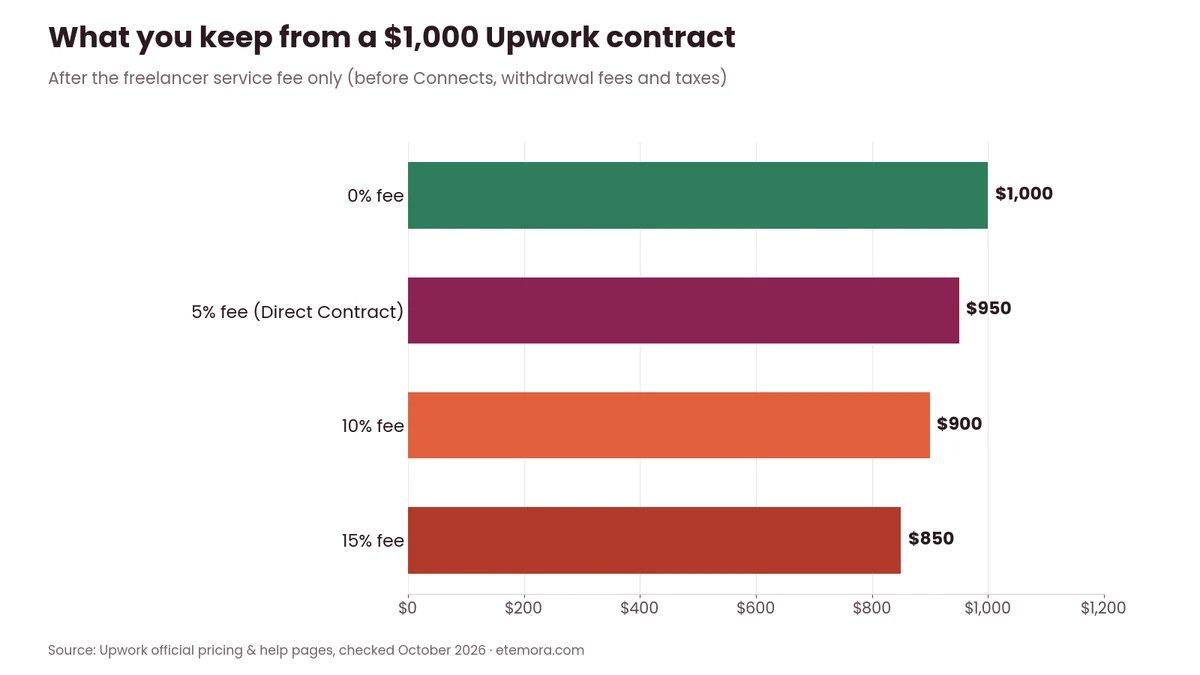
For example, if a $1,000 project has a 10% service fee, the freelancer receives $900 before any separate withdrawal or other applicable costs. At a 15% fee, the same $1,000 would leave $850.
How the Upwork Service Fee Works
The service fee applies to earnings from hourly contracts, fixed-price contracts and Project Catalog projects, with some exceptions listed in Upwork’s Freelancer Service Fee help article. Upwork also states that the fee applies to bonuses.
That means freelancers should calculate their target take-home amount before submitting proposals. If you want to receive approximately $900 from a contract subject to a 10% fee, you need to account for that deduction when setting your price. Upwork’s own example: to take home $20 an hour at a 10% fee, you would charge the client about $22.22 an hour.
Simple Upwork Fee Examples
| Client payment | 0% fee | 10% fee | 15% fee |
|---|---|---|---|
| $100 | $100 | $90 | $85 |
| $500 | $500 | $450 | $425 |
| $1,000 | $1,000 | $900 | $850 |
| $2,000 | $2,000 | $1,800 | $1,700 |
These are mathematical examples using Upwork’s published 0–15% range, not predictions of which rate a particular contract will receive. Upwork’s own pricing page uses the same logic: on $100 of earnings, a freelancer receives between $85 and $100 depending on the fee applied.
Upwork Connects Cost Explained
Connects are virtual tokens freelancers use to submit proposals and access certain paid features. Upwork lists additional Connects at $0.15 (USD) each as of October 2026. They are sold in bundles or as a custom amount (minimum 10), and you need a verified billing method to buy them, according to Upwork Support.
Connects are therefore a separate acquisition cost from the service fee. You can win no project and still spend Connects applying for opportunities, so freelancers should treat proposal costs as part of their overall client-acquisition budget.
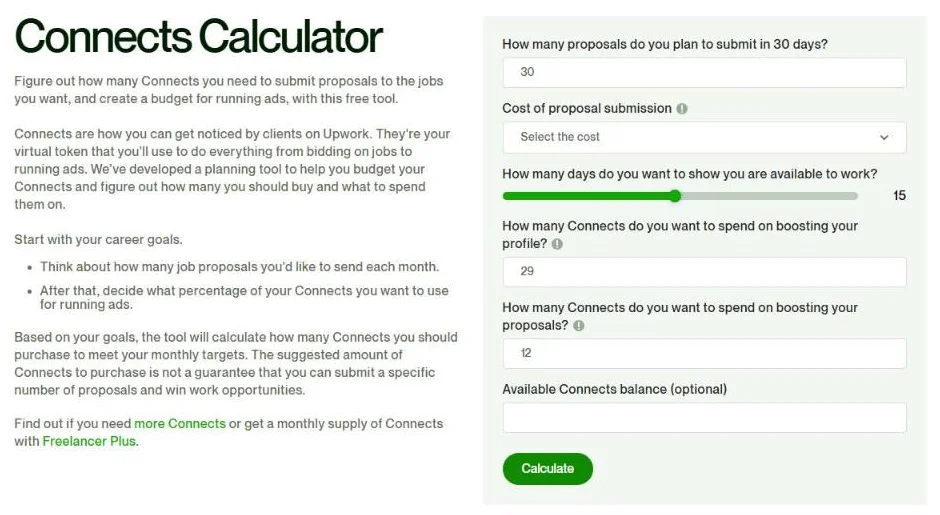
Freelancer Plus includes 100 Connects per month. On the Basic plan, Upwork’s pricing table shows 0 monthly Connects, although Upwork says some freelancers may receive free Connects through offers, badges such as Rising Talent or Top Rated, and certain interviews.
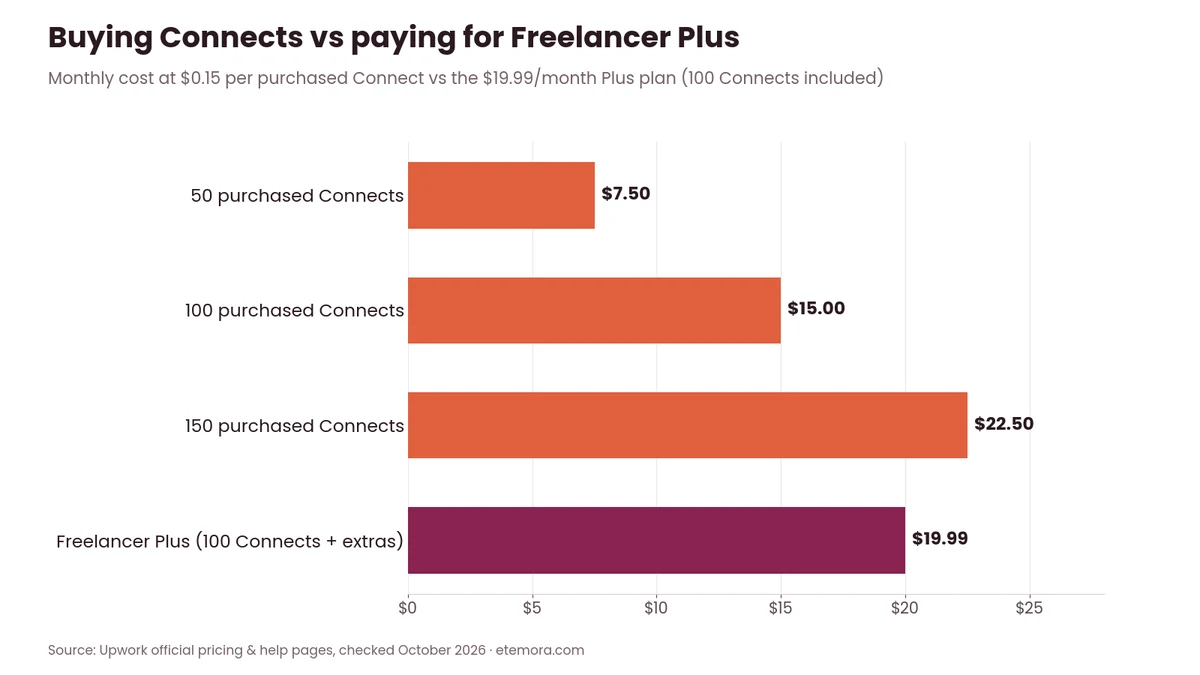
A simple example: buying 100 additional Connects at $0.15 each would cost $15 as of October 2026. Upwork also notes that Connects expire one year from the date they are issued.
What Connects Are Used For
Connects can be used for:
- Submitting job proposals
- Boosted Proposals
- The Availability Badge
- Other eligible Upwork promotion features, such as boosting your profile
Upwork’s Connects Calculator page says Connects cannot be exchanged for cash.
This creates an important distinction: the service fee is generally tied to money you earn, while Connects can cost money before you earn anything.
Compare Basic and Plus before you buy Connects.
See Upwork Plans →Is Upwork Free for Freelancers?
Yes, Upwork is free to join, and freelancers can use the Basic plan without a monthly subscription. Upwork also offers Freelancer Plus as an optional paid membership, as its pricing breakdown article explains.
Freelancer Basic is listed at $0/month as of October 2026. It can therefore be used without paying a recurring membership fee, although freelancers may still encounter service fees and Connects-related costs.
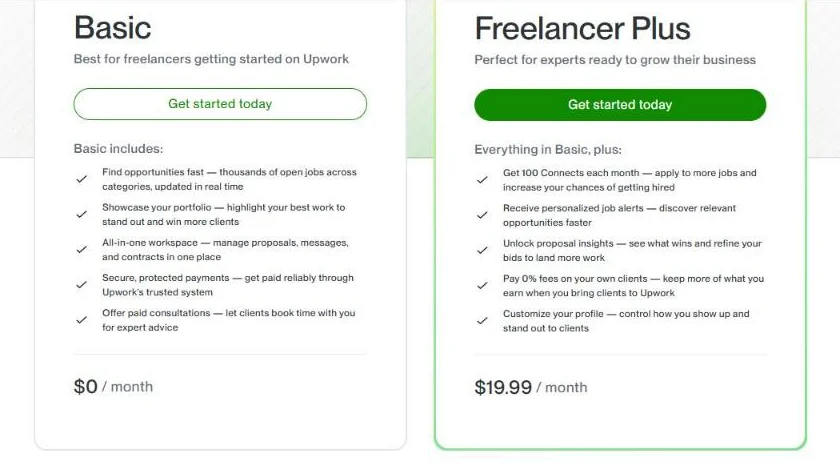
Freelancer Plus is listed at $19.99/month as of October 2026. It includes 100 monthly Connects, personalized job alerts, proposal insights, profile customization tools, unlimited access to Upwork’s AI assistant Uma and other features.
Is Freelancer Plus Worth the Cost?
That depends on how often you apply for jobs and whether its additional features are useful to your workflow. The $19.99/month subscription should not be treated as a guarantee of more clients or income.
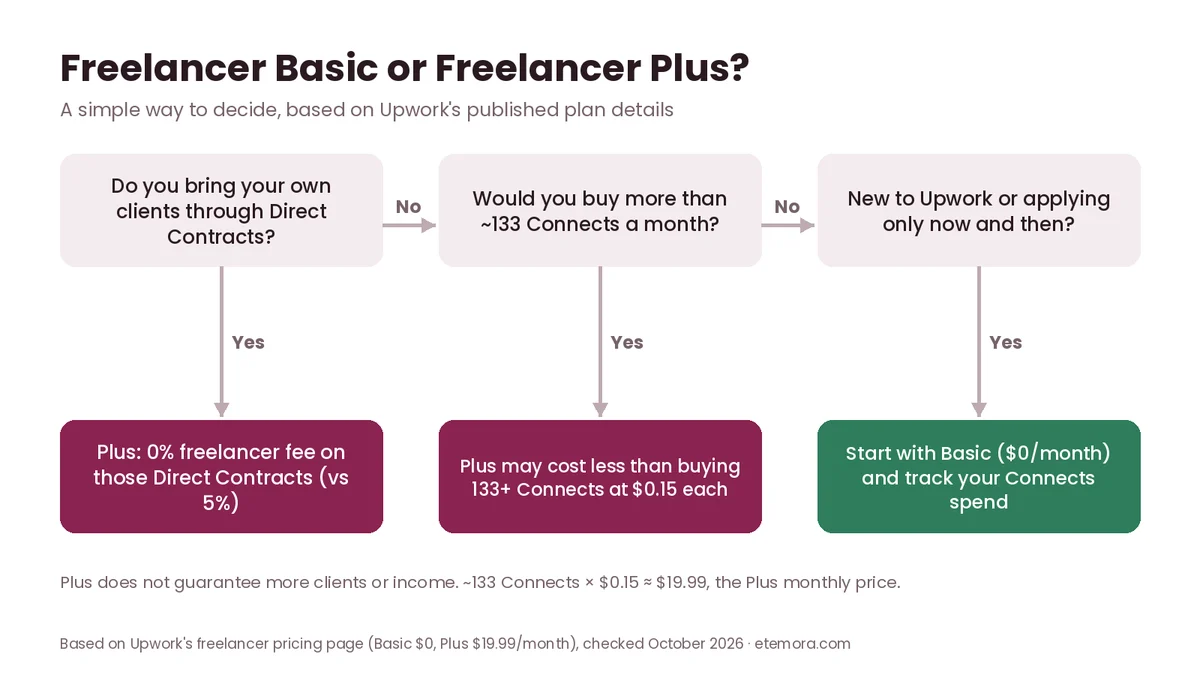
On Connects alone, the maths is simple: 100 purchased Connects cost $15, so Plus only beats buying Connects on price if you would otherwise buy roughly 133 or more Connects a month ($19.99 ÷ $0.15). Below that, you are paying for the extra features, not cheaper Connects.
One notable benefit is that Freelancer Plus members can pay 0% freelancer service fees on their own clients brought to Upwork through Direct Contracts. For someone who regularly brings existing clients onto Upwork, that feature can be materially different from simply buying more Connects.
Upwork Direct Contract Fees
Direct Contracts are designed for freelancers who bring clients to Upwork rather than finding those clients through the normal marketplace. Upwork states that freelancer-initiated Direct Contracts carry a 5% freelancer service fee, while active Freelancer Plus members do not pay freelancer service fees on those contracts, according to its Direct Contracts help article.
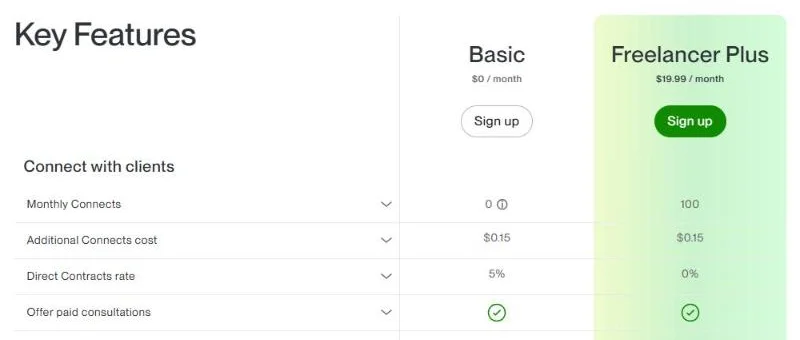
For example, a $1,000 Direct Contract would normally produce a $50 freelancer service fee at the published 5% rate. With an active Freelancer Plus membership, the freelancer service fee on that Direct Contract is 0%. Note that your client still pays the Client Marketplace Fee and Contract Initiation Fee on Direct Contracts.
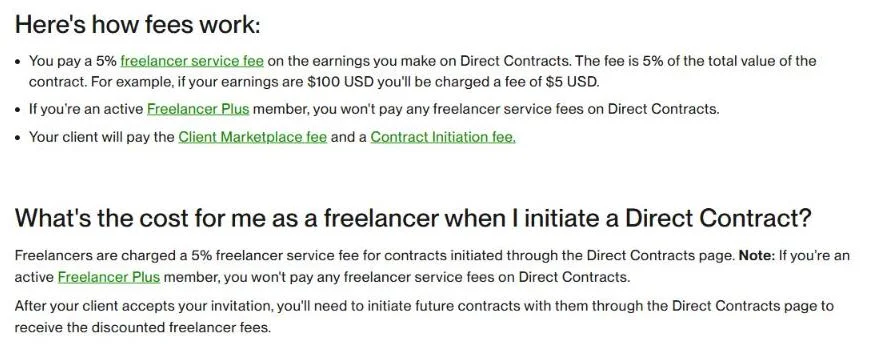
This can make Direct Contracts particularly relevant to freelancers who already have clients outside Upwork and want to use Upwork’s contract and payment infrastructure. To keep the discounted fee, Upwork says you need to start future contracts with that client through the Direct Contracts page too.
Bringing your own clients to Upwork?
View Freelancer Plus Details →Upwork Withdrawal Fees
Getting paid is the last piece of Upwork fees explained here, and it is easy to forget. Withdrawal fees depend on the payment method and the freelancer’s location.
As of October 2026, Upwork’s How to get paid on Upwork page lists Direct to Local Bank outside the United States at $0.99 per transfer, U.S. Dollar Wire Transfer at $50 per transfer and Instant Pay for U.S. freelancers at $2 per transfer.
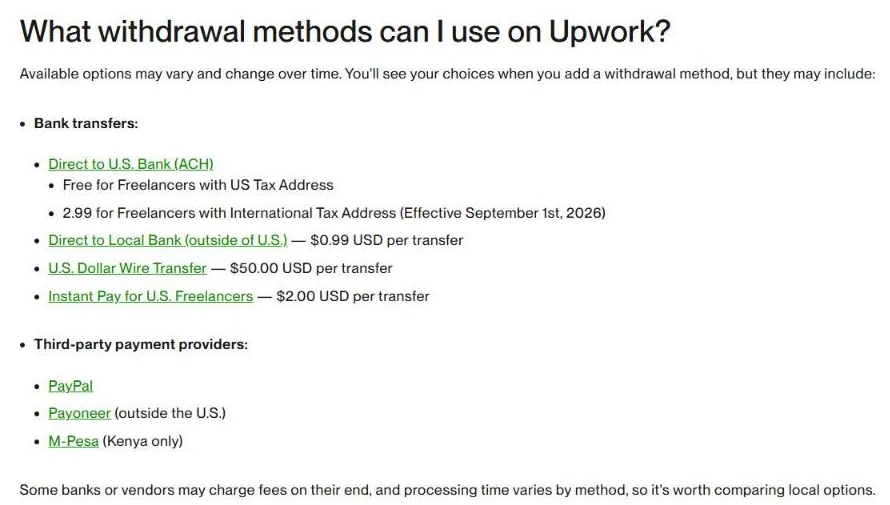
For Direct to U.S. Bank, Upwork’s timing and fees page states that withdrawals are free for freelancers with a U.S. tax address. Starting September 1, 2026, the fee is $2.99 per withdrawal for freelancers with a tax address outside the United States.
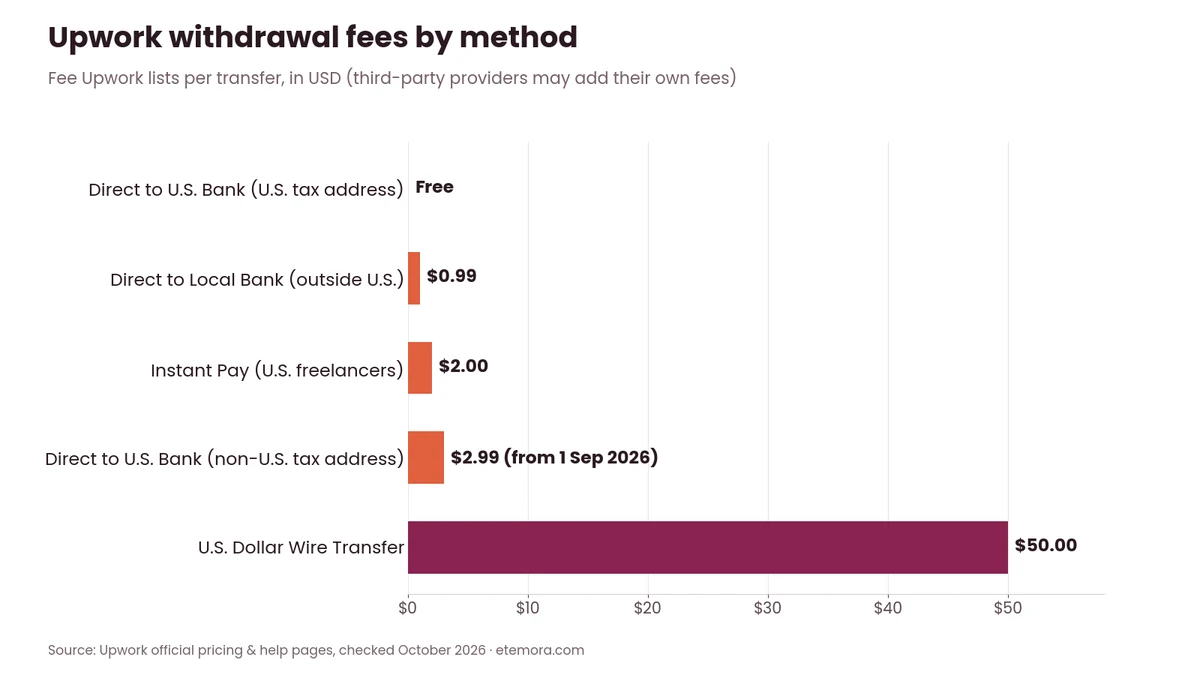
Other providers can have their own charges. PayPal and Payoneer are also available as withdrawal options, and Upwork notes that some banks or vendors may charge fees on their end, so it is worth checking PayPal withdrawal details and your provider’s own pricing.
How Much Does Upwork Take From a $1,000 Project?
This is where Upwork fees explained in real numbers matter most. The answer depends on the service fee attached to the contract and any additional costs you incur.
If the applicable freelancer service fee is 10%, a $1,000 contract produces $900 after that fee. If the fee is 15%, it produces $850. If the applicable fee is 0%, the service-fee deduction is $0.
Connects and withdrawal costs are separate. For example, a freelancer could pay for Connects before winning the $1,000 project and later incur a withdrawal charge depending on the payout method.
So the useful calculation is:
Net earnings = contract earnings − freelancer service fee − applicable withdrawal costs − other applicable expenses
Taxes are separate from Upwork’s platform fees and should be considered according to the freelancer’s tax situation.
Upwork Client Fees
No Upwork fees explained guide is complete without the client side. Upwork fees are not limited to freelancers: clients can also pay fees when hiring.
Upwork’s client pricing page lists a 5% Marketplace fee on the Basic plan (a discounted 3% for eligible U.S. clients paying with a checking account) and a 10% fee on Business Plus (8% discounted). Upwork’s separate Client Marketplace Fee help article describes the Basic fee as “up to 7.99%”, so clients should confirm the exact fee shown at checkout.
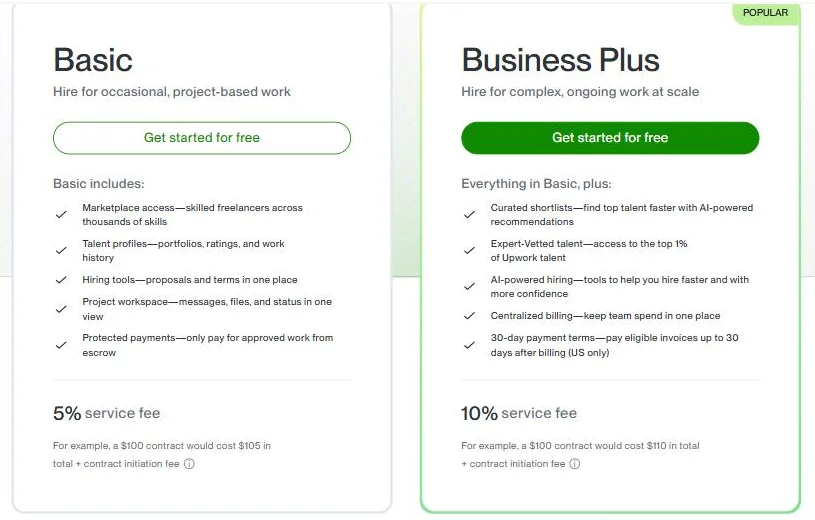
Clients may also pay a one-time Contract Initiation Fee when starting a new Marketplace or Project Catalog contract. Upwork lists this fee at $0.99 to $14.99 per contract. On Business Plus, Upwork says there is no initiation fee except on new contracts of $100 or less (up to $4.99).
That fee is separate from the amount paid to the freelancer.
Example of Client-Side Costs
Suppose a client hires a freelancer for $1,000.
The client’s final cost may be higher than $1,000 because a marketplace fee and contract initiation fee can apply. On the Basic plan that means a $50 Marketplace fee plus up to $14.99 to start the contract, or up to $1,064.99 in total; on Business Plus the 10% fee brings it to $1,100. The exact amount depends on the client’s account, payment method, contract and applicable Upwork terms.
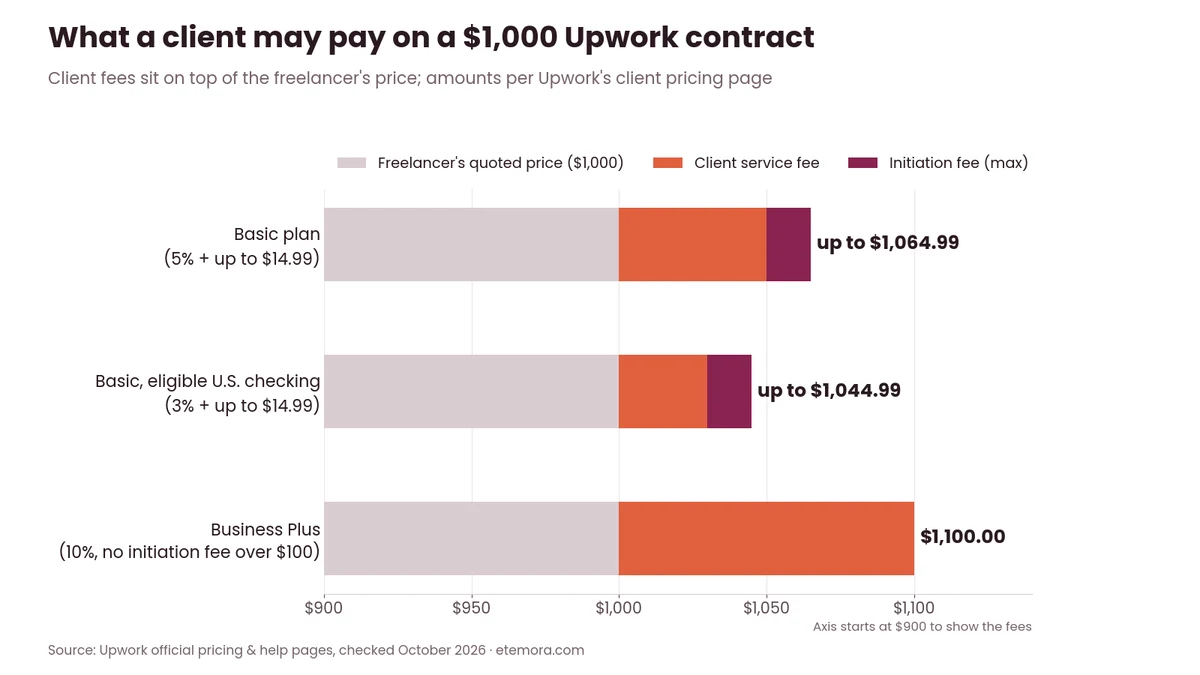
This is why freelancers should understand both sides of the transaction. A client may see a higher checkout total than the freelancer’s quoted project price.
Upwork Fees for Hourly vs Fixed-Price Projects
The freelancer service fee applies to both hourly and fixed-price contracts. The difference is mainly how the underlying project is priced and billed.
Hourly contracts are based on time worked, while fixed-price contracts use an agreed project amount and milestones. Upwork lists minimum rates of $3 per hour for hourly contracts and $5 for fixed-price projects.
The minimums are platform requirements, not recommended professional rates. A freelancer should set pricing based on the value, scope, complexity and time required for the work.
Upwork Fees Explained: Hidden Costs to Watch
The biggest mistake is looking only at the headline service fee. With Upwork fees explained line by line, the smaller charges add up.
Watch for these additional costs:
- Connects used to submit proposals.
- An optional Freelancer Plus subscription.
- Withdrawal fees that vary by payout method and location.
- Client-side fees that can increase the buyer’s final cost.
- Currency conversion or third-party payment-provider charges where applicable.
- Contract-specific or promotional terms that can change the effective cost.
Upwork’s own help pages say the available withdrawal options may vary and change over time, so check the methods and current fees shown inside your account. If you are still deciding between marketplaces, our Upwork vs Fiverr comparison puts these costs side by side with Fiverr’s model.
How to Calculate Your Upwork Rate After Fees
A simple approach is to start with the amount you want to keep and work backward.
For a 10% service fee, divide your desired net amount by 0.90. If you want to receive $900 before other costs, the required gross contract value would be $1,000.
For a 15% fee, divide the target amount by 0.85. To target $900 after a 15% service fee, the gross amount would need to be about $1,058.82.
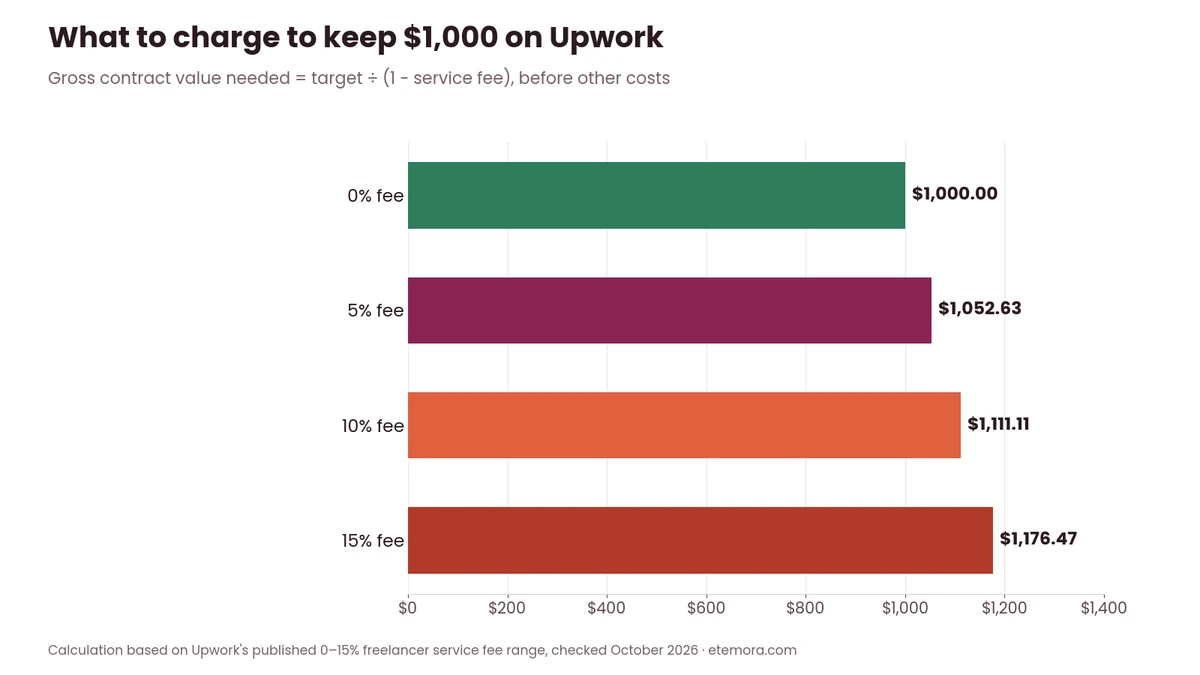
These calculations do not include Connects, withdrawal charges, taxes, currency conversion or other costs. To work out a full hourly rate that covers taxes, expenses and unpaid time, try our free freelance hourly rate calculator.
Example Rate Calculation
| Desired amount after service fee | 10% fee | 15% fee |
|---|---|---|
| $500 | $555.56 gross | $588.24 gross |
| $1,000 | $1,111.11 gross | $1,176.47 gross |
| $2,000 | $2,222.22 gross | $2,352.94 gross |
Use the actual service fee shown for your contract when setting your final price. Upwork notes that its rate calculator estimates net pay and that small rounding differences can occur.
How to Choose the Right Upwork Plan
1. Start with Freelancer Basic
Basic is listed at $0/month as of October 2026. For a new freelancer who is still learning how Upwork works, this avoids adding a recurring subscription before there is a clear need for Plus. If you are brand new, our guide on how to start freelancing covers the steps before your first proposal.
2. Track Your Connects
Connects cost $0.15 each when purchased as of October 2026. Keep track of how many proposals you submit and how many turn into interviews or contracts.
3. Calculate Your Real Take-Home
Do not price a project by looking only at the client’s headline budget. Account for the applicable service fee and potential withdrawal costs.
4. Consider Plus Only for a Clear Reason
Freelancer Plus costs $19.99/month as of October 2026. Consider the subscription based on its included Connects, the 0% Direct Contracts fee and its features rather than assuming the plan itself will generate work.
5. Check Withdrawal Costs
Before choosing a payout method, review the current fee displayed for your location and payment method. International freelancers can face different charges from U.S. freelancers, such as the $2.99 Direct to U.S. Bank fee for non-U.S. tax addresses.
6. Keep Client-Side Costs in Mind
If you work with price-sensitive clients, remember that their final Upwork checkout cost can exceed your quoted project amount because client fees may apply.
Upwork is only one option: our comparison of the best freelancing platforms shows how other marketplaces handle fees and proposals.
How we compared: this is a research-based guide; we did not run hands-on tests. For this Upwork fees explained guide, we reviewed Upwork’s official freelancer pricing page, Connects Calculator, help documentation on the Freelancer Service Fee, Connects, Direct Contracts, client fees, minimum rates and payments, with the relevant pages checked in October 2026. We used Upwork’s published examples and current fee information rather than estimating platform charges. Fees can change, so re-check them before you commit.
How to Choose: Weighing the Full Cost of Upwork
The right way to use Upwork fees explained data is to look at your entire workflow rather than one percentage.
- Your contract service fee: Check the actual rate that applies to the contract.
- Proposal costs: Track Connects used to apply for work.
- Membership: Decide whether Freelancer Plus provides enough useful features to justify its $19.99/month price.
- Withdrawal method: Compare the available payout methods and their current fees.
- Client budget: Remember that the client’s total cost can include Upwork fees beyond your quoted rate.
- Client source: If you already have clients outside Upwork, compare the economics of Direct Contracts with ordinary marketplace work.
- Business margin: Treat platform fees as part of your cost of acquiring and servicing clients.
If you’re comparing Upwork with another freelance marketplace, the fee percentage is only one part of the decision. Connects, client fees, payment protection, competition, project types and the way each marketplace generates leads can also affect the practical cost of finding work. For income options beyond freelance marketplaces, see our guide on how to make money online and our list of the best remote job websites.
Final Verdict: Upwork Fees Explained
Upwork Fees Explained comes down to more than the headline 0–15% service-fee range. Freelancers should account for service fees, Connects, optional membership costs, withdrawal charges, and the difference between marketplace contracts and Direct Contracts.
- Best fit for beginners: Freelancer Basic — $0/month as of October 2026, with no recurring Plus subscription required.
- Best for freelancers who regularly bring their own clients: Freelancer Plus — $19.99/month, with 0% freelancer service fees on Direct Contracts and 100 monthly Connects.
- Best for proposal-focused freelancers: Basic or Plus, depending on Connects needs — compare the cost of purchased Connects with Plus’s included 100 monthly Connects.
- Best for international freelancers: compare withdrawal methods first — fees vary by method and location, so include the payout cost in your calculation.
- Best for clients: check the final Upwork checkout total — marketplace and contract initiation fees can be added to the freelancer’s quoted price.
Ready to check the latest numbers yourself?
Check Current Upwork Fees →You can browse more guides like this in our freelancing guides.
Frequently Asked Questions
How much does Upwork charge freelancers?
Upwork charges freelancers a variable service fee ranging from 0% to 15% of earnings as of October 2026. The exact fee depends on the contract, and additional costs such as Connects or withdrawal fees can affect the freelancer’s overall cost.
Is Upwork free to join?
Yes, Upwork is free to join, and Freelancer Basic is listed at $0/month as of October 2026. Freelancers can still incur costs through service fees, purchased Connects, withdrawal fees or optional Freelancer Plus.
How much do Upwork Connects cost?
Upwork Connects cost $0.15 each when purchased as of October 2026, with a minimum custom purchase of 10. Connects are used for proposals and certain promotion features, and they expire one year from the date of issue.
How much is Upwork Freelancer Plus?
Freelancer Plus costs $19.99 per month as of October 2026. It includes 100 monthly Connects and additional features such as job alerts, proposal insights, profile customization and a 0% freelancer fee on Direct Contracts.
Does Upwork take 10% from every freelancer?
No. Upwork publishes a variable freelancer service-fee range of 0% to 15%. The applicable fee can differ by contract, so check the fee shown on the offer or proposal rather than assuming a 10% deduction.
Does Upwork charge clients fees?
Yes. Clients can pay a Client Marketplace Fee and a separate Contract Initiation Fee. Upwork’s client pricing page lists a 5% fee on the Basic plan (3% for eligible U.S. checking accounts) and 10% on Business Plus, and Basic contracts also carry a one-time Contract Initiation Fee of $0.99 to $14.99.
How much does Upwork charge for Direct Contracts?
Freelancer-initiated Direct Contracts carry a 5% freelancer service fee, while active Freelancer Plus members pay no freelancer service fees on their own clients brought through Direct Contracts.
Does Upwork charge withdrawal fees?
Yes, some withdrawal methods carry fees. Upwork lists Direct to Local Bank outside the U.S. at $0.99 per transfer, U.S. Dollar Wire Transfer at $50, Instant Pay at $2, and Direct to U.S. Bank at $2.99 for non-U.S. tax addresses (free with a U.S. tax address).
How much will I receive from a $1,000 Upwork project?
Your amount after the freelancer service fee could range from $850 to $1,000 if the applicable fee is between 15% and 0%. A 10% fee would leave $900. Connects, withdrawal costs, taxes and other expenses are separate from this calculation.
Should freelancers include Upwork fees in their rates?
Yes. Freelancers should account for the applicable service fee and other business costs when setting rates. A simple way is to divide your target net amount by (1 minus the fee) to find the gross contract amount you need.
Sources
- Upwork: Freelancer pricing and plans
- Upwork Support: Freelancer Service Fee
- Upwork: Client pricing and plans
- Upwork Support: Understanding and using Connects
- Upwork: Connects Calculator
- Upwork Support: Direct Contracts
- Upwork Support: How to get paid on Upwork
- Upwork Support: Direct to U.S. Bank timing and fees
- Upwork Support: Client Marketplace Fee
- Upwork Support: Contract Initiation Fee
- Upwork Support: Minimum hourly and fixed-price rates
Disclosure: Some links on this page may be affiliate links. If you purchase through an eligible link, Etemora may earn a commission at no additional cost to you. Our editorial recommendations are not determined solely by commission. Read our affiliate disclosure →
Related articles you may like
 FreelancingHow to Start Freelancing: 7 Proven Steps in 2026
 FreelancingBest Remote Job Websites in 2026: 12 Platforms Compared
 FreelancingHow to Make Money Online in 2026: 15 Legit Ways & Platforms
 FreelancingUpwork vs Fiverr: Which Platform Is Right for Freelancers?
 FreelancingBest Freelancing Platforms in 2026: 10 Websites Compared
 Web HostingBest Domain Registrars in 2026: 10 Options Compared