
Wix vs Squarespace (2026): Pricing, Fees and Which to Choose
 By M. Zaid
- Updated October 20, 2026
- 13 min read
Wix vs Squarespace is the first big choice for most people building a website without code. Both are all-in-one website builders that include hosting, templates, a free domain for the first year on yearly plans and tools to sell online, so the real differences come down to price, design approach, free options and selling fees.
This research-based guide compares Wix vs Squarespace on pricing, the free plan and free trial, templates, ecommerce fees, features and marketing tools, using each company’s official pricing pages and help center (checked October 2026). By the end you’ll know which builder fits your site and your budget.
Quick answer: In the Wix vs Squarespace choice, pick Wix if you want to start on a free plan, need lots of apps and booking tools, or want the cheapest paid plan with your own domain (Light, $17/month on a yearly plan). Pick Squarespace if you want polished, design-led templates, unlimited contributors from the Core plan, or you plan to sell courses and memberships. On the most popular middle plans, both list Core at $29/month on a yearly plan.
Comparing more website builders?
See the Best Website Builders →Wix vs Squarespace: Quick Verdict
If you only have a minute, this table sums up what the official pages list for each builder.
| Factor | Wix | Squarespace |
|---|---|---|
| Free option | Free plan, $0 (Wix branding, no custom domain) | No free plan; 14-day free trial, no card needed |
| Cheapest paid plan | Light: $17/mo (yearly) | Basic: $19/mo (yearly) or $25 monthly |
| Most popular plan | Core: $29/mo (yearly) | Core: $29/mo (yearly) or $39 monthly |
| Top plan | Business Elite: $159/mo (yearly) | Advanced: $99/mo (yearly) or $139 monthly |
| Free domain | 1 year with yearly plans | 1 year with annual plans |
| Selling online | From the Core plan | Every plan (Basic adds a 2% store fee) |
| Team members | 2 to 100 site collaborators | 2 on Basic, unlimited from Core |
| Best for | Starting free, apps, bookings, flexible editing | Design-led sites, portfolios, courses and memberships |
Wix vs Squarespace Pricing
Pricing is where most people start the Wix vs Squarespace comparison. Both companies show their lowest prices for yearly plans, so compare like with like: the monthly figure assumes you pay for a full year upfront.
Wix plans
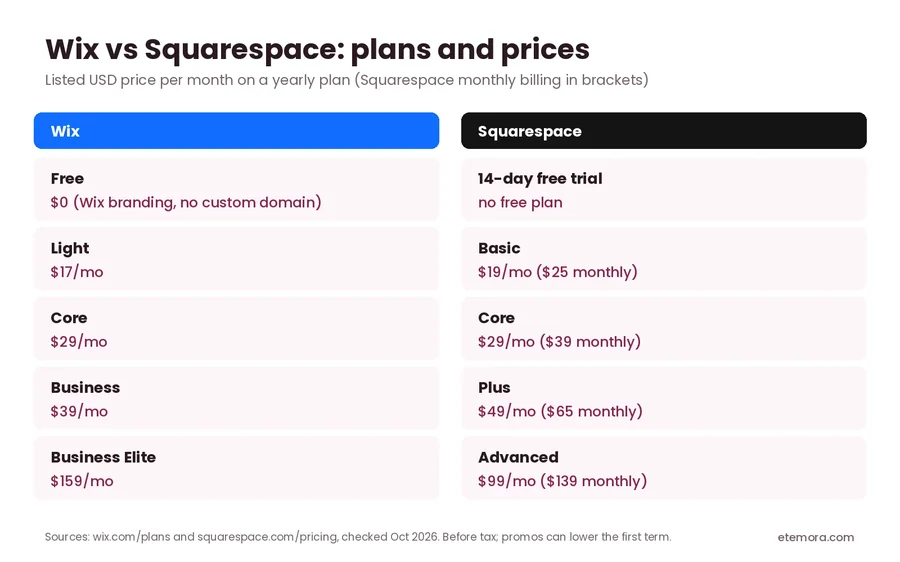
Wix lists five options on its pricing page. The Free plan costs $0 and needs no credit card. Paid plans are Light at $17/month, Core at $29/month, Business at $39/month and Business Elite at $159/month. Wix notes that these are prices for yearly subscriptions paid in full, that prices vary by location, and that taxes are extra.
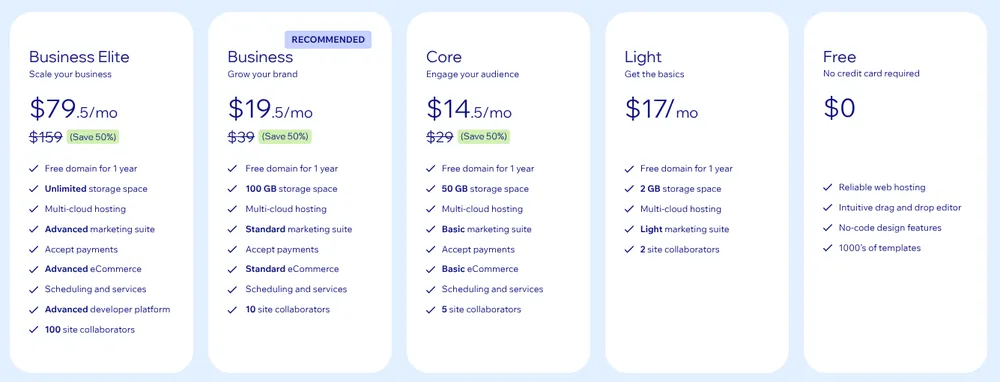
When we checked in October 2026, Wix was also showing a limited-time 50% discount on the first term of Core, Business and Business Elite for US visitors. Offers like this change often and usually apply only to the first yearly term, so budget for the regular price at renewal.
Squarespace plans
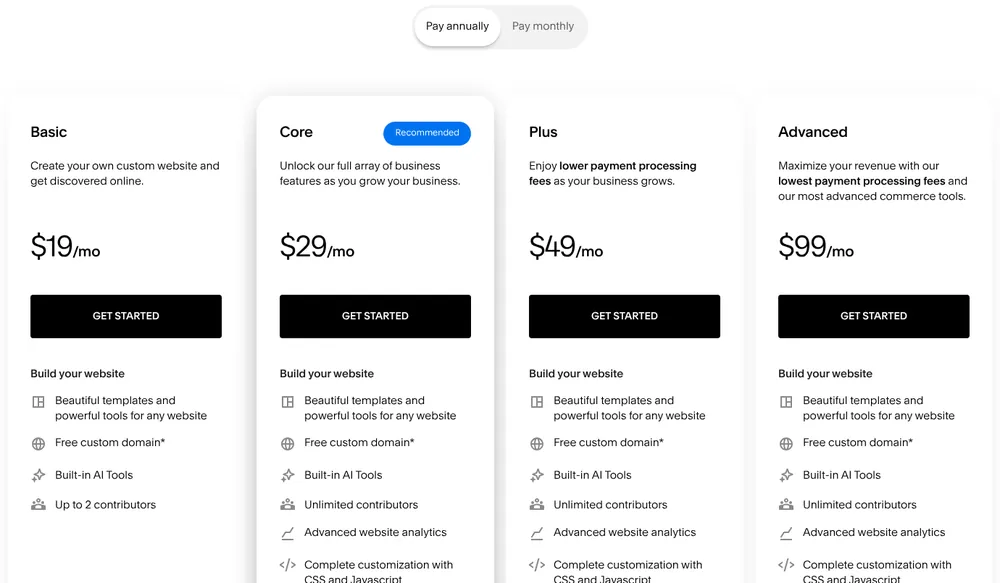
Squarespace has four plans and no free plan. On annual billing, Basic is $19/month, Core is $29/month, Plus is $49/month and Advanced is $99/month. Paying month to month costs more: $25, $39, $65 and $139 respectively. Squarespace says annual billing saves up to 36%.
What a Year Costs on Each Plan
Monthly prices hide how big the yearly bill is. Here is each plan’s listed yearly-plan price multiplied by twelve, before tax and before any first-term promotion.
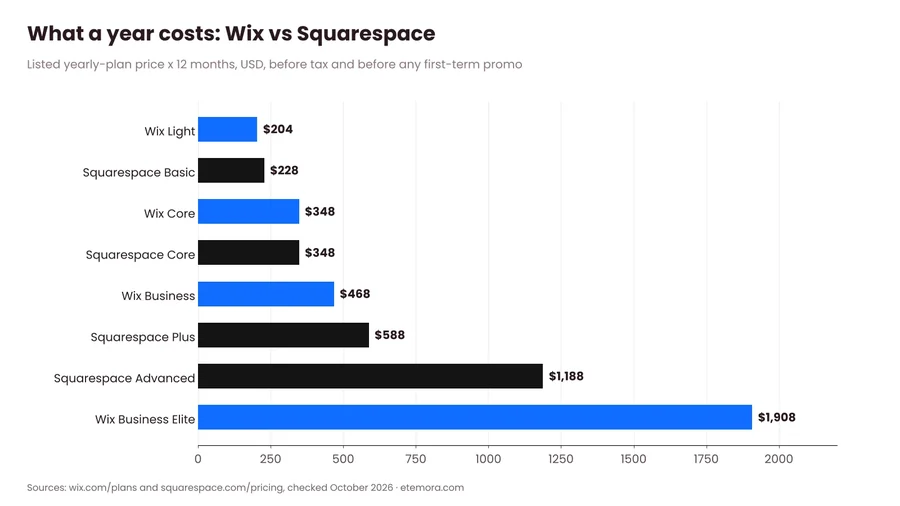
- Entry level: Wix Light comes to $204 a year, Squarespace Basic to $228.
- Middle: Wix Core and Squarespace Core are both $348 a year.
- Growing business: Wix Business is $468 a year, Squarespace Plus $588.
- Top tier: Squarespace Advanced is $1,188 a year, while Wix Business Elite is $1,908.
So Wix is slightly cheaper at the lower end, the two match in the middle, and Squarespace is much cheaper at the top. Remember that a domain is only free for the first year on both, so add a renewal fee from year two. Our guide on how to buy a domain name explains what renewals usually cost.
Free Plan vs Free Trial
This is one of the clearest differences between Wix and Squarespace.
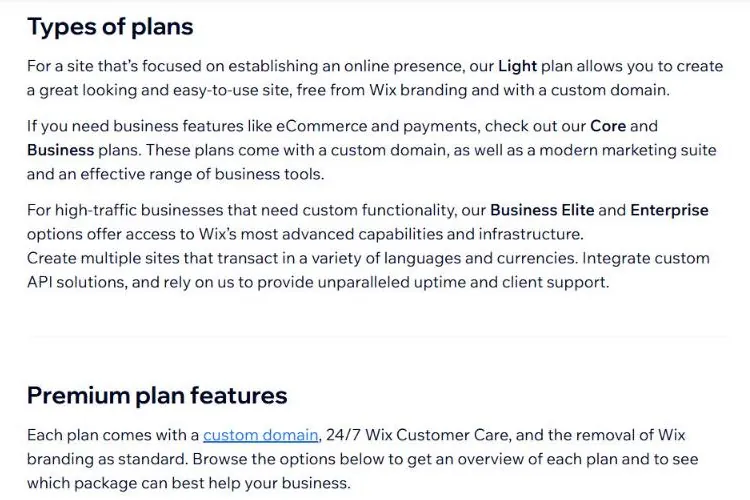
Wix has a permanent free plan. You can build and publish a site at no cost, with hosting and the drag-and-drop editor included. The trade-off is that free sites show Wix branding and can’t use your own domain. According to Wix’s help center, every Premium plan adds a custom domain, 24/7 customer care and removes Wix branding. Wix also lists a 14-day money-back guarantee on paid plans.
Squarespace does not offer a free plan. Instead, its pricing FAQ says every site starts with a 14-day free trial and no credit card is required. You can upgrade during or after the trial, but you can’t keep a site live for free.
If you want to test ideas for weeks or run a hobby site at no cost, Wix wins here. If you just want two weeks to see whether you like the editor, both work.
Templates and Design
Both builders start you from a template, then let you change everything. Their style is different, though.

Wix says it offers more than 2,000 templates, an AI website builder that can create a site from a single prompt, and a drag-and-drop editor where you can place elements almost anywhere on the page. That freedom suits people who want full control, but it also means you need a bit more care to keep pages tidy on mobile.
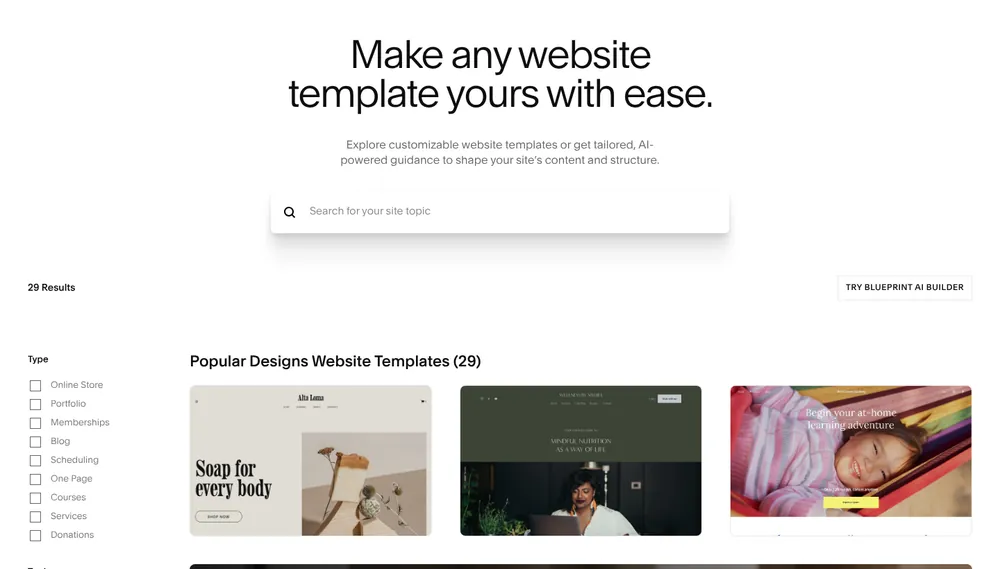
Squarespace focuses on fewer, design-led templates and a more structured editor. Its pricing page lists built-in AI tools on every plan, and its templates page offers an AI-guided option called Blueprint. The structured approach makes it harder to break a layout, which is why Squarespace is popular with photographers, designers and creative businesses.
Selling Online and Transaction Fees
If you plan to sell, fees matter as much as the plan price.
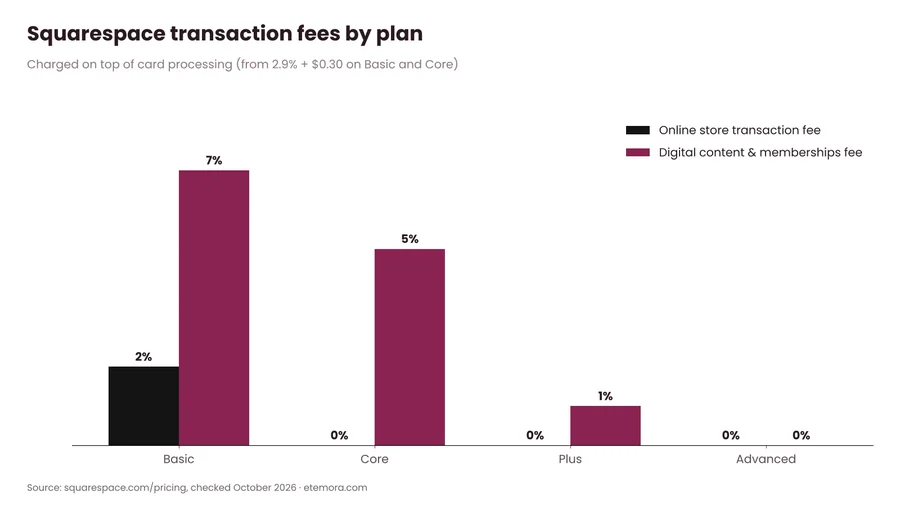
On Squarespace, every plan can sell products and services, but the Basic plan adds a 2% online store transaction fee and a 7% fee on digital content and memberships. Core removes the store fee and lowers the digital content fee to 5%, Plus lowers it to 1%, and Advanced has 0% on both. These are charged on top of card processing, which the pricing page lists from 2.9% + $0.30 on Basic and Core, 2.7% + $0.30 on Plus and 2.5% + $0.30 on Advanced.
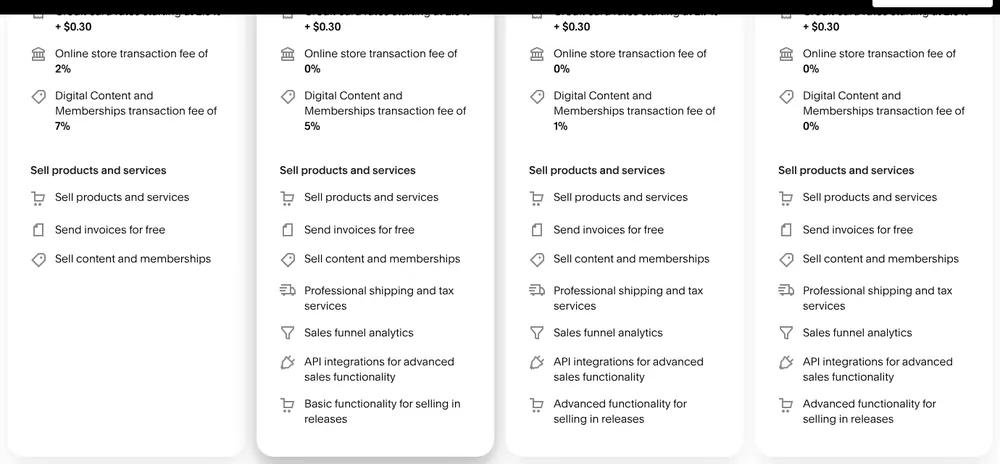
On Wix, the Light plan doesn’t include payments. Accepting payments and selling start on Core (basic eCommerce), with Business adding standard eCommerce and Business Elite advanced eCommerce. Wix’s help center adds that Business and Business Elite include point-of-sale and automated sales tax for up to 100 transactions per month. Payment processing fees depend on the payment provider and country, so check them at checkout.
In short: for a small shop on a budget, Wix Core and Squarespace Core cost the same and neither adds a store fee. For selling courses or memberships, Squarespace has built-in tools but charges a digital content fee until the Advanced plan.
Need hosting for a WordPress site instead?
Compare Web Hosting Services →Wix vs Squarespace: Features Compared
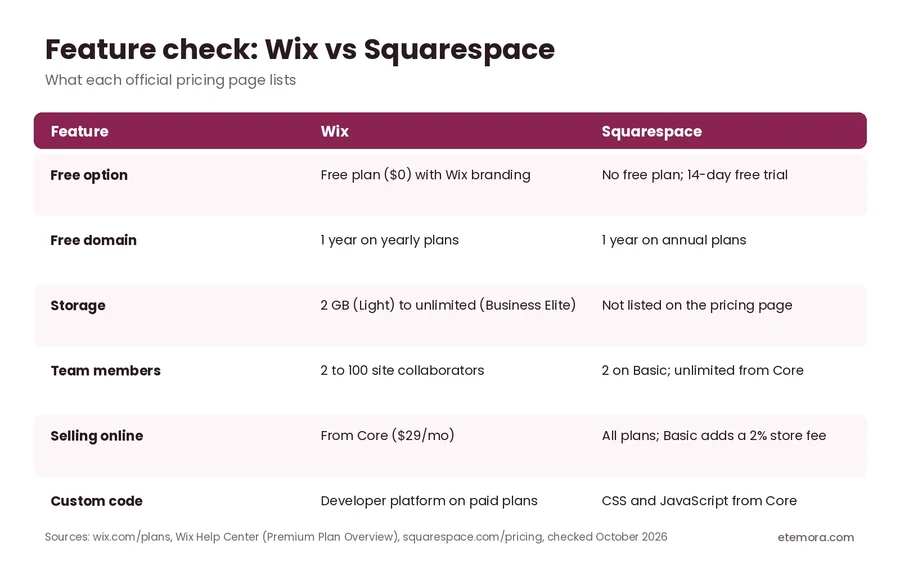
Beyond price, here is how the main features line up on each official page.
Storage and video
Wix sets storage by plan: 2 GB on Light, 50 GB on Core, 100 GB on Business and unlimited on Business Elite. Its help center also lists video upload limits, from 30 minutes on Light to unlimited on Business Elite. Squarespace’s pricing page doesn’t list a storage limit per plan.
Team members
Wix allows 2 site collaborators on Light, 5 on Core, 10 on Business and 100 on Business Elite, according to its pricing page. Squarespace allows up to 2 contributors on Basic and unlimited contributors from Core upwards, which is useful for agencies and teams.
Custom code
Squarespace lists complete customization with CSS and JavaScript from the Core plan. Wix includes a developer platform on paid plans, from basic on Light and Core to advanced on Business Elite.
Support
Wix lists 24/7 customer care on all plans. Squarespace lists 24/7 support along with its help center, forum and webinars.
SEO, Blogging and Marketing
Both builders include a built-in blog and the SEO settings most small sites need to get found on Google. Wix promotes a built-in marketing and SEO suite that grows with each plan, from “light” on Light to “advanced” on Business Elite. Squarespace lists advanced website analytics from the Core plan.
Neither builder will rank your site by itself. What matters most is useful content, a clear structure and steady publishing. If you’re new to this, start with our guide to what SEO is, and if you plan to build an email list, read what email marketing is.
Wix vs Squarespace: Pros and Cons
Here is a short summary of the strengths and trade-offs in the Wix vs Squarespace comparison, based on what each company lists.
| Wix | Squarespace | |
|---|---|---|
| Pros | Free plan; cheapest entry plan ($17/mo); 2,000+ templates; AI builder from a prompt; storage and collaborator limits clearly listed; booking and scheduling from Core | Design-led templates; selling on every plan; unlimited contributors from Core; CSS and JavaScript from Core; much cheaper top plan ($99/mo) |
| Cons | Free sites show Wix branding and can’t use your own domain; no payments on Light; top plan costs $159/mo | No free plan; Basic adds a 2% store fee; digital content fees until Advanced; month-to-month billing costs much more |
If none of the cons on one side is a deal-breaker for you, that builder is probably the safer pick. Many people decide the Wix vs Squarespace question simply by building the same home page in both during the free trial week.
Wix or Squarespace: Which Should You Choose?
The right answer in the Wix vs Squarespace debate depends on the site you’re building.
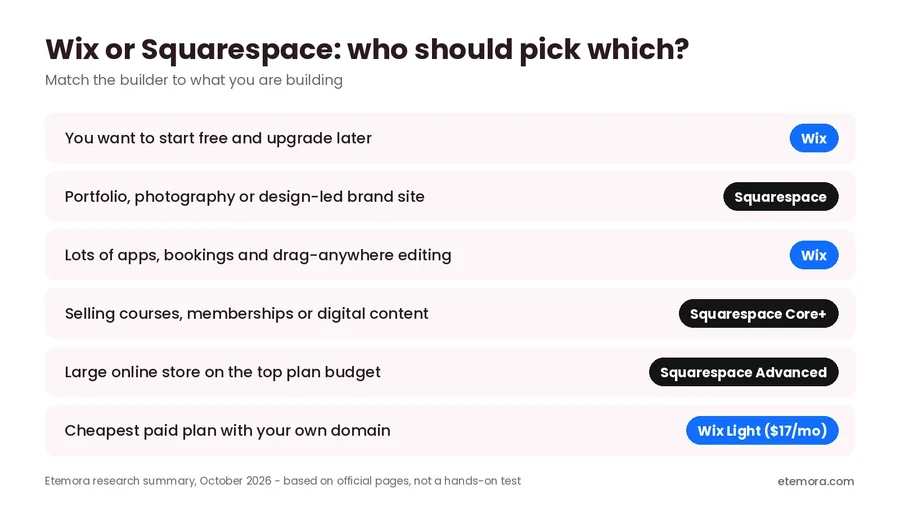
- Choose Wix if you want to start free, need a cheap first paid plan, want lots of apps and booking tools, or like placing elements freely on the page.
- Choose Squarespace if design matters most, you want unlimited contributors on a mid-range plan, you sell courses or memberships, or you need a big store on the top plan at a lower price than Wix’s top tier.
- Consider WordPress if you want full ownership, thousands of plugins and the freedom to move hosts. See our best website builders roundup for more options.
How We Compared
This comparison is research-based. We did not build paid sites on either platform for this article. Prices and features come from wix.com/plans, the Wix Help Center and squarespace.com/pricing, checked in October 2026 from the US. Prices vary by country and change often, so always confirm on the checkout page. Read more about how we review.
Final Verdict: Wix vs Squarespace
In the Wix vs Squarespace matchup, there is no single winner. Wix is the better pick if you want a free plan, the cheapest entry plan and maximum flexibility. Squarespace is the better pick for design-led sites, teams that need unlimited contributors, and sellers who will eventually move to the Advanced plan. On the middle Core plans the price is the same, so try both: start a free Wix site and a 14-day Squarespace trial, and keep the one whose editor you enjoy.
Still comparing options?
Compare the Best Website Builders →Frequently Asked Questions
Is Wix or Squarespace better?
Neither is better for everyone. Wix suits people who want a free plan, a cheap first paid plan and flexible drag-and-drop editing. Squarespace suits design-led sites, portfolios and creators selling courses or memberships.
Is Wix cheaper than Squarespace?
At the entry level, yes: Wix Light is $17/month on a yearly plan versus $19 for Squarespace Basic. Both Core plans are $29/month. At the top, Squarespace Advanced ($99/month) is cheaper than Wix Business Elite ($159/month).
Does Squarespace have a free plan?
No. Squarespace doesn’t offer a free plan, but every site starts with a 14-day free trial and no credit card is required.
Can I use Wix for free?
Yes. Wix has a free plan with hosting and the editor included. Free sites show Wix branding and can’t connect your own domain; a paid plan removes both limits.
Do Wix and Squarespace include a free domain?
Both include a free domain for the first year when you buy a yearly or annual plan. From the second year you pay the normal domain renewal price.
Which is better for an online store?
For small stores, Wix Core and Squarespace Core cost the same and neither adds a store transaction fee. Avoid Squarespace Basic for selling if you can, because it adds a 2% store fee. For large stores, compare Wix Business Elite with Squarespace Advanced.
Which is easier for beginners, Wix or Squarespace?
Both are built for beginners. Wix gives more freedom to drag elements anywhere and can build a first draft from a prompt, while Squarespace’s more structured editor makes it harder to break a layout. Try Wix’s free plan and Squarespace’s 14-day trial to see which feels easier.
Sources
Related articles you may like
 SEO & MarketingWhat Is Email Marketing? Complete Beginner Guide 2026
 SEO & MarketingWhat Is SEO? A Simple Beginner’s Guide for 2026
 SEO & MarketingBest Local SEO Tools: 7 Proven Picks for 2026
 Tech & SoftwareWhat Is a Website Builder? The Ultimate 2026 Guide
 Tech & SoftwareBest AI Image Generators in 2026
 SEO & MarketingBest SEO Tools in 2026: 12 SEO Tools Compared