
What Is Email Marketing? Complete Beginner Guide 2026
 By M. Zaid
- Updated October 25, 2026
- 17 min read
What is email marketing, and why do businesses use it to reach customers? Email marketing is a form of digital marketing that uses email to share useful information, announce products, promote offers and maintain relationships with subscribers. It can help a small business talk to existing customers, let a freelancer stay in touch with potential clients, or give a website owner a way to share new content.
However, effective email marketing involves more than sending messages to a list of addresses. You need relevant content, permission-based list building, a clear goal and a way to measure results. This guide explains what is email marketing in practice and shows beginners how to get started.
Quick answer: What is email marketing? It is the practice of sending relevant emails to an audience that agreed to hear from you, to share information, promote products or services, encourage purchases and build customer relationships. Common formats include newsletters, promotional campaigns, welcome emails and automated messages.
Comparing tools to send your first campaign?
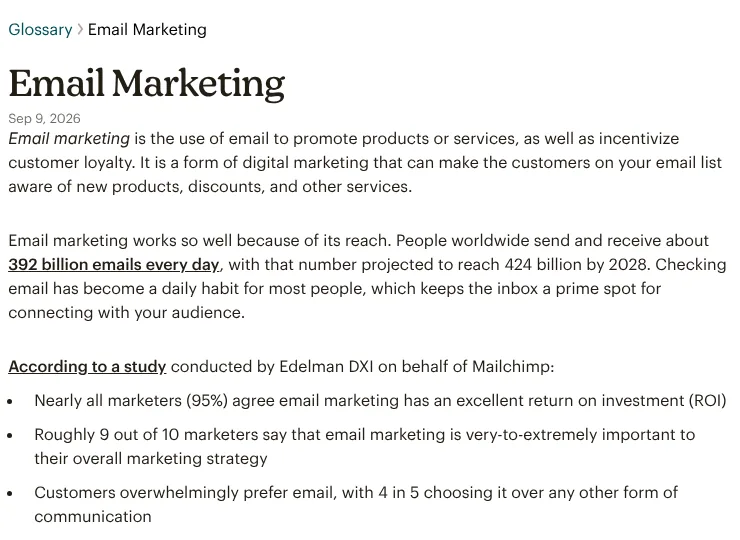
See Email Marketing Tools →Mailchimp’s email marketing glossary defines it as using email to promote products or services and to encourage customer loyalty, keeping people on your list aware of new products, discounts and services.
How Does Email Marketing Work?
The simplest way to answer what is email marketing in practice is to follow its process, which repeats for every campaign. A business defines its goal, invites people to subscribe, organizes contacts, creates and sends an email, and reviews the results.
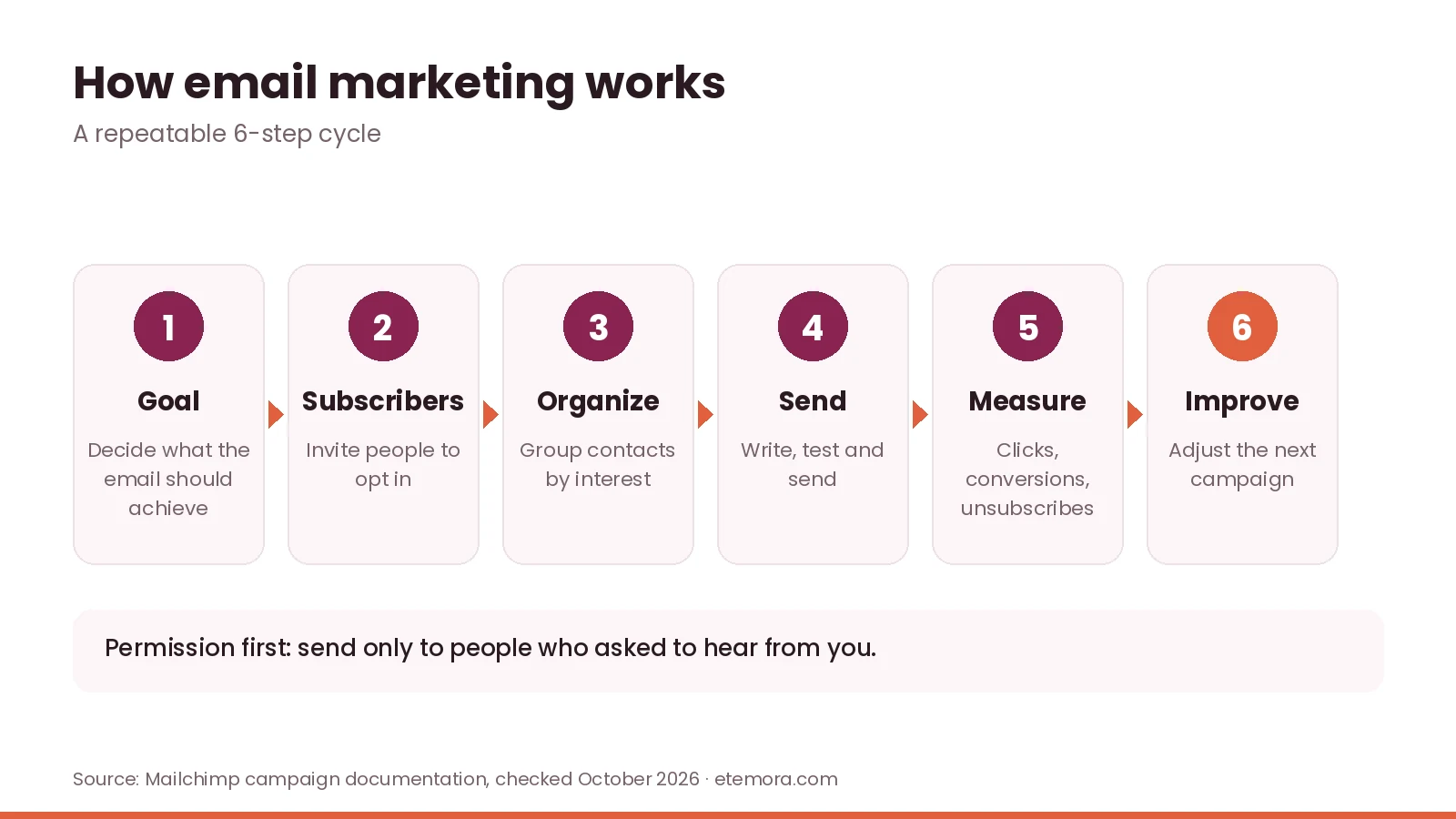
- Set a goal. Decide what the email should accomplish: sharing a new article, announcing a product, registering people for an event or encouraging repeat purchases.
- Grow a subscriber list. Collect addresses through signup forms, purchases or registrations, and explain what people will receive.
- Organize the audience. Group contacts by interests, preferences or past purchases when you have a suitable basis to do so.
- Create and send. Write a useful message, choose a clear subject line, check links and formatting, then send it to the intended audience.
- Measure. Review clicks, conversions, unsubscribes and delivery information.
- Improve. Use what you learn to make the next campaign better.
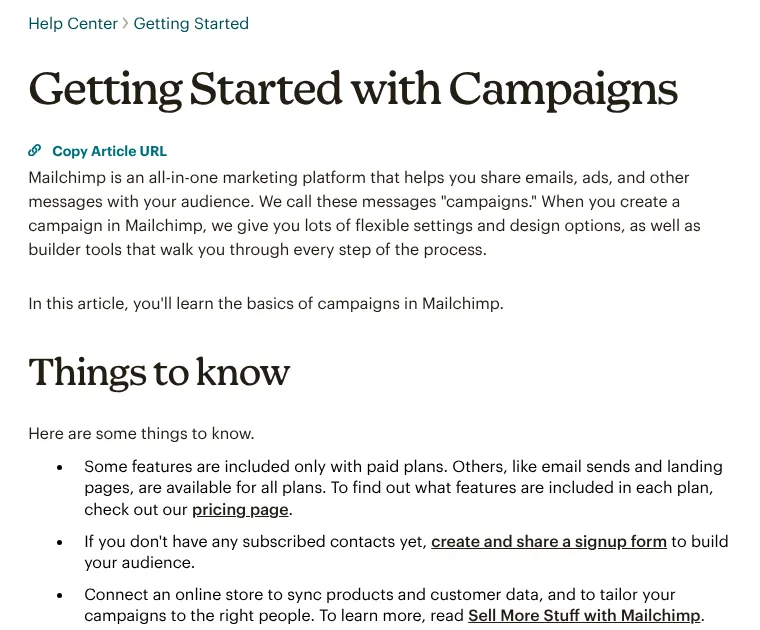
Email platforms help manage these steps with contact lists, campaign builders, scheduling, automation and reporting. Mailchimp’s getting started with campaigns guide explains that it calls these messages “campaigns” and that some features are only available on paid plans.
What Are the Main Types of Email Marketing?
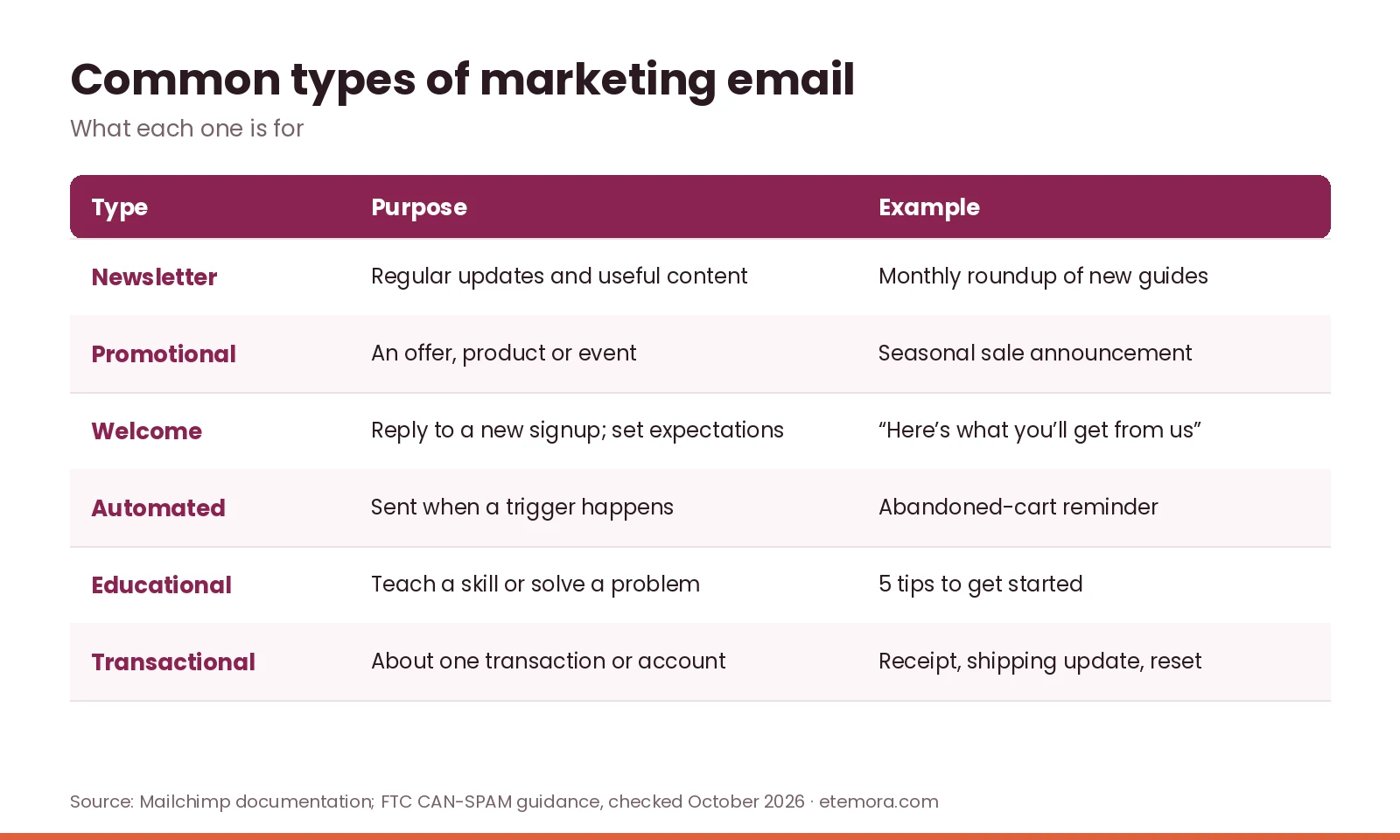
Part of understanding what is email marketing is knowing that different emails serve different purposes. A newsletter is not the same as a discount campaign, and neither is the same as an order confirmation.
1. Email newsletters
A newsletter delivers regular updates to subscribers: new articles, company news, educational tips, product updates or useful resources. A digital marketing website might send a monthly roundup of recent guides. The goal is to give readers a reason to stay connected, rather than making every message a sales pitch.
2. Promotional emails
Promotional emails announce offers, products, services or events. Explain the offer clearly, state restrictions and deadlines accurately, and make sure the subject line reflects the content.
3. Welcome emails
A welcome email is sent after someone subscribes or creates an account. It can confirm the signup, deliver a promised resource, introduce the business and set expectations about frequency and topics.
4. Automated emails
Automated emails are triggered by a defined event, such as a welcome sequence after signup, a reminder about an abandoned cart or a follow-up after a purchase. Automation saves repetitive work but still needs maintenance: wrong triggers and outdated links create a poor experience.
5. Educational emails
Educational emails help subscribers understand a topic or use a product better, such as a freelancer sending a short guide to writing a project brief. They work best when the information is genuinely useful and claims can be backed up.
6. Transactional emails
Transactional emails cover an individual transaction or account activity: order confirmations, shipping updates, password resets and receipts. A message can mix transactional and marketing content, and the FTC’s guidance says its classification depends on the message’s primary purpose, so don’t assume every email to a customer is exempt from marketing rules.
Why Is Email Marketing Important?
Knowing what is email marketing is only useful if you see why it matters. Email gives businesses a direct way to reach people who chose to receive messages. Its value depends on what the audience wants, how relevant the content is and whether the channel is managed responsibly.
Direct communication with subscribers
Unlike relying only on social media, a business can send messages to the addresses it manages, subject to consent, privacy, platform and legal rules. That still doesn’t guarantee inbox placement: delivery depends on sender reputation, authentication, recipient settings and message quality.
Repeat visits and customer relationships
A useful newsletter reminds readers about a business and brings them back. The key is relevance: too many emails, or promotions in every message, lead people to ignore emails or unsubscribe.
Measurable results
Platforms may report deliveries, clicks, unsubscribes and conversions. Treat open rates carefully, because privacy features and automated activity can affect tracking, and don’t judge success by one metric.
Segmentation and personalization
Segmentation means grouping subscribers so messages better match their interests. An online store might send product-care tips to recent buyers and an introduction to subscribers who haven’t bought yet. Collect only the data you need.
Opportunities for small businesses
Email marketing suits small businesses, freelancers, publishers and nonprofits. A freelancer might share availability with past clients, while a publisher sends new articles to subscribers. A clear purpose and a manageable schedule matter more than a big list.
How to Start Email Marketing as a Beginner
If you are asking what is email marketing because you want to try it, start with a simple plan and expand as your audience grows.
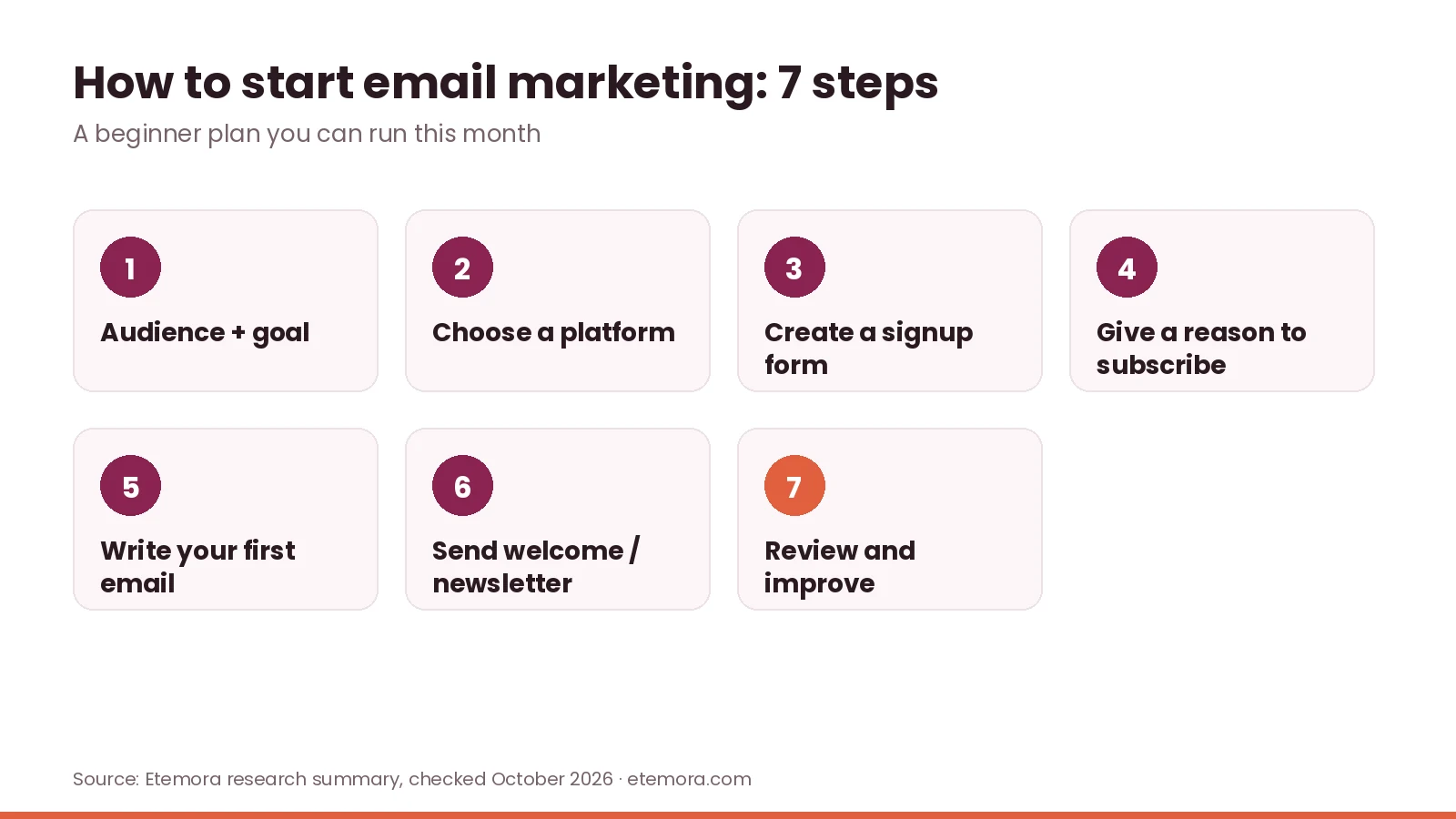
Step 1: Define your audience and goal
“Everyone who might buy something” is too broad. Pick a specific audience and one practical goal, for example a web design freelancer staying in touch with small business owners who downloaded a website planning checklist.
Step 2: Choose an email marketing platform
A platform manages contacts, creates messages, sends campaigns and reports results. Before choosing, compare contact and sending limits, automation and segmentation, templates, signup forms and integrations, reporting, pricing as your list grows, and support.
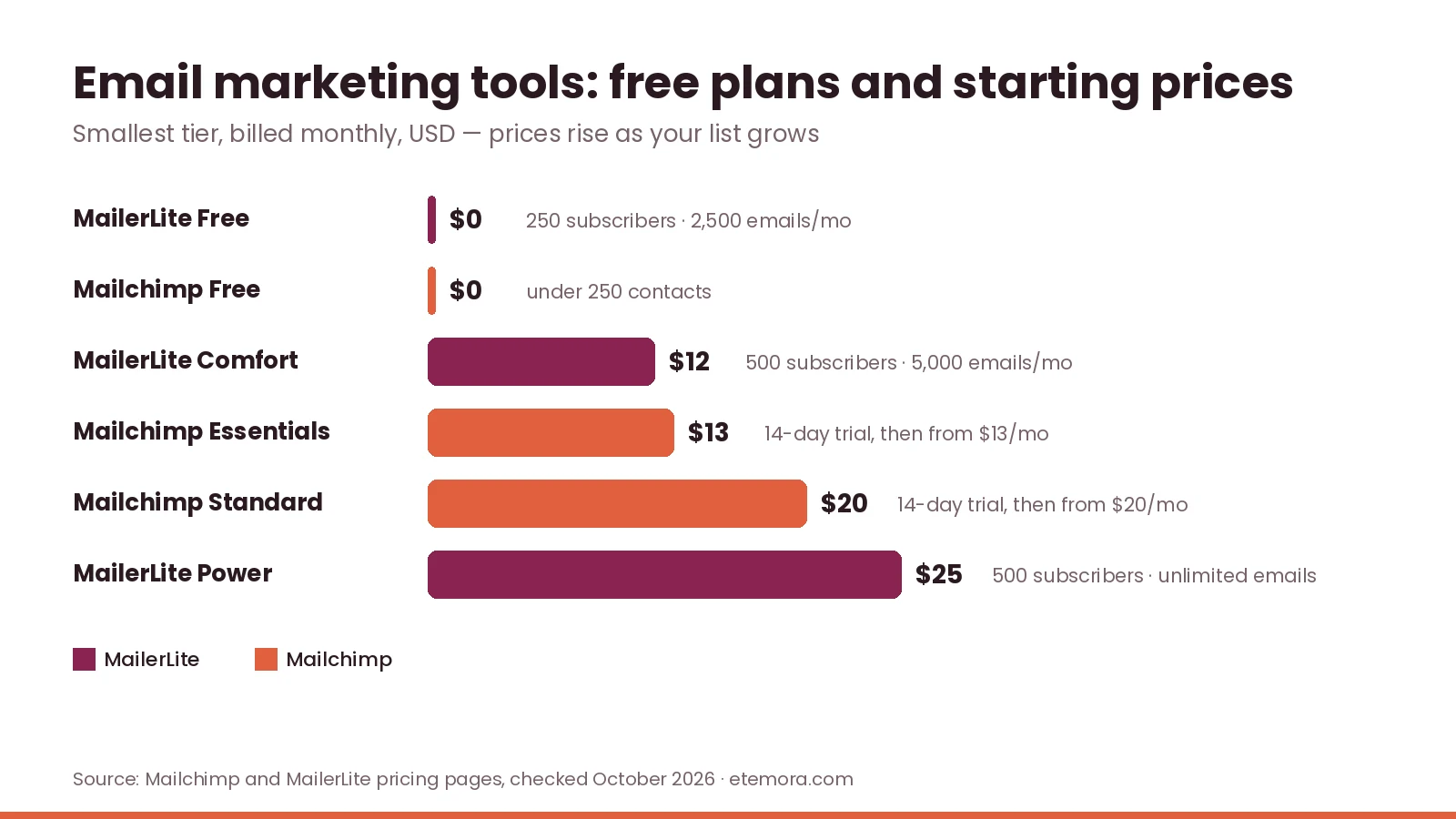
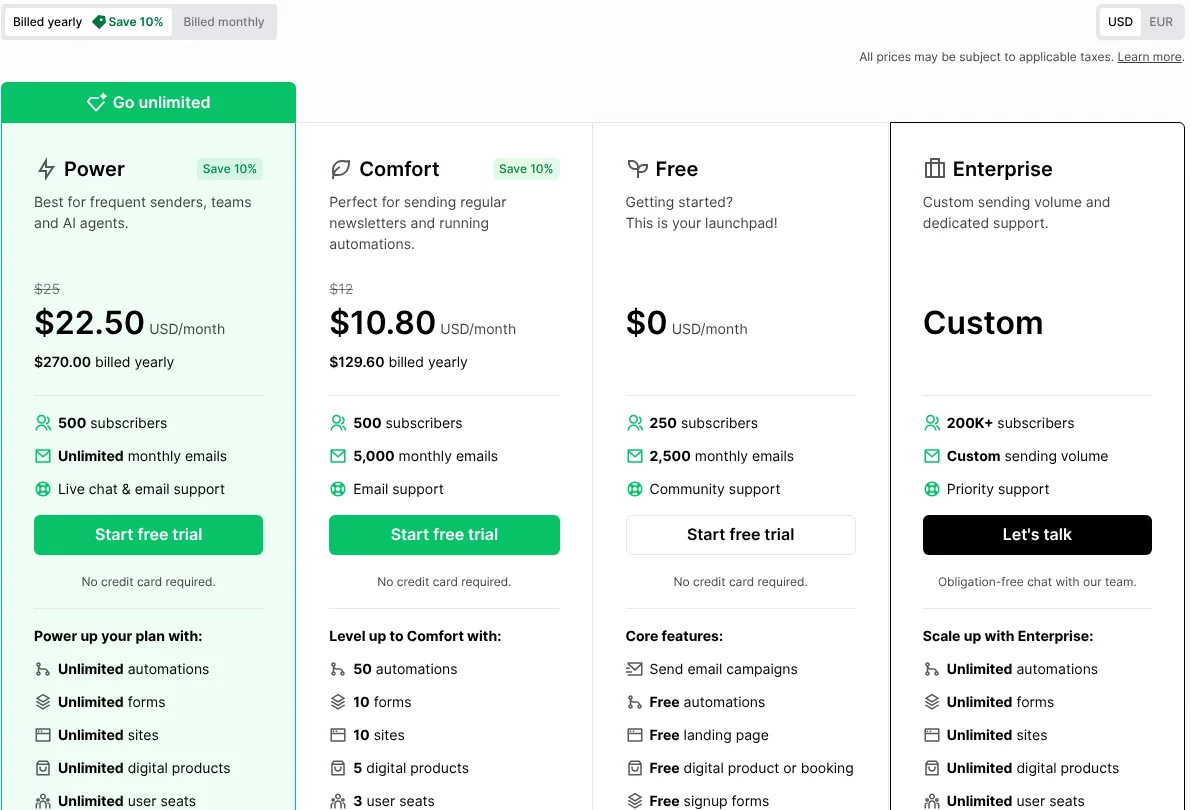
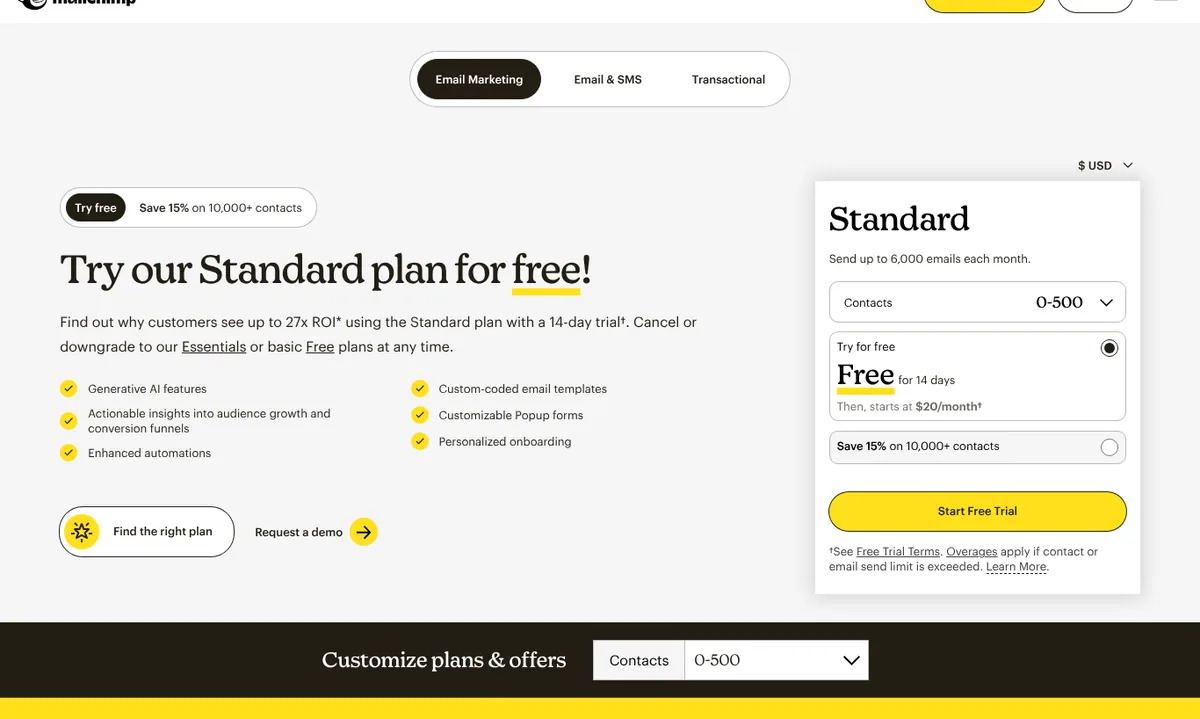
Many services start free. When we checked in October 2026, MailerLite’s pricing page listed a Free plan for 250 subscribers and 2,500 monthly emails, with paid plans from $12 per month on monthly billing. Mailchimp’s pricing page offered a free plan for under 250 contacts and paid plans starting at $13 (Essentials) and $20 (Standard) per month after a 14-day trial. Prices rise with list size, so check the current tiers.
For a wider look at software, compare marketing tools for planning and managing campaigns.
Step 3: Create a signup form
Place a simple form where it makes sense: a relevant blog post, a resource page, checkout or your footer, and describe what people will receive. Don’t buy email lists or assume that having someone’s address gives you permission to market to them.
Step 4: Offer a clear reason to subscribe
A useful newsletter, a checklist or a tutorial gives people a reason to sign up. Deliver what you promise: if the form says weekly newsletter, don’t switch to daily promotions.
Step 5: Write your first email
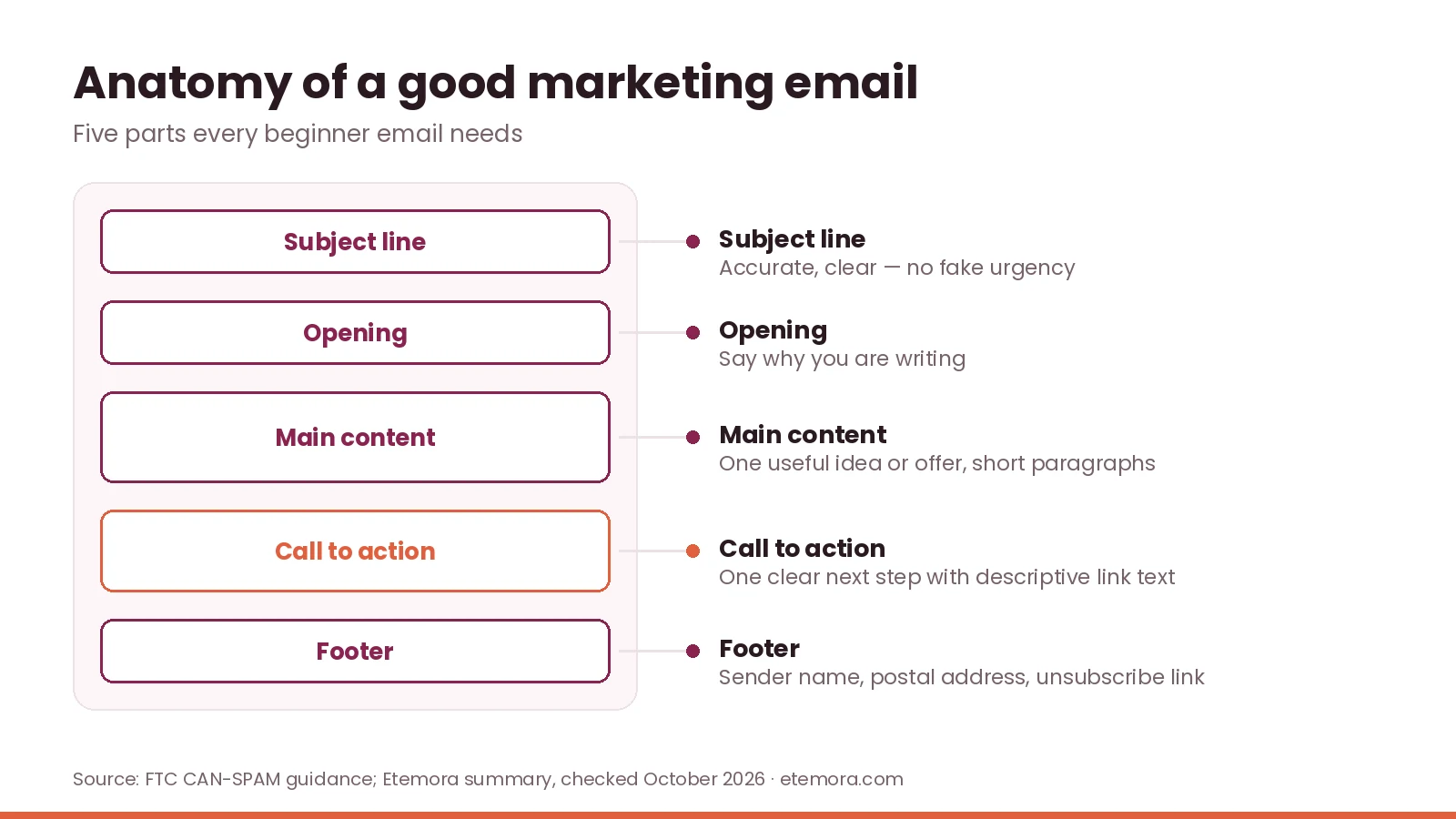
A beginner-friendly email has five parts: an accurate subject line, an opening that says why you are writing, the main content, a call to action, and a footer with the required sender information and unsubscribe option. Keep paragraphs short, use descriptive links and check it on mobile. AI writing tools for drafting and editing email content can help with a first draft, but check every claim.
Step 6: Send a welcome email or newsletter
A welcome email introduces your business and confirms what subscribers can expect. Before sending anything, check the segment, sender name, subject line, spelling, links, images, mobile layout and that unsubscribing works.
Step 7: Review and improve
Look at clicks, conversions, unsubscribes and delivery problems against your original goal. If people click but don’t act, check that the landing page matches the email’s promise. If unsubscribes rise, review relevance and frequency rather than sending more. Treat these as clues, not proof of cause and effect.
Email Marketing Best Practices
A good answer to what is email marketing always includes respect for the subscriber. These practices help you build a useful, responsible program.
Send relevant emails
Match content to what subscribers signed up for. Even a simple newsletter works when its topic and frequency are consistent.
Use honest subject lines
Describe the email accurately. Avoid fake urgency, fake replies or claims the message doesn’t back up.
Make unsubscribing easy
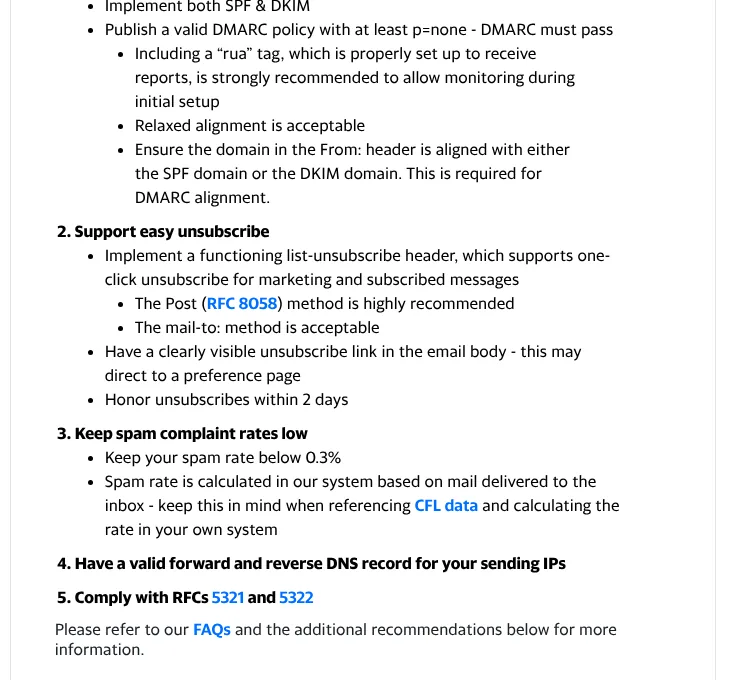
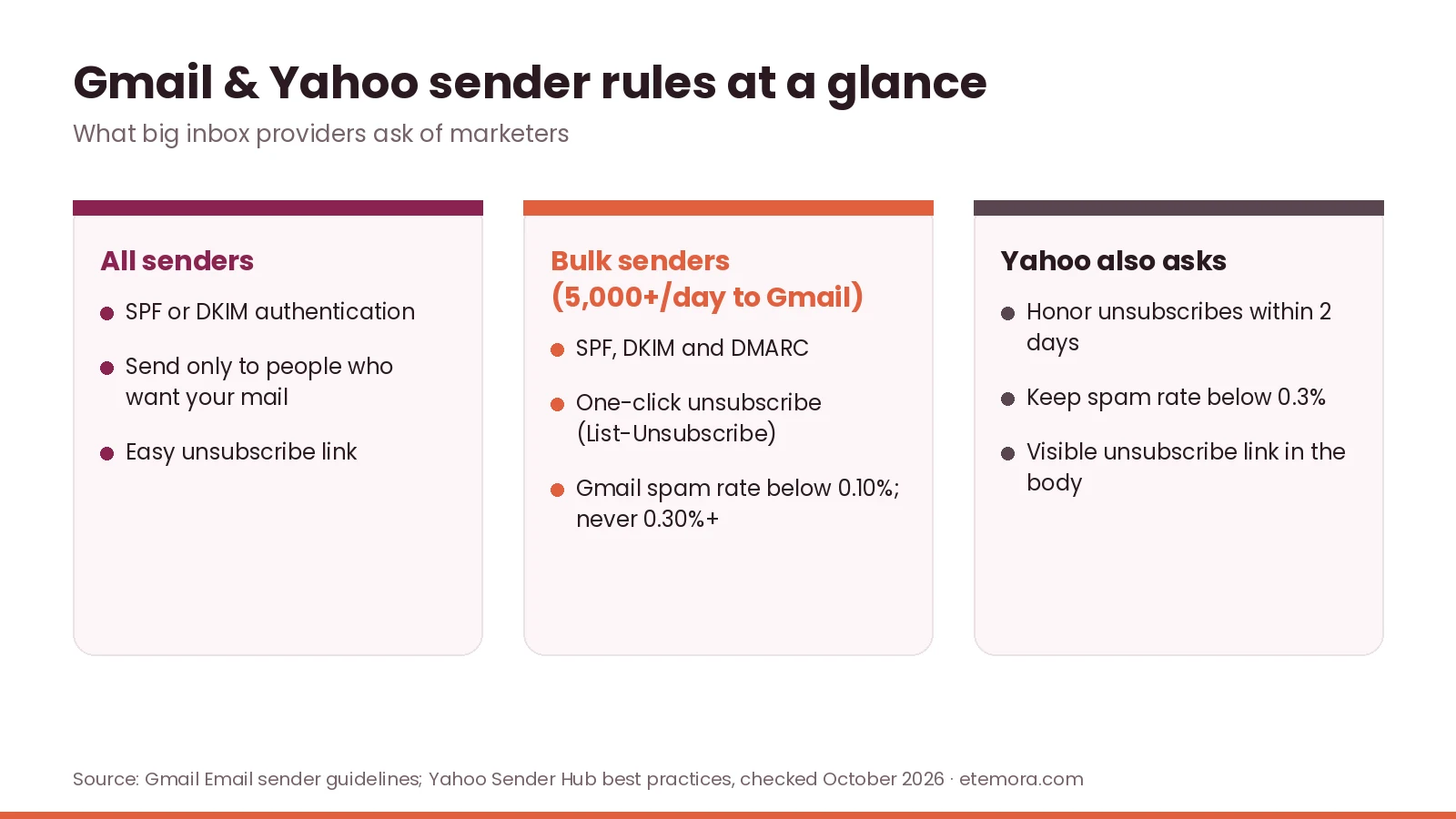
Give people a clear way to stop marketing emails and process requests promptly. Yahoo’s sender best practices ask senders to support one-click unsubscribe, show a visible unsubscribe link in the body and honor unsubscribes within 2 days.
Set up email authentication
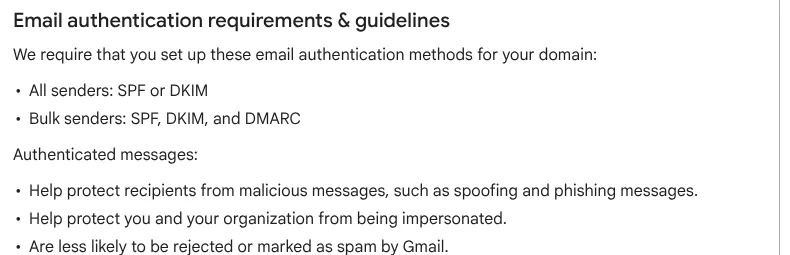
SPF, DKIM and DMARC help receiving systems check that a message is authorized to use your sending domain. Google’s email sender guidelines require all senders to Gmail accounts to use SPF or DKIM, and bulk senders (5,000 or more messages a day) to use SPF, DKIM and DMARC and support one-click unsubscribe. Google also says to keep the spam rate in Postmaster Tools below 0.10% and avoid ever reaching 0.30%. If you are setting up a sending domain, our guide to what a domain name is covers the basics.
Avoid spam-like sending
Unsolicited messages, misleading subject lines and repeatedly emailing people who never engage harm trust and delivery. A smaller list of people who want your content beats a bigger list built without permission.
Make emails easy to read
Use a clear hierarchy, short paragraphs, descriptive links and one obvious main action. Add alt text to informative images and don’t put key information only inside an image.
Review content regularly
Check automated emails, signup promises, links and offers periodically. A simple editorial calendar with topic, audience, send date and goal keeps regular sending organized.
What Are the CAN-SPAM Rules for Email Marketing?
Any honest guide to what is email marketing has to cover the law. In the United States, the FTC’s CAN-SPAM compliance guide lists the main requirements for commercial email. The law makes no exception for business-to-business email.
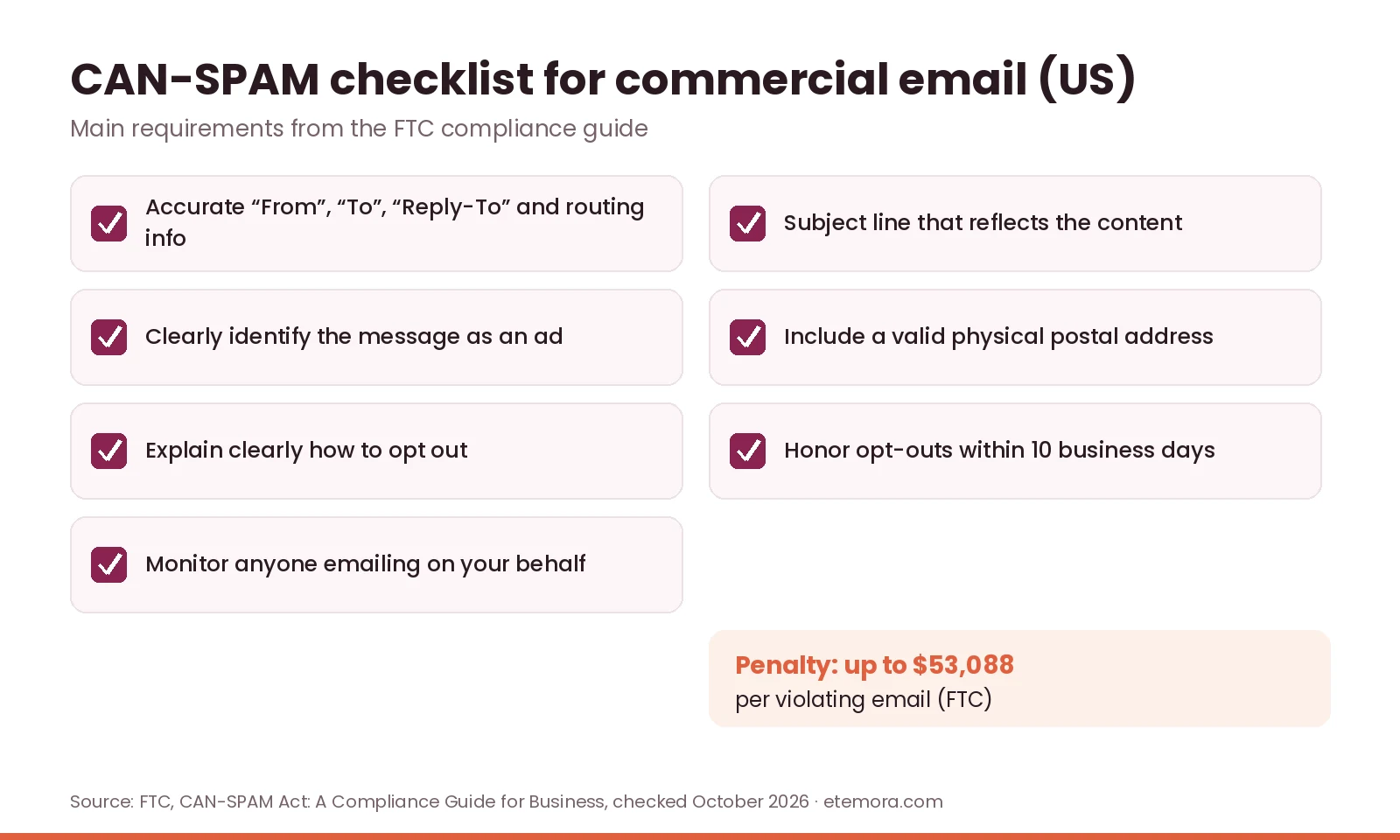
- Don’t use false or misleading header information (From, To, Reply-To and routing).
- Don’t use deceptive subject lines.
- Identify the message as an ad, clearly and conspicuously.
- Include a valid physical postal address.
- Explain clearly how to opt out of future marketing email.
- Honor opt-out requests within 10 business days.
- Monitor what others do on your behalf.
The FTC says each separate email that violates the law is subject to penalties of up to $53,088. Other countries have their own rules, so don’t assume US compliance is enough when you email people internationally.
Common Email Marketing Mistakes
Most problems beginners face come from misunderstanding what is email marketing for: permission-based relationships, not mass sending. Plan audience, content and sending before launching.
- Buying email lists: people who didn’t expect your messages create legal, reputation and deliverability risks.
- Sending without a clear goal: every email needs a purpose that fits its audience.
- Too many links: competing actions make it hard to know what matters.
- Ignoring mobile readers: dense text and small buttons are hard to use on phones.
- Focusing only on open rates: opens alone don’t show whether a campaign met its goal.
- Forgetting list maintenance: invalid addresses and outdated preferences hurt quality.
- Not checking the rules: legal and provider requirements differ by country, message type and volume.
- Set-and-forget automation: triggers, links and messages go stale.
How to Choose an Email Marketing Tool
Once you know what is email marketing and what you want from it, the right tool depends on your needs today. Weigh these six factors.
1. Contact and sending limits
Check how many contacts and sends a plan allows, and how unsubscribed contacts are counted for billing. On Mailchimp, for example, monthly sends on paid plans are a multiple of your contact count (10× on Essentials, 12× on Standard, 15× on Premium).
2. Automation features
An occasional newsletter needs only a simple campaign builder. Welcome sequences or behavior-triggered emails need the right automation tier, so don’t pay for advanced workflows you won’t use yet.
3. Segmentation and personalization
Check that the platform supports the groups you need, such as interest, signup source or purchase history, and keep data collection transparent.
4. Integrations
Make sure it connects to your website, store, forms or analytics, and supports the exact data and actions you need.
5. Reporting and deliverability support
Look for clear reports on clicks, conversions, unsubscribes and delivery issues, plus help with domain authentication. No platform can guarantee inbox placement.
6. Total cost and ease of use
Look past the first price: contact growth, sending limits, extra users and add-ons all change the cost. A simple tool that fits today often beats an expensive one full of unused features.
If email supports a content site, pair it with search traffic using SEO tools for attracting relevant website visitors; our explainer on what SEO is covers the basics. Website owners who earn through affiliate marketing often use newsletters to bring readers back, and AI tools for business productivity can help plan campaigns.
How We Compared
This guide to what is email marketing draws on Mailchimp’s glossary, help center and pricing page, MailerLite’s pricing page, the FTC’s CAN-SPAM compliance guide, Google’s Gmail email sender guidelines and Yahoo’s sender best practices. Sources were checked in October 2026. This is a research-based guide; we did not run hands-on tests. Prices, plan limits and sender requirements change, so confirm current terms before sending campaigns. Read more about how we review.
Final Verdict: What Is Email Marketing?
So, what is email marketing? It is a way to communicate with an audience through relevant, purposeful emails, whether you want to share information, promote a product, encourage repeat purchases or build stronger customer relationships.
For beginners, start with one audience, one clear goal and a manageable schedule. Choose a platform that fits your current needs, collect subscribers with permission, send useful content and review results before moving into complex automation.
- Best fit for small business owners: useful updates, relevant offers and customer follow-ups
- Best for bloggers and publishers: a newsletter that brings readers back to new articles
- Best for freelancers: expertise and service updates for the right contacts
- Best for online stores: suitable promotional and post-purchase emails
- Best for beginners: a simple newsletter and signup form before advanced tools
Email marketing is not a shortcut to guaranteed sales. Its value comes from understanding your audience, respecting subscriber preferences and sending messages worth receiving.
Ready to pick a platform?
Compare the Best Marketing Tools →Frequently Asked Questions
What is email marketing in simple words?
What is email marketing in simple words? It means sending emails to people who agreed to hear from you, to share information, promote products or services, or keep customer relationships going. Businesses use it for newsletters, announcements, offers and automated messages.
How does email marketing work?
It starts with a goal and a permission-based audience. A business collects subscribers, organizes contacts, creates a message, sends it and reviews the results. Platforms help with signup forms, scheduling, automation and reporting, depending on the plan.
Is email marketing free?
You can often start on a free plan. In October 2026, MailerLite’s Free plan covered 250 subscribers and 2,500 monthly emails, and Mailchimp offered a free plan for under 250 contacts. Free plans limit contacts, sends and features, and you may still pay for a domain or other tools.
What are the main types of email marketing?
Common types are newsletters, promotional emails, welcome emails, educational emails and automated campaigns. Transactional emails such as receipts and order confirmations are a separate category with a different purpose.
Is email marketing good for small businesses?
It can help small businesses share updates, introduce offers, keep customer relationships and encourage repeat visits. Its usefulness depends on audience relevance, message quality and cost. Start with a simple newsletter and add tools when needed.
How do I start email marketing with no experience?
Pick a specific audience and goal, choose a platform, create a clear signup form and prepare one useful welcome email or newsletter. Check the platform’s terms and the marketing rules that apply to you, then use reports to improve gradually.
What is an email marketing campaign?
A campaign is a planned email or series of emails sent to an intended audience for one purpose, such as announcing a product, sharing a newsletter, inviting people to an event or delivering a welcome sequence.
How often should a business send marketing emails?
There is no single right schedule. Choose a frequency you can sustain and that matches what subscribers were promised, then watch engagement, complaints and unsubscribes. More emails are not automatically better.
What is the difference between email marketing and spam?
Email marketing is legitimate when done with permission and in line with laws and provider rules. Spam generally means unwanted or unsolicited messages. Build lists responsibly, use accurate sender information and subject lines, and always provide an unsubscribe option.
Which email marketing platform should a beginner choose?
Look for an easy platform that covers your contact limit, sending volume, signup forms and basic reporting. Compare official plan limits, costs, integrations and support rather than assuming one provider suits every business.
Sources
Related articles you may like
 SEO & MarketingEmail Marketing for Small Business: A Simple 7-Step Guide for 2026
 SEO & MarketingBest Mailchimp Alternatives in 2026: 6 Cheaper Email Tools Compared
 Tech & SoftwareWix vs Squarespace (2026): Pricing, Fees and Which to Choose
 SEO & MarketingWhat Is SEO? A Simple Beginner’s Guide for 2026
 SEO & MarketingBest Local SEO Tools: 7 Proven Picks for 2026
 Tech & SoftwareWhat Is a Website Builder? The Ultimate 2026 Guide