
What Is Cybersecurity? Complete Beginner’s Guide 2026
 By M. Zaid
- Updated October 19, 2026
- 20 min read
What is cybersecurity? It is the practice of protecting computers, mobile devices, networks, applications and data from unauthorized access, damage, disruption and other digital threats. Cybersecurity matters whenever you use email, shop online, store files in the cloud, manage a business website or connect a device to the internet.
You do not need to be a technical expert to improve your security. Everyday habits such as using unique passwords, turning on multifactor authentication, recognizing suspicious messages and installing updates reduce common risks. This guide answers what is cybersecurity in plain English: what it protects, the threats to understand, how it works, the tools that help, and practical steps individuals and businesses can take.
Quick answer: What is cybersecurity? It is the protection of digital systems, accounts, networks and information against threats such as malware, phishing, unauthorized access and data theft. It combines technology, processes and human behavior to reduce risk, detect suspicious activity, respond to incidents and restore systems when something goes wrong.
Want an extra layer of device protection?
See Antivirus Software →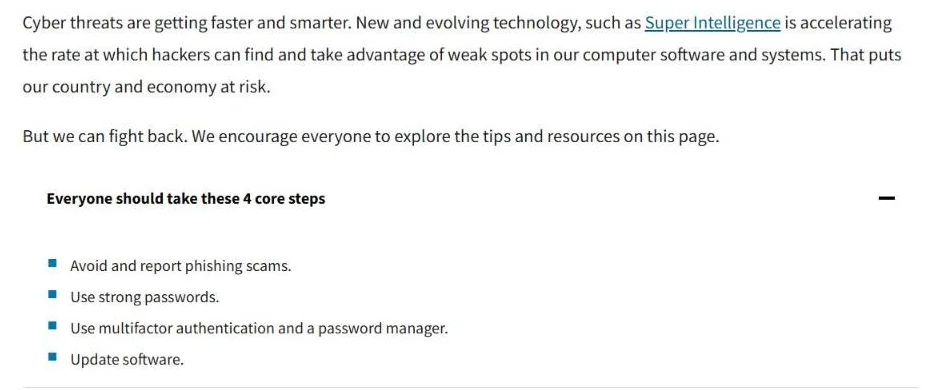
What Does Cybersecurity Protect?
A practical way to answer what is cybersecurity is to look at what it protects: the technology and information people rely on for personal, educational and business activities. It is broader than installing antivirus software or creating a strong password.
Devices and endpoints
Computers, smartphones, tablets and other connected devices can be targets for malicious software or unauthorized access. Endpoint security includes keeping devices updated, configuring security settings, controlling application access and using appropriate protection tools. For a home user, this might mean securing a laptop and phone; for a business, it also means managing employee devices and blocking unauthorized software.
Accounts and identities
Email accounts, social media profiles, banking logins and work accounts can open the door to sensitive information. Attackers may try to steal passwords, trick users into approving sign-ins or exploit weak account recovery settings. Unique passwords and multifactor authentication reduce the risk that one compromised password exposes several accounts.
Networks and internet connections
Networks connect devices and let information move between them. Cybersecurity measures here include secure Wi-Fi settings, firewalls, network monitoring and appropriate access controls.
A VPN can encrypt traffic between your device and a VPN server, depending on the service and configuration. However, it does not automatically prevent phishing, malware or every form of tracking. Learn more in our guide to what a VPN does.
Applications and websites
Software can contain vulnerabilities that attackers exploit. Security practices include installing updates, restricting unnecessary permissions, protecting administrator accounts and monitoring applications for suspicious behavior. For a website owner, what is cybersecurity in daily terms? Secure hosting, backups, careful access permissions and updates to their content management system and extensions all play a part.
Data and digital records
Ask what is cybersecurity protecting in your own life, and the answer is usually data. Personal photos, financial records, customer details, business documents and intellectual property can all need protection. Access controls, encryption, secure storage and reliable backups help protect data against unauthorized access or loss. The right controls depend on how sensitive the information is and what would happen if it became unavailable or exposed.
What Are the Main Types of Cybersecurity?
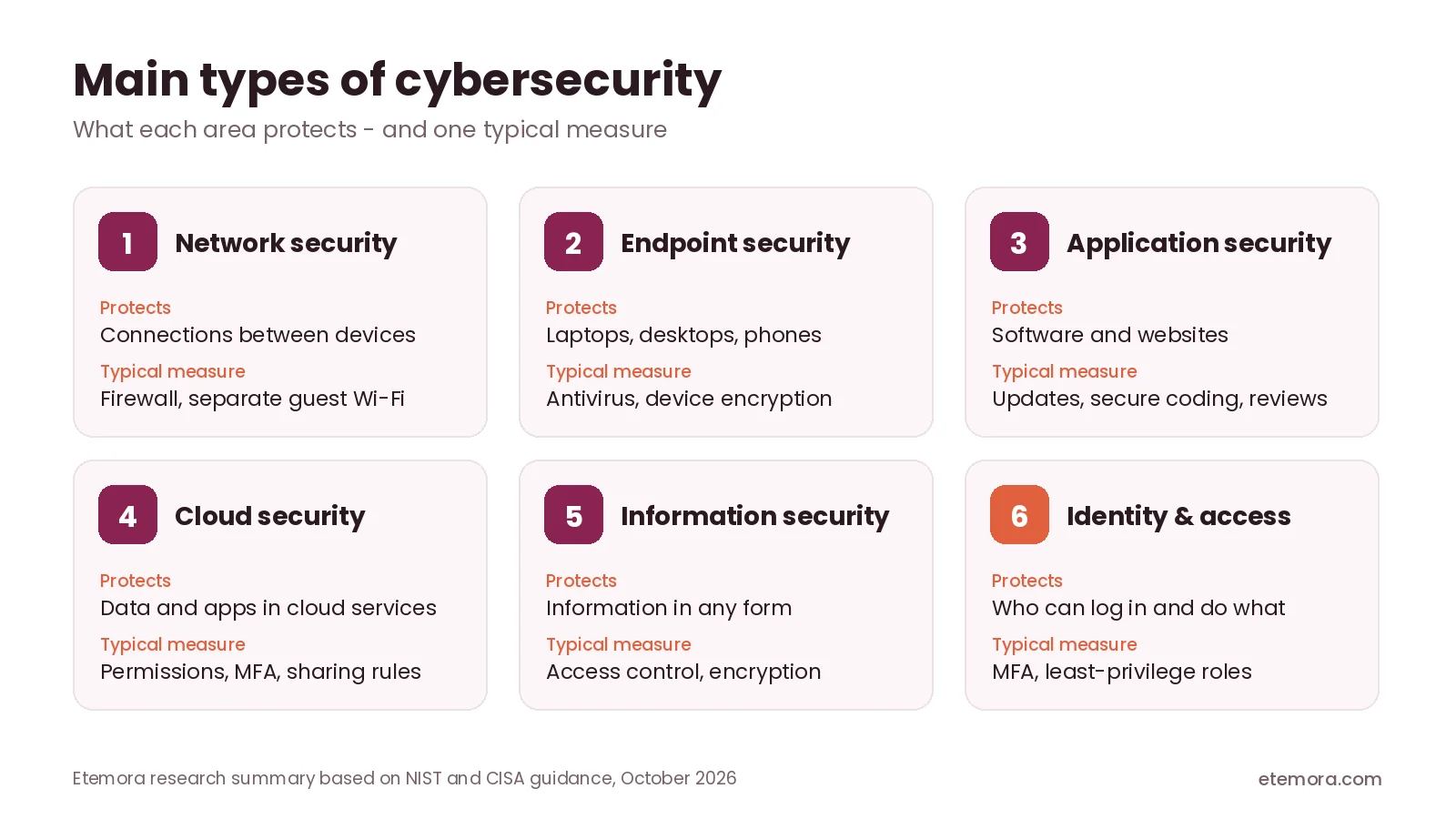
Part of understanding what is cybersecurity is knowing its main disciplines. They often overlap, because an attack against one part of a system can affect other parts.
Network security
Network security protects the connections and systems through which devices communicate. Common measures include firewalls, network segmentation, secure Wi-Fi configuration and monitoring for unusual activity. For example, a business may separate its guest Wi-Fi from the network used for company files, which limits unnecessary access between groups of devices.
Endpoint security
Endpoint security protects individual devices such as laptops, desktops and mobile phones. It may include antivirus software, endpoint detection tools, device encryption, security policies and centralized management. The right level depends on the device, the data it handles and the threats its user faces.
Application security
Application security aims to find and reduce vulnerabilities in software. Developers and website administrators use secure coding practices, dependency updates, access controls and security reviews. For website owners, keeping software and extensions maintained is a big part of avoiding needless exposure.
Cloud security
Cloud security protects data, applications, identities and infrastructure hosted in cloud services. Responsibility is often shared: the provider secures its underlying infrastructure, while the customer stays responsible for user permissions, authentication, data sharing and account recovery. The exact split depends on the service.
Information security
Information security protects information from unauthorized access, alteration, destruction or loss, whether it is digital or on paper. Cybersecurity supports information security when the information is held or processed in digital systems, but the two terms are not identical.
Identity and access management
Identity and access management controls who can access systems and what they are allowed to do. Common measures include multifactor authentication, role-based permissions, regular account reviews and removing access when someone no longer needs it. Limiting access to the minimum necessary reduces the damage a compromised account can cause.
What Are Common Cybersecurity Threats?
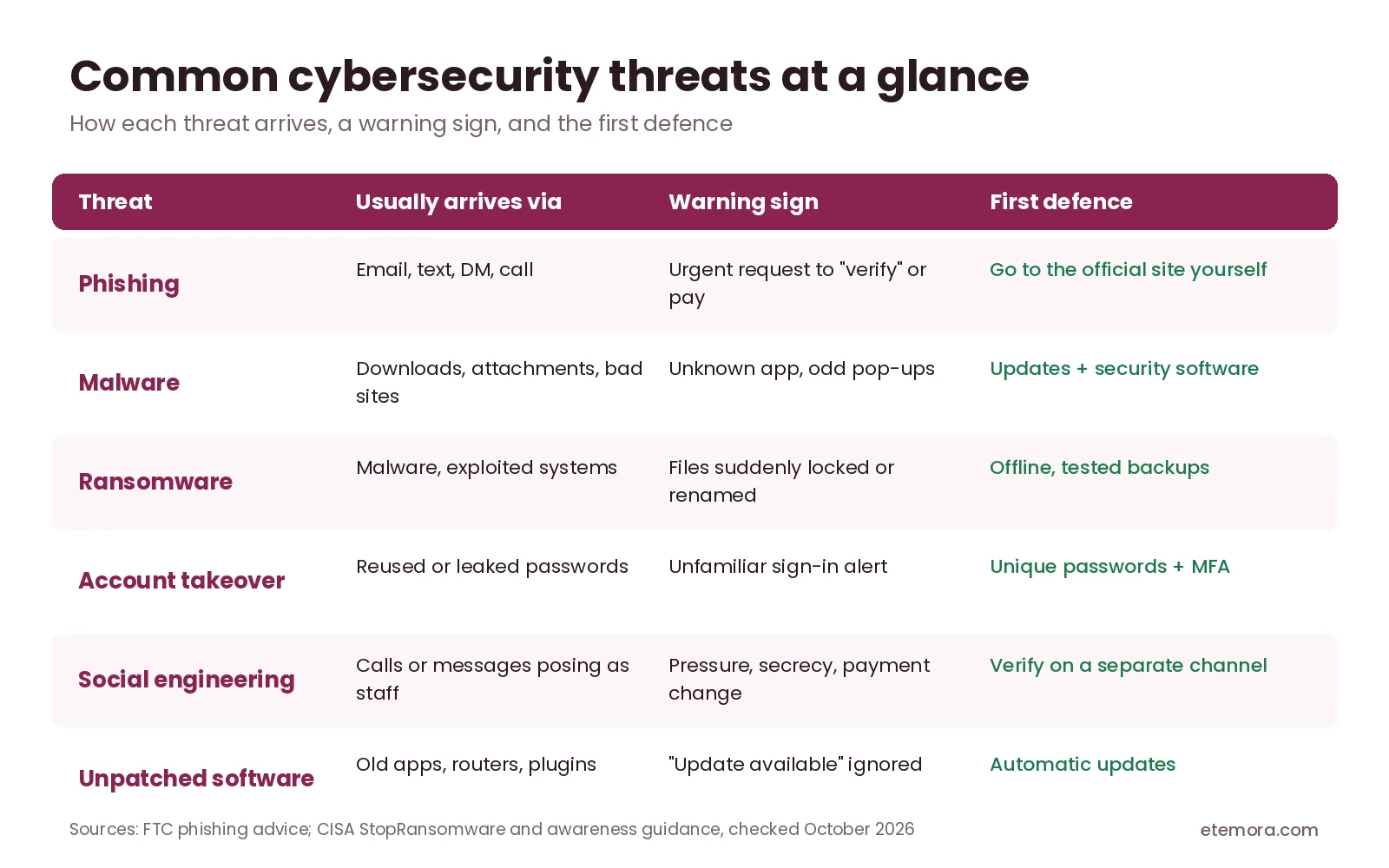
Knowing the threats is the other half of what is cybersecurity: it helps you recognize warning signs and choose suitable protections. Here is a quick overview before the details.
Phishing
Phishing is an attempt to trick someone into revealing information, opening a harmful attachment, visiting a fraudulent website or approving an unsafe action. Messages may imitate banks, delivery companies, employers, colleagues or familiar online services.
The FTC’s guide to recognizing and avoiding phishing scams lists common tactics: claims of suspicious log-in attempts, a “problem” with your account or payment details, requests to confirm personal information, invoices you don’t recognize and links to make a payment. Polished language and familiar branding do not prove that a message is genuine. If a message asks you to verify an account or pay something, go to the organization’s official website or contact it through a channel you already know.
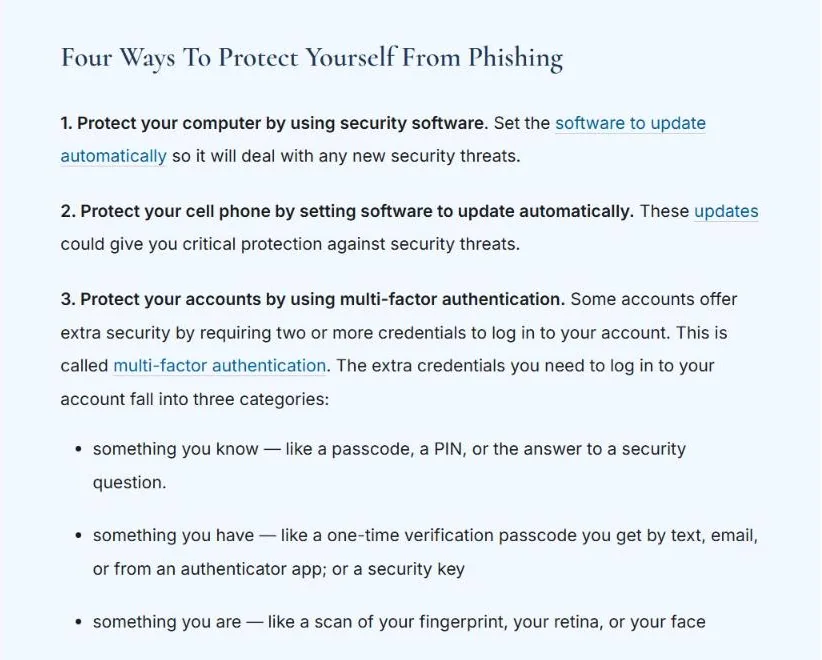
In the US, the FTC says to forward phishing emails to reportphishing@apwg.org, forward phishing texts to SPAM (7726) and report the attempt at ReportFraud.ftc.gov.
Malware
Malware is software designed to perform harmful or unauthorized actions. It includes categories such as spyware, trojans and ransomware. Malware may arrive through malicious downloads, compromised websites, unsafe attachments or exploited software vulnerabilities. Keeping software updated, downloading apps only from trustworthy sources and using appropriate security tools reduce exposure.
Ransomware
CISA’s StopRansomware site describes ransomware as malware designed to encrypt files on a device, making those files and the systems that rely on them unusable, after which attackers demand a ransom for decryption. Some attackers also threaten to publish stolen information.
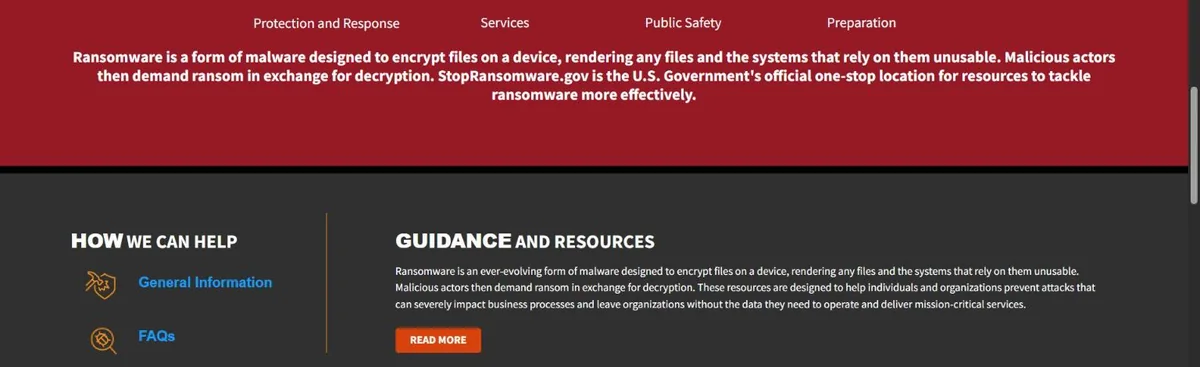
Backups help recovery, but they must be protected from the same attack. CISA’s #StopRansomware Guide recommends keeping offline, encrypted backups of critical data and regularly testing that they can be restored, because many ransomware variants try to find and delete or encrypt accessible backups. Organizations should also prepare an incident response plan rather than assuming that paying a ransom will restore systems or protect their information.
Password attacks and account takeover
Attackers may guess weak passwords, use passwords exposed in earlier data breaches or trick people into sharing credentials. Reusing one password across services makes a single leak far more damaging. A password manager helps you create and store unique passwords, and multifactor authentication adds another layer, although some methods resist phishing better than others. If you are choosing one, compare password managers for safer account access.
Social engineering
Social engineering manipulates people into actions that compromise security. A caller might pose as technical support, a manager or a supplier and ask for confidential information or an urgent payment. Verify unusual requests through a separate, trusted channel, and for business payments or changes to a supplier’s bank details, follow an approval process instead of acting on one message.
Unpatched software vulnerabilities
Software vulnerabilities are weaknesses that can be exploited to gain access, disrupt operations or expose data. Attackers often target systems that have not received important security updates. Turn on automatic updates where appropriate, remove software you no longer need and prioritize security fixes for internet-facing systems and critical applications.
How Does Cybersecurity Work?
Another way to explain what is cybersecurity is as a cycle of prevention, detection, response and recovery. No single product removes every risk, so effective security uses several measures that support one another.
The NIST Cybersecurity Framework (CSF) 2.0, published in February 2024, organizes cybersecurity outcomes into six core functions: Govern, Identify, Protect, Detect, Respond and Recover. NIST says the functions should be addressed concurrently, with Govern informing how the other five are prioritized.

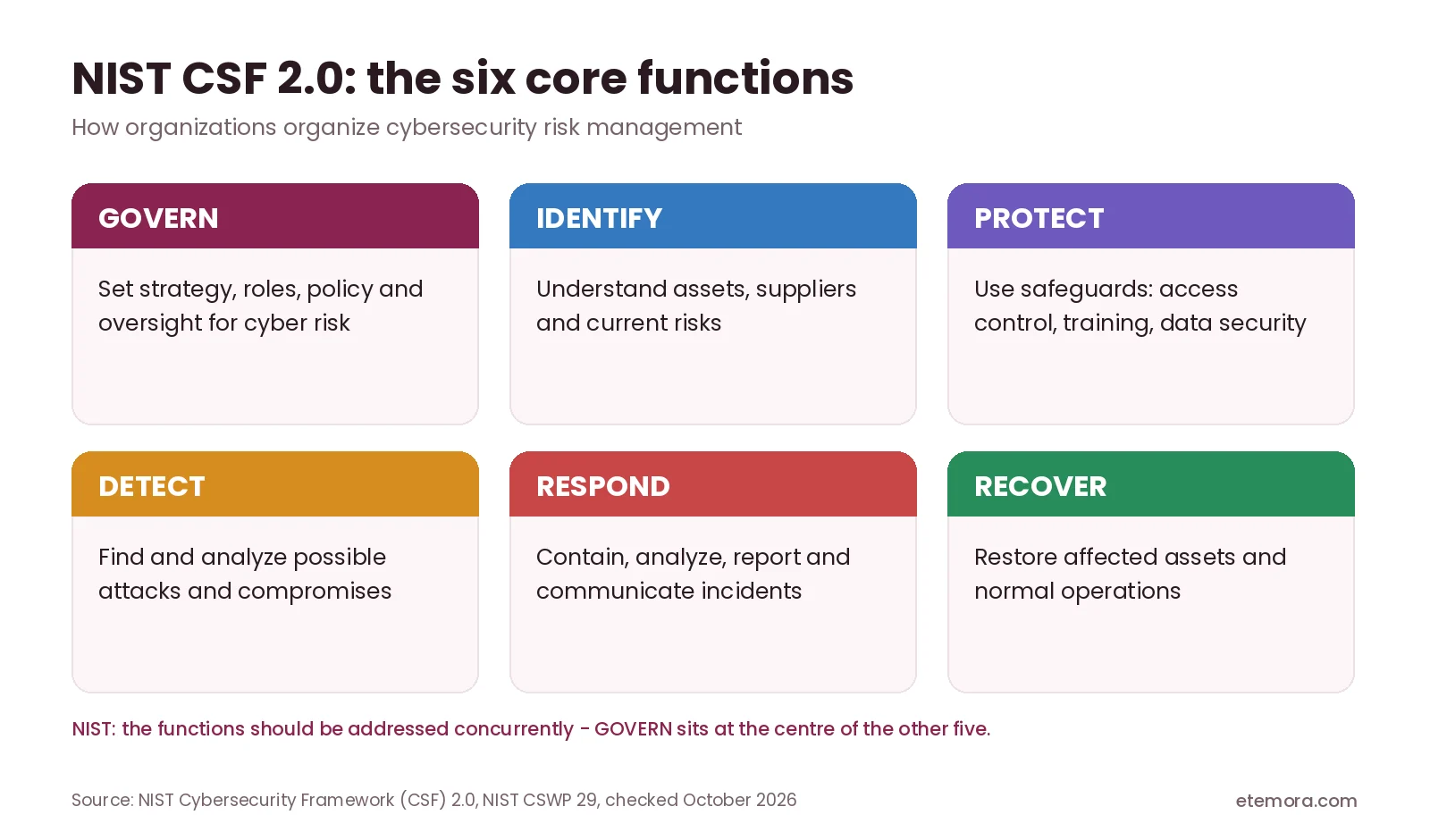
Govern: set direction
Decide who is responsible for security, what the rules are and how risk is reviewed. For a freelancer, that might simply be a written list of accounts and a habit of reviewing them monthly; for a company, it covers policy, roles and supplier risk.
Identify risks
Work out what needs protection: devices, accounts, applications, networks and data. Consider who could access those assets, what could go wrong and the likely consequences. A freelancer may prioritize a primary email account, client documents, financial records and a website login, while a larger organization also considers employee devices, business applications and supplier access.
Protect systems and information
Protective measures make attacks harder or limit what an attacker can reach: multifactor authentication, software updates, encryption, firewalls, access restrictions and staff awareness training. Protection should reflect the real risks; a personal laptop and a hospital’s critical systems need different levels of security.
Detect suspicious activity
Monitoring helps spot unusual sign-ins, unexpected file changes, malware alerts or suspicious network traffic. Some tools raise alerts automatically, while organizations may have security teams investigate. An alert does not always mean an attack succeeded, but it should be evaluated according to its severity and context.
Respond to incidents
When an incident occurs, the priority is to contain the threat, protect critical assets, investigate what happened and follow the relevant procedures. That may mean disconnecting an affected device, disabling compromised credentials, contacting a service provider or alerting the security team. Avoid deleting evidence if an investigation may be needed.
Recover and improve
Recovery means restoring services and information, confirming systems are safe to use and fixing the cause. Backups matter here, but only if they are usable and protected from the same threat. Afterwards, review what happened and improve the controls, training and procedures that could reduce the chance or impact of a repeat.
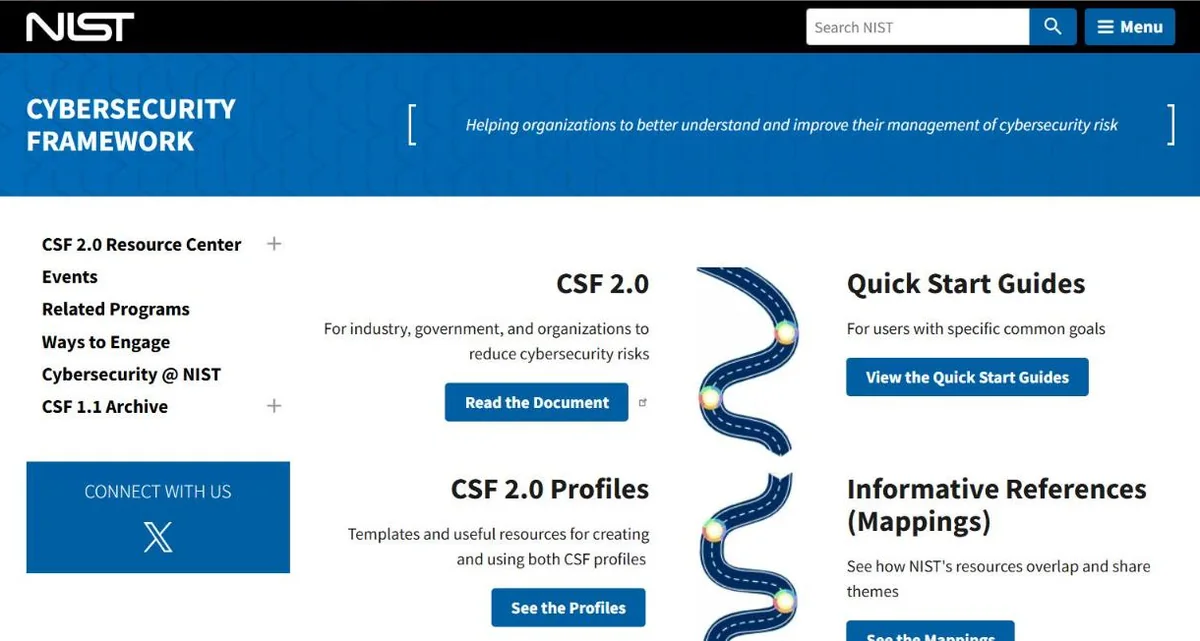
Organizations that want a structured starting point can use NIST’s free CSF 2.0 Quick Start Guides, which are written for users with specific common goals.
Essential Cybersecurity Practices for Everyday Users
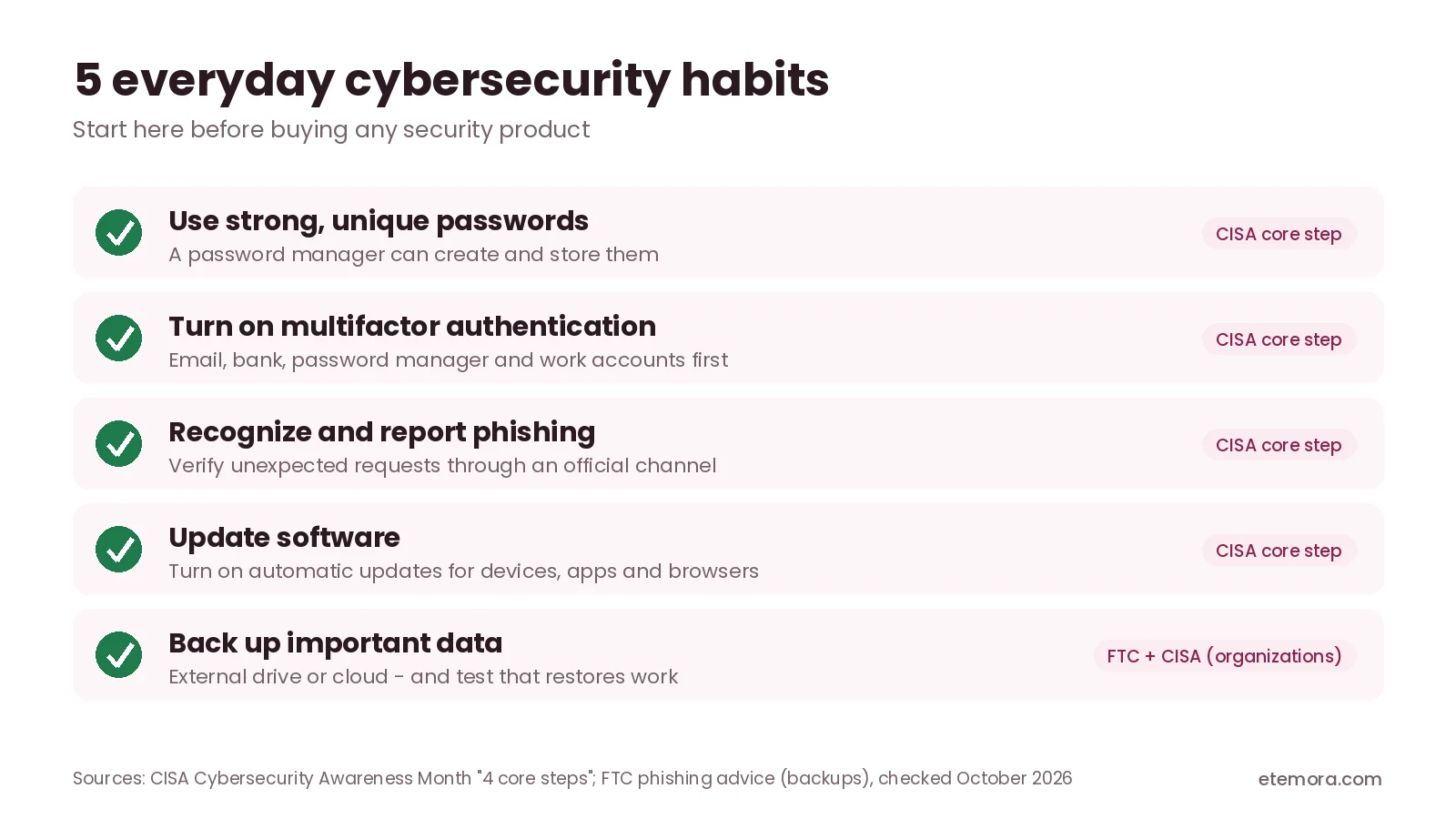
For most people, what is cybersecurity really comes down to a handful of habits. You can improve your personal security without becoming a specialist; start with the accounts and devices that would cause the most disruption if compromised.
Use unique passwords
Create a different password for each important account. Long, unique passwords are far more useful than one familiar password reused everywhere. A reputable password manager can generate and store them, so you don’t need to remember each one; protect the manager itself with a strong master password and multifactor authentication. If you are wondering what is cybersecurity worth doing first, start with this habit. Our 1Password vs Bitwarden comparison looks at two popular options.
Enable multifactor authentication
Multifactor authentication requires an extra form of verification beyond a password. The FTC groups these extra credentials into three categories: something you know (a PIN or passcode), something you have (a one-time code from an authenticator app or a security key) and something you are (a fingerprint or face scan). Turn it on first for your primary email, financial accounts, password manager and important work accounts. Your email deserves special attention, because it is often used to reset passwords for everything else.
Recognize suspicious messages
Pause before opening unexpected attachments, entering credentials through a link or approving an unusual sign-in request. If a message creates urgency or asks for secrecy, verify the request independently, and report suspicious messages through your email provider or workplace process.
Install updates
Updates often fix security vulnerabilities as well as adding features. Keep operating systems, browsers, applications, routers and other supported devices updated. If a device no longer receives security updates, consider replacing it or limiting what you use it for.
Use trusted security software
Antivirus and endpoint security tools can help detect or block certain malicious files and activities. Choose software that supports your devices and understand which protections your plan includes; our guide helps you compare antivirus software for device protection. Security software is only one layer: it cannot guarantee protection against every phishing attempt, stolen password or newly discovered vulnerability.
Back up important files
Keep backups of documents, photos and other information you cannot afford to lose, using a cloud service, an external drive or both. For important data, keep at least one backup that is not continuously connected to your main device, and check now and then that files actually restore. You can also compare cloud storage options for files and backups.
Secure your Wi-Fi
Change the router’s default administrator credentials, use the most modern Wi-Fi security setting your equipment supports and update router firmware. Use a separate guest network when appropriate. Public Wi-Fi does not automatically mean your information is compromised, but stick to HTTPS websites, keep your device updated and never ignore certificate warnings. A VPN can add protection on untrusted networks; see VPN options for protecting network traffic.
Review privacy and app permissions
Check which apps can access your location, camera, microphone, contacts and files, and remove permissions they don’t need. Also review account recovery options and active sign-in sessions for important services, and revoke access for devices or apps you don’t recognize.
Cybersecurity for Small Businesses
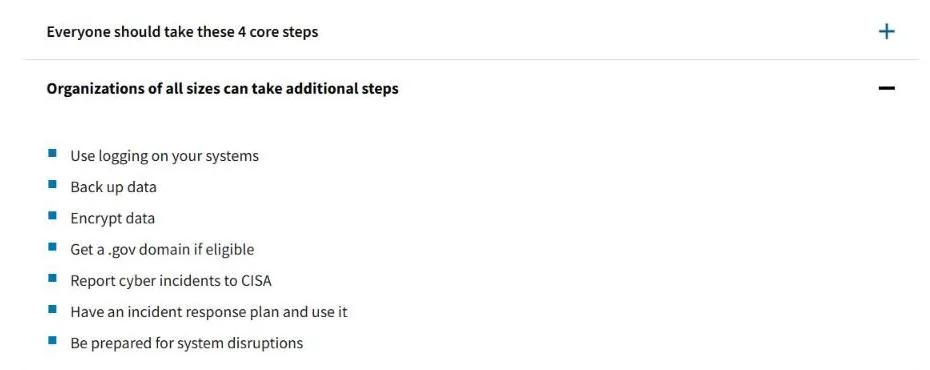
For a small business, what is cybersecurity in practice? It is protection against the same threats individuals face, but a successful incident can also interrupt operations, affect customers and create financial or legal consequences. CISA’s Cybersecurity Awareness Month guidance adds extra steps for organizations: use logging, back up data, encrypt data, report cyber incidents, have an incident response plan and use it, and be prepared for system disruptions.
A practical answer to what is cybersecurity for a small team is this starting plan:
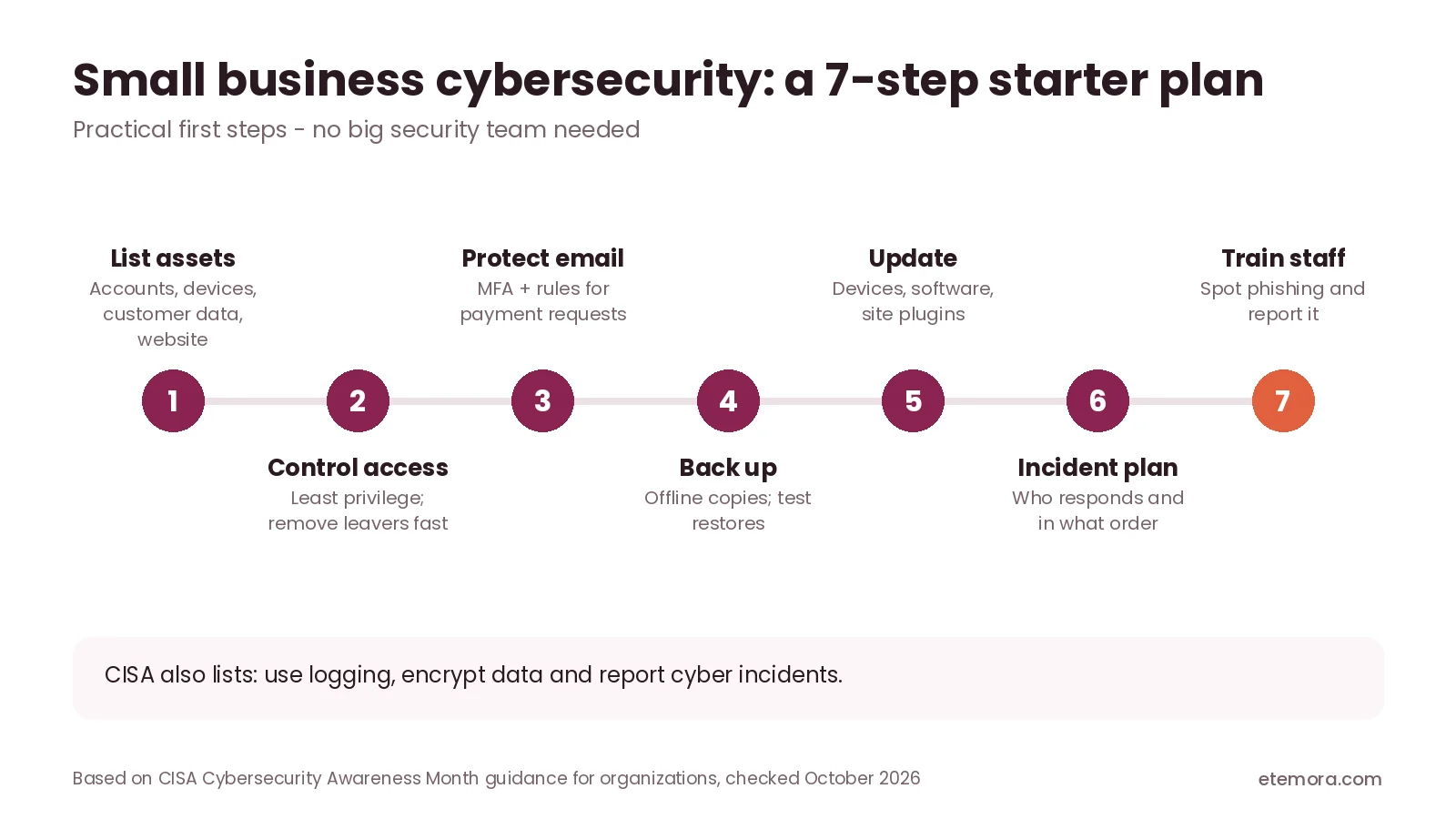
- Identify important assets. List business accounts, devices, customer information, payment systems, websites and critical applications.
- Control access. Give each employee or contractor only the permissions their role needs, and remove access promptly when it is no longer required.
- Protect business email. Use multifactor authentication, strong account recovery controls and clear procedures for verifying payments and sensitive requests.
- Maintain backups. Protect important records and test restoration on a planned schedule.
- Update systems. Keep supported devices, software, website platforms and extensions maintained.
- Prepare an incident plan. Document who responds, which systems take priority and how to contact relevant service providers.
- Train staff. Teach employees to recognize suspicious messages, report incidents and handle sensitive information.
If your business runs a website, security also covers hosting configuration, administrator access, software updates and backup management; see our web hosting comparison when reviewing hosting options. Cloud storage alone is not necessarily a complete backup strategy, so check version history, recovery features, access controls and retention terms.
How to Choose Cybersecurity Tools
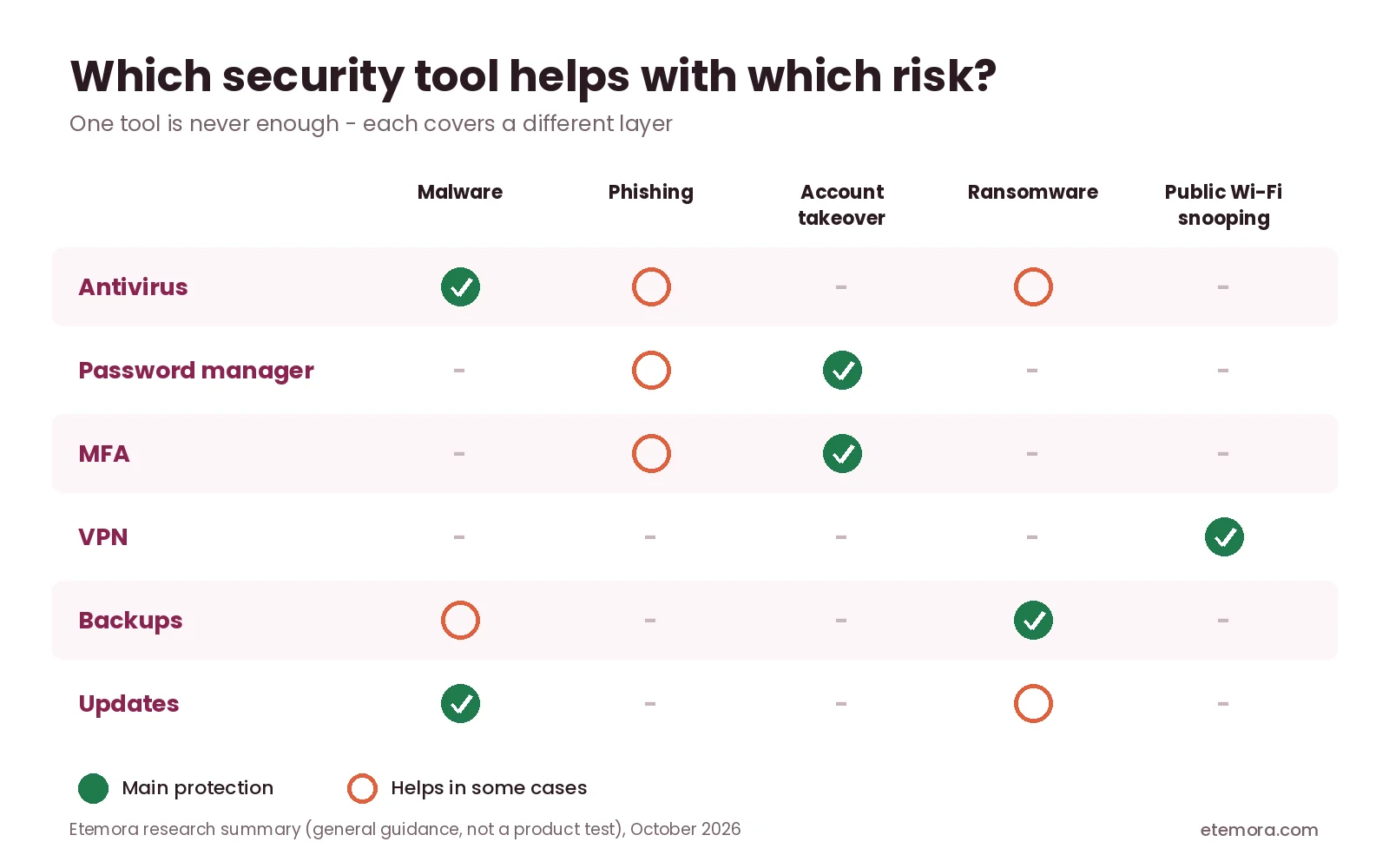
Once you know what is cybersecurity and which risks matter most to you, choosing tools gets easier. Cybersecurity products solve different problems, so before paying for a tool, identify the risk you want to reduce.
1. Define the protection needed
Antivirus software focuses on detecting and blocking certain threats on devices. A password manager organizes unique credentials. A VPN protects traffic between your device and a VPN server under the relevant configuration. These tools are not interchangeable.
2. Check device compatibility
Confirm that a product supports your operating system, browser and other devices. Some plans cover a limited number of devices or restrict features to certain platforms.
3. Understand the included features
Compare malware protection, web protection, identity monitoring, password tools, parental controls or backups only when they are relevant to your needs. Bundled features may need separate activation or subscriptions.
4. Review privacy and data handling
Read the provider’s privacy policy to understand what information it collects, how it is used and how long it is kept. Be especially careful with tools that ask for broad permissions or access to sensitive accounts.
5. Check price and renewal terms
Compare the first-term price, renewal rate, billing period, device limits and charges for optional features. Security subscriptions often renew at a higher price than the introductory offer, so confirm current terms on the official provider page before buying.
6. Consider support and recovery
Check how the provider handles account recovery, technical support and security incidents. A tool is far less useful if you cannot regain access to it when you need it.
How We Compared
This guide to what is cybersecurity is a research-based explainer; we did not run hands-on tests. It draws on official guidance from the Cybersecurity and Infrastructure Security Agency (CISA), including its Cybersecurity Awareness Month steps and StopRansomware resources, the National Institute of Standards and Technology (NIST) Cybersecurity Framework 2.0, and the FTC’s consumer advice on phishing. Sources were reviewed in October 2026. Security recommendations and framework documents change, so confirm current guidance on the official pages before making important decisions. Read more about how we review.
Final Verdict: What Is Cybersecurity?
So, what is cybersecurity? It is the practice of protecting devices, accounts, networks, applications and information from digital threats, combining technical safeguards, sensible user behavior, risk management and plans for responding to incidents.
You do not need to buy every security product to get started. Use unique passwords, enable multifactor authentication, update devices, treat unexpected messages carefully and back up important information. Businesses should also control access, train staff and prepare to recover if an incident occurs.
- Best fit for beginners: strong account security, software updates and phishing awareness
- Best for families: protected shared devices, reviewed account permissions and backups of important files
- Best for freelancers: secured client documents, business email, payment accounts and website logins
- Best for small businesses: access controls, backups, update routines and a written incident response plan
- Best for website owners: secure administration, supported software, reliable backups and good hosting protection
Cybersecurity is not a one-time setup. Review your protections regularly, respond to new risks and choose tools based on the problems you actually need to solve.
Choosing protection for your devices?
See Antivirus Software →Frequently Asked Questions
What is cybersecurity in simple words?
What is cybersecurity in simple words? It means protecting computers, phones, online accounts, networks and digital information from unauthorized access or harm. It includes tools such as security software and firewalls, plus habits such as unique passwords, multifactor authentication, installing updates and avoiding suspicious links.
Why is cybersecurity important?
Cybersecurity helps protect personal information, financial accounts, business records and the systems people rely on. A successful attack can lead to stolen information, disrupted services, financial loss or unauthorized access. Good security measures reduce these risks, although no single tool or practice can prevent every incident.
What are the main types of cybersecurity?
Common areas include network security, endpoint security, application security, cloud security and information security, along with identity and access management, incident response and security governance. These categories overlap, and organizations choose controls based on their systems, data, obligations and risk.
What are examples of cybersecurity threats?
Examples include phishing, malware, ransomware, stolen passwords, social engineering and attacks that exploit software vulnerabilities. They target individuals as well as organizations. Keeping systems updated, using multifactor authentication, maintaining backups and verifying unexpected requests all reduce exposure.
How can I protect myself from cyberattacks?
Use unique passwords, enable multifactor authentication, install security updates and avoid suspicious links or attachments. Back up important files, secure your home Wi-Fi and review app permissions. For important accounts, check recovery settings and sign-in activity so you can react quickly if something looks unfamiliar.
Is antivirus software enough for cybersecurity?
No. Antivirus software is only one part of cybersecurity. It can help detect or block certain malicious activity, but it does not replace strong authentication, software updates, secure backups, careful handling of messages and access controls. A layered approach protects far more than any single product.
What is the difference between cybersecurity and information security?
When people ask what is cybersecurity compared with information security, the answer is scope. Cybersecurity focuses on protecting digital systems, networks, applications and data from digital threats. Information security is broader: it protects information against unauthorized access, alteration, disclosure, destruction or loss in any format. The two overlap heavily when information is stored or processed digitally.
What is the NIST Cybersecurity Framework?
The NIST Cybersecurity Framework is guidance that helps organizations understand, assess, prioritize and manage cybersecurity risk. Version 2.0, published in February 2024, organizes outcomes around six functions: Govern, Identify, Protect, Detect, Respond and Recover. It helps structure security work, but it does not implement protections automatically or guarantee that incidents won’t happen.
How does cybersecurity help small businesses?
Cybersecurity helps small businesses protect customer information, business accounts, devices, websites and essential operations. Useful measures include multifactor authentication, access controls, security updates, backups, staff awareness and an incident response plan. The right controls depend on the business’s size, technology, data and regulatory obligations.
What should I do if I think my account has been hacked?
Use a trusted device to sign in to the official service and change the password, plus anywhere you reused it. Sign out unfamiliar sessions, turn on multifactor authentication and check recovery details. If money is involved, contact your bank or provider through its official number. In the US, you can report scams at ReportFraud.ftc.gov.

Sources
Related articles you may like
 SecurityBest Free Antivirus in 2026: 6 Free Picks Compared by Features and Lab Scores
 SecurityBest Antivirus for Mac in 2026: 6 Picks Compared by Price and Lab Scores
 SecurityIs Windows Defender Enough in 2026? Test Results, Gaps and Settings
 SecurityHow to Know If Your Phone Is Hacked: 8 Signs and What to Do
 SecurityWhat Is Antivirus Software? Complete Guide for 2026
 SecurityNordVPN vs Surfshark: Honest 2026 VPN Comparison