
Is Windows Defender Enough in 2026? Test Results, Gaps and Settings
 By M. Zaid
- Updated October 24, 2026
- 17 min read
Is Windows Defender enough to protect a Windows PC in 2026, or do you still need to pay for antivirus? For most home users, the built-in protection is now good enough — as long as you keep Windows updated, leave the default protections switched on and add a few good habits.
This research-based guide explains what Microsoft Defender Antivirus (the antivirus inside the Windows Security app) actually includes, how it scored in the latest independent lab tests from AV-Comparatives and AV-TEST, where it falls short, and when a paid antivirus suite is still worth the money. Every result, price and setting below was checked on the official page in October 2026.
Quick answer: Yes — for most people, Windows Defender is enough. In AV-Comparatives’ Feb–May 2026 Real-World Protection Test it blocked 396 of 400 threats (99.0%), earned the top ADVANCED+ award and had zero false alarms. It is not enough if your PC no longer gets Windows security updates, if you switch off its protections, or if you need extras it doesn’t include, such as a VPN, parental controls across phones and Macs, or identity monitoring.
Want more than the built-in protection?
Compare the Best Antivirus Software →Is Windows Defender Enough? The Short Answer
Windows Defender used to have a poor reputation, and for good reason: in 2014 and 2015 it scored close to zero for protection in AV-TEST’s lab. That is no longer the picture. Since about 2018 it has scored at or near the maximum in most AV-TEST rounds, and in 2026 it sits in the top group of AV-Comparatives’ real-world protection results alongside paid suites from Bitdefender, Norton and Kaspersky.
So the honest answer to “is Windows Defender enough?” depends less on Defender itself and more on your situation. This quick verdict table sums it up.
| Your situation | Is Defender enough? | Why |
|---|---|---|
| Windows 11 home user, updates on, careful browsing | Yes | Top-tier protection results and no extra cost |
| Windows 10 PC enrolled in Extended Security Updates | Yes, for now | The OS still gets security fixes until October 12, 2027 |
| Windows 10 PC with no ESU and no upgrade | No | Microsoft says antivirus alone can’t protect an unpatched OS |
| Family with kids on phones, tablets and Macs | Partly | Windows Security only protects that one Windows PC |
| Older or low-power laptop | Usually, with a trade-off | Defender had a higher performance impact than many rivals in April 2026 |
| You want a VPN, ID monitoring or a password manager in one app | No | Windows Security does not include those extras |
What Windows Defender Actually Includes
“Windows Defender” is the old name people still use. Today the antivirus is called Microsoft Defender Antivirus, and it lives inside the free Windows Security app that comes with Windows 10 and Windows 11. Microsoft describes Windows Security as an app that combines Defender Antivirus, Windows Firewall and Smart App Control to give real-time protection from the moment you switch the PC on.
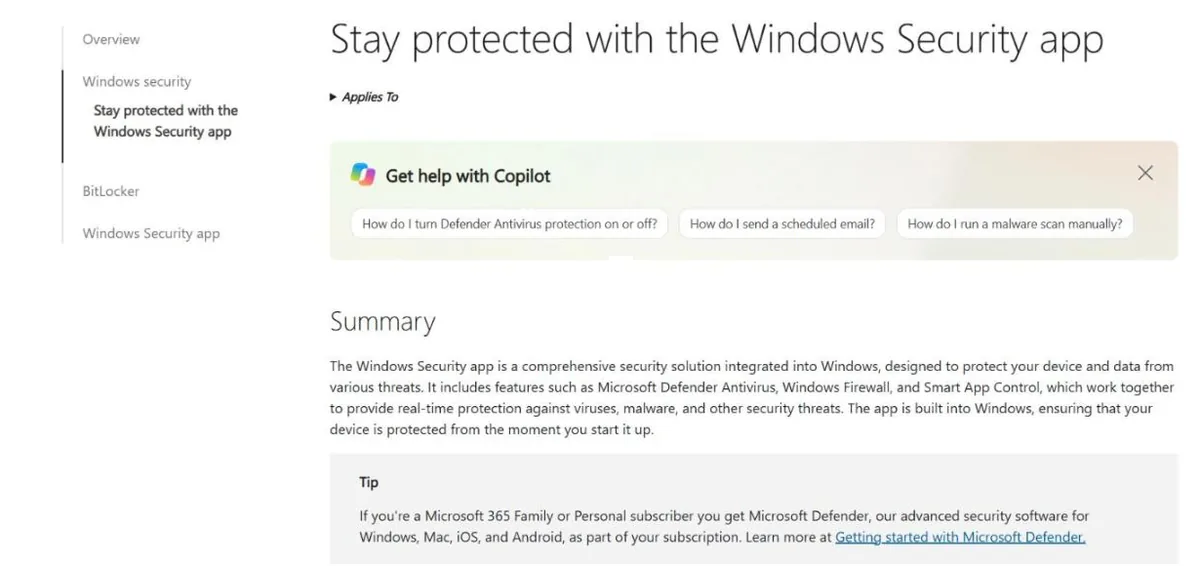
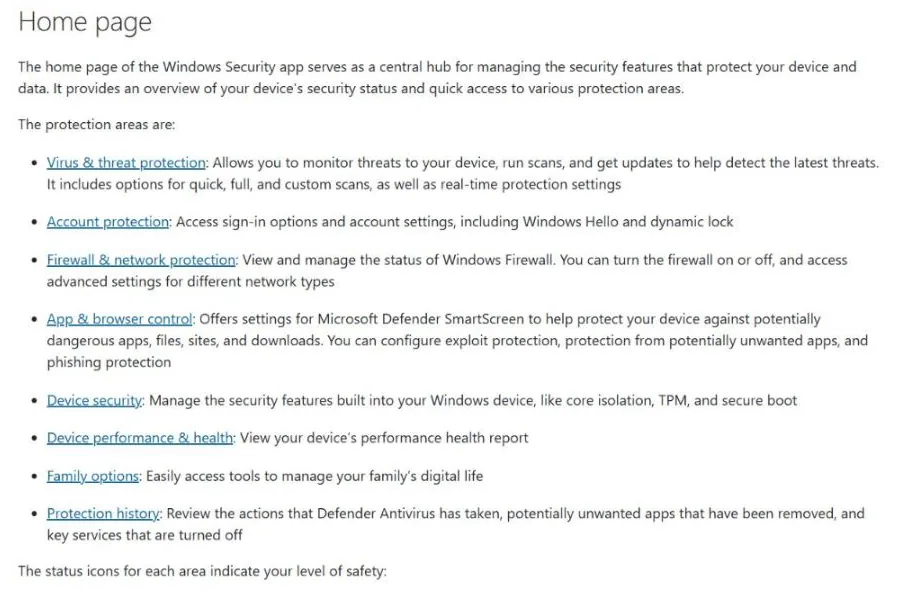
According to Microsoft Support, the Windows Security app is split into these protection areas:
- Virus & threat protection — real-time scanning, quick, full, custom and offline scans, security intelligence updates and ransomware protection.
- Account protection — sign-in options such as Windows Hello and dynamic lock.
- Firewall & network protection — Windows Firewall settings for each network type.
- App & browser control — Microsoft Defender SmartScreen, exploit protection, protection from potentially unwanted apps and phishing protection.
- Device security — core isolation, TPM and Secure Boot.
- Device performance & health, Family options and Protection history.
Two details matter for this question. First, Defender is on by default and updates itself through Windows Update, so a new PC is protected without any setup. Second, if you install another antivirus, Microsoft says Defender Antivirus turns off automatically — and turns back on if you uninstall the other app. You never need two antivirus programs running at once.
If you are new to the basics, our guide to what antivirus software is and how it works explains the terms used below.
How Good Is Windows Defender? Independent Test Results
The best way to judge whether Windows Defender is enough is to look at independent labs that test many products against the same threats. We used the two best-known labs, AV-Comparatives and AV-TEST, and read their published results directly.
AV-Comparatives Real-World Protection Test (Feb–May 2026)
AV-Comparatives tested 20 home-user security products against 400 real-world threats between February and May 2026, on Windows 11 with internet and cloud access allowed. Microsoft Defender Antivirus blocked 396 of 400 cases, a protection rate of 99.0%, the same as TotalAV and only slightly behind Kaspersky (99.8%), Bitdefender (99.5%) and Avast, AVG and Norton (99.3%).
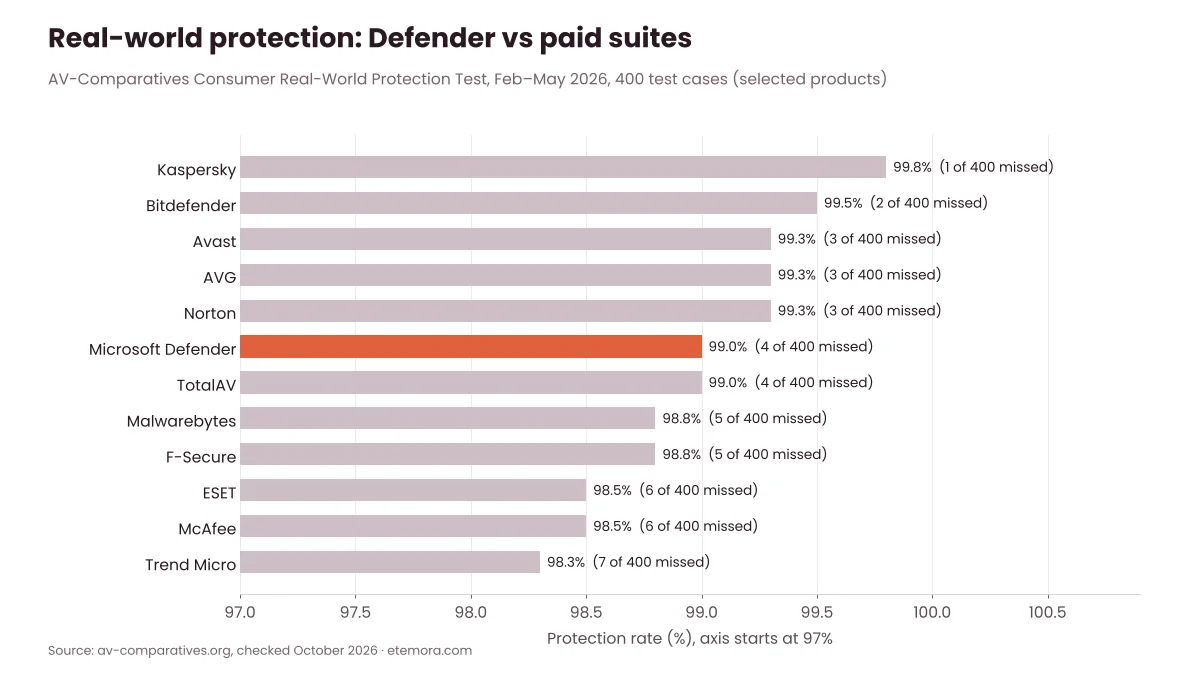
Two more results stand out. Microsoft was one of seven vendors to earn the lab’s highest ADVANCED+ award in this test, and it had zero false positives — the fewest of all 20 products. False alarms matter because a security tool that blocks safe files trains people to ignore its warnings.

AV-Comparatives Performance Test (April 2026)
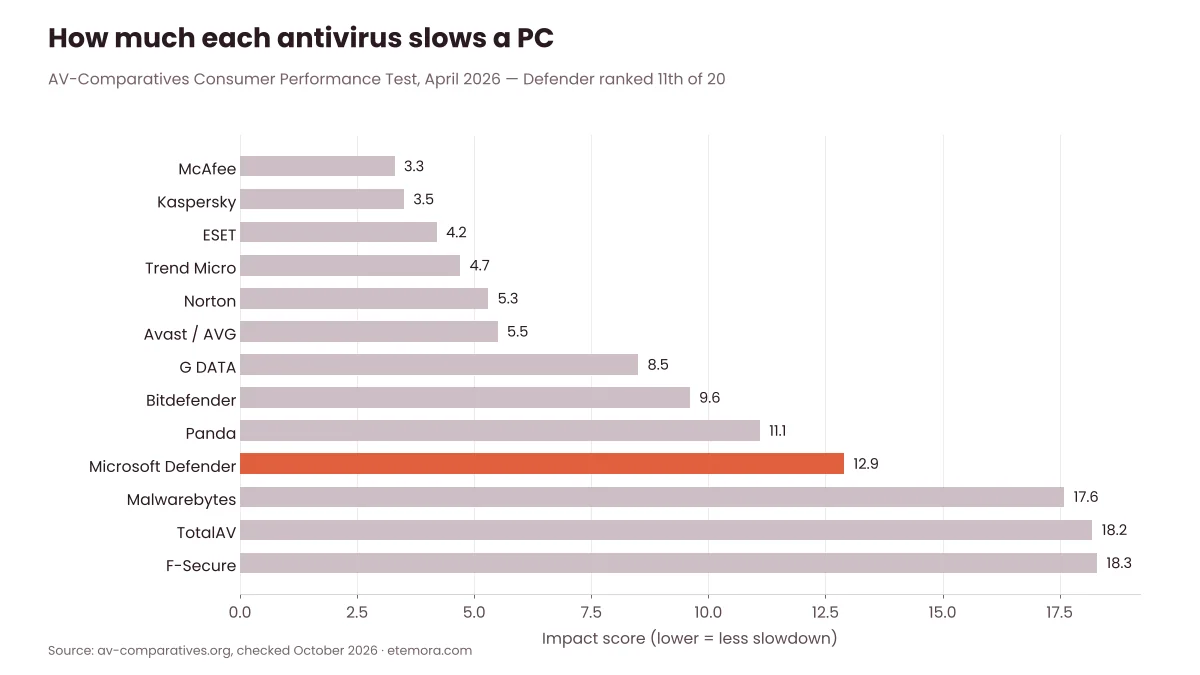
Protection is only half the story. A good antivirus should also stay out of your way. In AV-Comparatives’ April 2026 performance test, Microsoft Defender scored an impact score of 12.9 (lower is better) and ranked 11th of 20. McAfee (3.3), Kaspersky (3.5), ESET (4.2) and Norton (5.3) slowed the test PC less.
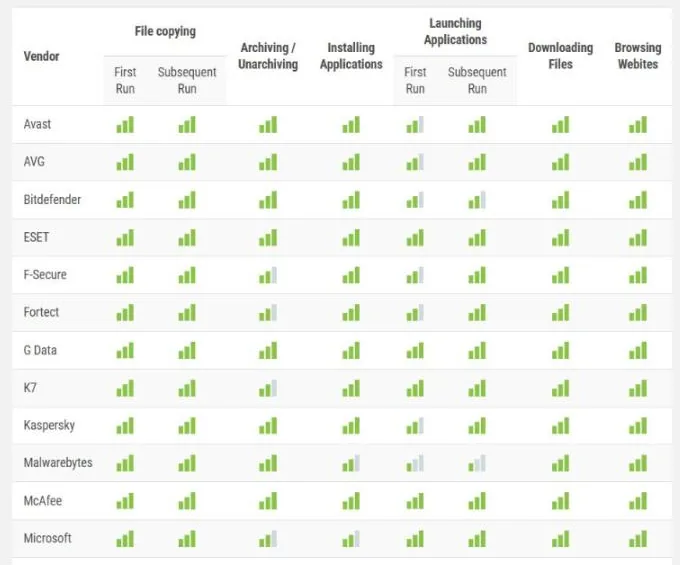
The detailed table shows where the slowdown happens: Defender scored lower for archiving/unarchiving files and installing applications than the top performers. On a modern PC this is rarely noticeable in daily browsing, but on an older laptop that often installs software or handles large archives, it can be.
AV-TEST Results Over Time
AV-TEST’s Microsoft results page shows how much Defender has improved. In the 2014–2015 rounds its protection score was 0 to 0.5 out of 6. From 2018 onward it has scored 6/6 for protection in most rounds, and its latest scored round on that page (October 2025) gave it 6/6 for protection, performance and usability. The listings from December 2025 onward show no scores, so we have not used them.

Taken together, the lab results answer the core question: on protection alone, Windows Defender is enough for most home users. Its weaker spots are system impact and the extras it doesn’t try to offer.
Where Windows Defender Falls Short
Saying Windows Defender is enough for most people doesn’t mean it does everything. These are the gaps worth knowing before you decide.
- It protects one Windows PC only. Windows Security doesn’t cover your phone, tablet or a family Mac. Microsoft’s cross-device Defender app requires a Microsoft 365 subscription (more on that below).
- No VPN. Windows Security has no VPN. Microsoft also ended the privacy protection (VPN) feature in its Microsoft Defender app on February 28, 2025. If you use public Wi-Fi often, see our best VPN services guide.
- No password manager. Reused passwords cause more account takeovers than viruses. A dedicated password manager is a separate tool — compare options in our best password managers roundup.
- Higher performance impact than some rivals, as the April 2026 AV-Comparatives test showed.
- It depends on Windows updates. Defender gets new security intelligence through Windows Update. If updates are blocked or your version of Windows is out of support, protection weakens.
- Only basic family tools. The Family options area points you to Microsoft’s family tools, but Windows Security itself has no full parental-control suite.
None of these gaps mean Defender is weak at its main job. They mean that if you want a single subscription that also covers phones, privacy and identity, a paid suite may suit you better.
Is Windows Defender Enough on Windows 10?
This is where the answer changes. Microsoft’s end-of-support page says Windows 10 reached end of support on October 14, 2025. After that, Windows 10 PCs only get security updates through the Extended Security Updates (ESU) program, which now runs until October 12, 2027.
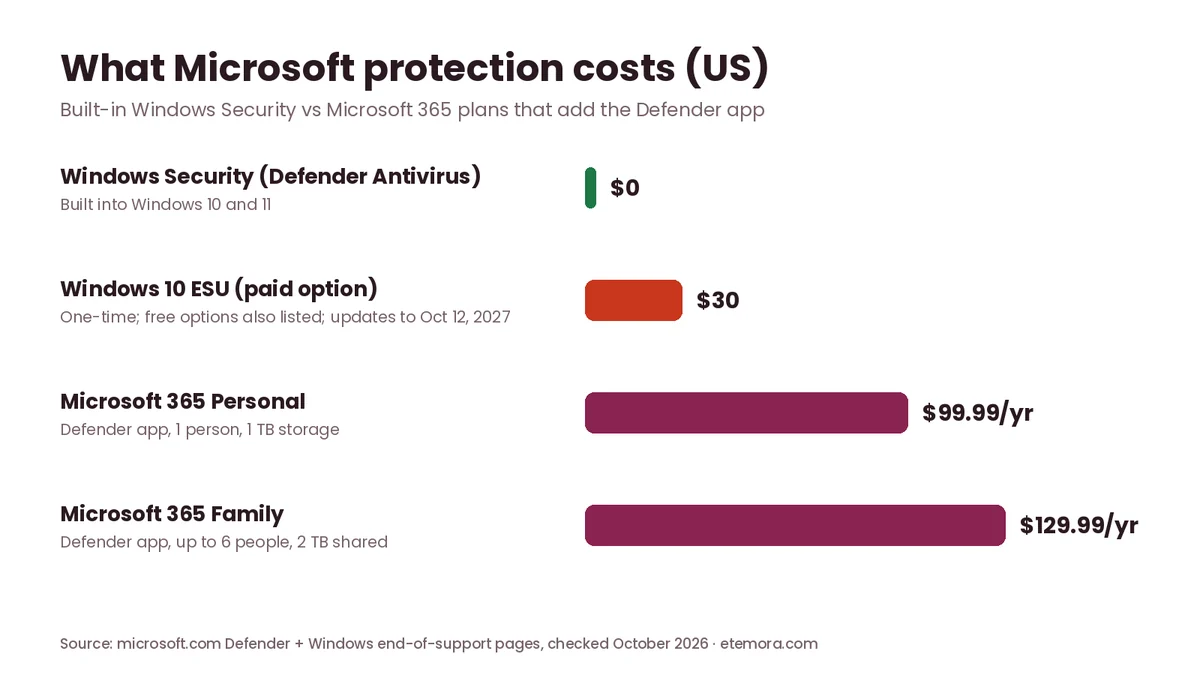
According to Microsoft, consumers can enroll in ESU by syncing their PC settings, by redeeming 1,000 Microsoft Rewards points, or with a one-time purchase of $30 (or local currency equivalent, plus tax). All three options give updates through October 12, 2027.
Microsoft’s own FAQ is clear about antivirus on an unsupported system: antivirus such as Microsoft Defender can help, but it is not enough on its own, because without security updates the operating system itself stays exposed to new threats. In plain terms, a Windows 10 PC with no ESU is not safe with Defender or with any paid antivirus. The fix is to enroll in ESU or move to Windows 11.
Need protection for more than one device?
See Our Antivirus Picks for 2026 →8 Windows Defender Settings to Turn On
Defender’s strong lab scores assume its default protections are switched on. These are the settings worth checking, with where Microsoft Support says to find them in the Windows Security app.
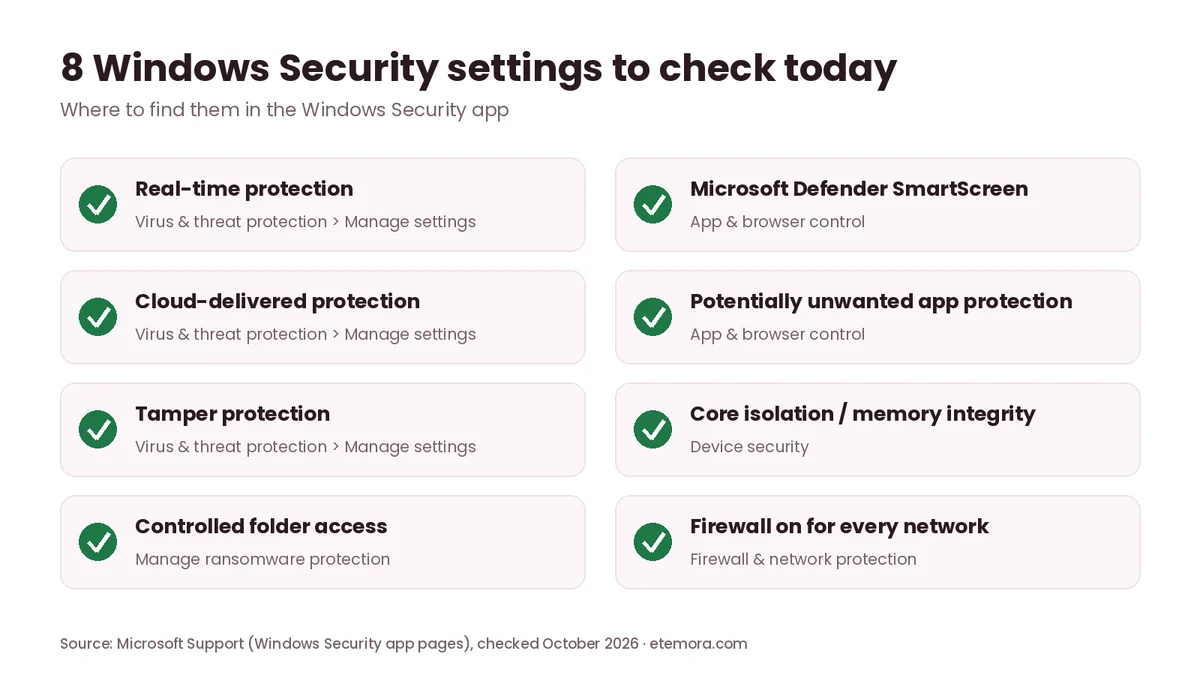
- Real-time protection (Virus & threat protection > Manage settings). It scans files as they are opened or downloaded. If you switch it off, Microsoft says it turns back on automatically after a short while.
- Cloud-delivered protection (same page). It lets Defender get constantly updated detection from Microsoft while you are online.
- Tamper protection (same page). It stops malicious apps from changing important Defender settings, such as turning off real-time protection.
- Controlled folder access (Virus & threat protection > Manage ransomware protection). It blocks unknown or untrusted apps from changing files in protected folders.
- Microsoft Defender SmartScreen (App & browser control). It helps block dangerous apps, files, sites and downloads.
- Potentially unwanted app protection (App & browser control). It blocks adware-style apps that aren’t always classed as malware.
- Core isolation / memory integrity (Device security), if your PC supports it.
- Windows Firewall on for every network type (Firewall & network protection).
Ransomware protection: controlled folder access
Controlled folder access is the setting many people miss, because it is off by default. Microsoft says that, once enabled, it protects common folders such as Documents, Pictures, Videos, Music and Desktop, and only lets trusted apps change files there. You will get a notification if it blocks an app, and you can allow a familiar app manually.
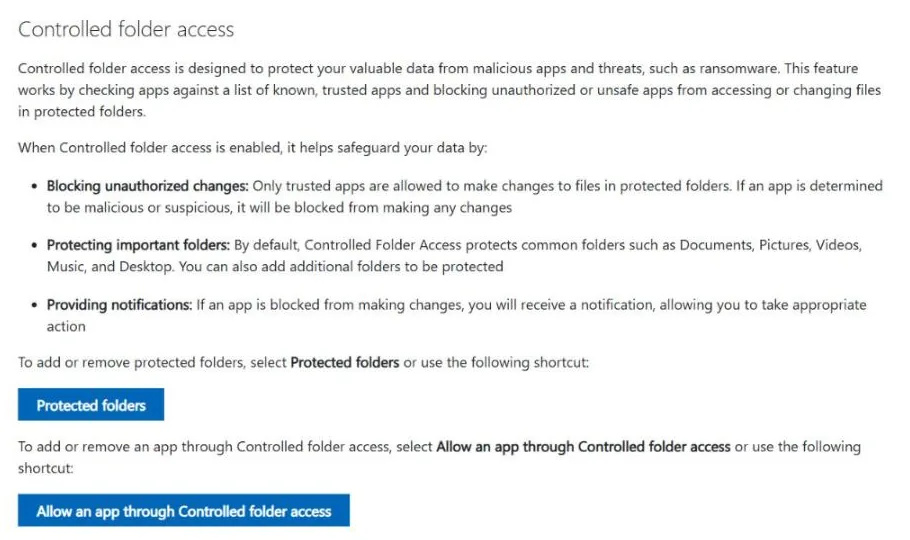
The same Ransomware protection page also links to OneDrive file recovery. A backup is still your best defence: if ransomware does get through, a recent copy of your files means you don’t have to pay.
Smart App Control
Smart App Control adds another layer on PCs that support it. Microsoft explains that it checks each app with a cloud-powered security service; if the service can’t make a confident prediction, it lets signed apps run and blocks unsigned ones. Microsoft also says recent Windows updates let you turn it on in the Windows Security app without a clean reinstall, and that it works alongside Defender rather than replacing it.
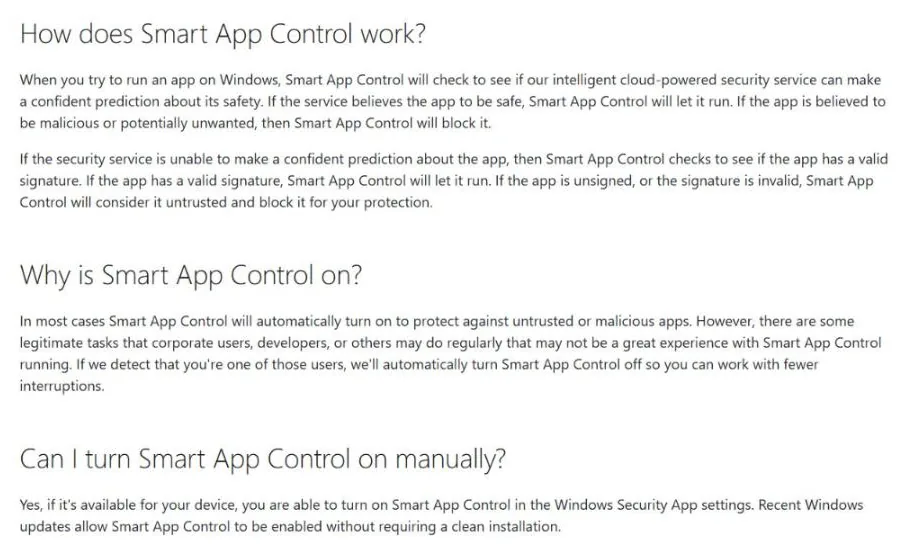
Smart App Control can be strict. Microsoft notes there is no way to allow a single blocked app — you either turn the feature off or ask the developer to sign the app. That makes it a better fit for family PCs than for developers.
Microsoft Defender App vs Windows Security: What’s the Difference?
Microsoft uses the Defender name for two different things, which causes a lot of confusion:
- Windows Security / Microsoft Defender Antivirus — free and built into Windows. This is what most people mean by “Windows Defender”.
- The Microsoft Defender app — included with Microsoft 365 Personal, Family and Premium subscriptions. Microsoft says it covers Windows, Mac, iOS and Android from one dashboard.
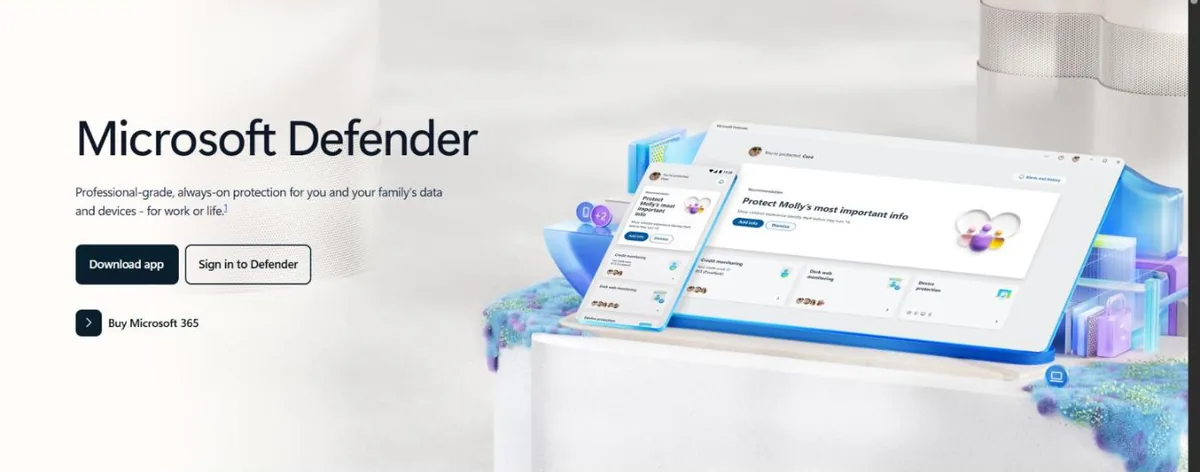
On Microsoft’s US page, the Defender app is sold as part of Microsoft 365 Personal at $99.99/year and Microsoft 365 Family at $129.99/year, with Microsoft 365 Premium at $199.99/year. Microsoft lists identity theft monitoring, dark web scanning and credit monitoring as features, and notes that these are available in the United States and US territories, and that Defender is not available in certain regions.
If you already pay for Microsoft 365 for Word, Excel and OneDrive, the Defender app is a useful extra at no added cost. If you don’t, buying Microsoft 365 just for the Defender app rarely makes sense compared with a dedicated security suite.
When a Paid Antivirus Is Worth It
So when is Windows Defender not enough? Based on the test results and the gaps above, a paid antivirus suite makes sense when you need things Defender doesn’t offer, not because Defender fails at blocking malware.
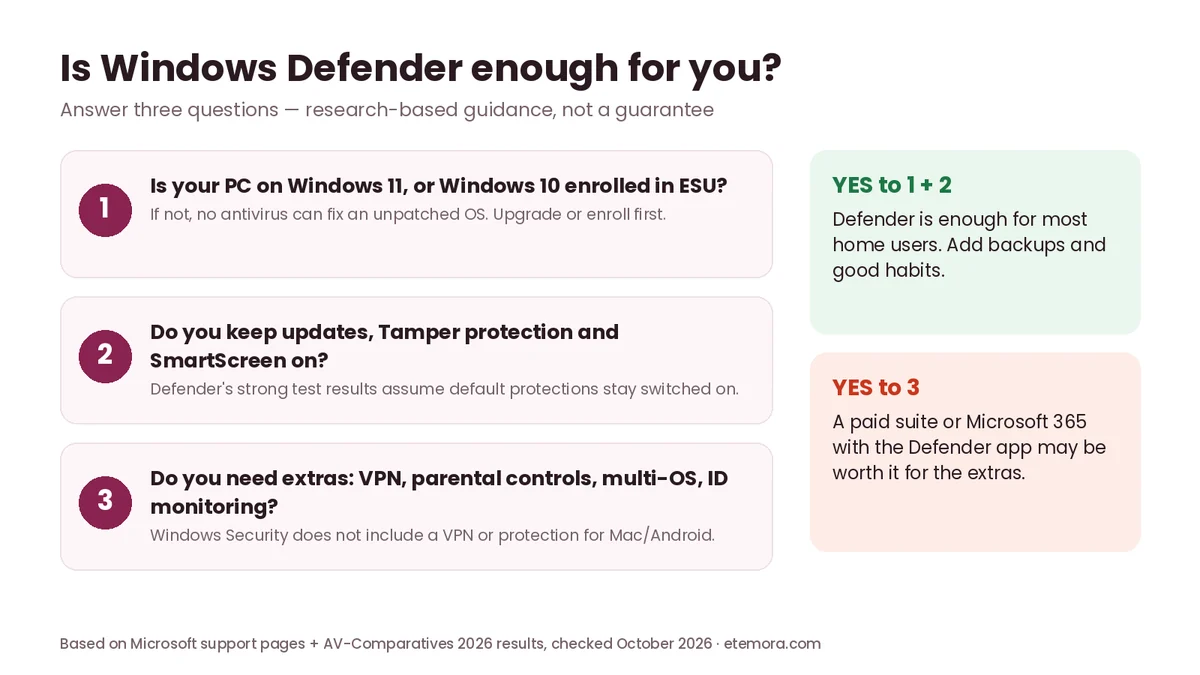
- You protect several devices and operating systems. Most paid suites cover Windows, Mac, Android and iPhone under one licence.
- You want extras in one place, such as a VPN, a password manager, parental controls or identity monitoring outside the US.
- You use an older, slower PC and want a product with a lower performance impact in independent tests.
- You want more hand-holding, such as phone support or guided clean-up.
If none of these apply, paying for antivirus mostly buys features you won’t use. If one or more applies, compare suites by price after the first year, not just the intro offer. Our best antivirus software guide compares the main options.
Decided you need a full security suite?
Compare Antivirus Plans →Good Habits Matter More Than Any Antivirus
Whether Windows Defender is enough also depends on you. Most real attacks today rely on tricking people, not on beating antivirus. These habits close the gaps no security app can:
- Install updates quickly — for Windows, your browser and your apps.
- Use a password manager and unique passwords, and turn on two-factor authentication for email, banking and social accounts.
- Download software only from official sites or the Microsoft Store. Cracked software is a common way malware gets in.
- Be suspicious of urgent messages that ask you to log in, pay or install something.
- Back up important files to OneDrive or an external drive you disconnect afterwards.
- Use a standard user account for daily work if several people share the PC.
For a wider view of the threats these habits protect against, read what cybersecurity is and why it matters. And if your phone is acting strangely too, see how to know if your phone is hacked.
How We Researched This Guide
This guide is research-based. We did not run our own malware tests. We read the published results of AV-Comparatives (Consumer Real-World Protection Test Feb–May 2026 and Consumer Performance Test April 2026) and AV-TEST’s Microsoft results page, and checked every feature, setting and price on Microsoft’s official support and product pages in October 2026. Our charts use only those published numbers. Menu names can differ slightly between Windows versions. Read more about how we review.
Final Verdict: Is Windows Defender Enough in 2026?
For most home users on a supported version of Windows, yes — Windows Defender is enough. It blocked 99.0% of real-world threats in AV-Comparatives’ 2026 test with zero false alarms, it costs nothing and it is already running. Turn on tamper protection, controlled folder access and SmartScreen, keep Windows updated and back up your files, and you have solid baseline protection.
It stops being enough when Windows itself is no longer patched, when you need to protect phones and Macs from one dashboard, or when you want a VPN, a password manager or identity monitoring bundled in. In those cases, a paid suite is a convenience upgrade rather than a rescue.
Compare your options before you pay
See the Best Antivirus Software →Frequently Asked Questions
Is Windows Defender enough for Windows 11?
For most home users, yes. Microsoft Defender Antivirus blocked 99.0% of threats in AV-Comparatives’ Feb–May 2026 Real-World Protection Test and earned the top ADVANCED+ award. Keep Windows updated and leave default protections on.
Is Windows Defender enough for Windows 10?
Only if your PC still gets security updates. Windows 10 reached end of support on October 14, 2025; enrolling in Extended Security Updates keeps updates coming until October 12, 2027. Without updates, Microsoft says antivirus alone is not enough.
Is Windows Defender as good as paid antivirus?
On protection, it is close. In the 2026 AV-Comparatives test it scored 99.0% versus 99.3%–99.8% for top paid suites. Paid suites mainly add extras such as VPNs, password managers and multi-device protection, and some have a lower performance impact.
Does Windows Defender slow down my PC?
It can a little. In AV-Comparatives’ April 2026 performance test, Microsoft Defender ranked 11th of 20 with an impact score of 12.9, with slower results for archiving files and installing apps than the best performers.
Does Windows Defender protect against ransomware?
Yes. Defender scans for ransomware in real time, and the controlled folder access setting can block untrusted apps from changing files in folders such as Documents and Pictures. It is off by default, so turn it on and keep backups.
Can I use Windows Defender with another antivirus?
You don’t need to. Microsoft says Defender Antivirus turns off automatically when you install another antivirus and turns back on if you uninstall it. Running two real-time scanners at once can cause conflicts.
Is the Microsoft Defender app free?
No. The free protection is Windows Security, built into Windows. The separate Microsoft Defender app comes with Microsoft 365 Personal ($99.99/year), Family ($129.99/year) or Premium subscriptions in the US.
Does Windows Defender include a VPN?
No. Windows Security doesn’t include a VPN, and Microsoft ended the privacy protection (VPN) feature in its Microsoft Defender app on February 28, 2025. You need a separate VPN service if you want one.
Sources
- AV-Comparatives: Real-World Protection Test February–May 2026
- AV-Comparatives: Performance Test April 2026
- AV-TEST: Microsoft test results for home users
- Microsoft Support: Windows Security App Overview
- Microsoft Support: Virus and Threat Protection in the Windows Security App
- Microsoft Support: Smart App Control FAQ
- Microsoft: Windows 10 end of support and ESU
- Microsoft: Microsoft Defender for individuals
- Microsoft Support: End of support for privacy protection (VPN) in Microsoft Defender
Related articles you may like
 SecurityBest Free Antivirus in 2026: 6 Free Picks Compared by Features and Lab Scores
 SecurityBest Antivirus for Mac in 2026: 6 Picks Compared by Price and Lab Scores
 SecurityHow to Know If Your Phone Is Hacked: 8 Signs and What to Do
 SecurityWhat Is Antivirus Software? Complete Guide for 2026
 SecurityWhat Is Cybersecurity? Complete Beginner’s Guide 2026
 SecurityNordVPN vs Surfshark: Honest 2026 VPN Comparison