
How to Know If Your Phone Is Hacked: 8 Signs and What to Do
 By M. Zaid
- Updated October 19, 2026
- 14 min read
Wondering how to know if your phone is hacked? You are not alone. A phone holds your email, banking apps, photos and the codes that unlock your other accounts, so even a small sign of trouble deserves a proper check.
This research-based guide explains how to know if your phone is hacked using the warning signs and steps published by the US Federal Trade Commission (FTC), Apple and Google (checked October 2026). You’ll learn which signs matter, where to look on an iPhone or Android phone, and exactly what to do next if something is wrong.
Quick answer: The clearest way to know if your phone is hacked is to look for several signs at once: apps you did not install, sign-in codes you did not request, messages sent from your accounts that you did not write, passwords that suddenly stop working, and unknown devices signed in to your Apple or Google account. If you see these, update the phone, remove unknown apps, change your key passwords, sign out of all devices and turn on two-factor authentication.
Want stronger protection on every device?
Compare Antivirus Software →How to Know If Your Phone Is Hacked: Quick Answer
Phone hacking usually shows up in one of two ways. Either something changes on the device (new apps, pop-ups, odd behaviour), or something changes in your accounts (logins, messages, password resets). Account signs are the more reliable ones, because the FTC and Apple both list them as signs that someone else has access.
| What you notice | How serious | First thing to do |
|---|---|---|
| Sign-in or 2FA codes you did not request | High | Change that account’s password and check signed-in devices |
| Messages sent that you did not write | High | Change the password, sign out everywhere, warn contacts |
| Password no longer works | High | Use the provider’s official account recovery |
| Unknown device in your Apple or Google account | High | Remove the device, then change your password |
| Apps you did not install | Medium to high | Delete the app and run a security scan |
| Pop-ups, fast battery drain, high data use | Low to medium | Check recent apps and updates before assuming a hack |
8 Warning Signs Your Phone May Be Hacked
The first step in learning how to know if your phone is hacked is spotting the warning signs. No single sign proves your phone is hacked. Many have ordinary causes, such as a new app or an old battery. What matters is a pattern: two or three of these at the same time, especially if they started suddenly.

1. Apps you did not install
An unfamiliar app, or a configuration profile you never added, is one of the strongest device-level signs. Some harmful apps hide behind generic names such as “System Service” or copy the icon of a real app.
2. Pop-ups and strange redirects
Constant ads outside of apps, or a browser that keeps opening pages you did not ask for, can point to adware or a harmful app. It can also be caused by a website’s notification permission, so check that first.
3. Battery draining much faster
Hidden apps that run in the background use power. If your battery suddenly lasts far less with the same use, look at the battery usage list in Settings to see which app is responsible.
4. Unusual mobile data use
Spyware has to send what it collects somewhere. A sharp rise in mobile data use that you cannot explain is worth checking in your phone’s data usage screen.
5. Codes you did not request
Apple lists unrequested two-factor authentication codes as a sign that someone may be trying to get into your account. If codes arrive when you are not signing in, someone else may have your password.
6. Messages you did not send
The FTC says friends receiving messages you did not send is a sign your account has been hacked. Apple lists the same for messages sent from your Apple Account.
7. Your password stops working
If a password you use every day suddenly fails, someone may have changed it. Both the FTC and Apple list this as a key warning sign.
8. Unknown devices or logins
A login alert from a device or location you do not recognise, or a device you do not own in your account list, means someone else may be signed in.
Signs Your Accounts Have Been Hacked
For most people, learning how to know if your phone is hacked really means checking your accounts. Your phone is the key to email, cloud backups and social apps, and attackers often go after those accounts rather than the device itself.

According to the FTC’s guide to recovering a hacked account, the warning signs include:
- You can’t log in to your account.
- You get notifications about changes you didn’t make.
- You see logins from a device or location you don’t recognise.
- Friends or followers get messages from you that you didn’t send.
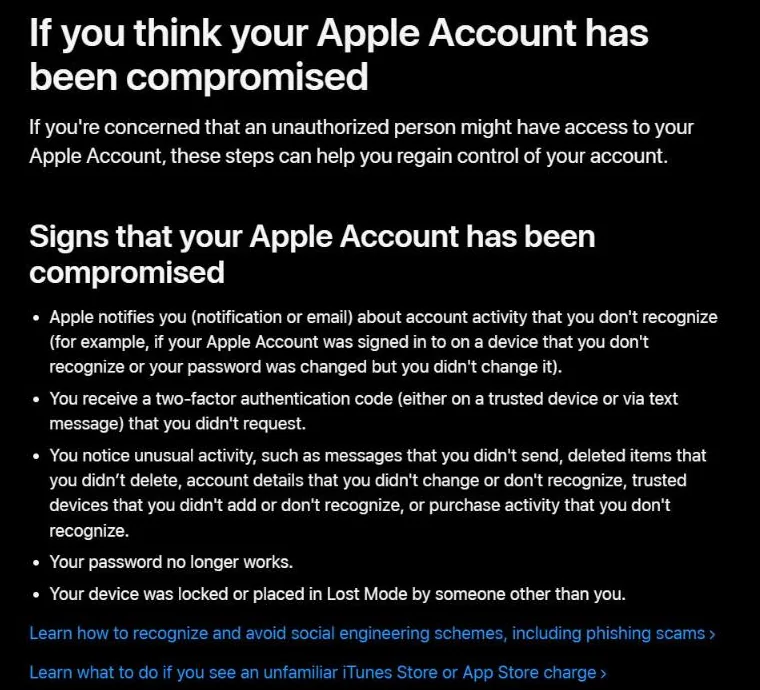
Apple adds a few more signs for Apple Accounts: activity notifications you don’t recognise, deleted items, unknown trusted devices or purchases, and a device that was locked or put in Lost Mode by someone other than you. Any one of these is a reason to act now, not later.
How to Check an iPhone for Hacking
If you want to know how to know if your phone is hacked on an iPhone, start with your account. iPhones are harder to infect with malware than many people think, so on an iPhone the most useful checks focus on your Apple Account and on who can see your data.

Check the devices signed in to your Apple Account
Go to Settings > [your name] and scroll down to see every device signed in with your Apple Account. Apple’s support page explains that you can tap a device you don’t recognise and choose Remove from Account. Afterwards, change your Apple Account password so the device can’t simply sign back in.
Run Safety Check
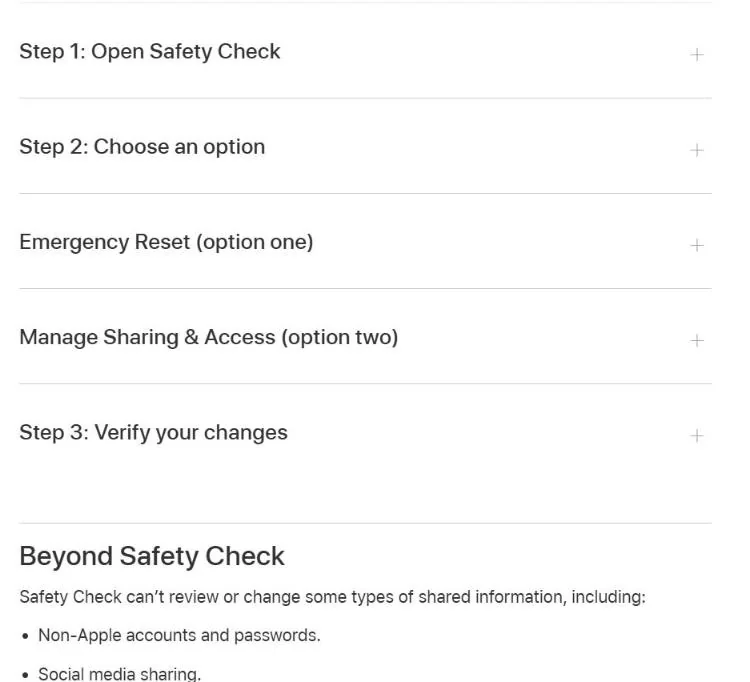
On iOS 16 or later, Apple’s Safety Check is found under Settings > Privacy & Security > Safety Check. It offers two options: Emergency Reset, which immediately stops sharing and resets access, and Manage Sharing & Access, which lets you review which people and apps can see your information.
Ask your carrier about SMS forwarding
Apple also suggests checking with your mobile carrier that nobody has set up SMS forwarding on your number. Forwarded texts would let an attacker receive your sign-in codes.
How to Check an Android Phone for Hacking
On Android, the answer to how to know if your phone is hacked usually starts with your apps. Android lets you install apps from more places, so app checks matter more. Google’s built-in tools cover both the apps on the phone and the devices signed in to your Google Account.
Scan with Google Play Protect
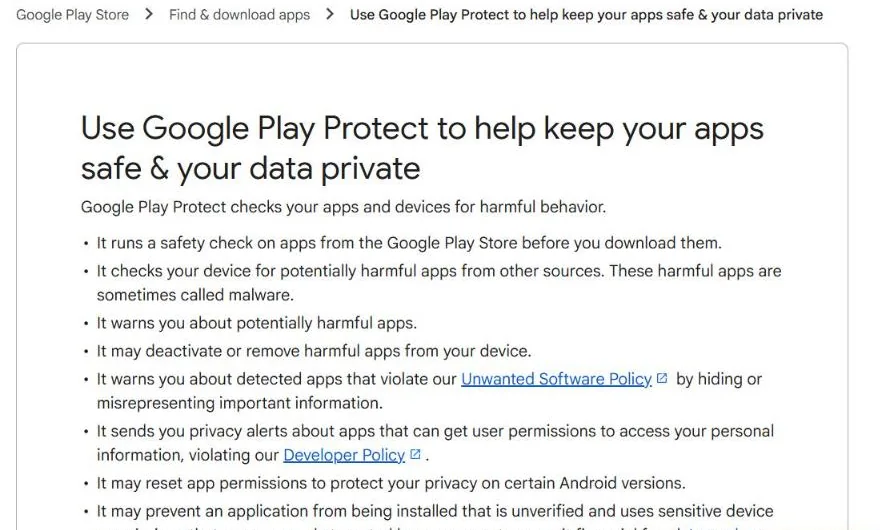
Google Play Protect checks apps when you download them and also checks apps installed from other sources. It can warn you about harmful apps and may remove them. It is on by default, but you can confirm it: open the Play Store, tap your profile icon, choose Play Protect, then Settings, and make sure Scan apps with Play Protect is on.
Check devices signed in to your Google Account
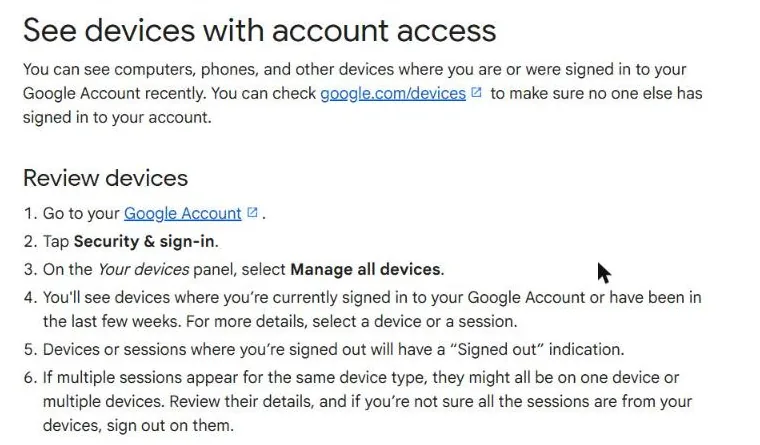
Google’s help page says you can open your Google Account, tap Security & sign-in and choose Manage all devices under “Your devices” (or visit google.com/devices). If you see a device you don’t recognise, tap it and choose Sign out, then follow Google’s steps to secure your account.
Review app permissions
Look through Settings > Apps for anything you don’t recognise, and check which apps can use your camera, microphone, location or SMS. Menu names vary by phone maker, but every Android phone has a permissions screen.
What to Do If Your Phone Is Hacked
If what you now know about how to know if your phone is hacked points to a real hack, move quickly and work in this order. The steps below combine the FTC’s account-recovery advice with Apple’s guidance for compromised accounts.

- Update and scan. The FTC recommends updating your security software and running a scan. Install the latest operating system update too.
- Remove apps you don’t recognise. Delete unknown apps and profiles. On Android, run a Play Protect scan afterwards.
- Change your passwords. Start with your email and your Apple or Google account, because they can reset everything else. Use a new, strong password for each. A password manager makes this much easier.
- Sign out of all devices. The FTC advises signing out of every device after changing the password, so an attacker’s session ends.
- Turn on two-factor authentication. This adds a second step that a stolen password alone can’t pass.
- Check recovery and forwarding settings. The FTC suggests checking your recovery email and phone, email forwarding rules, and your sent and deleted folders.
- Call your carrier. Ask whether SMS forwarding or any change to your number was set up without you.
- Tell your contacts. Warn people who may have received messages from you, so they don’t click links or send money.
Need a stronger lock on every account?
See the Best Password Managers →If you can’t get back into an account, use only the provider’s official recovery page. Avoid “account recovery” services that contact you on social media; they are a common scam. If the phone still behaves strangely after these steps, back up your photos and files, then consider a factory reset as a last resort.
Signs That Are Usually Not Hacking
Part of learning how to know if your phone is hacked is spotting when it probably isn’t. These issues worry many people but usually have everyday causes:
- A warm phone after gaming, video calls, charging or a big update.
- A slower phone when storage is almost full or the battery is old.
- Battery drain right after an update, while the phone re-indexes photos and files.
- Higher data use after a new streaming, backup or cloud sync app.
- Spam texts or calls, which reach almost everyone and don’t mean your phone is infected.
Check the battery and data usage screens first. If one known app explains the change, the phone is very likely fine.
How to Protect Your Phone From Hackers
Once you know how to know if your phone is hacked, the next step is stopping it from happening. Prevention is simple and mostly free. The FTC’s advice on protecting your phone focuses on a few habits that block most attacks.


- Lock your phone. The FTC recommends a passcode of at least six digits, plus Face ID or a fingerprint if you have them.
- Update automatically. Turn on automatic updates so security fixes install without you having to remember.
- Back up your data. A recent backup means you can reset the phone without losing photos and files.
- Turn on Find My. It lets you locate, lock or erase a lost phone.
- Use two-factor authentication on email, Apple, Google and banking accounts.
- Install apps only from official stores and avoid links that ask you to download an app.
Public Wi-Fi is another weak point. A trusted VPN encrypts your connection on networks you don’t control. For the bigger picture of how these layers fit together, read our guide to what cybersecurity is, and learn how antivirus software works if you also want to protect your computer.
How We Researched This Guide
This guide on how to know if your phone is hacked is research-based. We did not hack or test phones. Every sign and step comes from official sources: the FTC’s consumer advice, Apple Support and Google Help pages, all checked in October 2026. Menu names can differ by iOS or Android version and phone maker. Read more about how we review.
Final Word: How to Know If Your Phone Is Hacked
The best way to know if your phone is hacked is to check your accounts, not just the device. Unrequested codes, messages you didn’t send, passwords that stop working and unknown signed-in devices are the clearest signs. If you see them, update the phone, remove unknown apps, change your passwords, sign out everywhere and turn on two-factor authentication. Then keep the habits that stop it from happening again.
Protect your computer too
Compare Antivirus Software →Frequently Asked Questions
How do I know if my phone is hacked?
The simplest answer to how to know if your phone is hacked: look for several signs at once, such as apps you didn’t install, sign-in codes you didn’t request, messages you didn’t send, passwords that stop working and unknown devices in your Apple or Google account. One sign alone is rarely proof.
Can someone hack my phone by calling me?
Simply answering a normal call is very unlikely to hack your phone. The bigger risk is the caller tricking you into sharing a code, a password or installing an app. Never share sign-in codes with anyone who calls you.
Does a factory reset remove hackers?
A factory reset removes apps and settings on the device, so it removes most malware. It does not secure your accounts, so you still need to change passwords, sign out of all devices and turn on two-factor authentication.
How do I check if my iPhone is hacked?
Check the devices listed under Settings > [your name], remove any you don’t recognise, and run Safety Check under Settings > Privacy & Security. Also watch for Apple Account codes or purchases you didn’t make.
How do I check if my Android phone is hacked?
Run a Google Play Protect scan from the Play Store, review your installed apps and permissions, and check the devices signed in to your Google Account under Security & sign-in.
Can a phone be hacked without me clicking anything?
Rare “zero-click” attacks exist, but they usually target a small number of high-profile people. For most users, keeping the phone updated is the best defence, because updates fix the flaws these attacks use.
Should I install antivirus on my phone?
Built-in tools such as Google Play Protect already scan Android apps. Updates, two-factor authentication and installing apps only from official stores matter more for most people than a separate app.
Sources
- FTC: How To Protect Your Phone From Hackers
- FTC: How To Recover Your Hacked Email or Social Media Account
- Apple Support: If you think your Apple Account has been compromised
- Apple Support: Review devices signed in to your Apple Account
- Apple: Safety Check for iPhone
- Google Play Help: Google Play Protect
- Google Account Help: See devices with account access
Related articles you may like
 SecurityBest Free Antivirus in 2026: 6 Free Picks Compared by Features and Lab Scores
 SecurityBest Antivirus for Mac in 2026: 6 Picks Compared by Price and Lab Scores
 SecurityIs Windows Defender Enough in 2026? Test Results, Gaps and Settings
 SecurityWhat Is Antivirus Software? Complete Guide for 2026
 SecurityWhat Is Cybersecurity? Complete Beginner’s Guide 2026
 SecurityNordVPN vs Surfshark: Honest 2026 VPN Comparison