
Best Free Antivirus in 2026: 6 Free Picks Compared by Features and Lab Scores
 By M. Zaid
- Updated October 25, 2026
- 16 min read

Finding the best free antivirus in 2026 is easier than it sounds, because several well-known security companies still give away real-time malware protection for Windows at no cost. The catch is that “free” means different things: some apps protect you all the time, some only scan when you ask, and most keep the best features for their paid plans.
This research-based guide compares six free options: Bitdefender Antivirus Free, Avast Free Antivirus, AVG AntiVirus Free, Microsoft Defender, Avira Free Security and Malwarebytes Free. We used each company’s official product pages and the latest AV-TEST results for Windows (all checked October 2026), so you can see exactly what each free plan includes before you install anything.
Quick answer: For most Windows users, the best free antivirus is the one already on your PC, Microsoft Defender (17.5/18 in AV-TEST’s August 2026 round), as long as you keep Windows updated. If you want a separate app, Bitdefender Antivirus Free is a light, low-pop-up choice for Windows, while Avast Free Antivirus and AVG AntiVirus Free scored a perfect 18/18 and also offer free apps for Mac, Android and iOS. Use Malwarebytes Free as a second-opinion scanner, not as your only protection.
Want paid protection with more features?
See the Best Antivirus Software →Best Free Antivirus: Quick Comparison
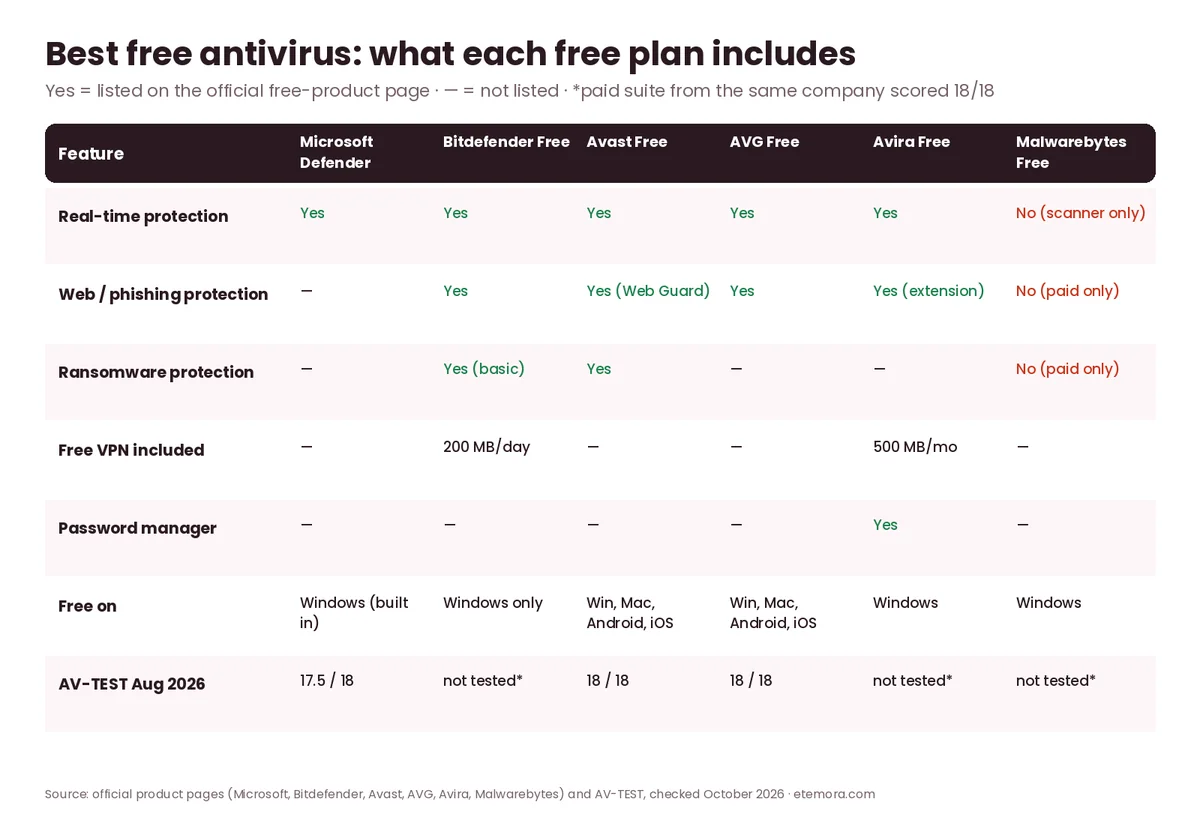
Here is how the six free options line up, based only on what each official product page lists.
| Free antivirus | Best for | Real-time protection | Platforms (free) |
|---|---|---|---|
| Bitdefender Antivirus Free | Light, quiet protection on Windows | Yes | Windows only |
| Avast Free Antivirus | Free extras and scam checks | Yes | Windows, Mac, Android, iOS |
| AVG AntiVirus Free | Simple protection with AI scam blocking | Yes | Windows, Mac, Android, iOS |
| Microsoft Defender | Built-in protection with nothing to install | Yes | Windows (built in) |
| Avira Free Security | VPN, password manager and tune-up in one app | Yes (cloud-based) | Windows (plus other apps) |
| Malwarebytes Free | Second-opinion scan and cleanup | No (on-demand scanner) | Windows and more |
Is a Free Antivirus Enough in 2026?
For many people, yes. A good free antivirus gives you the core job: scanning files as they are opened or downloaded, stopping known malware and blocking some dangerous downloads. If you also keep Windows and your browser updated, use strong unique passwords and think before you click, a free tool covers the basics well.
Where free plans fall short is the extras. Ransomware file recovery, unlimited VPN data, identity monitoring, parental controls, multi-device licenses and live support usually need a paid plan. Free apps also tend to show upgrade offers inside the app, because that is how the companies pay for them.
If you are not sure what antivirus actually does, our guide on what antivirus software is and how it works explains the basics. And if you are wondering whether you need anything beyond Windows’ built-in tool, read is Windows Defender enough for a deeper look.
1. Bitdefender Antivirus Free: Best Lightweight Free Antivirus for Windows
Bitdefender is one of the best-known names in independent lab tests, and if you want the best free antivirus for a Windows PC that stays out of your way, its free product is built for that. The official page describes Bitdefender Antivirus Free as “basic protection, Windows only” that finds and removes existing viruses, has minimal impact on performance, shows no annoying pop-ups and needs no credit card.
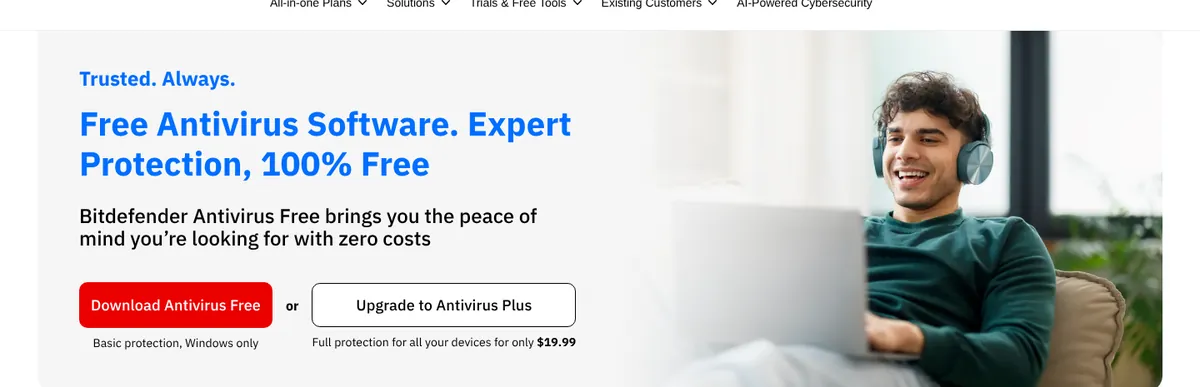
According to Bitdefender, the free app learns your PC’s normal activity to detect suspicious changes in real time, and it lists protection against ransomware, infected downloads, phishing, zero-day exploits, rootkits, trojans and malicious websites. Advanced Threat Defense shows where a threat came from. It also includes a basic Bitdefender VPN with up to 200 MB of encrypted traffic per device per day, and it has no expiry date. You need a Bitdefender Central account to install it.
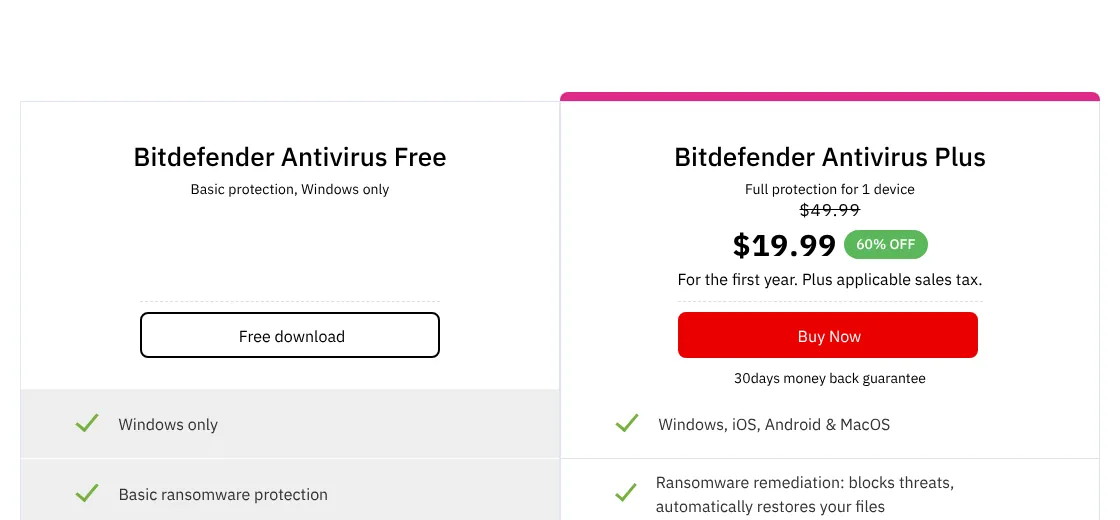
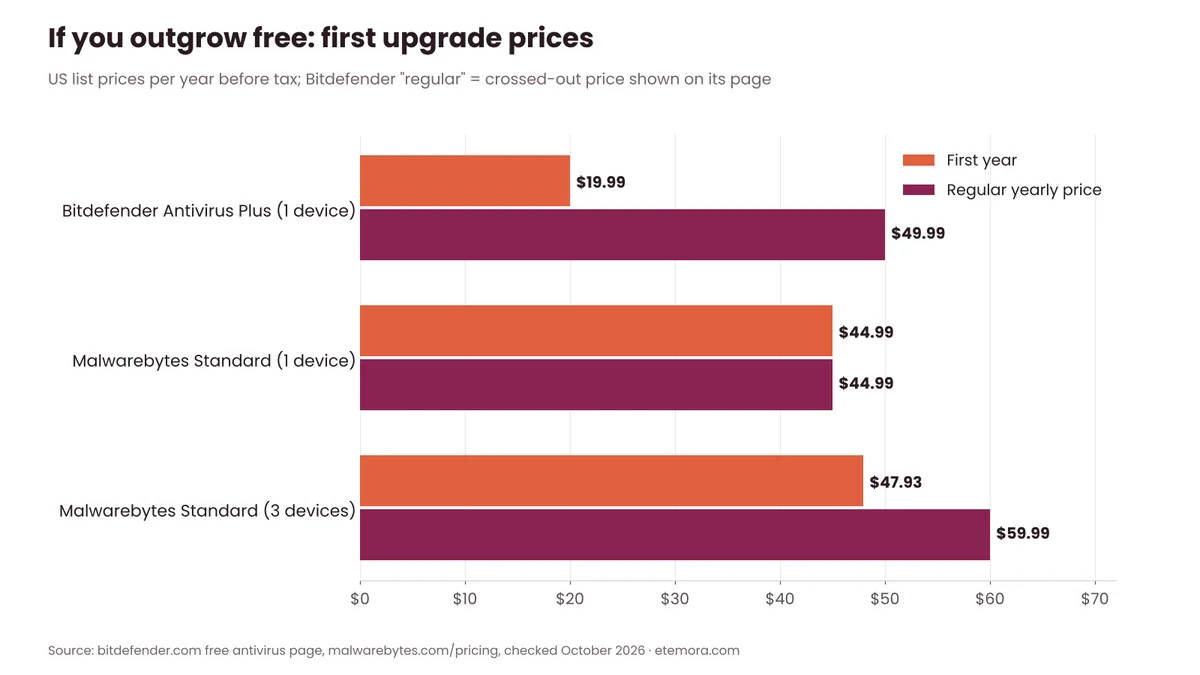
The free plan leaves out several features found in Bitdefender Antivirus Plus: full ransomware remediation, anti-tracking, social network protection, a full-system vulnerability analysis and the productivity and entertainment modes. Antivirus Plus was listed at $19.99 for the first year (down from $49.99) for one device.
Pros
- Real-time protection with few interruptions
- Basic VPN with 200 MB per day
- No time limit on the free version
Cons
- Windows only
- Only basic ransomware protection
- Needs a Bitdefender account
Want a quiet free antivirus for your Windows PC?
See Bitdefender Antivirus Free →2. Avast Free Antivirus: Best Free Antivirus With Extra Features
Among the best free antivirus apps, Avast Free Antivirus packs the most extra features into a free plan on this list. Its official page lists real-time protection, AI-powered scam guidance through Avast Assistant, and multi-layered security, and says free apps are also available for Mac, Android and iOS.
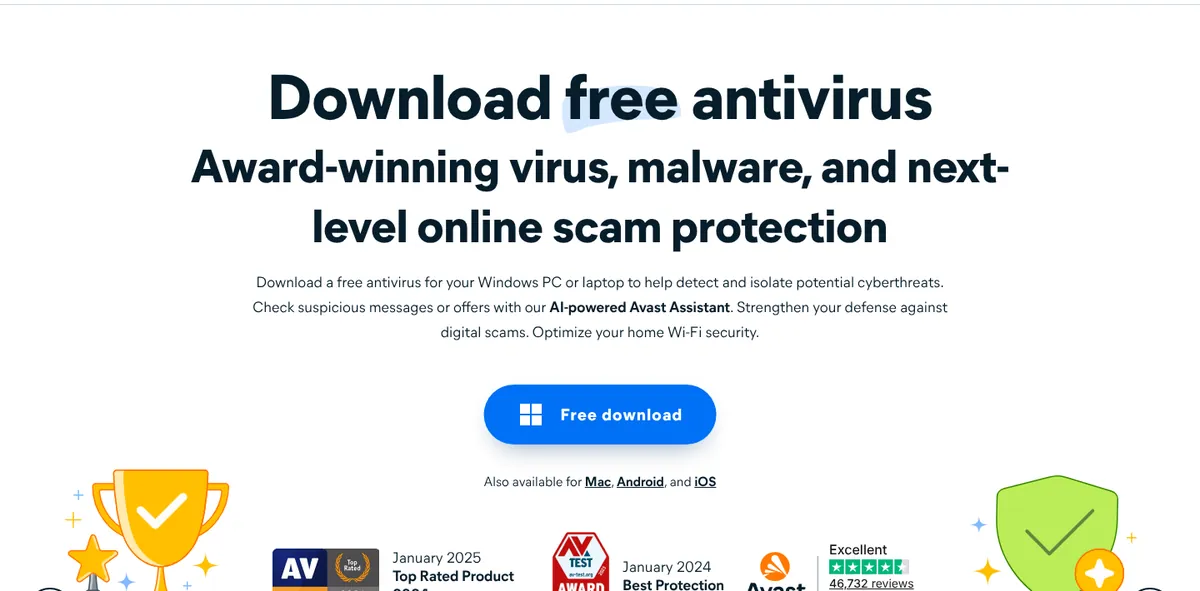
The free toolkit includes Web Guard (blocks scam websites, phishing links and malicious downloads), Smart Scan, File Shield (scans files as they are added or opened), Behavior Shield (alerts you when an app acts suspiciously) and Quarantine. On top of that, Avast lists Wi-Fi network security checks, safer browsing and email, ransomware protection and data leak alerts if a password linked to your email has been exposed.

In AV-TEST’s July–August 2026 Windows 11 round, Avast Free Antivirus 26.6 scored the maximum 6 points in protection, performance and usability (18/18). As with most free antivirus apps, Avast also promotes its paid Avast Premium Security for extra features.
Pros
- 18/18 in the latest AV-TEST Windows round
- Web Guard, Wi-Fi checks and data leak alerts
- Free apps for Mac, Android and iOS
Cons
- Paid upgrade (Avast Premium Security) promoted on its site
- Many extra features you may not need
Want free protection with scam checks?
See Avast Free Antivirus →3. AVG AntiVirus Free: Best Simple Free Antivirus
AVG and Avast are both part of Gen Digital, and AVG AntiVirus Free is the simpler-looking sibling. AVG’s official page says the free app gives real-time protection against viruses, infected emails, scam websites and more, using AI to spot well-disguised links, sites and downloads. Free versions are also offered for Mac, Android and iOS.

Setup is three steps: download, install and let it run. In the same AV-TEST round, AVG AntiVirus Free 26.6 and 26.7 also scored 18/18. If you like Avast’s protection but want a cleaner app, AVG is worth a look.
Pros
- 18/18 in the latest AV-TEST Windows round
- AI-powered scam website and link blocking
- Easy three-step setup
Cons
- Advanced features need a paid plan
- Fewer listed extras than Avast
Prefer a simple free antivirus?
See AVG AntiVirus Free →4. Microsoft Defender: Best Built-In Free Antivirus
If you use Windows 10 or Windows 11, you already have a free antivirus. Microsoft’s support page says the Windows Security app is built into Windows and includes Microsoft Defender Antivirus, Windows Firewall and Smart App Control, working together to give real-time protection from the moment you start your device.
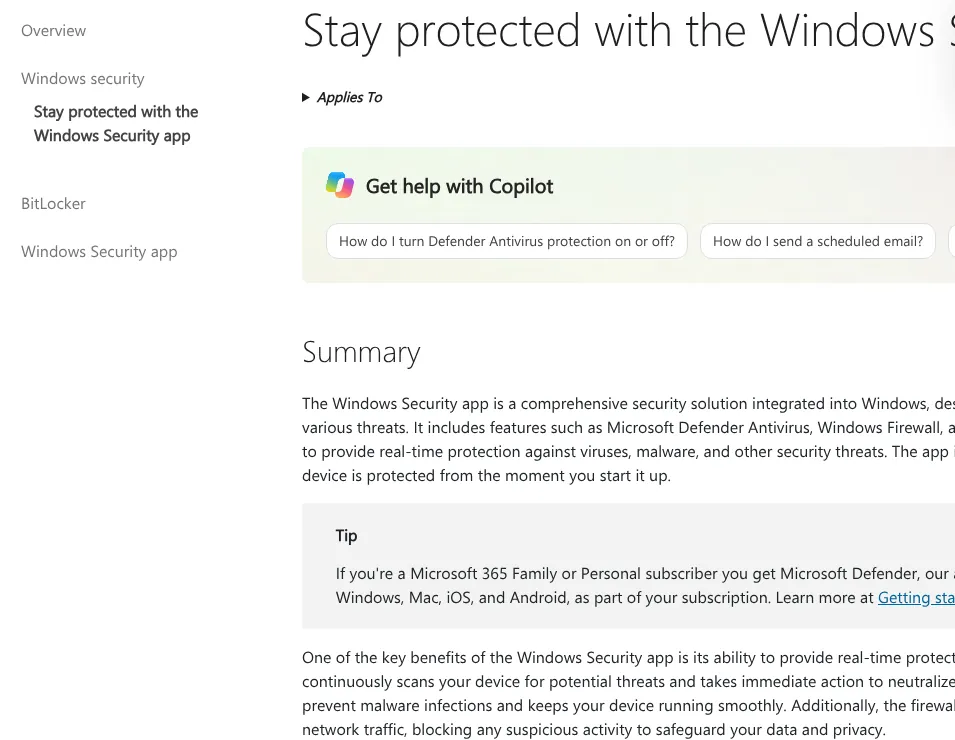
You can run a quick scan from Windows Security → Virus & threat protection, or right-click a file and choose Scan with Microsoft Defender. In AV-TEST’s August 2026 results, Microsoft Defender Antivirus (Consumer) scored 6 for protection, 5.5 for performance and 6 for usability, a total of 17.5/18, which still earns AV-TEST’s Top Product award.
Defender’s biggest strength is that it needs nothing extra: no download, no separate account and no extra cost. Microsoft 365 Personal and Family subscribers also get the separate Microsoft Defender app for Windows, Mac, iOS and Android.
Pros
- Already installed and free with Windows
- 17.5/18 in the latest AV-TEST round
- No extra download or account needed
Cons
- Windows only
- Slightly lower AV-TEST performance score (5.5)
- Fewer extras than third-party free apps
Check how to use Windows Security
Open Microsoft’s Windows Security Guide →5. Avira Free Security: Best Free All-in-One Security Suite
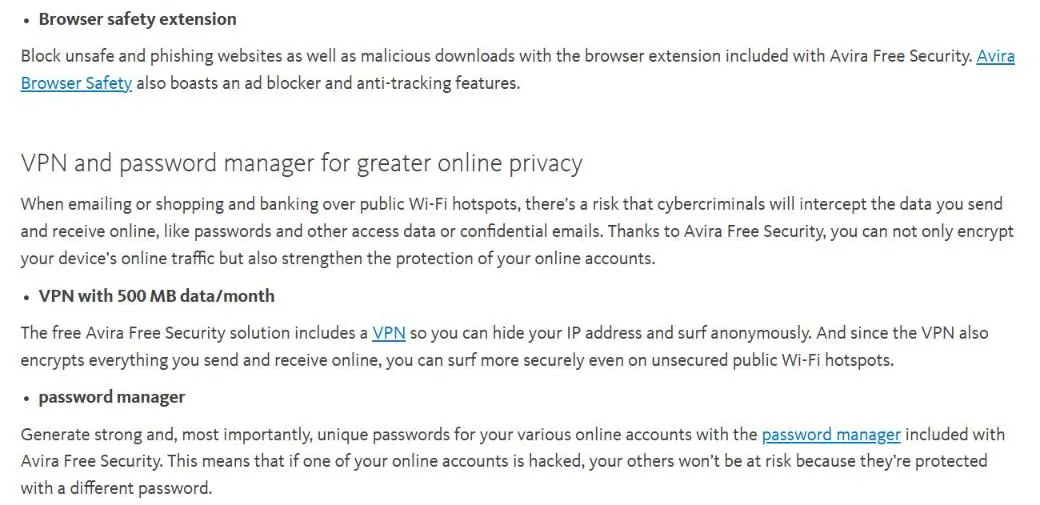
Avira Free Security goes beyond antivirus. Its official page lists cloud-based real-time protection that analyzes suspicious files in the Avira Protection Cloud, a virus scanner, a browser safety extension that blocks unsafe and phishing websites and malicious downloads, a password manager, Windows privacy settings and tune-up tools.
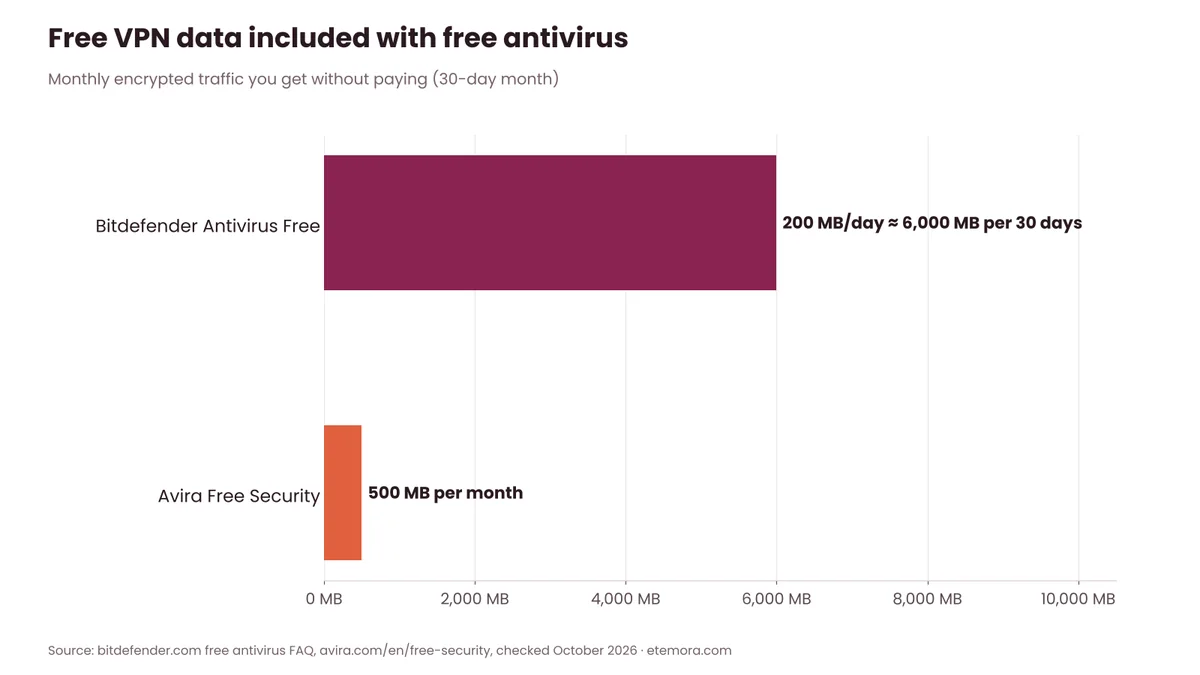
The standout extra is the free VPN, which Avira lists at 500 MB of data per month. That is less than Bitdefender’s 200 MB per day, but it is enough for quick sessions on public Wi-Fi.
Avira’s free edition was not tested on its own in AV-TEST’s August 2026 round, but Avira Internet Security for Windows scored 18/18. If you want the best free antivirus with privacy tools in the same app, Avira is the most complete option here.
Pros
- Free VPN, password manager and tune-up tools
- Browser extension with phishing protection
- Cloud-based real-time protection
Cons
- VPN limited to 500 MB per month
- Free edition not tested separately by AV-TEST
- Unlimited VPN needs paid Avira Prime
Want a VPN and password manager in your free antivirus?
See Avira Free Security →6. Malwarebytes Free: Best Free Second-Opinion Scanner
Malwarebytes Free is different from the rest of this list, and it is important to know why. Malwarebytes says its free scanner “finds and removes infections that are already on your device,” while real-time protection, ransomware protection, phishing and malicious site blocking and exploit protection are only in Malwarebytes Premium Security.
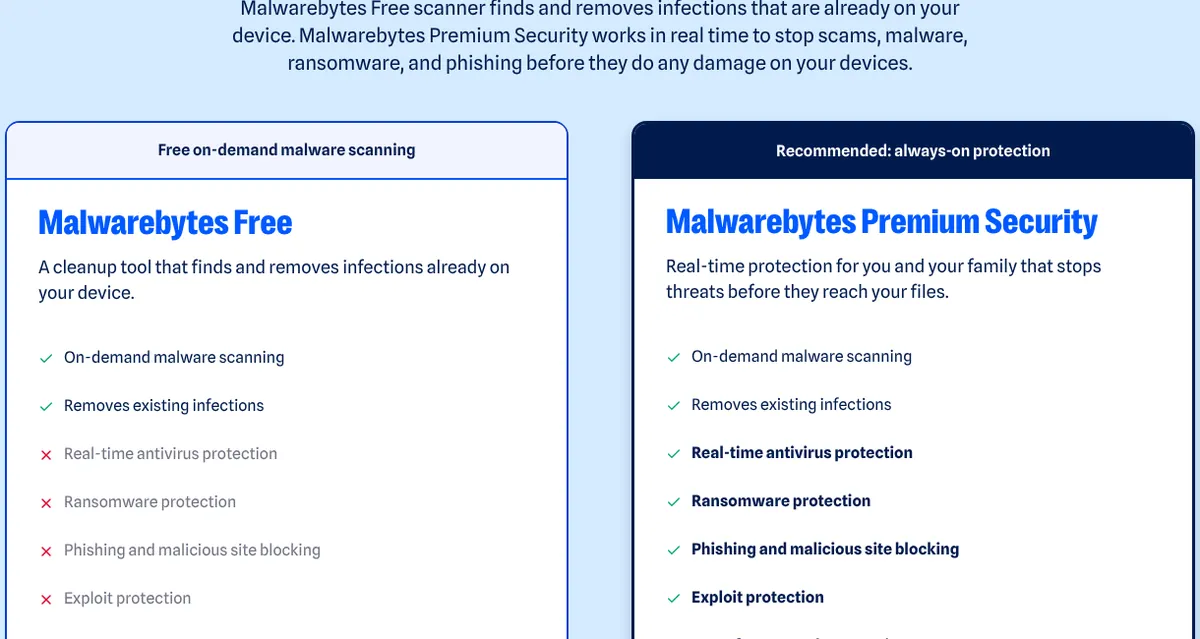
That makes Malwarebytes Free a great cleanup tool and second opinion: keep Defender or another real-time antivirus running, and use Malwarebytes Free to scan when something feels wrong. Malwarebytes also offers a 14-day free trial of Premium with no credit card. Paid plans start at $44.99 per year for one device, or Standard for three devices at $47.93 for the first year (then $59.99 per year), with a 60-day money-back guarantee.
Pros
- Good for scanning and removing existing infections
- Works next to your main antivirus
- 14-day Premium trial with no card
Cons
- No real-time protection in the free version
- No phishing or ransomware protection for free
Need a free scan for an infected PC?
See Malwarebytes Free →Best Free Antivirus Test Scores (AV-TEST, August 2026)
Product pages tell you what an app includes, but independent labs show how well it protects. AV-TEST evaluated 15 home security products on Windows 11 during July and August 2026, using default settings, and scored each one out of 6 for protection, performance and usability (18 points maximum).
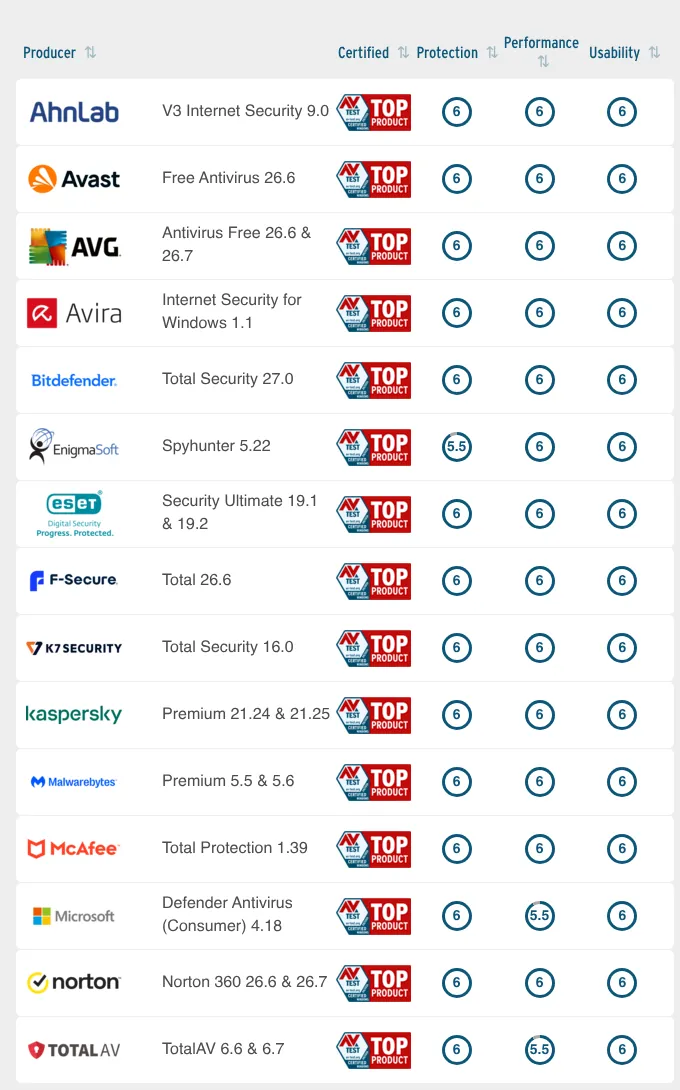
Two free products were tested directly: Avast Free Antivirus and AVG AntiVirus Free, both at 18/18. Microsoft Defender scored 17.5/18. Bitdefender, Avira and Malwarebytes were tested with their paid suites, which all scored 18/18; their free editions were not tested separately in this round.
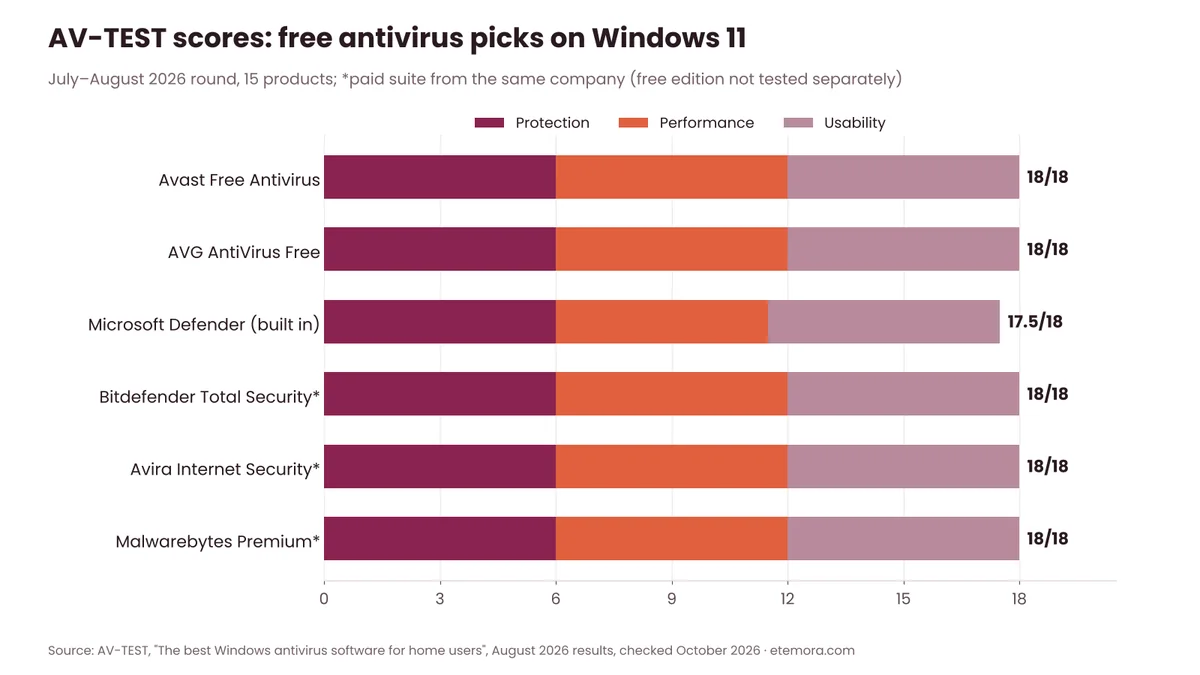
Lab results are a snapshot of one test period. They are a useful guide, but they don’t replace good habits like updating your software and avoiding suspicious downloads.
Free vs Paid Antivirus: What You Give Up
The best free antivirus apps cover real-time malware protection well. Paid plans mostly add convenience and extra layers. Based on the official comparisons, here is what you typically get by upgrading:
- Stronger ransomware tools: Bitdefender Antivirus Plus adds ransomware remediation that restores your files; the free app has basic ransomware protection.
- Real-time protection (Malwarebytes): only Premium blocks threats before they reach your files.
- More VPN data: free plans cap the VPN at 200 MB per day (Bitdefender) or 500 MB per month (Avira).
- More devices and platforms: Bitdefender’s free app is Windows only, while Antivirus Plus lists Windows, iOS, Android and macOS.
- Privacy and identity extras: anti-tracking, identity monitoring and support come with paid tiers.
Both free VPN allowances are small compared with a dedicated VPN, as the chart shows.
If you outgrow free, the first paid step can be cheap. Bitdefender Antivirus Plus was $19.99 for the first year, and Malwarebytes Standard started at $44.99 per year for one device. Check renewal prices before you buy, because first-year deals usually renew higher.
For full-featured paid suites, see our best antivirus software for 2026 guide. For privacy on public Wi-Fi, a dedicated option from our best VPN services list will give you far more than a free antivirus VPN.
How to Choose the Best Free Antivirus for You
The best free antivirus is the one that fits your devices and habits. Use this quick guide:
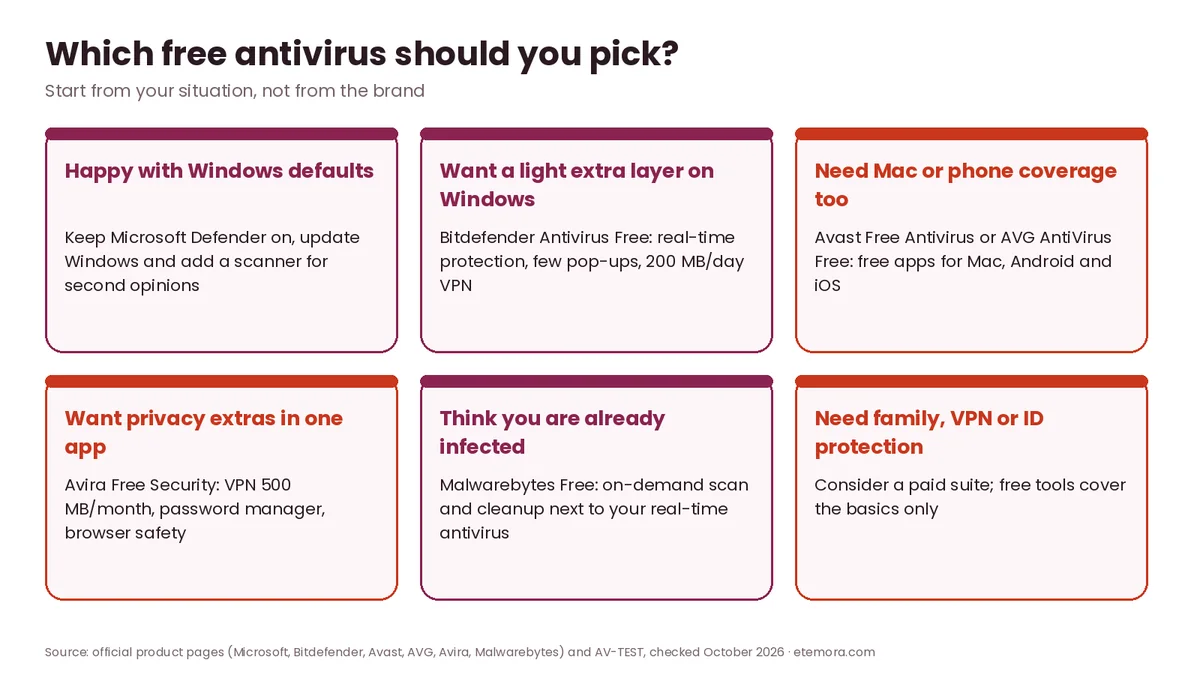
- You only use Windows and want zero hassle: keep Microsoft Defender on and updated.
- You want a separate, quiet app on Windows: Bitdefender Antivirus Free.
- You also use a Mac or phone: Avast Free Antivirus or AVG AntiVirus Free. Mac users can also read our best antivirus for Mac guide.
- You want privacy tools in one app: Avira Free Security.
- You think your PC is already infected: run Malwarebytes Free alongside your main antivirus.
Whichever you choose, follow a few simple setup steps so your free antivirus works as well as it can:
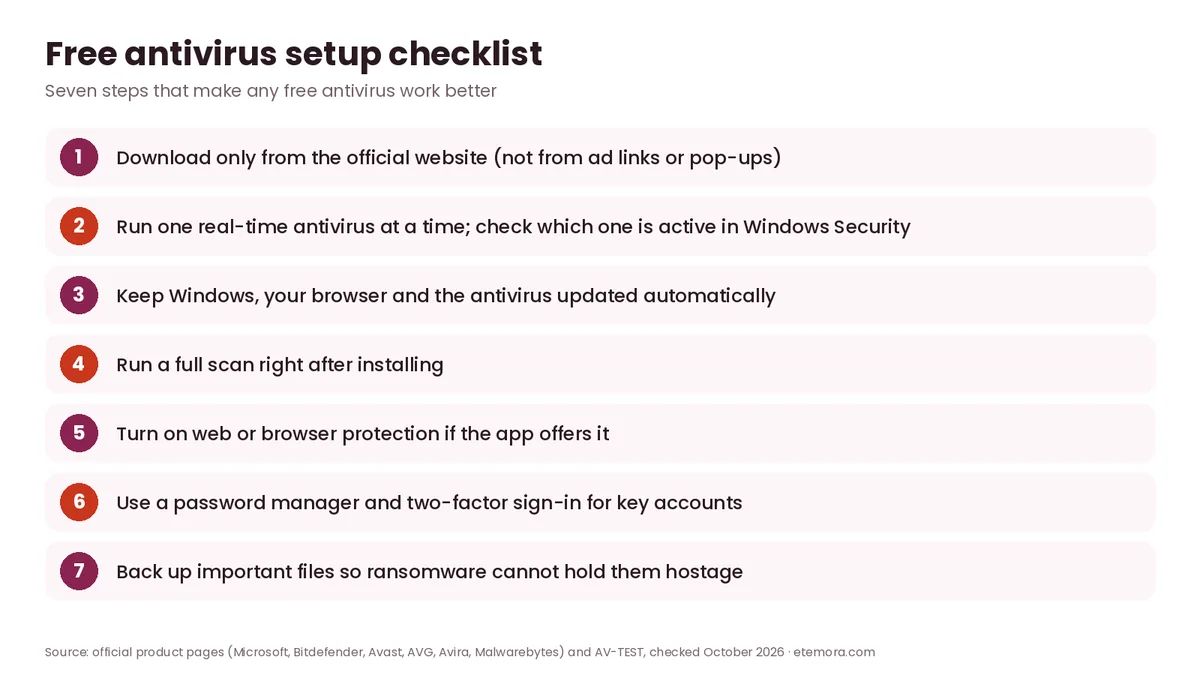
Two of those steps matter more than people think. First, don’t run two real-time antivirus apps at the same time, because they can conflict and slow your PC; a scanner like Malwarebytes Free is fine because it only runs when you ask. Second, antivirus can’t protect a reused password, so pair it with one of the best password managers. On phones, also learn the signs covered in our guide on how to know if your phone is hacked.
How We Researched
This best free antivirus guide is research-based; we did not run hands-on tests or our own malware samples. We read each official free-product page (Bitdefender Antivirus Free, Avast Free Antivirus, AVG AntiVirus Free, Avira Free Security, Malwarebytes Free Downloads), Microsoft’s Windows Security support page and Malwarebytes’ pricing page, and we used AV-TEST’s Windows home user results for July–August 2026. Everything was checked in October 2026, with US prices in USD before tax. Kaspersky was not included in this guide. Read more about how we review.
Final Verdict: The Best Free Antivirus in 2026
You don’t need to pay to stay protected on a Windows PC, and the best free antivirus for you depends mostly on your devices. Microsoft Defender is a strong default, and Avast, AVG and Bitdefender give you free alternatives with extra web and scam protection. Avira adds the most privacy tools, while Malwarebytes Free is best kept as a cleanup scanner.
- Best fit for most Windows users: Microsoft Defender (built in, 17.5/18)
- Best lightweight free app: Bitdefender Antivirus Free
- Best free extras and multi-device: Avast Free Antivirus (18/18)
- Best simple alternative: AVG AntiVirus Free (18/18)
- Best free privacy bundle: Avira Free Security
- Best free cleanup scanner: Malwarebytes Free
Our advice: start with Defender, add one free app only if you want its extras, and upgrade to a paid suite when you need more devices, unlimited VPN data or identity protection.
Ready for full protection?
Compare Paid Antivirus Suites →Frequently Asked Questions
What is the best free antivirus in 2026?
For most Windows users, Microsoft Defender is the best free antivirus because it is built in and scored 17.5/18 in AV-TEST’s August 2026 round. If you want a separate app, Bitdefender Antivirus Free, Avast Free Antivirus and AVG AntiVirus Free are strong free choices.
Is free antivirus safe to use?
Yes, when you download it from the official website. Free apps from established companies like Bitdefender, Avast, AVG and Avira give real-time protection. Avoid “free antivirus” offers from pop-ups or ads, which can be scams.
Is Microsoft Defender good enough on its own?
For many people, yes, as long as Windows stays updated. It scored 6/6 for protection and 17.5/18 overall in AV-TEST’s latest Windows round. You may want a third-party app for extra scam protection, a VPN or coverage on other devices.
Does Malwarebytes Free protect in real time?
No. Malwarebytes says its free version is an on-demand scanner that finds and removes existing infections. Real-time, ransomware and phishing protection are in Malwarebytes Premium Security.
Can I run two free antivirus programs at once?
Run only one real-time antivirus at a time, because two can conflict. An on-demand scanner like Malwarebytes Free can sit alongside your main antivirus because it only scans when you start it.
Is Bitdefender Antivirus Free really free forever?
Bitdefender says its free antivirus for Windows has no time limit and no hidden costs, and needs no credit card. You do need to create a Bitdefender Central account to install it.
Which free antivirus includes a VPN?
Bitdefender Antivirus Free includes a basic VPN with up to 200 MB per device per day, and Avira Free Security includes a VPN with 500 MB per month. For regular VPN use, a paid VPN service is a better fit.
Is there a free antivirus for Mac and phones?
Yes. Avast and AVG both say their free antivirus apps are also available for Mac, Android and iOS. Bitdefender’s free antivirus is Windows only.
Sources
Related articles you may like
 SecurityBest Antivirus for Mac in 2026: 6 Picks Compared by Price and Lab Scores
 SecurityIs Windows Defender Enough in 2026? Test Results, Gaps and Settings
 SecurityHow to Know If Your Phone Is Hacked: 8 Signs and What to Do
 SecurityWhat Is Antivirus Software? Complete Guide for 2026
 SecurityWhat Is Cybersecurity? Complete Beginner’s Guide 2026
 SecurityNordVPN vs Surfshark: Honest 2026 VPN Comparison