
1Password vs Bitwarden: Honest 2026 Comparison
 By M. Zaid
- Updated October 2, 2026
- 17 min read
1Password vs Bitwarden is a comparison between two well-known password managers that take very different approaches to pricing, features and control. 1Password focuses on a polished paid experience built around its Secret Key, Watchtower alerts, Travel Mode and family sharing. Bitwarden offers a permanent free plan, low-cost Premium and Families plans, open-source software and the option to self-host.
This guide compares their current US pricing, core features, security design, ease of use, support and the situations where each one makes more sense. It is research-based: prices and plan details come from the official 1Password and Bitwarden pages, checked in October 2026, and usability notes come from independent publications rather than our own hands-on tests.
Quick answer: 1Password vs Bitwarden mainly comes down to priorities. 1Password is a paid-only password manager (14-day free trial) with extra convenience and security features such as the Secret Key and Travel Mode. Bitwarden has a free plan with unlimited passwords and devices, Premium at $19.80/year, open-source code and self-hosting. If price and control matter most, Bitwarden is the better value; if you want a guided, polished experience and don’t mind paying $35.88 in year one (then $47.88/year), 1Password is the more feature-rich choice.
Compare both plans side by side on the official pages
Check 1Password Pricing → See Bitwarden Plans →1Password vs Bitwarden at a Glance
Here is how 1Password vs Bitwarden compares on the basics before we go into each area.
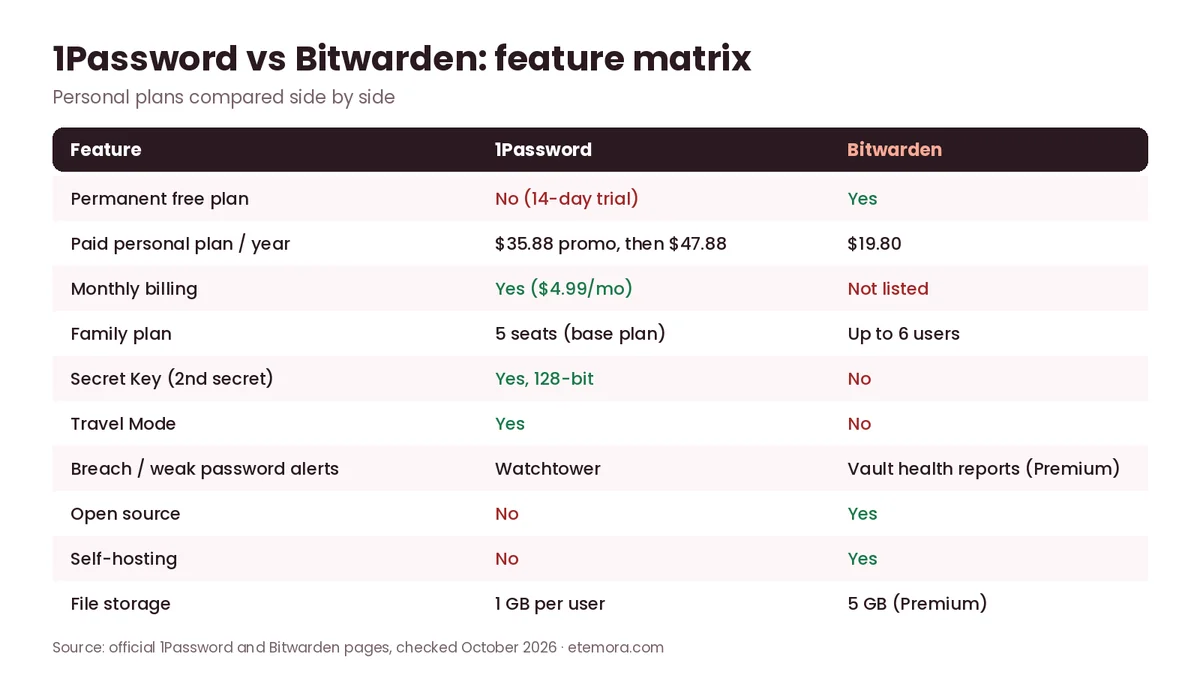
| Feature | 1Password | Bitwarden |
|---|---|---|
| Best for | People who want a polished, guided paid password manager | Budget-conscious users, free-plan users and technical users |
| Free plan | No (14-day free trial) | Yes — unlimited passwords and devices |
| Personal paid plan | Individual: $2.99/mo first year, then $3.99/mo (billed annually) | Premium: $1.65/mo, billed $19.80/year |
| Monthly billing | $4.99/mo (Individual) | Not listed for personal plans (annual) |
| Family plan | Families: $4.49/mo first year, then $5.99/mo — 5 seats in the base plan | Families: $3.99/mo, billed $47.88/year — up to 6 users |
| Storage | 1 GB per user | 5 GB encrypted file attachments (Premium) |
| Key strength | Secret Key, Watchtower, Travel Mode, ease of use | Free plan, open source, self-hosting, low price |
| Main drawback | No permanent free plan; higher price after year one | Interface and autofill can take more getting used to |
Prices in US dollars from the official 1Password and Bitwarden pricing pages, checked October 2026, before tax. 1Password’s first-year prices are a promotion for new customers who subscribe directly through 1Password.com with annual billing.
1Password vs Bitwarden Pricing
Pricing is the clearest difference in 1Password vs Bitwarden. Bitwarden has a $0 plan and a paid tier that costs less than half of 1Password’s standard Individual price, while 1Password is paid-only after its 14-day trial.
1Password Individual Cost
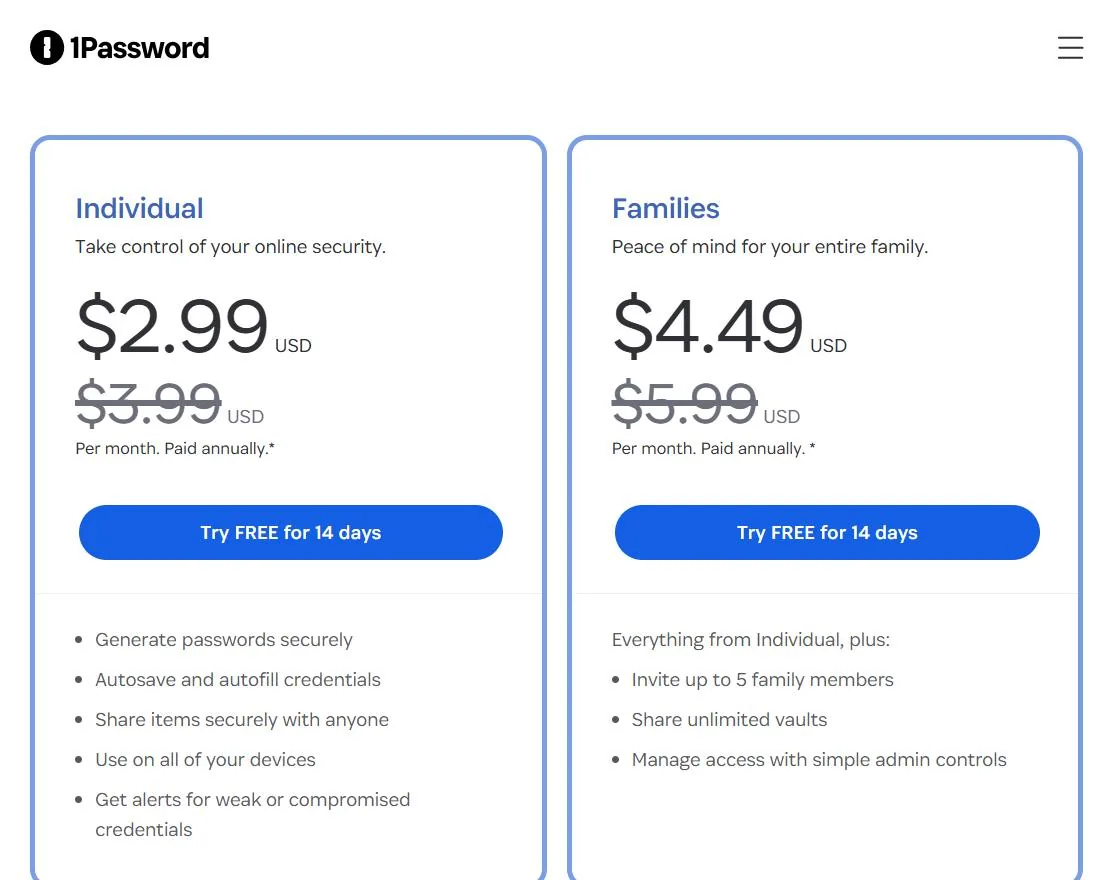
1Password’s personal pricing page lists the Individual plan at $2.99/month for the first year when billed annually, with a standard annual-billing price of $3.99/month. Paying month to month costs $4.99/month.
- First year (promotion): $2.99/month, paid annually — $35.88
- Standard annual billing: $3.99/month — $47.88/year
- Monthly billing: $4.99/month — $59.88 over 12 months
- Free trial: 14 days
The important detail is the promotion. 1Password says the discounted price is only for new customers who subscribe directly through 1Password.com, for the first year, with annual billing — and it isn’t available through Google Play, the Apple App Store or other third-party stores. Don’t treat $2.99/month as the long-term price.
Want the guided, feature-rich option?
Check 1Password Pricing →Bitwarden Premium Cost
Bitwarden keeps its pricing simpler. The Bitwarden pricing page lists Premium at $1.65/month, billed annually at $19.80, and does not show a separate introductory and renewal rate. The Free plan has no subscription charge at all.
- Free plan: $0 — unlimited passwords and devices
- Premium: $1.65/month, billed annually — $19.80/year
- Families: $3.99/month, billed annually — $47.88/year for up to 6 users
Bitwarden notes that its prices are shown in USD for an annual subscription and exclude taxes. As with any subscription, check the renewal amount in your account before the next billing date.

Want the lowest-cost paid plan, or a free one?
See Bitwarden Plans →
The gap grows over time. At current list prices, three years of 1Password Individual costs $131.64 (one promotional year plus two standard years), against $59.40 for three years of Bitwarden Premium. Prices can change, so treat this as an estimate based on today’s published rates.

1Password Families vs Bitwarden Families
For households, 1Password vs Bitwarden is also price-driven, and the plans differ slightly in size: Bitwarden Families covers up to six users, while 1Password’s base Families plan includes five seats.
1Password Families costs $4.49/month for the first year and $5.99/month at the standard annual-billing rate ($53.88 in year one, then $71.88/year). Monthly billing is $7.99/month. 1Password’s plan table lists five seats in the base Families plan, and the plan lets you invite family members, share unlimited vaults and manage access with simple admin controls.
Bitwarden Families costs $3.99/month billed annually, or $47.88/year, for up to six users. It includes six premium accounts, unlimited sharing, unlimited collections and organization storage, with 5 GB of personal plus 5 GB of family file storage.

1Password vs Bitwarden Features
In 1Password vs Bitwarden, both password managers cover the core job: storing credentials, generating strong passwords, autofill, syncing across devices and encrypting your vault. The bigger differences sit in the extras and in how each account model works.
1Password’s Individual plan lists secure password generation, autosave and autofill, secure sharing with anyone, use on all your devices and alerts for weak or compromised credentials. Every account also includes Watchtower, storage for items such as SSH keys and API tokens, and 1 GB of storage per user.
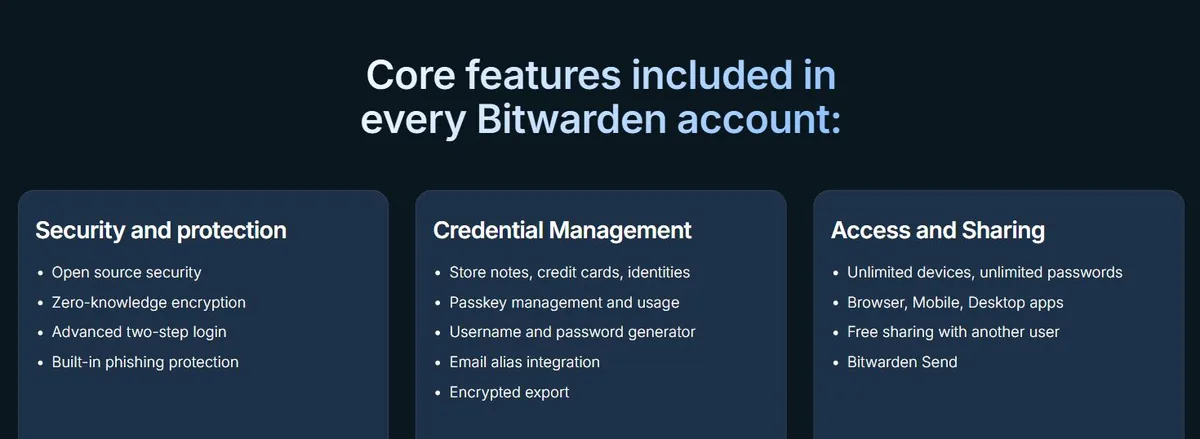
Bitwarden lists these core features in every account, including the Free plan: open-source security, zero-knowledge encryption, two-step login, built-in phishing protection, passkey management, a username and password generator, email alias integration, encrypted export, unlimited devices and passwords, sharing with one other user and Bitwarden Send. Premium adds an integrated authenticator (TOTP), encrypted file attachments, Emergency Access, vault health reports and priority support.
Where 1Password Stands Out
1Password’s main differentiators are a mix of security design and convenience:
- A 128-bit Secret Key that works alongside your account password
- Watchtower alerts for breached websites and vulnerable passwords
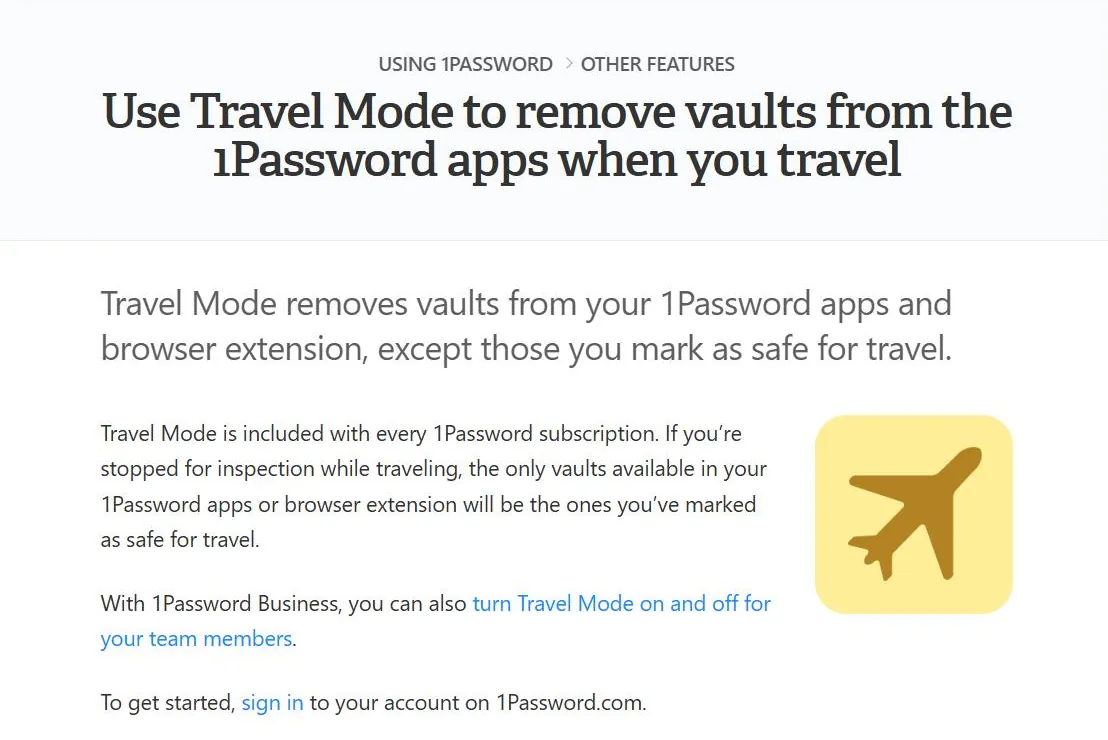
- Travel Mode, which removes vaults not marked “safe for travel” from your devices
- Unlimited shared vaults and simple admin controls on the Families plan
- Developer and business tools as your needs grow
- A strong focus on making security easy for non-experts
1Password pros
- Secret Key adds a second secret to account protection
- Travel Mode and Watchtower included
- Polished, guided apps described by reviewers as easy to use
- Monthly billing available
1Password cons
- No permanent free personal plan
- Price rises after the promotional first year
- No self-hosted option for personal plans
Where Bitwarden Stands Out
Bitwarden’s differentiators lean towards value and control:
- A permanent free plan with unlimited passwords and devices
- Open-source code that anyone can review on GitHub
- Self-hosting for people and organizations that want to run their own server
- Low-cost Premium and Families plans
- Broad browser support, including Vivaldi and Tor
- Encrypted sharing with anyone through Bitwarden Send
Bitwarden pros
- Free plan with unlimited passwords and devices
- Premium costs $19.80/year
- Open source and self-hostable
- 5 GB encrypted file attachments on Premium
Bitwarden cons
- Interface and autofill can take more getting used to
- No Travel Mode equivalent
- Self-hosting shifts maintenance and security work to you
Ease of Use
Ease of use is where 1Password vs Bitwarden reviews tend to differ most. We did not run hands-on usability tests for this comparison, so this section relies on what the companies publish and what independent reviewers report.
1Password’s design puts a lot of weight on keeping security accessible. Its security page says you don’t have to be a security expert to use it and that the secure thing to do should also be the easy thing. Tom’s Guide also describes 1Password as easy and intuitive to use.
Bitwarden covers desktop, mobile and browser apps with a broad feature set, but independent reviews note a steeper learning curve. Tom’s Guide’s 2026 password manager guide says Bitwarden offers a lot on its free and premium plans but isn’t the most intuitive password manager to use, especially its autofill.
That doesn’t make Bitwarden hard to use. The difference is how much guidance and polish you want. Someone who wants to install a password manager, import their logins and rely on a guided experience may prefer 1Password. Someone comfortable with settings may value Bitwarden’s extra control.
Performance as Reported by Independent Sources
Etemora did not run speed or performance tests for this comparison. Independent publications have published their own observations.
TechRadar’s Bitwarden vs 1Password comparison says 1Password performs well across its web interface and mobile and desktop apps, and points to platform-specific features such as Windows Hello and Face ID unlock. Tom’s Guide lists Bitwarden on Windows, Mac, Linux, iOS and Android, with browser extensions for Chrome, Safari, Firefox, Opera, Brave, Edge, Vivaldi and Tor.
These are third-party observations, not Etemora benchmarks. Password managers run inside your browser and operating system, so hardware, browser settings and other extensions can affect your own experience.
1Password vs Bitwarden Security
Security is central to 1Password vs Bitwarden, because a password manager protects the logins to your email, bank, work accounts and more. Both use end-to-end, zero-knowledge designs so the provider cannot read your vault, but they add different layers on top.
1Password Security Model
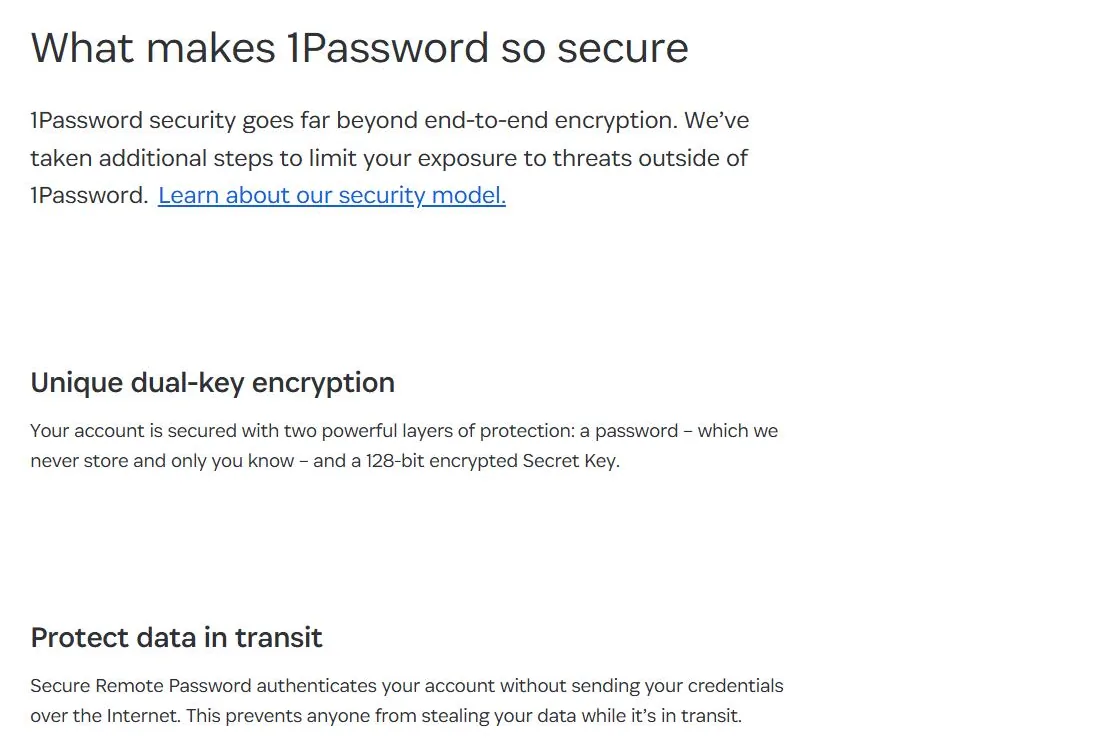
1Password uses what it calls dual-key encryption: your account password, which it never stores, plus a 128-bit Secret Key. Its security model documentation also describes Secure Remote Password (SRP) authentication, which verifies you without sending your password over the internet.
1Password says it is SOC 2 Type 2 certified, publishes the results of independent security audits and runs a bug bounty. Watchtower adds alerts for breached sites and weak or reused passwords.
Bitwarden Security Model
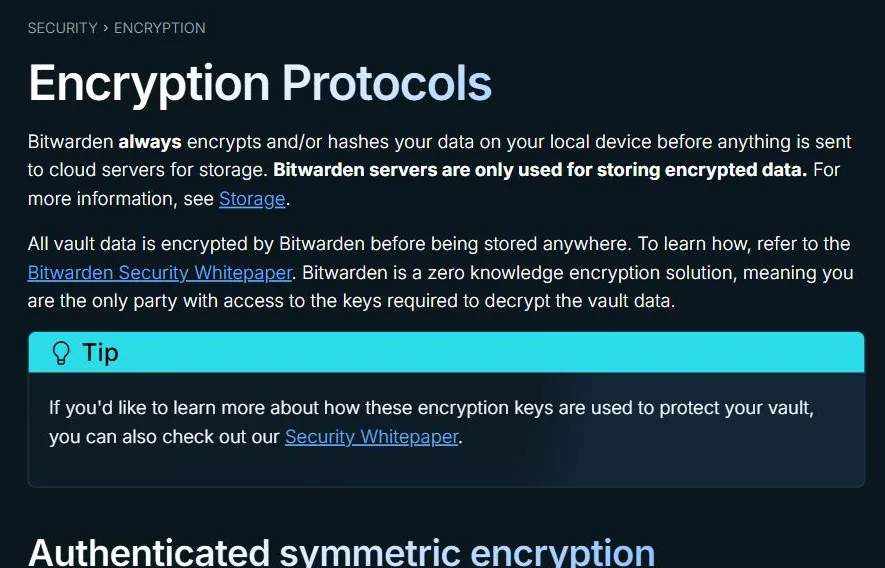
Bitwarden says it always encrypts or hashes your data on your own device before anything is sent to its cloud servers, and calls itself a zero-knowledge encryption solution. Its encryption protocols page lists AES-256 in CBC mode with HMAC-SHA256 for integrity (AES256-CBC-HMAC-SHA256), plus RSA with OAEP for sharing features.
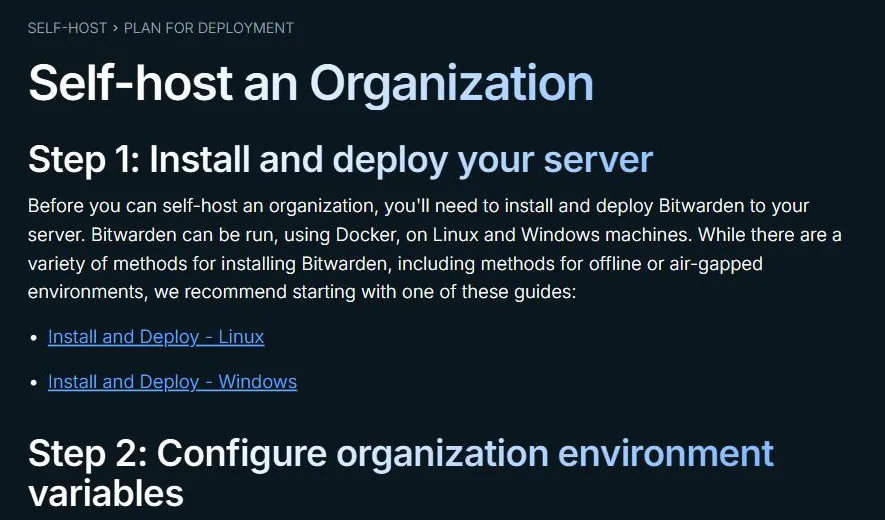
Bitwarden’s source code is public on GitHub, and its security FAQs say it is audited by third-party security firms and independent researchers. It also supports self-hosting: Bitwarden can be run with Docker on Linux and Windows machines, and the pricing page says self-hosted servers work with all Bitwarden clients.
Self-hosting isn’t automatically simpler or safer for everyone. It moves responsibility for updates, backups, uptime and server security to whoever runs it. Whichever service you choose, protect the account with two-step login and a strong, unique master password — our free password generator can help with that.
Support
1Password offers a support center, documentation and customer-support channels. Its personal plans are a hosted service, so ordinary users don’t maintain any server infrastructure.
Bitwarden offers a help center, documentation and community resources. Its pricing page says 24/7 email support is available to everyone, with priority support for paid users.
On support, 1Password vs Bitwarden is close. For most individuals, the bigger question is whether you want a fully hosted service or the flexibility of Bitwarden’s open-source and self-hosting model.
1Password vs Bitwarden: Who Should Choose Which
The most useful way to settle 1Password vs Bitwarden is to match the product to your priorities.
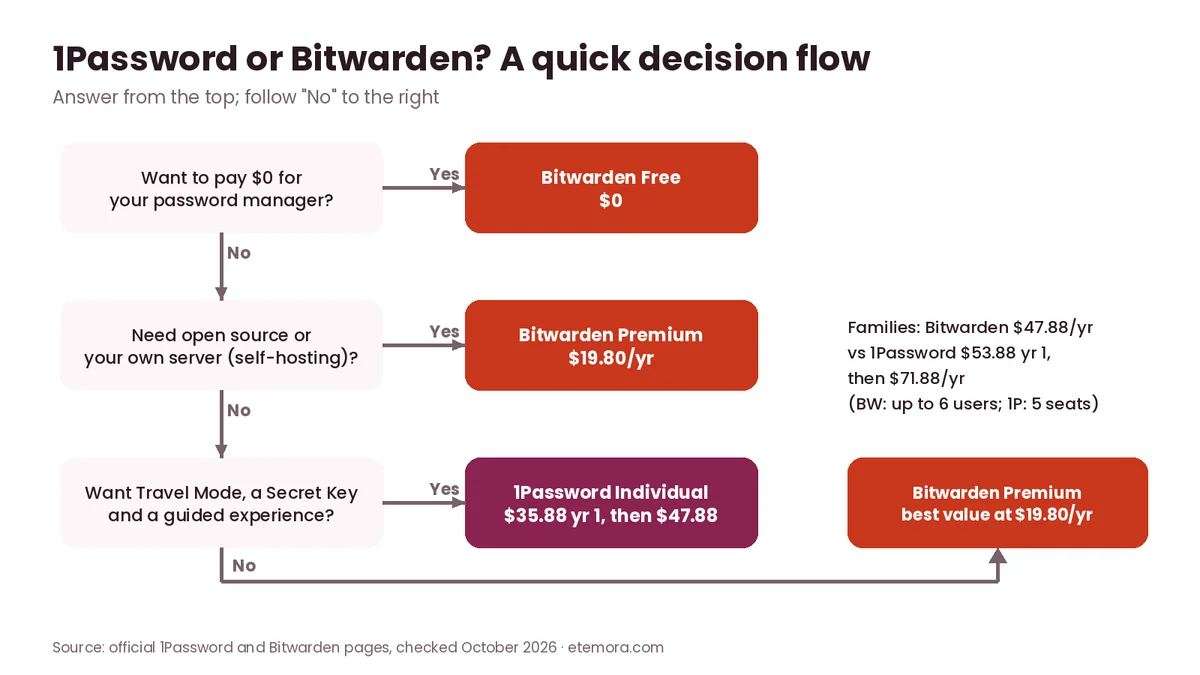
Choose 1Password if you want:
- A paid password manager with a polished, guided feature set
- Secret Key-based account protection
- Watchtower alerts and Travel Mode
- Family sharing with simple admin controls
- The option to pay month to month
- Business and developer features as your needs grow
Choose Bitwarden if you want:
- A permanent free personal plan
- Premium features for $19.80/year
- Open-source software you can inspect
- Self-hosting capability
- Unlimited passwords and devices, even on the free plan
- Broad browser support, including Vivaldi and Tor
For Families
Bitwarden Families covers up to six users for $47.88/year, while 1Password Families includes five seats in its base plan for $53.88 in its promotional first year and $71.88/year after that. Families that value 1Password’s guided apps and Travel Mode may still find the extra cost worthwhile.
Still deciding between more than these two? Our guide to the best password managers compares the wider field.
How to Choose Between 1Password and Bitwarden
1. Decide whether you need a free plan
If you want to spend nothing, Bitwarden is the only one of the two with a permanent free personal plan. 1Password’s personal plans are paid, with a 14-day free trial.
2. Compare the real annual cost
Don’t compare only the advertised monthly number. 1Password’s $2.99/month Individual rate is a first-year promotion with annual billing; the standard rate is $3.99/month, and monthly billing is $4.99/month. Bitwarden Premium is $19.80/year.
3. Consider your technical comfort
Bitwarden’s open-source approach and self-hosting options appeal to technical users. 1Password focuses on a managed, guided experience.
4. Look at family sharing
If several people need access, compare the number of users, sharing features, admin controls and the annual cost after any promotion.
5. Understand account recovery
1Password’s Secret Key is part of its security model — store it somewhere safe and offline. Bitwarden relies on your master password and its own encryption design. Whichever you pick, learn its recovery process before you store important credentials.
6. Check browser and device support
Both support the major operating systems and browsers. If you use Vivaldi or Tor, check that your browser is supported before you commit.
7. Think about your wider security setup
A password manager is one layer. Pair it with up-to-date antivirus software on your devices, and consider a VPN on public Wi-Fi — see what a VPN does if you’re unsure. If you run a website, also choose one of the most secure domain registrars so your domain account is protected too.
How We Compared
This 1Password vs Bitwarden comparison is research-based; we did not run hands-on tests. We reviewed the official 1Password and Bitwarden pricing pages, security documentation, help-center articles and plan details, then used independent publications — Tom’s Guide and TechRadar — for separately reported observations on usability and performance. Prices and plan details were checked in October 2026 in US dollars. See how we review for our wider methodology.
Final Verdict: 1Password vs Bitwarden
1Password vs Bitwarden isn’t a choice between a good and a bad password manager. Both provide encrypted storage, password generation, autofill and sync, but their philosophies differ: 1Password emphasises a polished paid experience with extra security and convenience features, while Bitwarden emphasises affordability, a permanent free plan, open source and deployment control.

- Best for a polished paid experience: 1Password
- Best free password manager of the two: Bitwarden
- Best for self-hosting and open source: Bitwarden
- Best for Secret Key protection and Travel Mode: 1Password
- Best for families on a budget: Bitwarden Families
If you’re comfortable paying for a managed product and value 1Password’s extra features, its Individual or Families plan is the better fit. If cost, open source and self-hosting matter more, Bitwarden gives you more for less.
Frequently Asked Questions
Is 1Password better than Bitwarden?
They serve different priorities. 1Password emphasises a paid, feature-rich experience with its Secret Key and Travel Mode, while Bitwarden offers a permanent free plan, open-source software and self-hosting. The right choice depends on your budget, technical comfort and the features you want.
Is Bitwarden cheaper than 1Password?
Yes. Bitwarden Premium costs $19.80/year, while 1Password Individual costs $35.88 for the first promotional year and $47.88/year at its standard annual rate (October 2026). Bitwarden also has a $0 free plan.
Does 1Password have a free plan?
No. 1Password doesn’t offer a permanent free personal plan. It offers a 14-day free trial of its Individual and Families plans, after which a subscription is required.
Does Bitwarden have a free plan?
Yes. Bitwarden’s free plan includes unlimited passwords and unlimited devices, plus core features such as the password generator, passkey management, encrypted export and Bitwarden Send. Premium adds an integrated authenticator, file attachments, Emergency Access and vault health reports.
Is 1Password more secure than Bitwarden?
Both use strong end-to-end encryption designed so the provider can’t read your vault. 1Password adds a 128-bit Secret Key alongside your account password; Bitwarden encrypts data locally with AES-256 and is open source and independently audited. Their designs differ rather than one being clearly weaker.
Can Bitwarden be self-hosted?
Yes. Bitwarden says you can run its server application on your own network or server, using Docker on Linux or Windows, and it works with all Bitwarden clients. Self-hosting gives more control but also more responsibility for updates and security.
Does 1Password support self-hosting?
No. 1Password’s personal plans are provided as a hosted service and it doesn’t list a self-hosted server option like Bitwarden’s. That suits people who don’t want to run their own infrastructure.
Which is better for families, 1Password or Bitwarden?
Bitwarden Families is cheaper at $47.88/year for up to six users. 1Password Families costs $53.88 for the first promotional year and $71.88/year after, with five seats in its base plan. Some families may still prefer 1Password’s guided apps and admin controls.
What is the 1Password Secret Key?
It’s a 128-bit key that works alongside your account password to encrypt your data. 1Password says it never stores your account password, so you are the only one who can unlock your vaults.
Which password manager should beginners choose?
Beginners who want a guided paid experience may prefer 1Password, while beginners who want to spend nothing can start with Bitwarden’s free plan and upgrade later if they need Premium features.
Sources
- 1Password personal pricing
- 1Password security overview
- About the 1Password security model
- 1Password Travel Mode
- Bitwarden pricing and plans
- Bitwarden encryption protocols
- Bitwarden security FAQs
- Bitwarden self-hosting documentation
- Tom’s Guide: The best password managers in 2026
- TechRadar: Bitwarden vs 1Password
Related articles you may like
 SecurityBest Free Antivirus in 2026: 6 Free Picks Compared by Features and Lab Scores
 SecurityBest Antivirus for Mac in 2026: 6 Picks Compared by Price and Lab Scores
 SecurityIs Windows Defender Enough in 2026? Test Results, Gaps and Settings
 SecurityHow to Know If Your Phone Is Hacked: 8 Signs and What to Do
 SecurityWhat Is Antivirus Software? Complete Guide for 2026
 SecurityWhat Is Cybersecurity? Complete Beginner’s Guide 2026