
Best Freelance Websites for Developers: 6 Proven Picks
 By M. Zaid
- Updated October 10, 2026
- 19 min read
The best freelance websites for developers depend on what kind of work you want, how much experience you have and how you prefer to find clients. A frontend developer looking for small website fixes has different needs from a senior software engineer seeking long-term contracts. Some platforms let you bid on posted jobs, others focus on packaged services, and some screen applicants before connecting them with clients.
This guide compares six options for web developers, software engineers, WordPress specialists and other programmers. It covers platform fees, how each marketplace works, its main limitations and which type of developer is most likely to benefit, using each platform’s own pricing and help pages checked in October 2026.
Quick answer: Upwork is a practical starting point for developers who want to apply for posted projects (free Basic plan, 0–15% service fee). Fiverr suits developers who can package a service into a clear offer (you keep 80% of each order). Toptal is aimed at experienced developers willing to pass a screening process, and says it takes no cut from the rate you set. Contra is worth adding for portfolio-led discovery with commission-free payments, while Freelancer.com and Guru are extra bidding marketplaces.
Want the biggest pool of posted development jobs?
See Upwork Freelancer Plans →Best Freelance Websites for Developers at a Glance
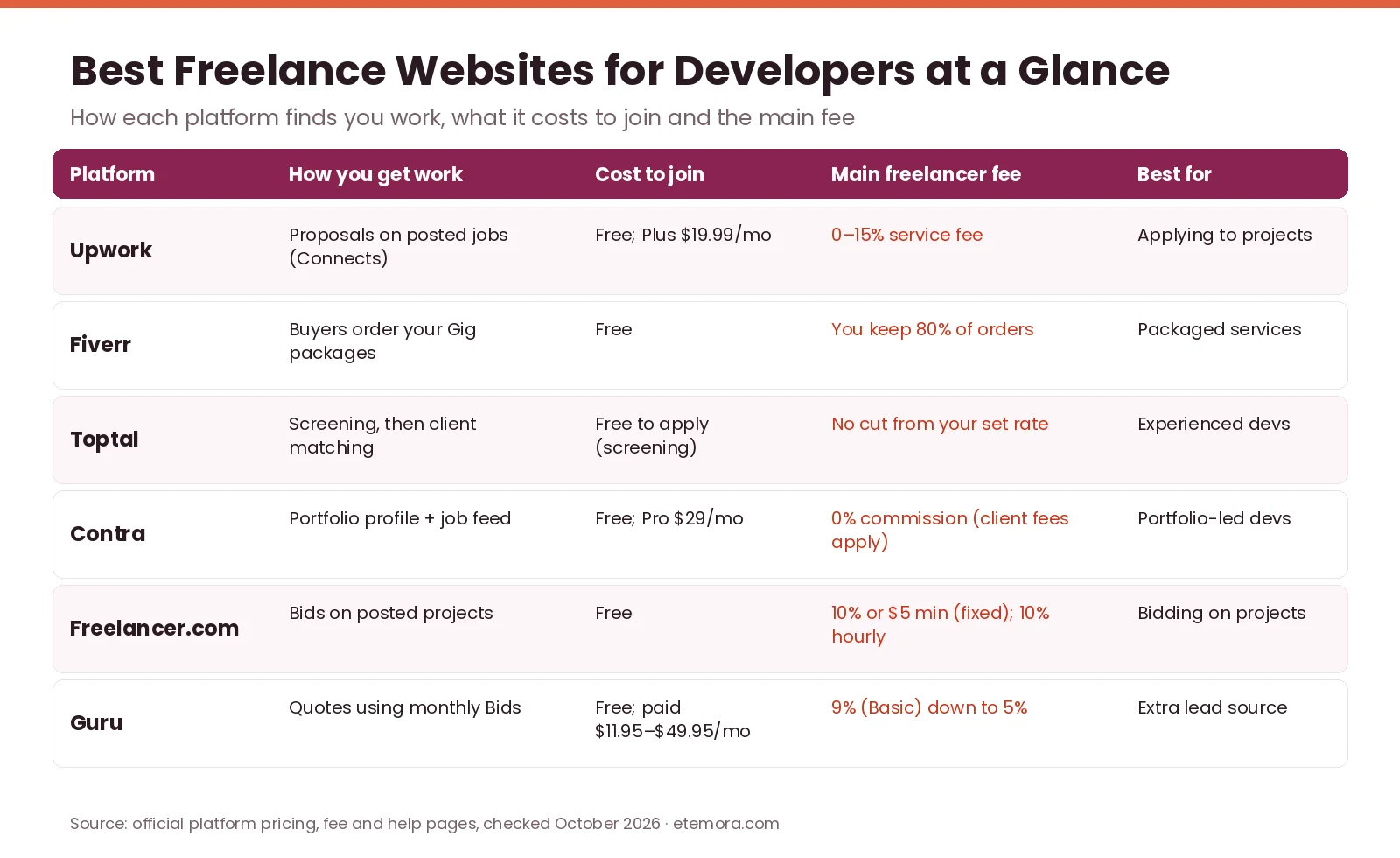
Here is how the best freelance websites for developers compare on cost to join, the main fee you pay and the kind of developer each one fits best.
| Platform | Best For | Cost to Join (Oct 2026) | Main Freelancer Fee | Key Strength | Main Drawback |
|---|---|---|---|---|---|
| Upwork | Developers applying for posted jobs | Free (Basic); Plus $19.99/mo | 0–15% service fee; extra Connects $0.15 each | Large project marketplace | Proposals use Connects |
| Fiverr | Developers selling defined services | Free to join | You keep 80% of each order | Buyers find and order your Gig | 20% of every order |
| Toptal | Experienced developers | Free to apply; screening required | No cut from the rate you set | Screened network and client matching | Hard to get in |
| Contra | Portfolio-led developers | Free; Pro $29/mo or $199/yr | 0% commission for freelancers | Portfolio and job feed, 0% commission | Clients pay platform and processing fees |
| Freelancer.com | Developers who like bidding | Free to join | 10% or $5 (fixed price), 10% hourly | Fixed-price and hourly projects | $5 minimum hurts small jobs |
| Guru | An extra bidding marketplace | Free Basic; paid $11.95–$49.95/mo | 9% on Basic, down to 5% on Executive | Quotes and work agreements | Only 10 Bids/month on Basic |
Fees, plans and eligibility can change, so confirm the current terms on each official page before you sign up to any of the best freelance websites for developers.
1. Upwork: Best Overall Starting Point for Freelance Developers
Best for: web developers, software engineers and programmers who want to apply for specific client projects.
Upwork is a general freelance marketplace where clients post projects and freelancers submit proposals. Development work can include website builds, backend systems, API integrations, bug fixes, mobile apps, database work and ongoing maintenance. It is a strong starting point among the best freelance websites for developers because you can search for work that matches your stack instead of waiting for a buyer to find a service listing.
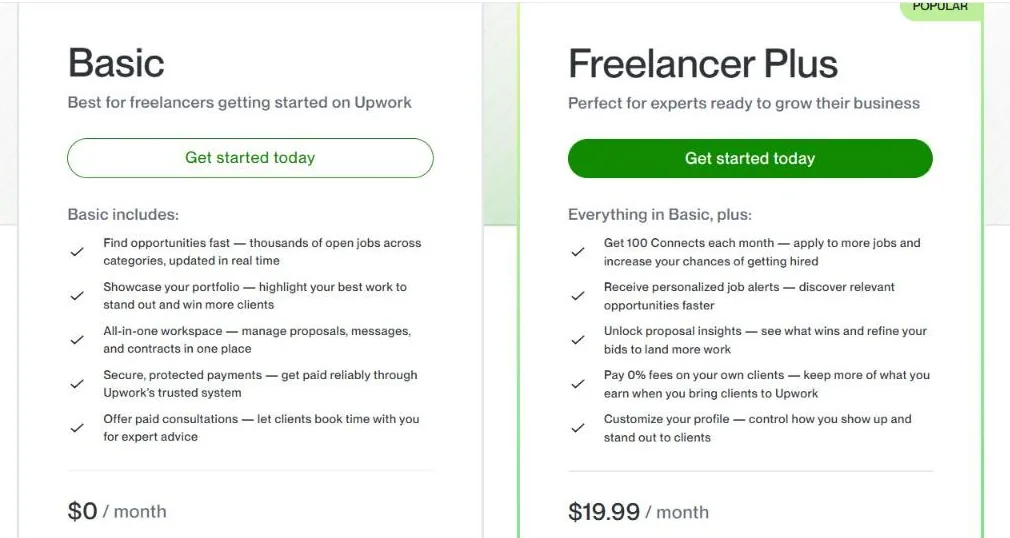
Upwork’s freelancer pricing page lists a free Basic plan and Freelancer Plus at $19.99 per month. Plus adds 100 Connects each month, proposal insights, personalised job alerts and 0% fees on clients you bring to Upwork yourself (Basic pays 5% on those Direct Contracts). Extra Connects cost $0.15 each on both plans.
Pricing and hidden costs
Among the best freelance websites for developers, Upwork has the most layered pricing. The free Basic plan does not mean every application is free. Connects are used to submit proposals, so you may need to buy more to keep applying. Upwork also charges freelancers a service fee that ranges from 0% to 15% of earnings; its own example says a freelancer on a project with $100 in earnings receives between $85 and $100, depending on the fee applied. Check the rate shown on each contract.
Key features
- Posted jobs and proposal-based applications
- Hourly and fixed-price contracts
- Profiles, portfolios and work history
- Paid consultations clients can book
- Built-in contracts, messages and protected payments
Pros and cons
Pros
- Wide range of development project types
- Short tasks and longer engagements
- Hourly and fixed-price work
- Free plan to get started
Cons
- Proposals use paid Connects
- Heavy competition on broad, beginner jobs
- Writing proposals takes time
- Service fee and subscription reduce net earnings
Skip it if: you dislike applying for jobs or would rather have clients discover a fixed service package. For a full breakdown of the fee, see our guide to Upwork fees explained.
Prefer applying to posted coding projects?
Check Upwork Pricing →2. Fiverr: Best for Developers Selling Packaged Services
Best for: WordPress developers, frontend specialists, automation programmers and freelancers who can define a service with a clear deliverable.
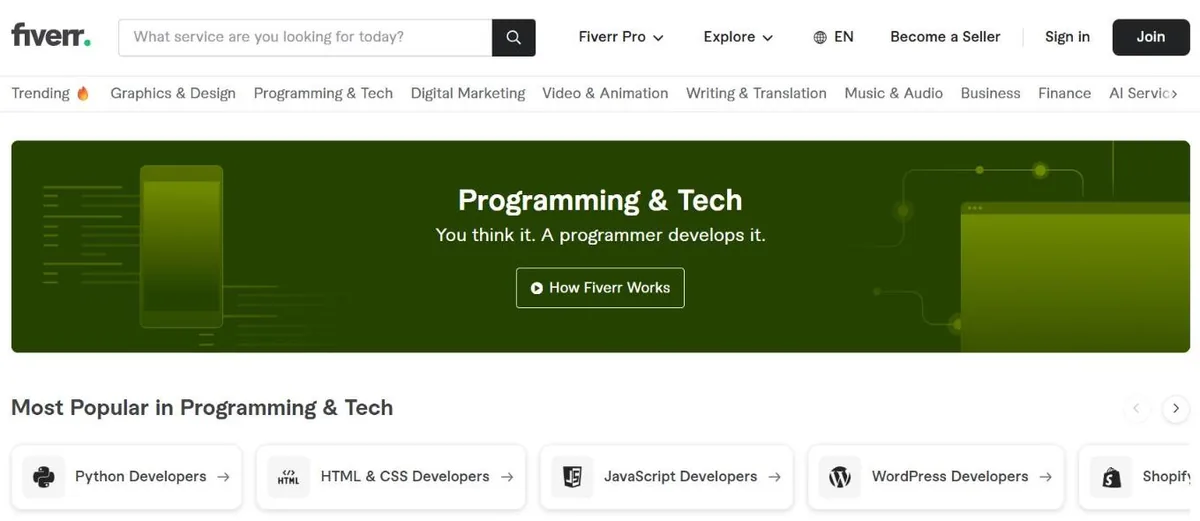
Fiverr is the most service-led of the best freelance websites for developers and takes a different approach from a traditional job board. Developers publish service listings, called Gigs, that describe what they deliver and what each package costs. Its Programming & Tech category groups buyers looking for Python, HTML and CSS, JavaScript, WordPress and Shopify developers, among others.
Examples of developer Gigs include fixing a WordPress error, building a landing page, integrating an API, creating a responsive interface or automating a repetitive task with a script. This works best when a buyer can understand what they are purchasing without first negotiating a whole software project.
Pricing and hidden costs
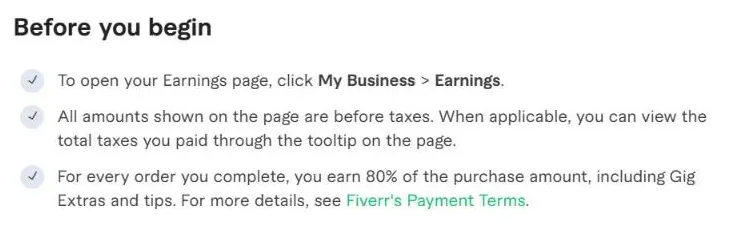
Creating a seller account is free, but the earnings share is significant. Fiverr’s earnings help page states that for every order you complete, you earn 80% of the purchase amount, including Gig Extras and tips. On a $500 order, that leaves $400 before taxes and other costs.
Price your Gigs to cover revisions, communication, testing and support, and spell out package boundaries: supported technologies, included pages or features, delivery requirements and what counts as extra work.
Pros and cons
Pros
- Good fit for clearly defined services
- Buyers come to your listing
- Packages make pricing easy to understand
- Repeat buyers can return for related work
Cons
- 20% of every order goes to Fiverr
- New Gigs can take time to get orders
- Awkward for complex custom projects
- Vague requirements can eat your margin
Skip it if: you mainly want large, open-ended engineering engagements. If you are torn between the two biggest marketplaces, read our Upwork vs Fiverr comparison.
Can you sell your skill as a fixed package?
See Fiverr →3. Toptal: Best for Experienced Developers Seeking Screened Work
Best for: developers with solid professional experience who are comfortable going through an application and screening process.
Toptal is the most selective of the best freelance websites for developers: a screened talent network rather than an open marketplace. Its talent FAQ says successful Toptal freelancers typically have at least 2–3 years of relevant experience, strong communication skills and the ability to get up to speed on projects quickly. Experience alone does not guarantee acceptance.
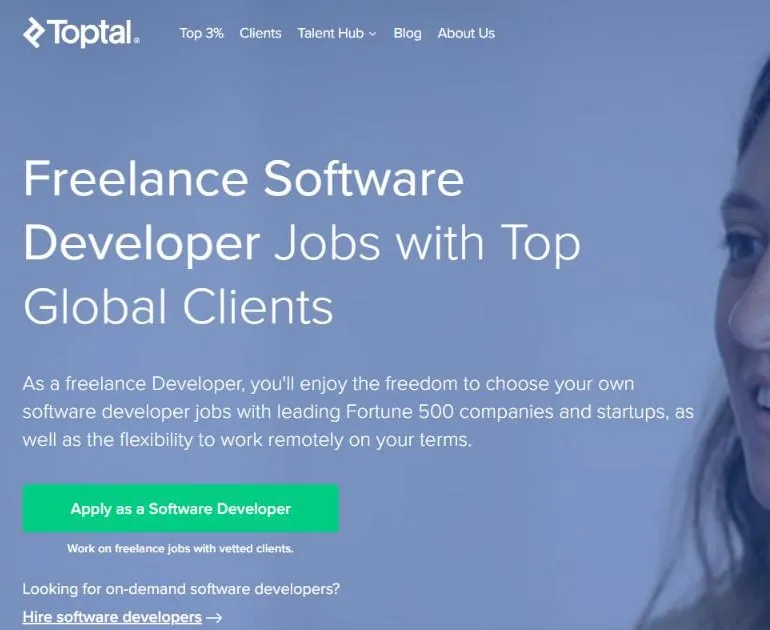
The software developer page describes a screening process with several steps, including showing clear communication and domain expertise and completing a real-world assessment. Once accepted, Toptal’s team connects you with client projects.
Pricing and hidden costs
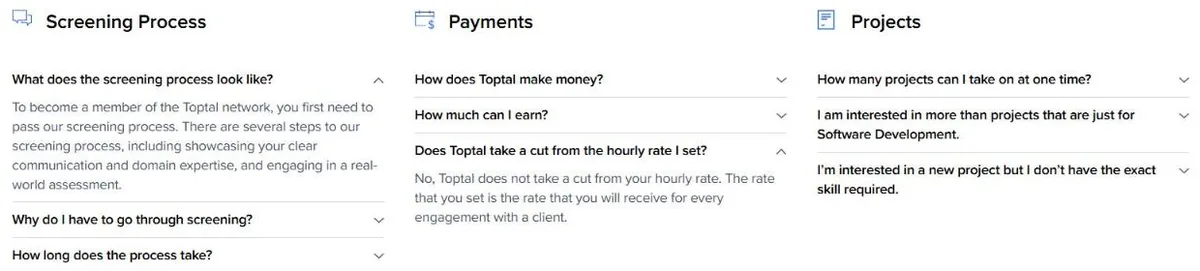
There is no published freelancer subscription. Toptal’s FAQ says it does not take a cut from your hourly rate: the rate you set is the rate you receive, and Toptal earns its revenue through its contracts with clients. The real cost for an applicant is the time needed to prepare for and complete the screening.
Pros and cons
Pros
- No cut from the rate you set
- Matching based on your skills
- Clients expect vetted specialists
- Less bidding against crowds
Cons
- Not open to every applicant
- Screening takes time and preparation
- Usually needs 2–3+ years of experience
- No guarantee of a steady flow of projects
Skip it if: you are still learning to program, have little project experience or need somewhere you can start applying for jobs today.
Have 2–3+ years of professional experience?
See Toptal for Developers →4. Contra: Best for Portfolio-Led Developer Businesses
Best for: independent developers who want to show their work, build a professional presence and manage clients in one place.
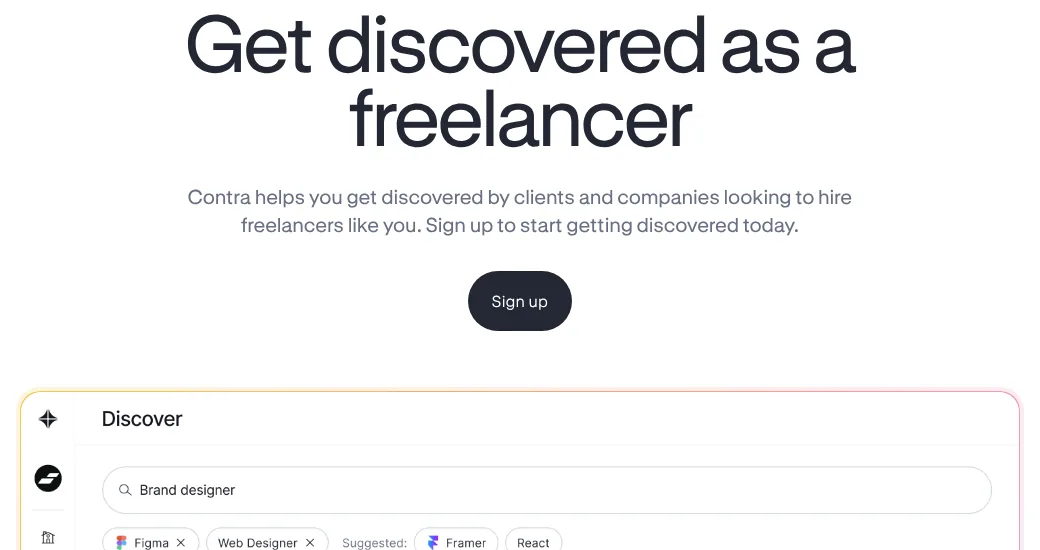
Contra puts the emphasis on profiles, portfolios and discovery. Its Get discovered page says freelancers can get paid commission-free and keep 100% of what they earn on Contra, which makes it one of the more interesting best freelance websites for developers who have projects they can show visually or technically.
Pricing and hidden costs
Contra’s pricing page lists a Free plan and Pro at $29 per month or $199 per year. Pro adds unlimited job opportunities, boosted discoverability and free faster payouts, and it waives client payment fees. On the Free plan, clients pay a fee on each payment, and faster payouts cost freelancers 2%.
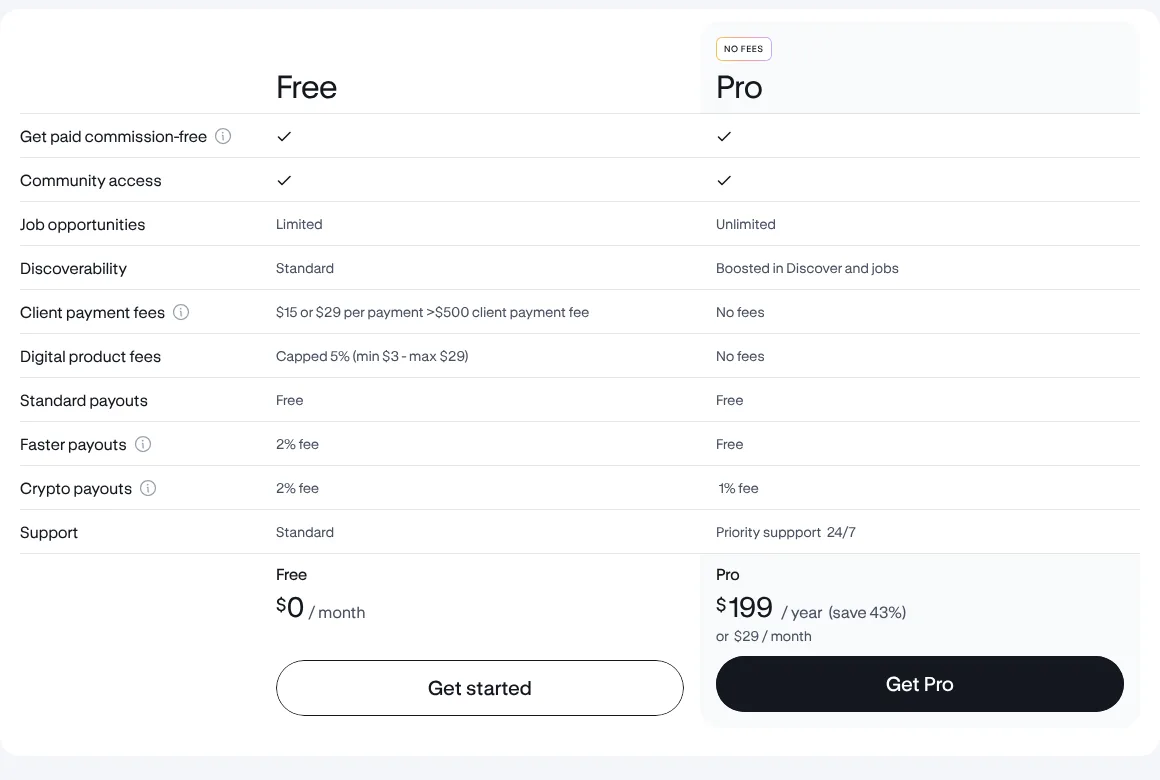
Commission-free does not mean the project carries no charges. Contra’s client fee guide lists platform fees that scale with payment size (from $2 up to $29 per transaction, lower when the freelancer is on Pro) plus card or bank processing fees, so factor those into how you quote clients.
Pros and cons
Pros
- Portfolio presentation is central
- 0% commission for freelancers
- Free plan to get started
- Works well alongside your own website
Cons
- Some features and job access need Pro
- Client-side fees affect budgets
- Smaller job feed than big marketplaces
- A polished profile does not guarantee inquiries
Skip it if: you need a large volume of posted coding jobs to bid on and do not want to invest in portfolio presentation.
Want a portfolio profile with 0% commission?
View Contra Plans →5. Freelancer.com: Best for Developers Who Prefer Bidding
Best for: programmers who want to compare posted projects and bid for fixed-price or hourly work.
Among the best freelance websites for developers, Freelancer.com is the closest alternative to Upwork for bidding. It is a general marketplace where clients post projects and freelancers compete for them. Development categories cover website work, software projects, scripts, mobile apps and other technical tasks. A large choice of listings does not mean every listing is worth bidding on, so filter carefully.
Pricing and hidden costs
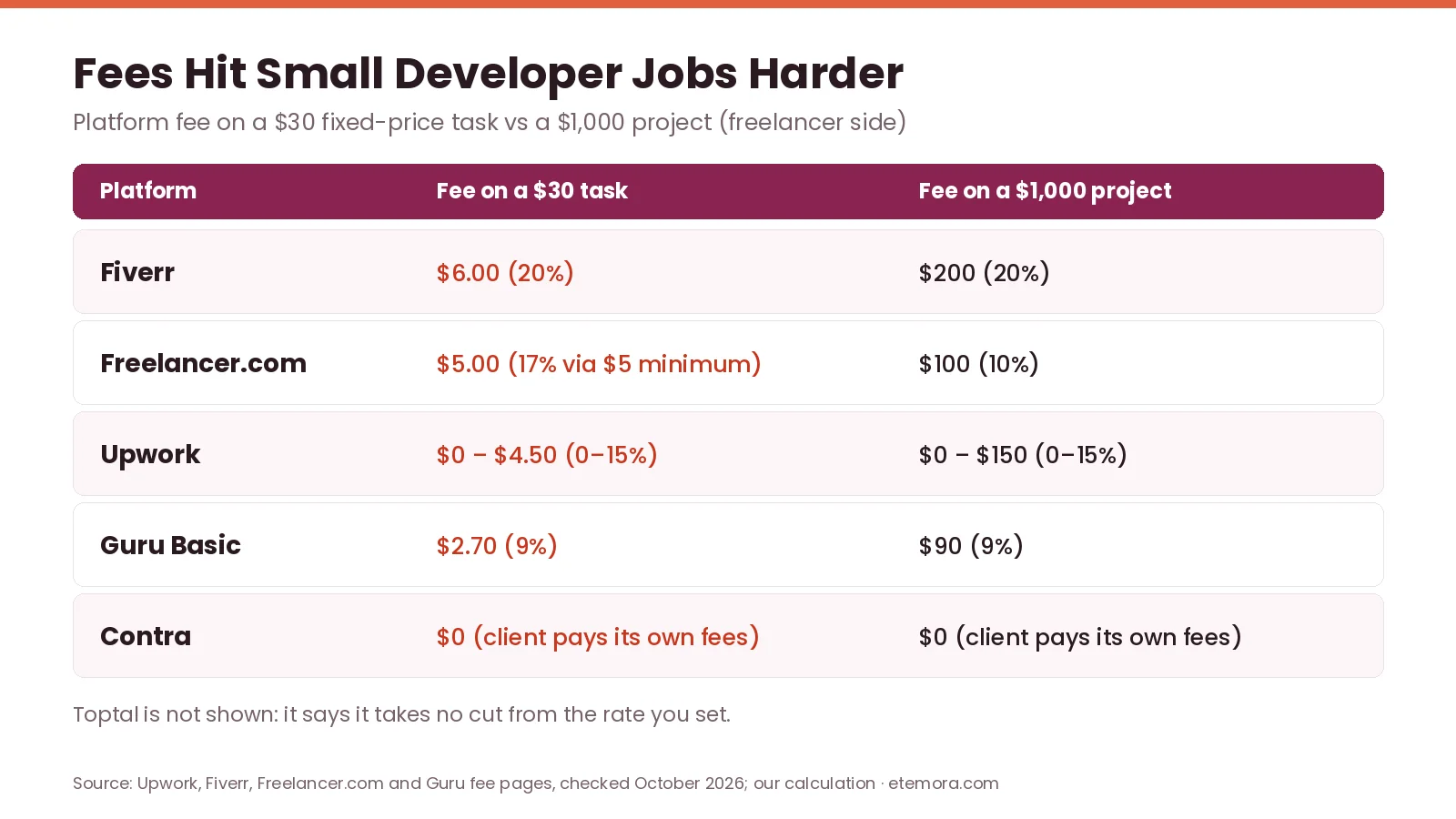
Freelancer.com’s fees and charges page says the fee for fixed-price projects is 10% or $5.00 USD, whichever is greater, and 10% for hourly projects. The $5 minimum matters on small tasks: a $30 fixed-price job costs $5 in fees, about 17%, leaving $25 before taxes.
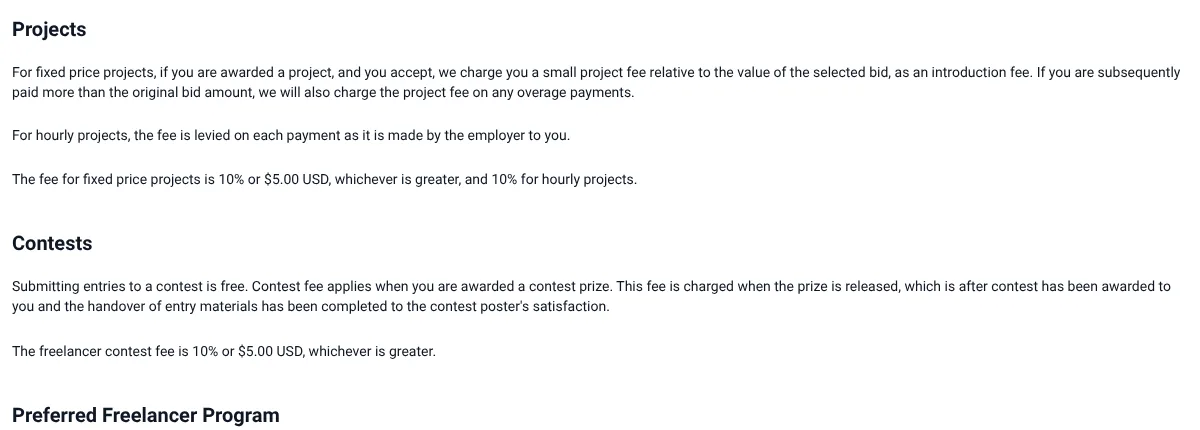
The same page lists optional extras, such as a $99 Verified by Freelancer badge application and a 15% project fee on Recruiter projects for members of its Preferred Freelancer Program. Treat paid extras as optional, not as a cost of doing business.
Pros and cons
Pros
- Hourly and fixed-price projects
- An alternative to Upwork for bidding
- Milestones help structure deliverables
- Free to join
Cons
- Bidding can be time-consuming
- $5 minimum fee hits small jobs
- Paid extras add acquisition cost
- A bid does not guarantee selection
Skip it if: you dislike bidding against other freelancers or would rather sell your own service packages.
Comfortable bidding on fixed-price and hourly work?
See Freelancer.com →6. Guru: Best for Developers Who Want Another Bidding Marketplace
Best for: freelancers who want another place to find projects, send quotes and structure work through agreements.
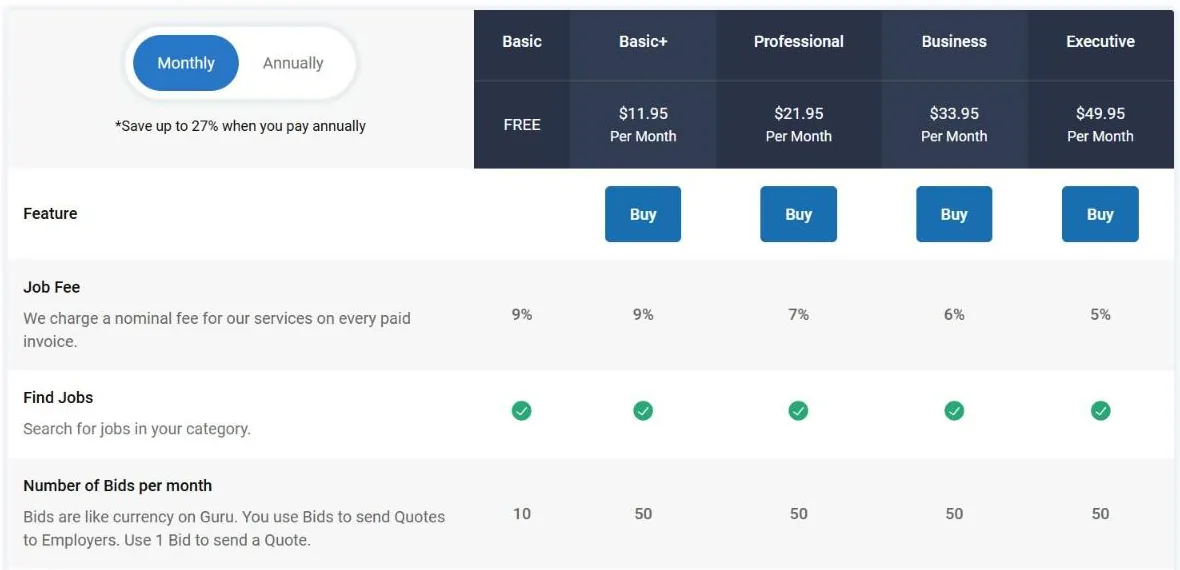
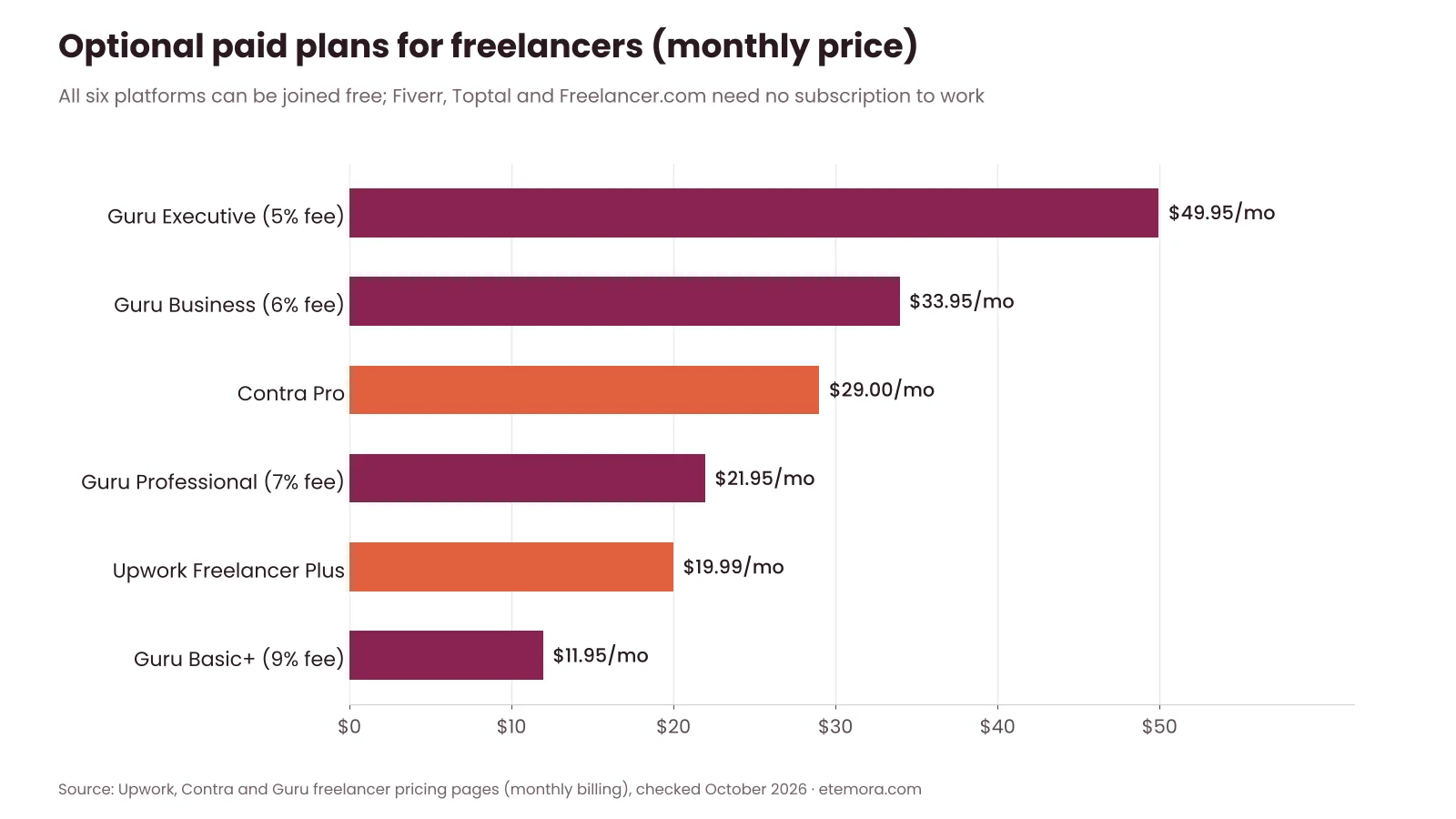
Guru offers project search, quotes, work agreements and membership plans. Its freelancer pricing page lists a free Basic plan with a 9% job fee and 10 Bids a month, plus paid plans: Basic+ at $11.95 a month (9% fee), Professional at $21.95 (7%), Business at $33.95 (6%) and Executive at $49.95 (5%), each with 50 Bids a month. Guru says annual billing saves up to 27%.
Pricing and hidden costs
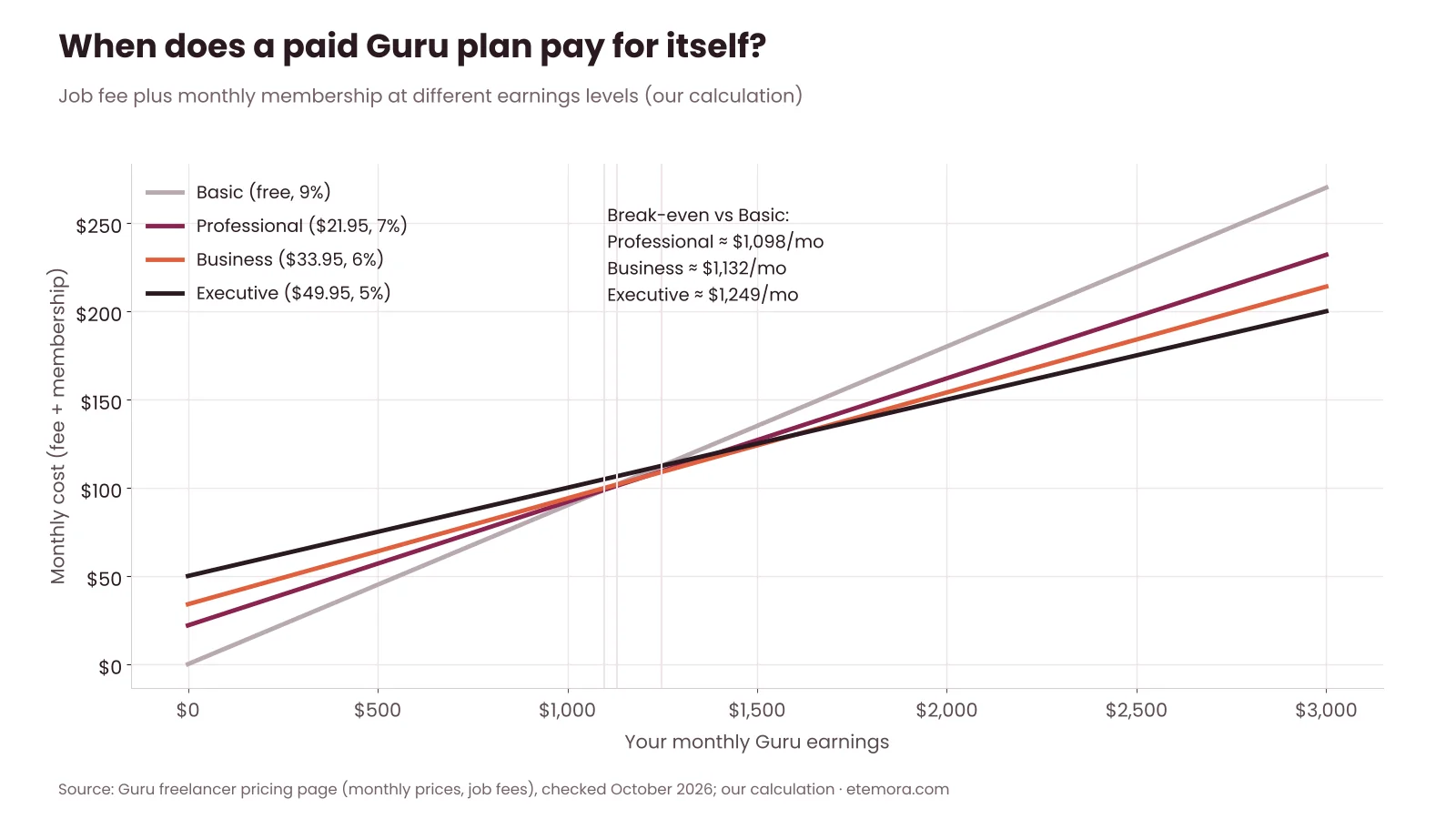
On Guru, the plan you pick changes the job fee more directly than on the other best freelance websites for developers in this list, but do not upgrade only to reduce the fee. By our calculation, Professional only beats the free Basic plan once you earn about $1,100 a month on Guru, and Executive needs roughly $1,250 a month. Below those levels, the subscription costs more than the fee it saves.
Pros and cons
Pros
- Another source of project leads
- Several membership tiers
- Quotes and work agreements define terms
- Free plan available
Cons
- 9% fee on Basic and Basic+
- Only 10 Bids a month on Basic
- Paid plans add recurring cost
- A paid plan does not guarantee clients
Skip it if: you already have enough qualified leads elsewhere.
Looking for one more source of project leads?
View Guru Plans →Fees and Take-Home Pay Compared
Comparing the best freelance websites for developers only by whether they are free to join hides the real cost. The chart below shows what you keep from a $1,000 project after each platform’s main freelancer fee, before taxes, payment-method charges, Connects, Bids and subscriptions.
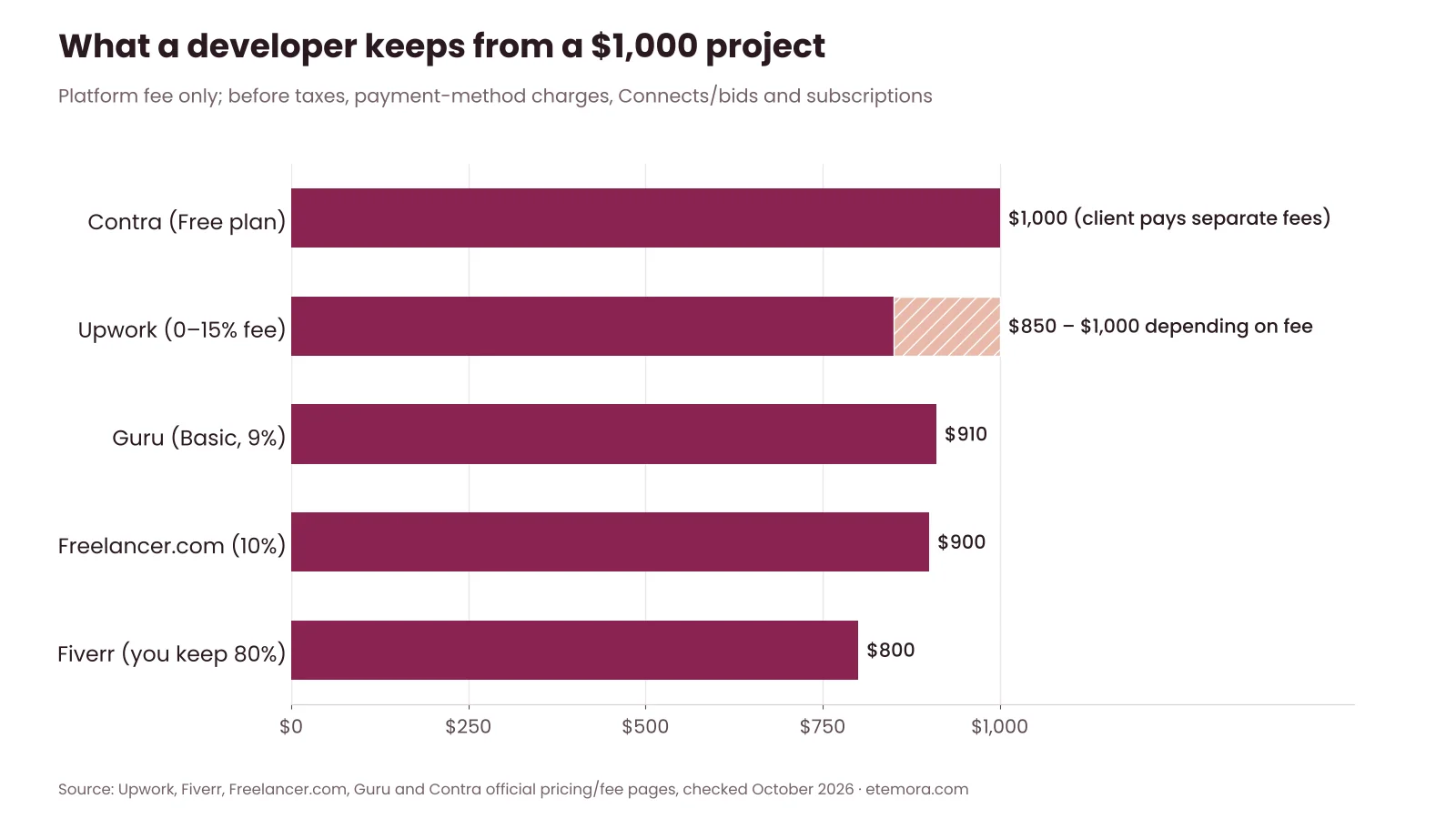
Small jobs change the picture. Freelancer.com’s $5 minimum and Fiverr’s 20% share take a much bigger bite out of a $30 task than a percentage-only fee does.
Paid plans are optional on every platform here. If you do upgrade, compare the monthly price with the extra Connects, Bids or fee savings you will actually use.
How to Choose the Best Freelance Websites for Developers
The right choice among the best freelance websites for developers depends on how you find work, the services you provide and the stage of your career. Before creating several accounts, compare these seven factors.
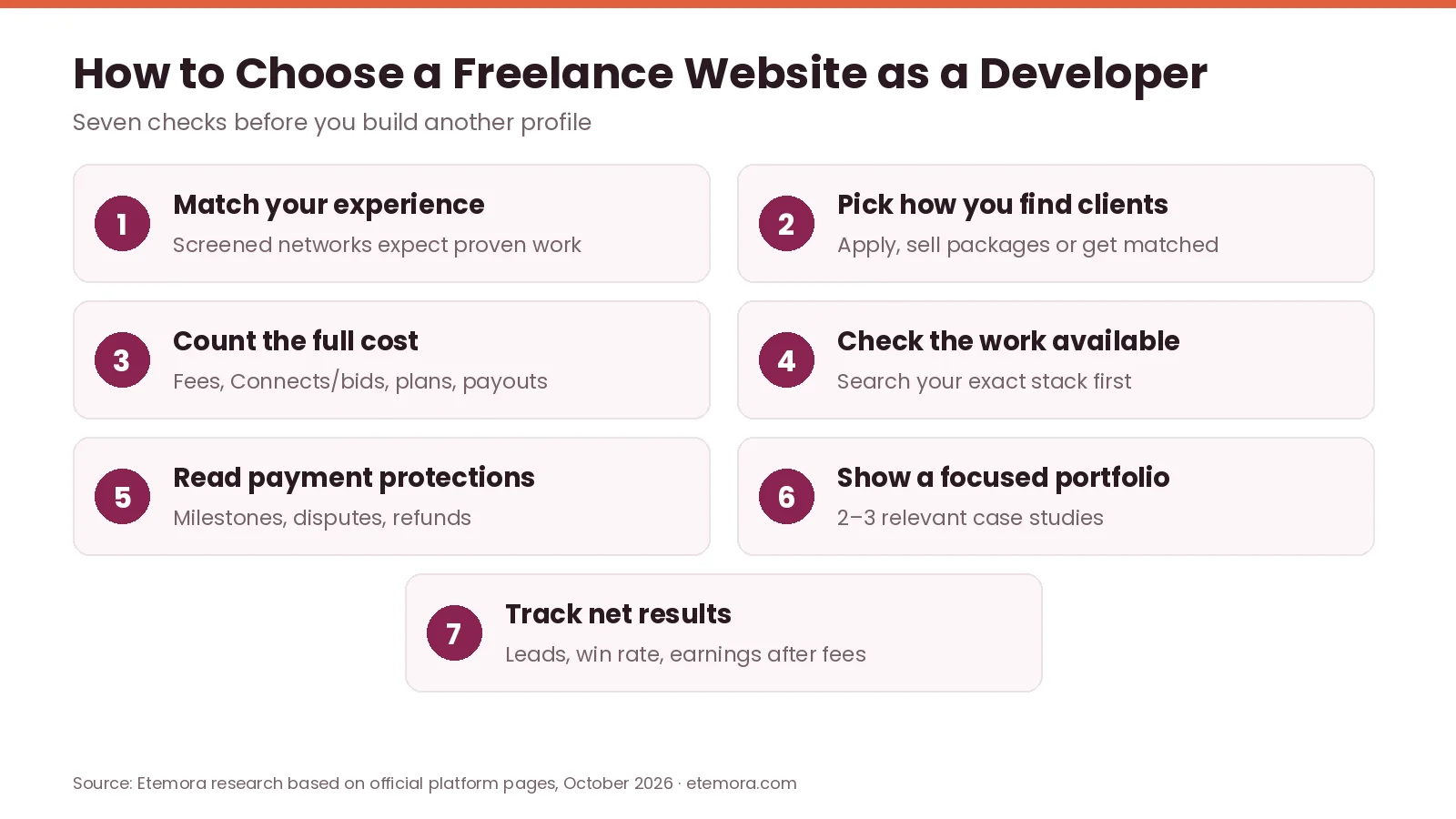
1. Match the platform to your experience
Beginners often need a way to build a portfolio, collect references and complete smaller projects. Accessible job listings or clearly defined services are usually more practical than a network that screens for years of professional experience.
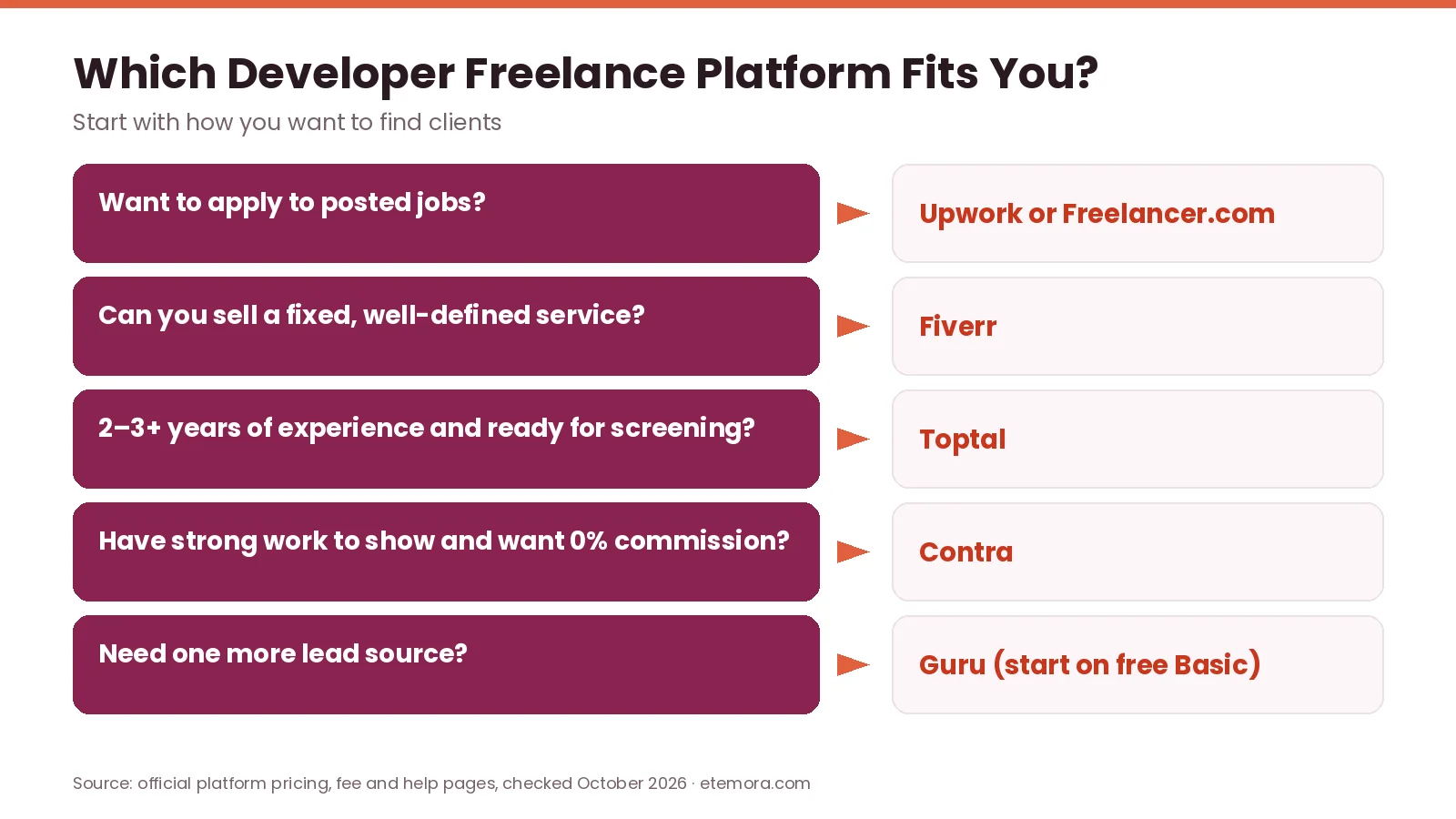
2. Decide how you want to find clients
There are three broad approaches:
- Apply to posted jobs: Upwork, Freelancer.com and Guru.
- Sell predefined services: Fiverr.
- Build a profile and get matched: Contra emphasises portfolios and discovery, while Toptal uses screening and matching.
3. Calculate the full platform cost
Include service fees, proposal credits, optional subscriptions and payment charges. Start with free plans where practical, then upgrade only when you can see a clear financial benefit.
4. Check the type of development work available
A WordPress developer may find site maintenance, plugin configuration and theme work, while a backend engineer may need API development, cloud integrations or longer engagements. Search for your actual stack before committing to a platform.
5. Evaluate payment and contract protections
Before accepting a project, understand how milestones, hourly tracking, payment release, cancellations, disputes and refunds work. Keep the scope in writing: deliverables, deadlines, acceptance criteria and revision limits.
6. Show a focused portfolio
A specific profile, such as React interfaces, Python automation or WordPress troubleshooting, helps clients see your fit faster than a generic “full-stack developer” label. If client work is confidential, write case studies that explain the problem, your role and the result without exposing details.
7. Track results, not just applications
Measure time spent, qualified inquiries, proposal win rate and earnings after fees on each platform. For a wider view beyond developer-focused sites, see our list of the best freelancing platforms.
How to Get Your First Developer Client
Picking from the best freelance websites for developers is only the first step. Your offer, portfolio and proposals decide whether an account turns into paid work.
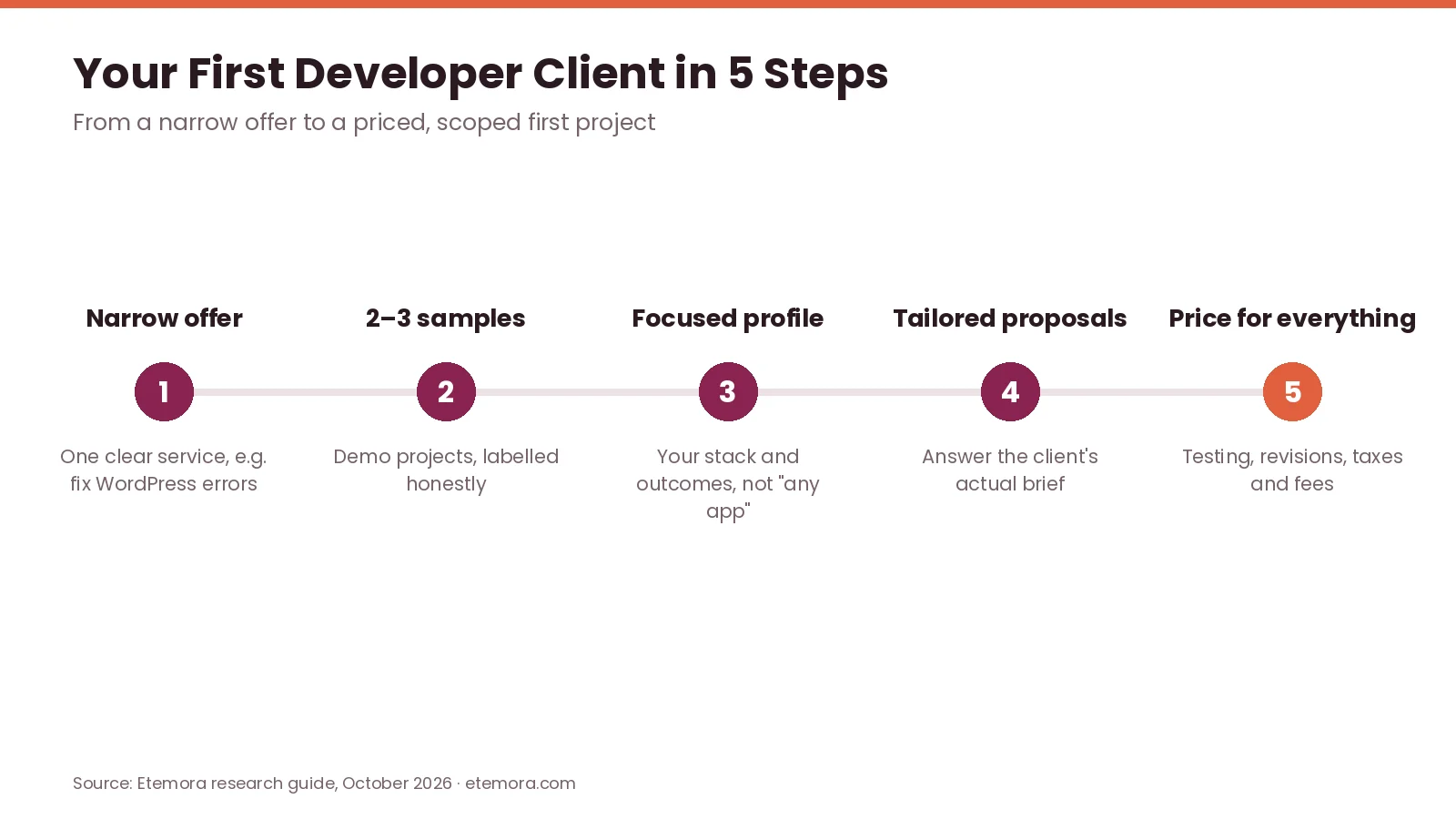
Start with a narrow service, such as fixing a defined class of WordPress errors, building a responsive landing page, integrating a documented API or automating a spreadsheet task with Python. Then create two or three credible portfolio examples; if you have no client work yet, build demo projects and label them honestly as personal projects.
When applying for a posted job, address the client’s actual requirements, explain briefly how you would approach the work and link the most relevant example. Finally, price for communication, testing, revisions, taxes and platform fees, not just coding hours. If you are brand new, our guide on how to start freelancing covers the basics, and our list of best remote job websites helps if you would rather find a salaried remote role.
Common Mistakes Developers Should Avoid
Most problems on the best freelance websites for developers come from a few avoidable habits.
- Joining too many platforms at once. Several half-finished profiles waste time. Start with one or two and expand when you have a repeatable process.
- Competing only on price. Low bids leave no room for testing and support. Compete on relevant examples, clear scope and reliable communication.
- Accepting vague requirements. Agree on the result, features, deadline and revision policy before setting a price.
- Paying for upgrades too early. A paid plan is an expense, not a guarantee of work.
- Ignoring platform rules. Do not move a contract off-platform if that breaks the platform’s terms.
- Not tracking net earnings. Project revenue is not profit once fees, tools and unpaid acquisition time are counted.
AI assistants can speed up proposals, documentation and code review, but check their output before it reaches a client. Our guide to the best AI tools for work compares the main options.
How We Compared
To pick the best freelance websites for developers, we compared official freelancer pricing pages, help-center articles and published fee schedules for each platform, checked in October 2026, and focused on developer use cases, entry requirements, fee structures and practical trade-offs. This is a research-based comparison; we did not run hands-on tests. Read more about how we review.
Final Verdict: Best Freelance Websites for Developers
The best freelance websites for developers are the ones that fit your technical specialty, experience and preferred way of finding clients. No single platform guarantees work, and more listings do not automatically mean better earnings.
For most developers starting out, begin with Upwork or Fiverr depending on whether you prefer applying for jobs or selling predefined services, and add Contra as a portfolio channel. Using two of the best freelance websites for developers at once is fine if you can keep both profiles strong. Experienced engineers can also apply to Toptal. Wondering what else you can do online with coding skills? See how to make money online.
Ready to set up your first developer profile?
Check Current Upwork Pricing →Frequently Asked Questions
Which freelance website is best for developers?
Among the best freelance websites for developers, Upwork is a practical starting point if you want to apply for posted projects, while Fiverr suits freelancers who sell predefined services. Experienced developers may prefer Toptal’s screened network, and Contra suits portfolio-led professionals. The best choice depends on your specialty, experience and how you like to find clients.
Which freelance website is best for beginner developers?
Beginners can start with Upwork or Fiverr, as long as they have a useful skill and credible examples of their work. Start with manageable projects, create a focused profile and avoid paying for upgrades before you understand the platform. Toptal is less suitable without the 2–3+ years of experience it typically expects.
Can I get freelance coding jobs without experience?
Yes, you can win smaller coding jobs without formal employment experience, but clients still need evidence that you can deliver. Build demo projects, document your technical decisions, offer a narrowly defined service and be honest about your experience.
How much do freelance developer websites charge?
It varies. Upwork lists a 0–15% service fee, Fiverr sellers keep 80% of each order, Freelancer.com charges 10% or $5 (whichever is greater) on fixed-price projects and 10% on hourly work, and Guru’s job fee runs from 9% on Basic to 5% on Executive. Contra is commission-free for freelancers, and Toptal says it takes no cut from your set rate.
Is Upwork or Fiverr better for web developers?
Upwork suits developers who want to apply for specific jobs and negotiate scope. Fiverr suits freelancers who can package a service and let buyers order it. Many developers use both, but account for Upwork’s Connects and service fee versus Fiverr’s 20% share.
Is Toptal good for freelance software developers?
Toptal can be worth it for experienced software developers who want a screened network. You must pass a multi-step screening process, and experience alone does not guarantee acceptance. Toptal says it does not take a cut from the hourly rate you set.
Can freelance developers find long-term projects?
Yes. Upwork supports hourly and fixed-price contracts that can run for months, and screened networks such as Toptal match developers with client projects. Availability depends on demand for your skills and how well your profile matches each project.
Should freelance developers pay for a premium membership?
Not automatically. A paid plan may add proposal credits, visibility or lower fees, but it does not guarantee clients. On Guru, for example, Professional only beats the free plan above roughly $1,100 a month in Guru earnings by our calculation.
How can developers avoid freelance job scams?
Check the client’s history, agree on a clear scope and use the platform’s payment process. Be cautious about requests for upfront payments, suspicious links, large amounts of unpaid “test” work or attempts to move off the platform against its rules.
Can I use multiple freelance websites at the same time?
Yes, and it can diversify your leads. But each profile takes time to maintain, so start with one or two platforms, track inquiries and net earnings, and add more once you can keep every profile strong.
Sources
- Upwork: Freelancer pricing
- Upwork Help: What is Freelancer Plus?
- Fiverr Help: Your earnings page
- Fiverr: Programming & Tech
- Toptal: Talent FAQ
- Toptal: Freelance software developer jobs
- Contra: Get discovered
- Contra: Pricing
- Contra Help: Understanding Contra’s fees as a client
- Freelancer.com: Fees and charges
- Guru: Pricing for freelancers
Related articles you may like
 FreelancingFiverr Review for Freelancers (2026): Fees, Levels and Payouts
 FreelancingWhat Is Freelancing? Complete Beginner’s Guide 2026
 FreelancingWhat Is Affiliate Marketing? Complete 2026 Beginner Guide
 FreelancingUpwork Fees Explained: Complete 2026 Guide
 FreelancingHow to Start Freelancing: 7 Proven Steps in 2026
 FreelancingBest Remote Job Websites in 2026: 12 Platforms Compared