
Email Marketing for Small Business: A Simple 7-Step Guide for 2026
 By M. Zaid
- Updated October 25, 2026
- 18 min read
Email marketing for small business means sending useful, permission-based emails to people who asked to hear from you — customers, past buyers and website visitors — so they come back, book again or buy again. You own the list, the cost is low, and a small shop or service business can start for free in an afternoon.
This research-based guide walks through a simple 7-step plan, compares four popular email tools on free plans and starting prices in US dollars, and explains the sender rules from the FTC, Gmail and Yahoo that every small business should follow. Every price, limit and rule below was read on the official page in October 2026. We have not run campaigns on every tool, so treat this as a guide to what each provider and rulebook says, not a hands-on test.
Quick answer: Start with a free plan (MailerLite, Brevo, Kit or Mailchimp), authenticate your sending domain with SPF, DKIM and DMARC, grow a list only through opt-in forms, and set up a short welcome series before anything else. Then send on a schedule you can keep and judge results by clicks, replies and sales — not open rates. For most small businesses, MailerLite is the easiest place to start; pick Brevo if you also need SMS or order emails and Kit if you run a newsletter or creator business.
Brand new to email?
Read Our Email Marketing Basics Guide →Why Email Marketing for Small Business Still Works
Social media reach depends on an algorithm you do not control, and paid ads stop the moment you stop paying. An email list is different: the people on it chose to hear from you, and you can reach them again whenever you have something worth saying. That is why email marketing for small business is usually one of the first channels worth building, right after a website and a Google Business Profile.
Email also fits how small businesses actually sell. A bakery can announce a weekend special, a salon can fill empty slots, a consultant can share a monthly tip, and an online store can remind someone about a product they viewed. None of these need a big team — just a list, a tool and a plan.
- You own the audience. If a social platform changes its rules, your list stays with you and can be exported.
- Low cost to start. Every tool in this guide has a free plan or a free tier, and paid plans start around $9–$13 a month.
- Easy to measure. You can see which links people click and which emails lead to bookings or sales.
- Works with what you already do. Blog posts, offers and updates can be turned into short emails.
If you are still deciding which marketing channels to focus on, our roundup of the best marketing tools shows how email fits next to SEO, social media and design apps.
Email Marketing for Small Business: A 7-Step Plan
Most small businesses do not fail at email because they picked the wrong tool. They fail because they skip the basics: no clear goal, no welcome email and no regular schedule. Work through these seven steps in order.

Step 1: Pick one clear goal
Decide what email should do for your business first. Good starting goals are “bring past customers back”, “fill appointment slots”, “sell more of our best product” or “turn blog readers into enquiries”. One goal keeps your emails focused and tells you which number to watch.
Step 2: Choose an email marketing tool
Do not send marketing emails from your normal Gmail or Outlook inbox. A proper email marketing platform handles signup forms, unsubscribe links, list cleaning and reporting for you. All four tools compared below have a free starting point, so you can begin without a budget and upgrade later.
Step 3: Use your own domain and authenticate it
Send from an address on your own domain, such as hello@yourbusiness.com, not a free webmail address. Then follow your tool’s steps to add SPF, DKIM and DMARC records to your domain. This is the single biggest technical step for getting into the inbox, and we explain it in the deliverability section. If you do not have a domain yet, our guide on how to choose a domain name will help.
Step 4: Grow your list with permission
Add a signup form to your website, checkout page and social profiles. Offer something small in return — a discount on the first order, a checklist, early access to sales. Collect emails at the counter only with clear consent. Never buy or rent a list: those people did not ask to hear from you, so they complain, and complaints hurt every email you send after that.
Step 5: Set up a short welcome series
Your welcome emails are often the most-read messages you will ever send, because people just signed up. Two to four automated emails over the first week are enough: say thank you and deliver what you promised, introduce your best products or services, share a customer story or FAQ, and invite a first purchase or booking.
Step 6: Send on a schedule you can keep
Consistency matters more than frequency. A useful monthly newsletter you never miss beats a weekly email you abandon after a month. Plan a simple calendar: one value email (tips, news, a guide) for every promotional email works well for many small businesses.
Step 7: Measure what matters and adjust
After each send, check clicks, replies, bookings or sales and unsubscribes. Keep what works, drop what does not, and test one thing at a time, such as the subject line or the main offer. We cover which numbers to trust in the metrics section.
Best Email Marketing Tools for Small Business Compared
There are dozens of email platforms, but four come up most often in email marketing for small business: Mailchimp, MailerLite, Brevo and Kit. The table below summarises what each official pricing page listed in October 2026, in US dollars. Providers price by different things — contacts, subscribers or emails sent — so read the notes in brackets.
| Tool | Best for | Free plan | Entry paid plan |
|---|---|---|---|
| MailerLite | Most small businesses | 250 subscribers, 2,500 emails/mo | Comfort $12/mo monthly or $10.80/mo yearly (500 subscribers) |
| Brevo | Email + SMS + order emails | 300 emails/day | Starter $9/mo monthly (from 5,000 emails/mo) |
| Kit | Creators and newsletters | Up to 10,000 subscribers | Creator $33/mo billed yearly (1,000 subscribers) |
| Mailchimp | Integrations and templates | Under 250 contacts | Essentials from $13/mo (up to 500 contacts) |
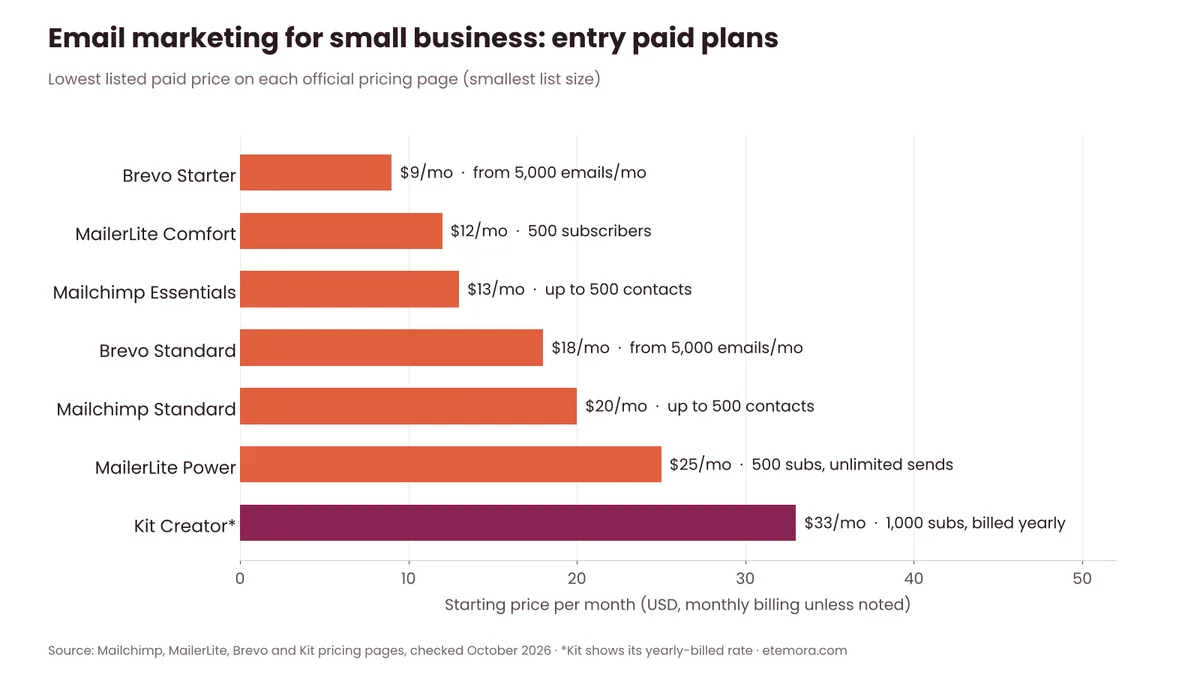
Brevo, MailerLite and Mailchimp all start between $9 and $13 a month at the smallest list size. Kit costs more on paid plans, but its free plan is the largest, so many creators never need to upgrade early. Prices rise as your list grows, so compare the price at the list size you expect in a year, not just today.
MailerLite: the easiest start for most small businesses
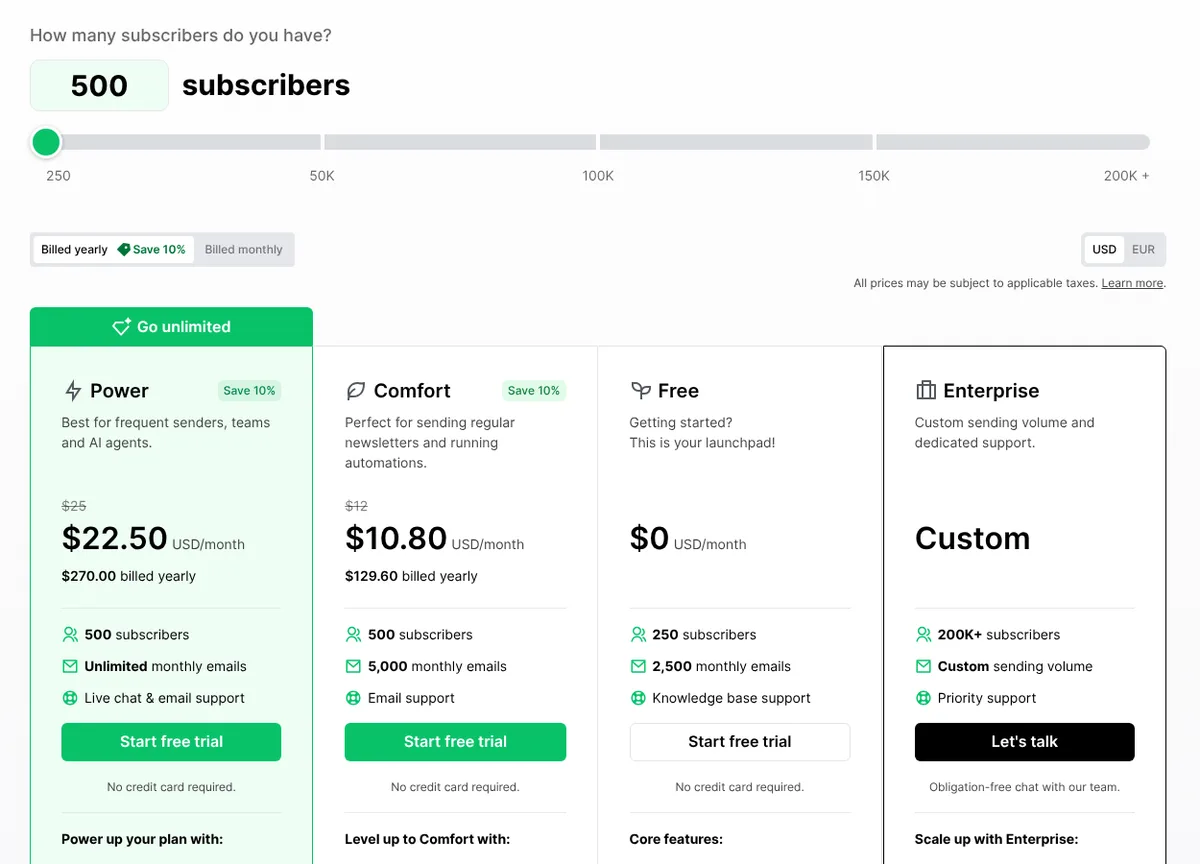
MailerLite covers email campaigns, automations, signup forms, landing pages and simple websites. Its pricing page says every paid plan gets the full feature set and you only pay more for a bigger list or more sending. For 500 subscribers it listed Comfort at $12/month ($10.80/month billed yearly, 5,000 emails a month) and Power at $25/month ($22.50 billed yearly, unlimited emails). The free plan covers 250 subscribers and 2,500 emails a month, with automations, one website and one landing page.
MailerLite: free for 250 subscribers, no credit card needed.
View MailerLite Plans →Brevo: best if you also need SMS or order emails
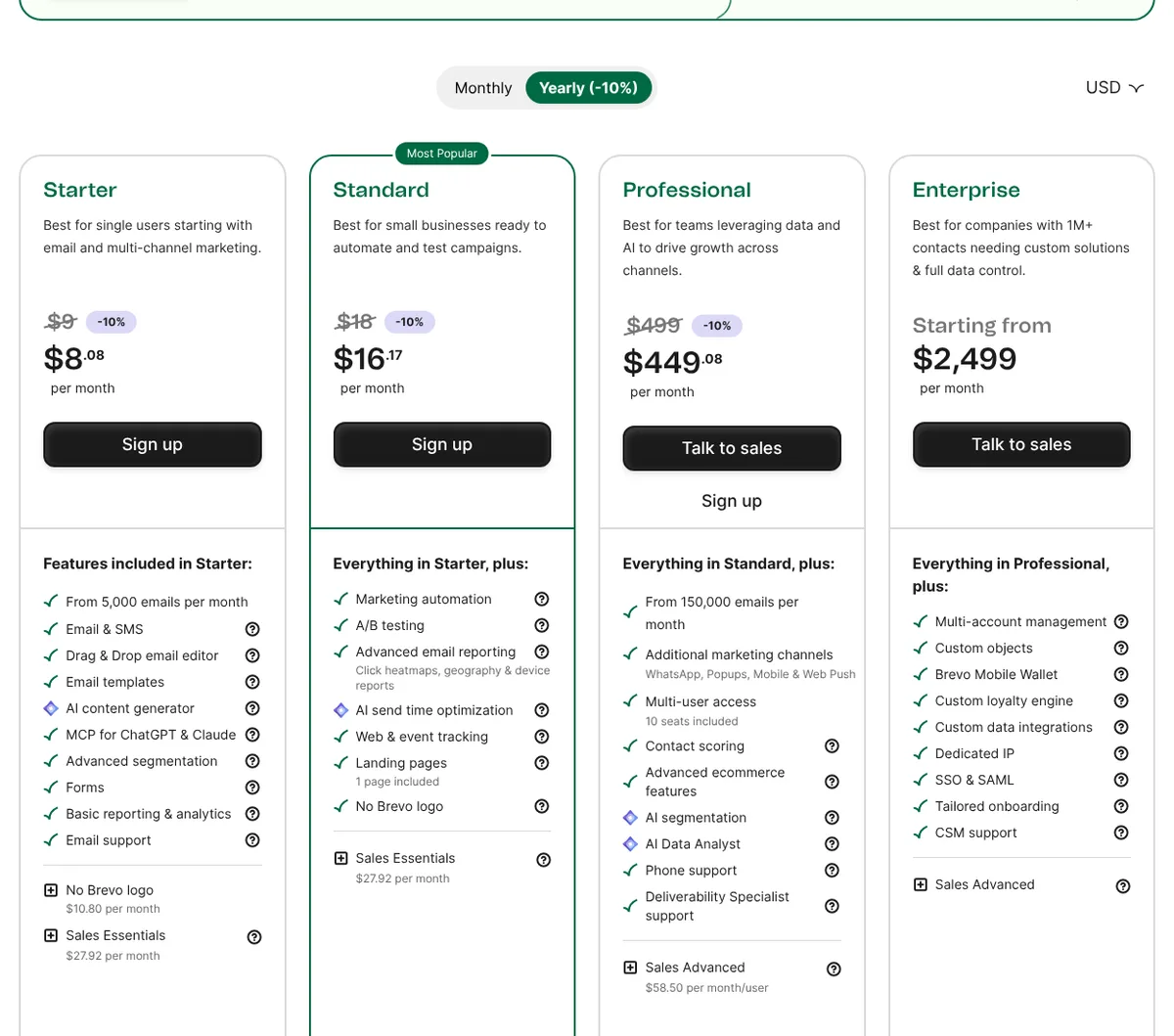
Brevo prices mostly by emails sent rather than contacts. Its free plan lets you send up to 300 emails per day once your account is approved. Paid plans listed Starter at $9/month ($8.08/month billed yearly) from 5,000 emails a month and Standard at $18/month ($16.17 billed yearly), which adds marketing automation, A/B testing and send-time optimisation. Brevo also handles SMS and transactional messages such as receipts and password resets, which suits online stores.
Brevo: email, SMS and transactional messages in one tool.
See Brevo Pricing →Kit: best for creators and newsletter-first businesses
Kit (formerly ConvertKit) is built for creators, coaches and newsletter writers. Its free plan covers up to 10,000 subscribers with unlimited landing pages, forms and broadcasts, and Kit says there are no sending limits on any plan. Visual automations and email sequences need a paid plan: Creator was listed at $33/month billed yearly ($390 a year) for 1,000 subscribers. Kit also lets you sell digital products and paid newsletters.
Kit: free up to 10,000 subscribers.
Check Kit Pricing →Mailchimp: the familiar all-rounder
Mailchimp is still the best-known name, with 300+ integrations, templates and reporting. On its US pricing page in October 2026, Essentials started at $13/month and Standard at $20/month for the smallest list size, with a 14-day free trial on both. Monthly sends are capped at 10x your contacts on Essentials and 12x on Standard. The free plan is now for accounts under 250 contacts, and Mailchimp notes that sending is paused if you exceed the free plan’s limits. If those prices feel high, our list of Mailchimp alternatives compares six cheaper options.
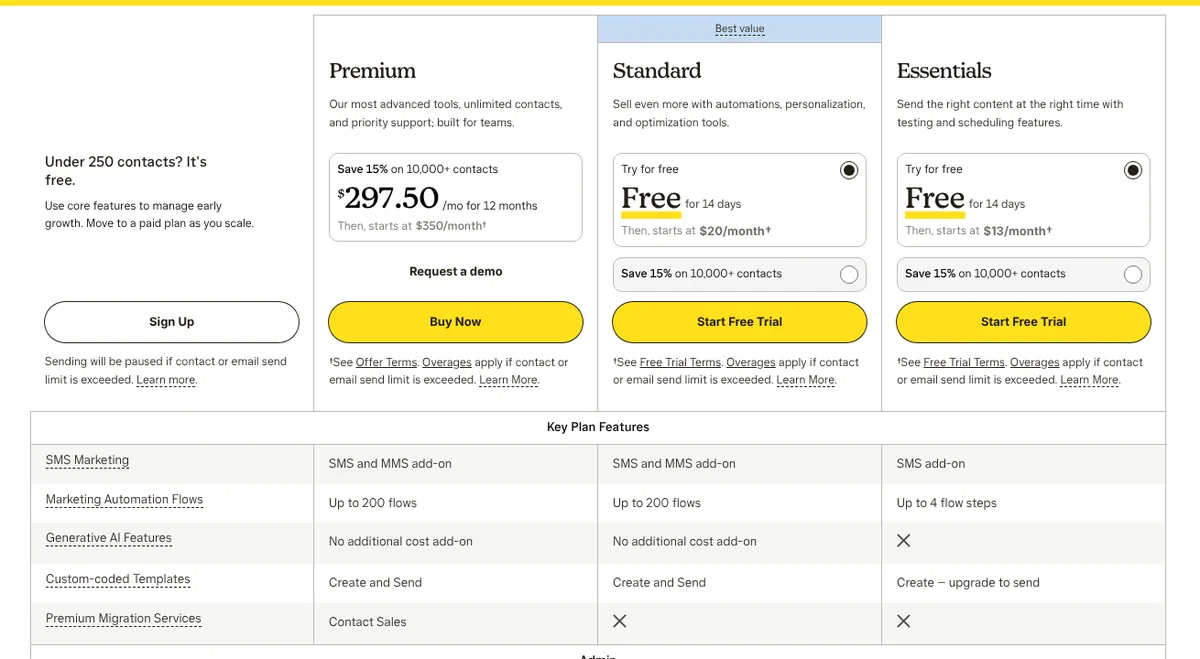
Mailchimp: 14-day free trial on Essentials and Standard.
View Mailchimp Plans →Free Plans for Small Business Email Marketing
If you are new to email marketing for small business, a free plan is enough to learn the basics, build your first welcome series and see whether email works for your business. Here is what each free plan allows before you need to pay.

Kit has the biggest free subscriber limit, Brevo is best if you have a large list but email it rarely, and MailerLite’s free plan is the only one of the four that includes automations plus a free website and landing page. Mailchimp’s free plan is the smallest, so it works best as a short trial of the platform.
Get Into the Inbox: SPF, DKIM and DMARC
The best email in the world is useless if it lands in spam. Gmail and Yahoo now publish clear sender requirements, and following them is part of email marketing for small business, not an optional extra.
- SPF lists which services are allowed to send email for your domain.
- DKIM adds a digital signature so receiving servers can check the message really came from you. Google says sending to personal Gmail accounts needs a DKIM key of at least 1024 bits and recommends 2048 bits.
- DMARC tells receiving servers what to do with mail that fails SPF or DKIM. Yahoo asks bulk senders to publish a DMARC policy of at least p=none.
Google’s email sender guidelines say all senders need SPF or DKIM, and anyone sending 5,000 or more messages a day to Gmail accounts needs SPF, DKIM and DMARC, plus one-click unsubscribe for marketing emails. Google also asks senders to keep the spam rate reported in Postmaster Tools below 0.10% and never reach 0.30%.
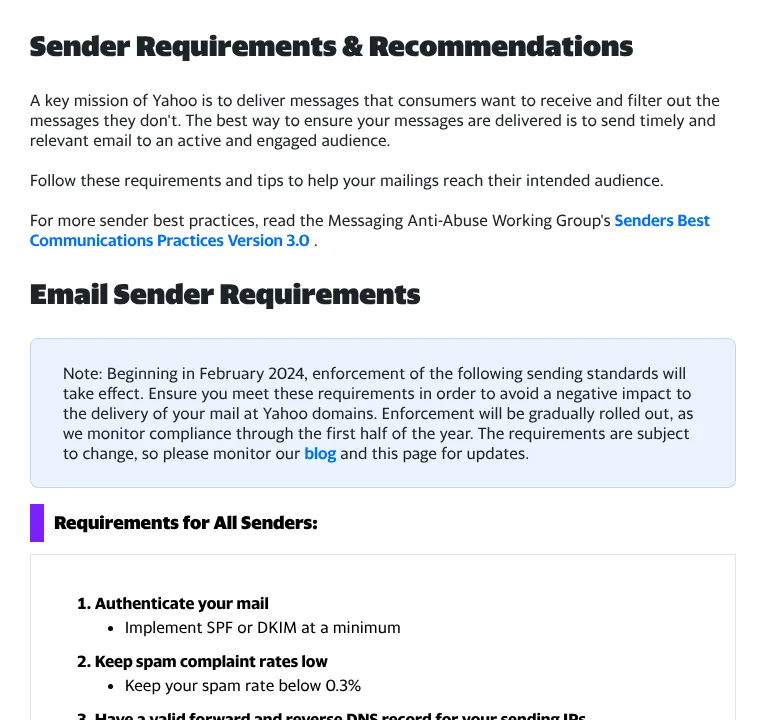
The good news: every tool in this guide walks you through adding these records, usually by copying two or three DNS entries into your domain registrar or host. It takes about as long as setting up your website’s domain, and you only do it once.
Email Marketing Rules and the Law
In the US, commercial email is covered by the CAN-SPAM Act, which the FTC enforces. The FTC’s CAN-SPAM compliance guide says the law covers all commercial messages, including business-to-business email, and each separate email in violation can face penalties of up to $53,088.
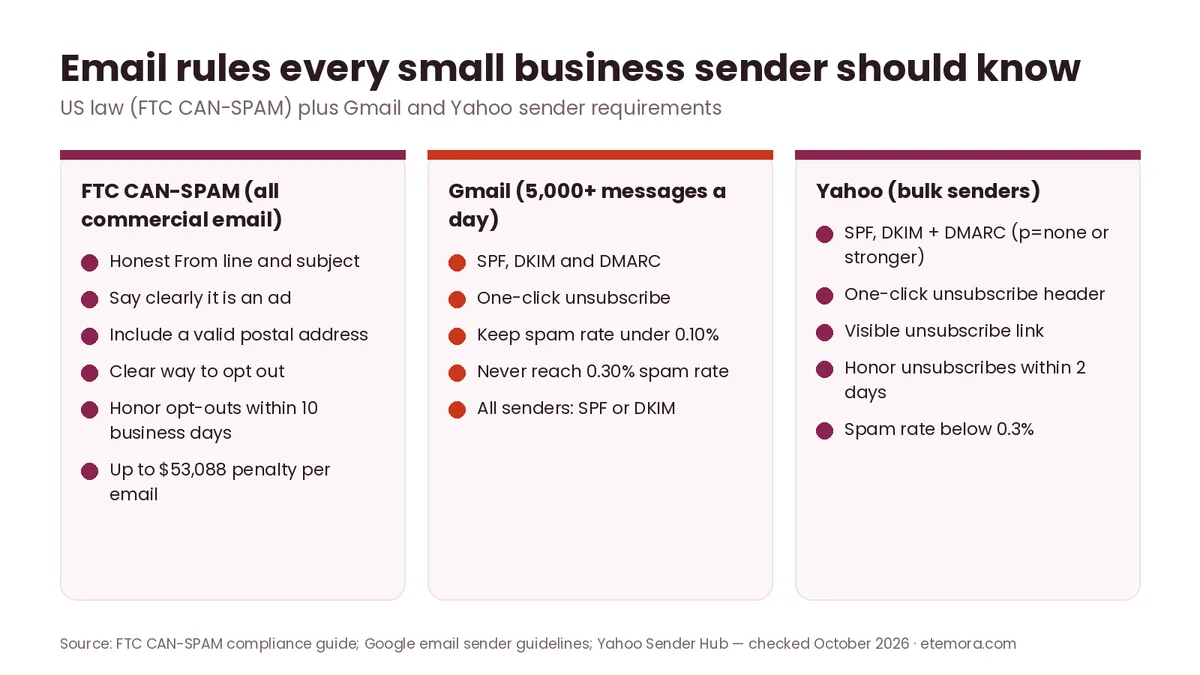
- Honest headers and subject lines. The From line must identify your business, and the subject must match the content.
- Identify ads. Make it clear when a message is an advertisement.
- Include a postal address. A valid street address, registered PO box or private mailbox.
- Make opting out easy. Explain clearly how to unsubscribe, and honor requests within 10 business days. Yahoo asks bulk senders to process unsubscribes within 2 days, so faster is safer.
- You stay responsible. Hiring an agency or tool to send for you does not move the legal responsibility away from your business.
If you have subscribers in the EU, UK, Canada or other countries, their local privacy and anti-spam laws may require clear opt-in consent before you email them. This is general information, not legal advice — check the rules for the countries you sell to.
What Emails Should a Small Business Send?
You do not need to send everything at once. Start with the first two below and add the others as you go.
| Email type | When to send | Example |
|---|---|---|
| Welcome series | Automatically after signup | “Thanks for joining — here is your 10% code” |
| Newsletter | Weekly or monthly | Tips, news, new products, a customer story |
| Promotion | Sales, launches, seasonal offers | “Weekend sale: 20% off all candles” |
| Abandoned cart | After someone leaves items in a cart | “You left something behind” |
| Review request | A few days after a purchase or visit | “How did we do?” with a review link |
| Win-back | When a customer has gone quiet | “We miss you — here is what is new” |
Abandoned-cart emails need a store connection (for example Shopify or WooCommerce) and are usually part of paid automation features, so check your plan. Write subject lines that say exactly what is inside — it is good practice and, under CAN-SPAM, a legal requirement not to mislead.
Which Email Marketing Metrics to Track
In email marketing for small business, most tools show open rate first, but it is the least reliable number. Apple’s Mail Privacy Protection hides the reader’s IP address and prevents senders from seeing whether a message was opened, so open rates can look inflated or incomplete for Apple Mail users.
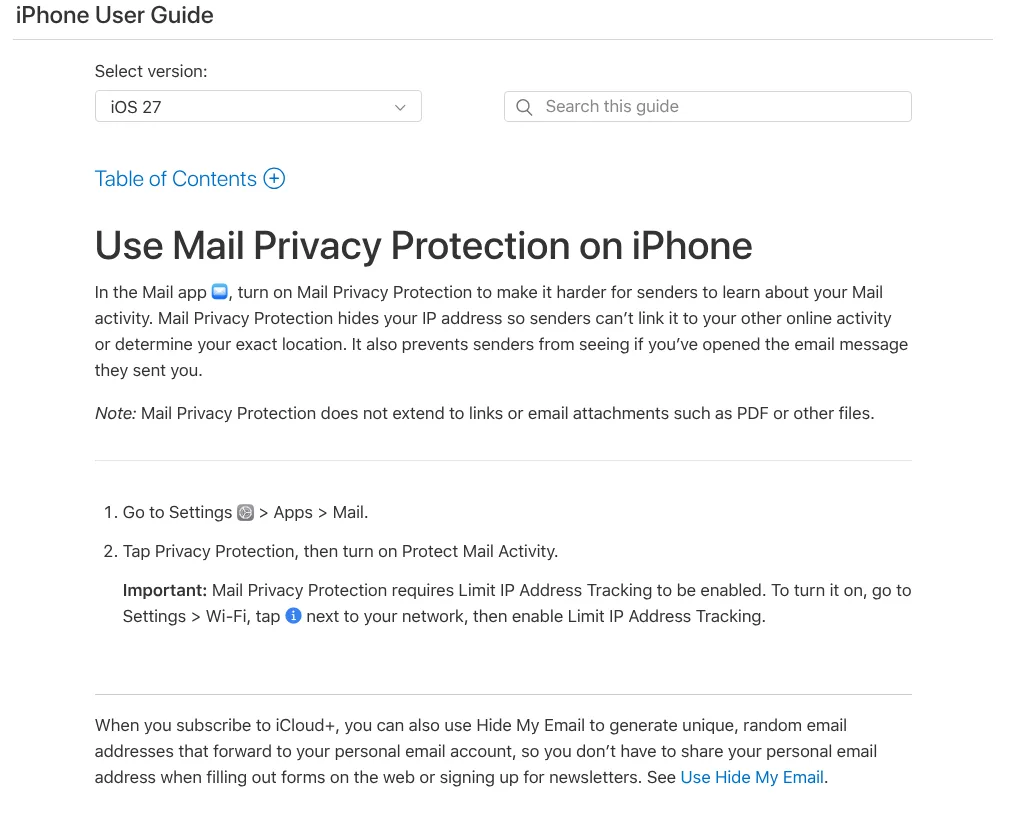
Apple notes that Mail Privacy Protection does not extend to links, so clicks remain a more useful signal. Focus on these numbers instead:
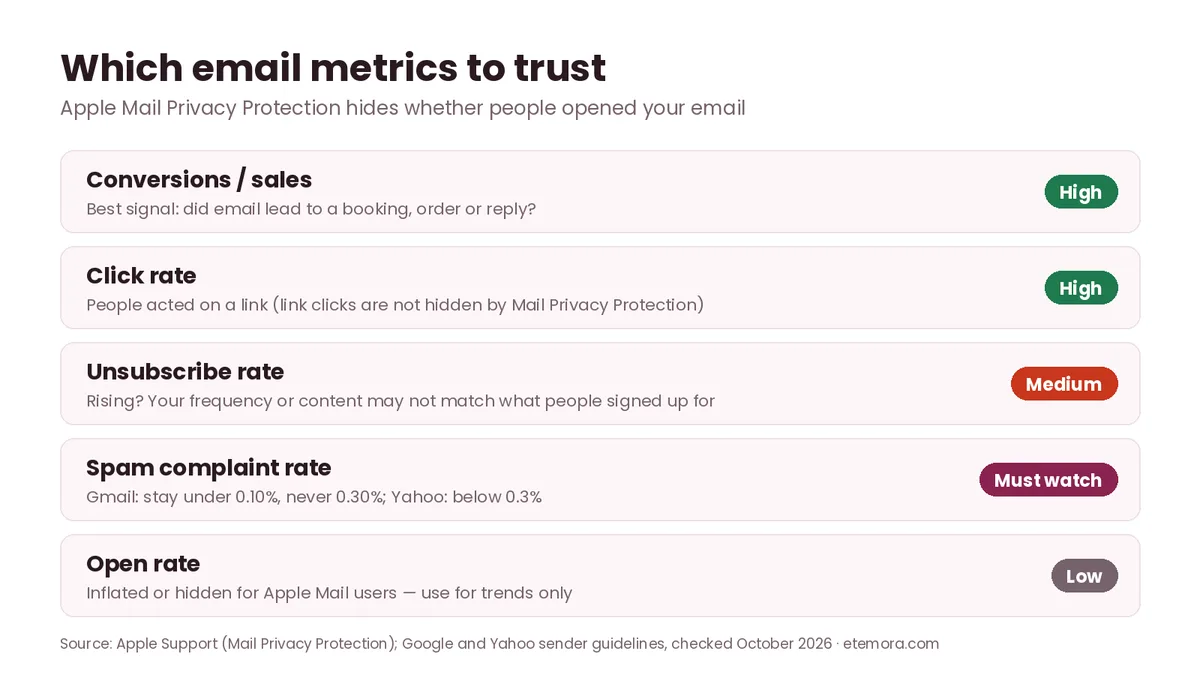
- Conversions: bookings, orders, replies or form fills that came from an email. Use your tool’s ecommerce tracking or UTM-tagged links in your analytics.
- Click rate: the share of recipients who clicked a link.
- Unsubscribe rate: a sudden rise usually means you are sending too often or off-topic.
- Spam complaints: keep them very low — Gmail asks for under 0.10% and Yahoo for under 0.3%.
- Bounces: remove addresses that hard-bounce; most tools do this automatically.
Email Marketing for Small Business: Mistakes to Avoid
Do this
- Send from your own domain with SPF, DKIM and DMARC
- Use opt-in forms and say what people will receive
- Write one clear call to action per email
- Keep a simple, steady sending schedule
- Clean out long-inactive subscribers
Avoid this
- Buying, renting or scraping email lists
- Sending marketing email from a personal Gmail inbox
- Hiding or slowing down unsubscribes
- Misleading subject lines
- Judging success by open rate alone
One more: do not wait for the “perfect” template. A plain, friendly email with one useful idea and one clear link often does the job better than a heavily designed one.
Which Email Tool Fits Your Small Business?
The right tool for small business email marketing depends on how you plan to use email. The table below is a starting point; all four let you try before you pay.

If your business serves a local area, email works well alongside local search. Our guide to the best local SEO tools covers the other half of getting found nearby.
How We Researched This Guide
This guide is research-based. We did not run campaigns from every tool. In October 2026 we read the official pricing pages of Mailchimp, MailerLite, Brevo and Kit and recorded US dollar prices, plan limits and included features. We read the FTC’s CAN-SPAM compliance guide, Google’s email sender guidelines, Yahoo’s Sender Hub requirements and Apple’s Mail Privacy Protection support page for the rules and metric advice. Our charts use only those published figures. Prices change often and can vary by country, so always confirm on the provider’s site. Read more about how we review.
Final Verdict: Email Marketing for Small Business in 2026
Email marketing for small business works best when it is simple and steady: one goal, an authenticated domain, a permission-based list, a short welcome series and a regular email people actually want. The tool matters less than doing those basics well — and you can start every one of them on a free plan.
Before you upgrade any small business email marketing plan, compare prices at the list size you expect in a year and check sending limits, not just contact limits. If you are still building the website your signup form will live on, our best website builders guide can help you choose one.
Comparing more email tools?
See 6 Mailchimp Alternatives →Frequently Asked Questions
Is email marketing for small business worth it?
For most small businesses, yes. You own the list, free plans cover the first few hundred subscribers, and you can see which emails lead to clicks, bookings or sales. It works best for businesses with repeat customers or regular news to share.
How much does email marketing cost for a small business?
You can start for free. In October 2026, paid plans for small lists started at $9/month (Brevo Starter), $12/month (MailerLite Comfort) and $13/month (Mailchimp Essentials). Kit Creator was $33/month billed yearly for 1,000 subscribers. Prices rise as your list grows.
What is the best email marketing tool for a small business?
MailerLite is the easiest start for most small businesses because its free plan includes automations and every paid plan has the full feature set. Brevo suits stores that also need SMS or order emails, and Kit suits creators.
How often should a small business send marketing emails?
Pick a schedule you can keep, such as once a month or once a week, and stick to it. Consistency matters more than frequency. Watch your unsubscribe rate: if it rises, send less often or make emails more useful.
Can I send marketing emails from my Gmail account?
It is not a good idea. A personal inbox has no proper unsubscribe handling, list management or reporting, and Gmail’s sender rules expect authenticated domains and one-click unsubscribe for bulk mail. Use an email marketing tool and your own domain.
Do I need permission to email customers?
In the US, CAN-SPAM requires honest headers, a postal address and a working opt-out rather than prior consent, but many other countries require opt-in consent. Emailing only people who signed up is the safest approach everywhere.
What are SPF, DKIM and DMARC?
They are DNS records that prove your emails really come from your domain. SPF lists approved senders, DKIM signs each message, and DMARC tells inboxes what to do with mail that fails those checks. Gmail and Yahoo require them for bulk senders.
Why are my email open rates unreliable?
Apple’s Mail Privacy Protection prevents senders from seeing whether a message was opened, which can inflate or hide opens. Track clicks, replies and sales instead.
Sources
Related articles you may like
 SEO & MarketingBest Mailchimp Alternatives in 2026: 6 Cheaper Email Tools Compared
 SEO & MarketingWhat Is Email Marketing? Complete Beginner Guide 2026
 SEO & MarketingWhat Is SEO? A Simple Beginner’s Guide for 2026
 SEO & MarketingBest Local SEO Tools: 7 Proven Picks for 2026
 SEO & MarketingBest SEO Tools in 2026: 12 SEO Tools Compared
 SEO & MarketingBest Marketing Tools in 2026: 10 Tools Compared